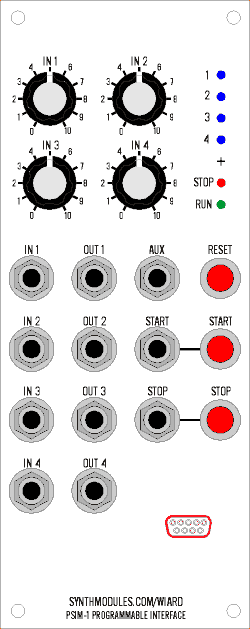
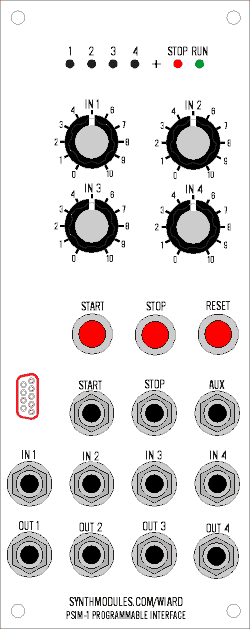
Front Panel
2006-03-23 by djbrow54
Yahoo Groups archive
Archive for ComputerVoltageSources.
Index last updated: 2026-03-30 01:00 UTC
Thread
2006-03-23 by djbrow54
2006-03-23 by Norman Fay
On 3/23/06, djbrow54 <davebr@...> wrote:
> Anyone started to design / conceptualize what a front panel for this
> might be with all the controls, jacks, & LCD? I'm starting to wonder
> how large it will be. Size is important to me. I'm thinking of the
> smaller knobs ala a UEG to minimize the width. Seems like a good
> project for a new Stooge panel.
>
> Dave
>
>
>
>
>
>
>
> Yahoo! Groups Links
>
>
>
>
>
>
>
2006-03-23 by Grant Richter
--- In ComputerVoltageSources@yahoogroups.com, "Norman Fay" <vietgrove@...> wrote:
>
> Having designed a few frac format schaeffer panels for Oakley PCBs
> that I'm pleased w/, I fancy having a try at this in frac format?
> (unless Mr Firman is already on it, of course) Can someone summarise
> what items will be on the front panel? 8 outputs, 8 or 16
> knobs...what else?
>
> On 3/23/06, djbrow54 <davebr@...> wrote:
> > Anyone started to design / conceptualize what a front panel for this
> > might be with all the controls, jacks, & LCD? I'm starting to wonder
> > how large it will be. Size is important to me. I'm thinking of the
> > smaller knobs ala a UEG to minimize the width. Seems like a good
> > project for a new Stooge panel.
> >
> > Dave
> >
> >
> >
> >
> >
> >
> >
> > Yahoo! Groups Links
> >
> >
> >
> >
> >
> >
> >
>
2006-03-23 by drmabuce
> Cursor/Enter buttons for LCD display?????the latest discussion i've seen precludes dedicated input controls for
>
2006-03-23 by Norman Fay
On 3/23/06, Grant Richter <grichter@...> wrote:
> Reset Pushbutton
>
> Run Pushbutton, Run LED, Run input jack
> Stop Pushbutton, Stop LED, Stop input jack
>
> 8 general purpose uncalibrated CV input jacks
> 1 to 8 1 volt per octave calibrated input jacks (probably only need 1 for most purposes)
> 8 offset pots
> 8 attenuator pots (dual function I hope)
> 8 output jacks
> 8 Output LEDs
>
> AUX I/O jack??????
> LCD display??????
> Cursor/Enter buttons for LCD display?????
>
>
>
> --- In ComputerVoltageSources@yahoogroups.com, "Norman Fay" <vietgrove@...> wrote:
> >
> > Having designed a few frac format schaeffer panels for Oakley PCBs
> > that I'm pleased w/, I fancy having a try at this in frac format?
> > (unless Mr Firman is already on it, of course) Can someone summarise
> > what items will be on the front panel? 8 outputs, 8 or 16
> > knobs...what else?
> >
> > On 3/23/06, djbrow54 <davebr@...> wrote:
> > > Anyone started to design / conceptualize what a front panel for this
> > > might be with all the controls, jacks, & LCD? I'm starting to wonder
> > > how large it will be. Size is important to me. I'm thinking of the
> > > smaller knobs ala a UEG to minimize the width. Seems like a good
> > > project for a new Stooge panel.
> > >
> > > Dave
> > >
> > >
> > >
> > >
> > >
> > >
> > >
> > > Yahoo! Groups Links
> > >
> > >
> > >
> > >
> > >
> > >
> > >
> >
>
>
>
>
>
>
>
>
> Yahoo! Groups Links
>
>
>
>
>
>
>
2006-03-23 by data2action
>side.
> OK, I plan on laying it out as follows:
>
> 8 g.p. uncalibrated input jacks
> 8 1v/oct calibrated input jacks
> 8 offset pots
> 8 attenuator pots
>
> in horizontal rows on the LH side.
>
> LED, cursor/enter buttons - top centre
>
> run button/led/jack & stop button/led/jack - bottom centre
>
> 8 output jacks & 8 output LEDs in 2 vertical columns down the RH
>easy
> Dunno about the aux i/o
>
> I figure that if I add all this, and anything gets deleted, it's
> to remove it using the .fpd editor.of,
>
> IN MY DREAMS I imagined this as fitting into a panel 2 x the width
> say, a frac noise ring or binary zone, ha ha, peals of derisive
> laughter - I'll see how it all fits into 4/5 of a complete fracrack,
> IE twice that. Maybe it can be shrunk into 3/5 or 7/10 and still be
> comfortable to use, but I doubt it.
>
>
>
2006-03-23 by mate_stubb
>
> Anyone started to design / conceptualize what a front panel for this
> might be with all the controls, jacks, & LCD? I'm starting to wonder
> how large it will be. Size is important to me. I'm thinking of the
> smaller knobs ala a UEG to minimize the width. Seems like a good
> project for a new Stooge panel.
>
> Dave
>
2006-03-23 by Norman Fay
On 3/23/06, data2action <rdrake@...> wrote:
> Norm,
>
> Also, I think, an RS-232 connector for the serial cable?
>
> I created a folder in the files section for front panel designs. I'm
> gonna take a shot at it, too... was planning on doing a sketch or 2,
> and post GIFs to get feedback; and then create a FPD file of a
> complete design.
>
> Besides multiple formats (Frac, MOTM, euro), I'm imagining there may
> be more than one implementation based on feature set... fr instance,
> I'll probably build a module which I'll use as a dedicated 4channel
> quantizer; may well only need 4 ins, 4 outs, and a couple of
> buttons/leds. but as you say, a good approach is to capture the
> complete set of controls, individuals can edit/delete to taste.
>
> anyway, thanks & looking forward to your contribution
>
> bbob
>
> --- In ComputerVoltageSources@yahoogroups.com, "Norman Fay"
> <vietgrove@...> wrote:
> >
> > OK, I plan on laying it out as follows:
> >
> > 8 g.p. uncalibrated input jacks
> > 8 1v/oct calibrated input jacks
> > 8 offset pots
> > 8 attenuator pots
> >
> > in horizontal rows on the LH side.
> >
> > LED, cursor/enter buttons - top centre
> >
> > run button/led/jack & stop button/led/jack - bottom centre
> >
> > 8 output jacks & 8 output LEDs in 2 vertical columns down the RH
> side.
> >
> > Dunno about the aux i/o
> >
> > I figure that if I add all this, and anything gets deleted, it's
> easy
> > to remove it using the .fpd editor.
> >
> > IN MY DREAMS I imagined this as fitting into a panel 2 x the width
> of,
> > say, a frac noise ring or binary zone, ha ha, peals of derisive
> > laughter - I'll see how it all fits into 4/5 of a complete fracrack,
> > IE twice that. Maybe it can be shrunk into 3/5 or 7/10 and still be
> > comfortable to use, but I doubt it.
> >
> >
> >
>
>
>
>
>
>
>
> Yahoo! Groups Links
>
>
>
>
>
>
>
2006-03-23 by Larry T.
>1 for most purposes)
> Reset Pushbutton
>
> Run Pushbutton, Run LED, Run input jack
> Stop Pushbutton, Stop LED, Stop input jack
>
> 8 general purpose uncalibrated CV input jacks
> 1 to 8 1 volt per octave calibrated input jacks (probably only need
> 8 offset pots
> 8 attenuator pots (dual function I hope)
> 8 output jacks
> 8 Output LEDs
>
> AUX I/O jack??????
> LCD display??????
> Cursor/Enter buttons for LCD display?????
>
2006-03-23 by microtonalsynthesis
>
>>
> does anyone have dimensions for the lcd screen?
>
2006-03-23 by data2action
>together! :-/
> OK, I just uploaded a blank panel .fpd file, 4 panel widths wide, IE
> 12" wide, 5.25" high, with screw holes 1.5" apart, 0.3" from the top
> and bottom. I think that's right - can anyone confirm? (I'll check
> tonight, in any case)
>
> I'll bring a bunch of parts into work tomorrow so I won't indulge in
> my usual bad .fpd habit of putting everything too close
>I'm
> rs-232 port, of course, yes.
>
> does anyone have dimensions for the lcd screen?
>
> On 3/23/06, data2action <rdrake@...> wrote:
> > Norm,
> >
> > Also, I think, an RS-232 connector for the serial cable?
> >
> > I created a folder in the files section for front panel designs.
> > gonna take a shot at it, too... was planning on doing a sketch or2,
> > and post GIFs to get feedback; and then create a FPD file of amay
> > complete design.
> >
> > Besides multiple formats (Frac, MOTM, euro), I'm imagining there
> > be more than one implementation based on feature set... frinstance,
> > I'll probably build a module which I'll use as a dedicated4channel
> > quantizer; may well only need 4 ins, 4 outs, and a couple ofwidth
> > buttons/leds. but as you say, a good approach is to capture the
> > complete set of controls, individuals can edit/delete to taste.
> >
> > anyway, thanks & looking forward to your contribution
> >
> > bbob
> >
> > --- In ComputerVoltageSources@yahoogroups.com, "Norman Fay"
> > <vietgrove@> wrote:
> > >
> > > OK, I plan on laying it out as follows:
> > >
> > > 8 g.p. uncalibrated input jacks
> > > 8 1v/oct calibrated input jacks
> > > 8 offset pots
> > > 8 attenuator pots
> > >
> > > in horizontal rows on the LH side.
> > >
> > > LED, cursor/enter buttons - top centre
> > >
> > > run button/led/jack & stop button/led/jack - bottom centre
> > >
> > > 8 output jacks & 8 output LEDs in 2 vertical columns down the RH
> > side.
> > >
> > > Dunno about the aux i/o
> > >
> > > I figure that if I add all this, and anything gets deleted, it's
> > easy
> > > to remove it using the .fpd editor.
> > >
> > > IN MY DREAMS I imagined this as fitting into a panel 2 x the
> > of,fracrack,
> > > say, a frac noise ring or binary zone, ha ha, peals of derisive
> > > laughter - I'll see how it all fits into 4/5 of a complete
> > > IE twice that. Maybe it can be shrunk into 3/5 or 7/10 andstill be
> > > comfortable to use, but I doubt it.
> > >
> > >
> > >
> >
> >
> >
> >
> >
> >
> >
> > Yahoo! Groups Links
> >
> >
> >
> >
> >
> >
> >
>
2006-03-23 by Grant Richter
>Then they can do their own layout, huh.
> oh yeah, midi too.
>
> At least some MOTM owners are concerned w/ consistency of panel
> layout (not me, i'm just sayin'... I've read some objections to other
> projects that deviated from the standard).
> However, implementing
> the full feature set plus strict adherence to Paul's original
> standard (max of 4 knobs vertically) might be a challenge... or a
> Very Big module. A couple ideas:
>
> Encore electronics UEG squeezes 8 knobs into one veritical row:
> http://www.encoreelectronics.com/cont_ueg1.html
>
> And Scott at Tellun has begun some designs that use the same smaller
> knobs: http://www.tellun.com/motm/diy/diy.html
>
> Just potential models to consider.
>
> b
>
>
> --- In ComputerVoltageSources@yahoogroups.com, "Norman Fay"
> <vietgrove@> wrote:
> >
> > OK, I just uploaded a blank panel .fpd file, 4 panel widths wide, IE
> > 12" wide, 5.25" high, with screw holes 1.5" apart, 0.3" from the top
> > and bottom. I think that's right - can anyone confirm? (I'll check
> > tonight, in any case)
> >
> > I'll bring a bunch of parts into work tomorrow so I won't indulge in
> > my usual bad .fpd habit of putting everything too close
> together! :-/
> >
> > rs-232 port, of course, yes.
> >
> > does anyone have dimensions for the lcd screen?
> >
> > On 3/23/06, data2action <rdrake@> wrote:
> > > Norm,
> > >
> > > Also, I think, an RS-232 connector for the serial cable?
> > >
> > > I created a folder in the files section for front panel designs.
> I'm
> > > gonna take a shot at it, too... was planning on doing a sketch or
> 2,
> > > and post GIFs to get feedback; and then create a FPD file of a
> > > complete design.
> > >
> > > Besides multiple formats (Frac, MOTM, euro), I'm imagining there
> may
> > > be more than one implementation based on feature set... fr
> instance,
> > > I'll probably build a module which I'll use as a dedicated
> 4channel
> > > quantizer; may well only need 4 ins, 4 outs, and a couple of
> > > buttons/leds. but as you say, a good approach is to capture the
> > > complete set of controls, individuals can edit/delete to taste.
> > >
> > > anyway, thanks & looking forward to your contribution
> > >
> > > bbob
> > >
> > > --- In ComputerVoltageSources@yahoogroups.com, "Norman Fay"
> > > <vietgrove@> wrote:
> > > >
> > > > OK, I plan on laying it out as follows:
> > > >
> > > > 8 g.p. uncalibrated input jacks
> > > > 8 1v/oct calibrated input jacks
> > > > 8 offset pots
> > > > 8 attenuator pots
> > > >
> > > > in horizontal rows on the LH side.
> > > >
> > > > LED, cursor/enter buttons - top centre
> > > >
> > > > run button/led/jack & stop button/led/jack - bottom centre
> > > >
> > > > 8 output jacks & 8 output LEDs in 2 vertical columns down the RH
> > > side.
> > > >
> > > > Dunno about the aux i/o
> > > >
> > > > I figure that if I add all this, and anything gets deleted, it's
> > > easy
> > > > to remove it using the .fpd editor.
> > > >
> > > > IN MY DREAMS I imagined this as fitting into a panel 2 x the
> width
> > > of,
> > > > say, a frac noise ring or binary zone, ha ha, peals of derisive
> > > > laughter - I'll see how it all fits into 4/5 of a complete
> fracrack,
> > > > IE twice that. Maybe it can be shrunk into 3/5 or 7/10 and
> still be
> > > > comfortable to use, but I doubt it.
> > > >
> > > >
> > > >
> > >
> > >
> > >
> > >
> > >
> > >
> > >
> > > Yahoo! Groups Links
> > >
> > >
> > >
> > >
> > >
> > >
> > >
> >
>
2006-03-23 by mate_stubb
> At least some MOTM owners are concerned w/ consistency of panel
> layout (not me, i'm just sayin'... I've read some objections to other
> projects that deviated from the standard).
2006-03-24 by pow333us
>horizontally.
> Build it and they will come. For large pot fields it is impossible to
> maintain the pure MOTM standard of 1 knob per 1 rack unit
>the
> I've done sequencer panels which use a 1 1/2" horizontal grid with
> big knobs, and of course you can go to the smaller knobs too.other
>
> Moe
>
> > At least some MOTM owners are concerned w/ consistency of panel
> > layout (not me, i'm just sayin'... I've read some objections to
> > projects that deviated from the standard).Could it be built 4U X 5U, then it could fit a motm or doepfer right?
2006-03-24 by John Loffink
> -----Original Message-----
> From: ComputerVoltageSources@yahoogroups.com
> [mailto:ComputerVoltageSources@yahoogroups.com] On Behalf Of mate_stubb
>
> Build it and they will come. For large pot fields it is impossible to
> maintain the pure MOTM standard of 1 knob per 1 rack unit horizontally.
>
> I've done sequencer panels which use a 1 1/2" horizontal grid with the
> big knobs, and of course you can go to the smaller knobs too.
>
> Moe
>
> > At least some MOTM owners are concerned w/ consistency of panel
> > layout (not me, i'm just sayin'... I've read some objections to other
> > projects that deviated from the standard).
>
>
2006-03-24 by John Loffink
> -----Original Message-----
> From: ComputerVoltageSources@yahoogroups.com
> [mailto:ComputerVoltageSources@yahoogroups.com] On Behalf Of mate_stubb
>
> I've been busy settling into a new job, but I can take a crack at a
> panel (in MOTM format anyway) after I get back from AHMW if people
> would like me to.
>
> Moe
> --- In ComputerVoltageSources@yahoogroups.com, "djbrow54" <davebr@...>
2006-03-24 by John Mahoney
2006-03-24 by djbrow54
>
> The Stooge panel designs for the PSIM may be useful for panel design
> inspiration:
>
> http://larry.retrosynth.com/larry/panel/gif/psim3.gif
> http://larry.retrosynth.com/larry/panel/gif/psim7.gif
>
> R.I.P., Larry.
> --
> john
>
2006-03-24 by Jason Proctor
2006-03-24 by data2action
>caught
> i'm not really up on what's going on with the concept, having
> the beginning of this thread on sdiy and then lost it until a dayor
> two ago when i learned it had moved here. i have what may beregarded
> as a few dumb questions.Mac
>
> - does it have to be rs232 for the computer interface?
>
> i've not seen a serial interface other than usb or firewire on a
> in living memory, and i'd be surprised if it survives on PCs formuch
> longer. however, MIDI's going to be around for a while yet, andinstead?
> presumably USB for a while longer. can we have one of those
>to a
> - larry's PSIM layouts look pretty good. are all 8 inputs etc that
> people are talking about necessary or even supportable by the
> hardware platform? 5U MOTM is pretty damn big!
>
> as a software tweak and hardware klutz i'm kinda looking forward
> module i can tweak...
>
> thanks,
> j
>
2006-03-24 by drmabuce
>i suggest that it's worth wading through the message traffic on this
> i'm not really up on what's going on with the concept, having caught
> the beginning of this thread on sdiy and then lost it until a day or
> two ago when i learned it had moved here. i have what may be regarded
> as a few dumb questions.
>i believe we are constrained by the design of the BasicAtomPro
> - does it have to be rs232 for the computer interface?
>
> i've not seen a serial interface other than usb or firewire on a Mac
> in living memory, and i'd be surprised if it survives on PCs for much
> longer. however, MIDI's going to be around for a while yet, and
> presumably USB for a while longer. can we have one of those instead?
>
> - larry's PSIM layouts look pretty good. are all 8 inputs etc that8 ins and outs are supported by Grants basic PCB design. But this is a
> people are talking about necessary or even supportable by the
> hardware platform?
>
> as a software tweak and hardware klutz i'm kinda looking forward to ait's nice to have the power to implement a complex function with
> module i can tweak...
>
2006-03-24 by Grant Richter
--- In ComputerVoltageSources@yahoogroups.com, John Mahoney <jmahoney@...> wrote:
>
> The Stooge panel designs for the PSIM may be useful for panel design
> inspiration:
>
> http://larry.retrosynth.com/larry/panel/gif/psim3.gif
> http://larry.retrosynth.com/larry/panel/gif/psim7.gif
>
> R.I.P., Larry.
> --
> john
>
2006-03-24 by Grant Richter
> Lots of jacks - not sure what the difference is between the calibratedIn the summing section of a typical VCO or synth module, you use 1% resistors. That is 1
> and uncalibrated inputs.
>
2006-03-24 by John Loffink
> -----Original Message-----
> From: ComputerVoltageSources@yahoogroups.com
> [mailto:ComputerVoltageSources@yahoogroups.com] On Behalf Of Grant Richter
>
> > Lots of jacks - not sure what the difference is between the calibrated
> > and uncalibrated inputs.
> >
>
> In the summing section of a typical VCO or synth module, you use 1%
> resistors. That is 1
> part in 100 accuracy.
>
> The input A/D is 10 bits or 1 part in 1024. So using any two 1% resistors,
> the input
> reading could differ by 20 "counts" (one res at +1%, one res at -1%). The
> simplest way to
> trim that precisely is with a trimpot.
>
> We want an input that is 0 counts at 0 volts and exactly 1023 counts at
> 5.000 volts (with
> 0.00499 volts per count). We can convert that to floating point and
> actually calculate in
> real world voltages. Since the ouput is calibrated, you can work in real
> world voltages also.
>
> The non-trimpot input is close but not precise. Unless you match the
> resistors by hand to
> 0.1% or buy them matched for 80 cents apiece.
>
2006-03-25 by Michael A. Firman
--- In ComputerVoltageSources@yahoogroups.com, "drmabuce" <drmabuce@...> wrote:
>
> Hi Jason
> ok i'll try to tackle these, i'm more of a software guy too.
> you hardware gurus feel free to jump in anytime if i f^&k this up!
> ;'>
>
> --- In ComputerVoltageSources@yahoogroups.com, Jason Proctor
> <jason@> wrote:
> >
> > i'm not really up on what's going on with the concept, having caught
> > the beginning of this thread on sdiy and then lost it until a day or
> > two ago when i learned it had moved here. i have what may be regarded
> > as a few dumb questions.
>
> i suggest that it's worth wading through the message traffic on this
> site to get the big picture. On a project this complex, consensus is
> pretty hard won and there are some folks working on this with a deep
> pool of hands-on expertise. There's a lot of widely applicable info in
> those posts
>
> >
> > - does it have to be rs232 for the computer interface?
> >
> > i've not seen a serial interface other than usb or firewire on a Mac
> > in living memory, and i'd be surprised if it survives on PCs for much
> > longer. however, MIDI's going to be around for a while yet, and
> > presumably USB for a while longer. can we have one of those instead?
> >
>
> i believe we are constrained by the design of the BasicAtomPro
> architecture- which is RS232. So if you are living in MACland, a USB
> to RS232 converter and some sort of PC emulation will probably be
> required. Look for some of Mike Firman's posts. He has some experience
> with MBASIC on a MAC.
> Please keep in mind that the realm of this kind of gadget is
> really neither PC or MAC.... it's PIC...basicstamps..... the little
> 'computer-on-a-chip' gadgets that operate the radial-saw elbow of
> those robots you see on Robot Wars! RS232 is still very much alive in
> that world.
> I find most of my best hints and tips in the hobbyist robot sites
>
>
> > - larry's PSIM layouts look pretty good. are all 8 inputs etc that
> > people are talking about necessary or even supportable by the
> > hardware platform?
> >
>
> 8 ins and outs are supported by Grants basic PCB design. But this is a
> DIY project so you can always 'roll-your-own' and implement fewer
> I/O's if you don't need them.
>
> > as a software tweak and hardware klutz i'm kinda looking forward to a
> > module i can tweak...
> >
>
> it's nice to have the power to implement a complex function with
> something OTHER than just opamps in your toolkit eh?
> Willkommen and have fun!
> -doc
>
2006-03-25 by John Mahoney
2006-03-25 by John Loffink
> -----Original Message-----
> From: ComputerVoltageSources@yahoogroups.com
> [mailto:ComputerVoltageSources@yahoogroups.com] On Behalf Of John Mahoney
> Sent: Friday, March 24, 2006 8:03 PM
> To: ComputerVoltageSources@yahoogroups.com
> Subject: [ComputerVoltageSources] resistor matching, was RE: Calibrated
> Inputs
>
> Re: matching resistors, will the following procedure work?
>
> Ingredients:
> 1 precision voltage reference
> 1 amplifier
> 1 voltmeter
> Resistors to be matched (RTBM)
>
> Feed a small, precisely regulated signal through a voltage divider
> made from an RTBM and some other resistor (the "constant"). Feed the
> divider's output through the amplifier. Measure the output. Repeat as
> needed.
>
> The idea, obviously, is to amplify the differences between the RTBM
> so that the voltmeter can register those differences. Concerns would
> include temperature stability, power supply stability, etc...
>
> So, this may not be good enough for a NASA guidance system, but will
> it suffice for this DIY project? As John Lofflink said, we need only
> be concerned with relative accuracy.
> --
> john
>
>
>
>
> Yahoo! Groups Links
>
>
>
>
2006-03-25 by Grant Richter
--- In ComputerVoltageSources@yahoogroups.com, "John Loffink" <jloffink@...> wrote:
>
> I think you're on the right track. Use a voltage reference chip, not your
> power supply. Feed this to a high accuracy low voltage offset differential
> amplifier with high gain. Your + and - input resistors are the ones to be
> matched. If both are attached to the voltage reference then the output is
> only the difference between the two and the op amp offsets.
>
> John Loffink
> The Microtonal Synthesis Web Site
> http://www.microtonal-synthesis.com
> The Wavemakers Synthesizer Web Site
> http://www.wavemakers-synth.com
>
>
> > -----Original Message-----
> > From: ComputerVoltageSources@yahoogroups.com
> > [mailto:ComputerVoltageSources@yahoogroups.com] On Behalf Of John Mahoney
> > Sent: Friday, March 24, 2006 8:03 PM
> > To: ComputerVoltageSources@yahoogroups.com
> > Subject: [ComputerVoltageSources] resistor matching, was RE: Calibrated
> > Inputs
> >
> > Re: matching resistors, will the following procedure work?
> >
> > Ingredients:
> > 1 precision voltage reference
> > 1 amplifier
> > 1 voltmeter
> > Resistors to be matched (RTBM)
> >
> > Feed a small, precisely regulated signal through a voltage divider
> > made from an RTBM and some other resistor (the "constant"). Feed the
> > divider's output through the amplifier. Measure the output. Repeat as
> > needed.
> >
> > The idea, obviously, is to amplify the differences between the RTBM
> > so that the voltmeter can register those differences. Concerns would
> > include temperature stability, power supply stability, etc...
> >
> > So, this may not be good enough for a NASA guidance system, but will
> > it suffice for this DIY project? As John Lofflink said, we need only
> > be concerned with relative accuracy.
> > --
> > john
> >
> >
> >
> >
> > Yahoo! Groups Links
> >
> >
> >
> >
>
2006-03-26 by Larry T.
>or MIDI to CV
> You already have a precision voltage source in your analog keyboard
> converter.keyboard input.
>
> The purpose of the calibrated input is so we can read an analog
>it's key voltage.
> 5.000 volts would be 5 octaves of keys and we can read each key by
> That way you can play the keyboard into a sequencer, or use it totranspose sequences.
> I'm sure there are other applications. You can also read a keyboaddirectly via MIDI of
> course.0.083 volts, so there are
>
> With a 5 volt range, each count is ~5 millivolts, a semitone is
> around 16 counts between semitones.then calibrate at 4.000
>
> Assuming bottom C is zero volts. If your keyboard is only 4 octaves
> volts.it is nice.
>
> It is not so important that it be absolute real world voltage, but
><jloffink@> wrote:
> --- In ComputerVoltageSources@yahoogroups.com, "John Loffink"
> >not your
> > I think you're on the right track. Use a voltage reference chip,
> > power supply. Feed this to a high accuracy low voltage offsetdifferential
> > amplifier with high gain. Your + and - input resistors are theones to be
> > matched. If both are attached to the voltage reference then theoutput is
> > only the difference between the two and the op amp offsets.John Mahoney
> >
> > John Loffink
> > The Microtonal Synthesis Web Site
> > http://www.microtonal-synthesis.com
> > The Wavemakers Synthesizer Web Site
> > http://www.wavemakers-synth.com
> >
> >
> > > -----Original Message-----
> > > From: ComputerVoltageSources@yahoogroups.com
> > > [mailto:ComputerVoltageSources@yahoogroups.com] On Behalf Of
> > > Sent: Friday, March 24, 2006 8:03 PMCalibrated
> > > To: ComputerVoltageSources@yahoogroups.com
> > > Subject: [ComputerVoltageSources] resistor matching, was RE:
> > > InputsRepeat as
> > >
> > > Re: matching resistors, will the following procedure work?
> > >
> > > Ingredients:
> > > 1 precision voltage reference
> > > 1 amplifier
> > > 1 voltmeter
> > > Resistors to be matched (RTBM)
> > >
> > > Feed a small, precisely regulated signal through a voltage divider
> > > made from an RTBM and some other resistor (the "constant"). Feed the
> > > divider's output through the amplifier. Measure the output.
> > > needed.
> > >
> > > The idea, obviously, is to amplify the differences between the RTBM
> > > so that the voltmeter can register those differences. Concerns would
> > > include temperature stability, power supply stability, etc...
> > >
> > > So, this may not be good enough for a NASA guidance system, but will
> > > it suffice for this DIY project? As John Lofflink said, we need only
> > > be concerned with relative accuracy.
> > > --
> > > john
2006-03-26 by Larry T.
>
> HI All
>
> Given that I'm not an EE or even a decent hobby designer, why is this
> calibration such a problem? Why not use trim pots and the Analog
> inputs themselves as follows:
>
> First: Ground the input to be calibrated. (This should ALWAYS be a
> constant of 0 right?)
>
> Second: Run a small program on the modules CPU to continously return
> the value of the converters input via the serial port to a 'telnet'
> session on a PC or Mac, followed by a Carriage Return and a Line Feed.
> (This will give you a continous dump of the converters value down the
> screen.)
>
> Third: Adjust the timpot until you get 0.00... as the returned value,
> and it stays that way for a minute or two.
>
> Would'nt this handle it with NO tools of any kind except those we
> already need to use the module anyway?
>
> Larry T.
>
2006-03-26 by John Loffink
> -----Original Message-----
> From: ComputerVoltageSources@yahoogroups.com
> [mailto:ComputerVoltageSources@yahoogroups.com] On Behalf Of Larry T.
> Sent: Saturday, March 25, 2006 8:03 PM
> To: ComputerVoltageSources@yahoogroups.com
> Subject: [ComputerVoltageSources] Re: resistor matching, was RE:
> Calibrated Inputs
>
> Thinking about it, I believe this would also account for varrainces in
> the ADC's thenselves would'nt it?
>
> Larry T.
>
> --- In ComputerVoltageSources@yahoogroups.com, "Larry T." <larry@...>
> wrote:
> >
> > HI All
> >
> > Given that I'm not an EE or even a decent hobby designer, why is this
> > calibration such a problem? Why not use trim pots and the Analog
> > inputs themselves as follows:
> >
> > First: Ground the input to be calibrated. (This should ALWAYS be a
> > constant of 0 right?)
> >
> > Second: Run a small program on the modules CPU to continously return
> > the value of the converters input via the serial port to a 'telnet'
> > session on a PC or Mac, followed by a Carriage Return and a Line Feed.
> > (This will give you a continous dump of the converters value down the
> > screen.)
> >
> > Third: Adjust the timpot until you get 0.00... as the returned value,
> > and it stays that way for a minute or two.
> >
> > Would'nt this handle it with NO tools of any kind except those we
> > already need to use the module anyway?
> >
> > Larry T.
> >
2006-03-26 by Larry T.
>That just
> For calibration you need to measure an amplified value, even if the
> amplification is 1. You can't do that by grounding the signal.
> sets the zero null point.this
>
> John Loffink
> The Microtonal Synthesis Web Site
> http://www.microtonal-synthesis.com
> The Wavemakers Synthesizer Web Site
> http://www.wavemakers-synth.com
>
>
> > -----Original Message-----
> > From: ComputerVoltageSources@yahoogroups.com
> > [mailto:ComputerVoltageSources@yahoogroups.com] On Behalf Of Larry T.
> > Sent: Saturday, March 25, 2006 8:03 PM
> > To: ComputerVoltageSources@yahoogroups.com
> > Subject: [ComputerVoltageSources] Re: resistor matching, was RE:
> > Calibrated Inputs
> >
> > Thinking about it, I believe this would also account for varrainces in
> > the ADC's thenselves would'nt it?
> >
> > Larry T.
> >
> > --- In ComputerVoltageSources@yahoogroups.com, "Larry T." <larry@>
> > wrote:
> > >
> > > HI All
> > >
> > > Given that I'm not an EE or even a decent hobby designer, why is
> > > calibration such a problem? Why not use trim pots and the AnalogFeed.
> > > inputs themselves as follows:
> > >
> > > First: Ground the input to be calibrated. (This should ALWAYS be a
> > > constant of 0 right?)
> > >
> > > Second: Run a small program on the modules CPU to continously return
> > > the value of the converters input via the serial port to a 'telnet'
> > > session on a PC or Mac, followed by a Carriage Return and a Line
> > > (This will give you a continous dump of the converters valuedown the
> > > screen.)value,
> > >
> > > Third: Adjust the timpot until you get 0.00... as the returned
> > > and it stays that way for a minute or two.
> > >
> > > Would'nt this handle it with NO tools of any kind except those we
> > > already need to use the module anyway?
> > >
> > > Larry T.
> > >
>
2006-03-26 by John Loffink
> -----Original Message-----
> From: ComputerVoltageSources@yahoogroups.com
> [mailto:ComputerVoltageSources@yahoogroups.com] On Behalf Of Larry T.
> Sent: Saturday, March 25, 2006 11:17 PM
> To: ComputerVoltageSources@yahoogroups.com
> Subject: [ComputerVoltageSources] Re: resistor matching, was RE:
> Calibrated Inputs
>
> Okay. But could you use the output of a MIDI-CV converter or a CV
> keyboard as your reference and still use this method? It should still
> be consistant across all inputs right?
>
> LArry
>
> --- In ComputerVoltageSources@yahoogroups.com, "John Loffink"
> <jloffink@...> wrote:
> >
> > For calibration you need to measure an amplified value, even if the
> > amplification is 1. You can't do that by grounding the signal.
> That just
> > sets the zero null point.
> >
> > John Loffink
> > The Microtonal Synthesis Web Site
> > http://www.microtonal-synthesis.com
> > The Wavemakers Synthesizer Web Site
> > http://www.wavemakers-synth.com
> >
> >
> > > -----Original Message-----
> > > From: ComputerVoltageSources@yahoogroups.com
> > > [mailto:ComputerVoltageSources@yahoogroups.com] On Behalf Of Larry T.
> > > Sent: Saturday, March 25, 2006 8:03 PM
> > > To: ComputerVoltageSources@yahoogroups.com
> > > Subject: [ComputerVoltageSources] Re: resistor matching, was RE:
> > > Calibrated Inputs
> > >
> > > Thinking about it, I believe this would also account for varrainces in
> > > the ADC's thenselves would'nt it?
> > >
> > > Larry T.
> > >
> > > --- In ComputerVoltageSources@yahoogroups.com, "Larry T." <larry@>
> > > wrote:
> > > >
> > > > HI All
> > > >
> > > > Given that I'm not an EE or even a decent hobby designer, why is
> this
> > > > calibration such a problem? Why not use trim pots and the Analog
> > > > inputs themselves as follows:
> > > >
> > > > First: Ground the input to be calibrated. (This should ALWAYS be a
> > > > constant of 0 right?)
> > > >
> > > > Second: Run a small program on the modules CPU to continously return
> > > > the value of the converters input via the serial port to a 'telnet'
> > > > session on a PC or Mac, followed by a Carriage Return and a Line
> Feed.
> > > > (This will give you a continous dump of the converters value
> down the
> > > > screen.)
> > > >
> > > > Third: Adjust the timpot until you get 0.00... as the returned
> value,
> > > > and it stays that way for a minute or two.
> > > >
> > > > Would'nt this handle it with NO tools of any kind except those we
> > > > already need to use the module anyway?
> > > >
> > > > Larry T.
> > > >
> >
>
>