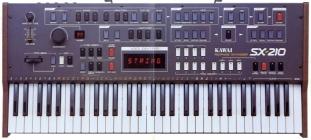
I thought I had tested the Rails correctly, but the +5v was the
culprit; replaced the 2SC356 with a 2N4401 and it worked.

I noticed that the SX240 patch file from synthmania would never load
for me via a computer so I edited the file by amplifying then
normalizing it. Let me know if I should load this into the group's files.

Thanks again and I hope to report back with some grat findings from a
pretty sweet synth I must say!

--- In kawai-teisco@yahoogroups.com, "gmanca101" <gmanca101@...> wrote:
>
> Thanks for the reply, I appreciate it!
>
> Well, I have no schematics for it and I looked at the power supply and
> it seems fine given those voltages you have. I have a polysix and that
> had a battery leakage issue but I don't see anything like that at all
> on the SX240. Is it a much more subtle thing than acid leakage?
>
> If you happen to know what happens durring power-up/reset, that would
> help because it's like the thing doesn't want to turn over. Ans a
> schematic would be most appreciated!
>
> Thanks again for your help!
>
> --- In kawai-teisco@yahoogroups.com, "Travis Shire" <boardjunkie@>
> wrote:
> >
> > Do you know what you're looking for? You should have +/-15v for the op
> > amps and +5 for the logic. Check for that at the connector that comes
> > from the pwr supply board or at the chip pins if you know the pinouts.
> > More than likely its a battery leakage problem. I bet its powering
up ok
> > but just not operating due to battery damage. Not fun to
repair....but I
> > have a 240 here so if you need the cpu board repaired I can probably
> take
> > care of it. But it won't be cheap. I have the service manual as
well. If
Show quoted textHide quoted text
> > I get some time I'll get it scanned and put in the files section.
> >
> >   ----- Original Message -----
> >   From: "gmanca101"
> >   To: kawai-teisco@yahoogroups.com
> >   Subject: [kawai-teisco] SX240 Power on Problem
> >   Date: Wed, 16 Jan 2008 21:01:54 -0000
> >
> >   Hello all! I just recently got a Kawai SX240 that won't turn on; the
> >   piezo buzzer emits a whine when I turn it on; I replaced the three
> >   big caps in the power supply and there is no change.
> >
> >   It looks like a power supply issue but I would hate to replace every
> >   single part to figure out what's wrong. The voltages seem ok but I
> >   have no frame of reference and any help would be most appreciated!
> >
> >   Thanks for your time!
> >
> >
> >
> > --
> > Want an e-mail address like mine?
> > Get a free e-mail account today at www.mail.com!
> >
>