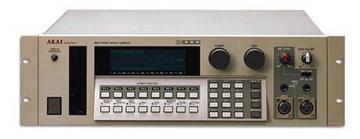
Akai S1000 / S1100 samplers group photo

Yahoo Groups archive

Akai S1000 / S1100 samplers

Index last updated: 2026-04-13 23:33 UTC

Thread

S 1000 SCSI Problems

S 1000 SCSI Problems

2006-05-25 by mircoland

Hi all,

Several monthes ago I purchased from Canada a second hand S1000.
In the transoceanic shipping it should have received some shocks and
actually the back of the unit arrived a bit "bumped".

At the beginning the display was dark but even worse it was not
writing anything.
After replacing the backlight and some twisting of the flat cables it
came back like new.

Now the problem is the corruption of samples when loading from SCSI.
I tried different SCSI cables, different CD ROM drives and also a JAZ
drive, but the problem is always the same:
the samples get corrupted when loaded, but are WRITTEN CORRECTLY to
the JAZ drive via SCSI.
When I load from floppies everything is OK, then I save those samples
to the JAZ drive and they are OK (I checked the JAZ disk with a S3000XL).
If I read back from the JAZ they get corrupted (clicks/glitches in the
samples, one or two clicks per sample).
I unplugged/repugged the SCSI card, I changed the order of the RAM
boards but still the result is the same.

Can anyone help me?

Thanks a lot!

M.

Re: S 1000 SCSI Problems

2007-05-18 by jonbstevens

Hi,

I'm new to the list and have been reading through the archives. I 
have an identical problem with my S1000 at the moment as well.  If it 
helps i'm using ver 4.4 of the OS.

Even more strange is the following. I have 1 8mb card in the machine. 
When I boot under OS 4.4 it only shows 4mb available. When I boot 
from the OS ver 1 on the EPROM then it shows the full 10mb available. 
Am I missing something obvious?

If none of these problems are fixable are there any S1000 for sale in 
Northern California? specifically the SF Bay area? Thanks!

Jonathon

--- In akaiS1000S1100Samplers@yahoogroups.com, "mircoland" 
<mircoland@...> wrote:
>
> Hi all,
> 
> Several monthes ago I purchased from Canada a second hand S1000.
> In the transoceanic shipping it should have received some shocks and
> actually the back of the unit arrived a bit "bumped".
> 
> At the beginning the display was dark but even worse it was not
> writing anything.
> After replacing the backlight and some twisting of the flat cables 
it
> came back like new.
> 
> Now the problem is the corruption of samples when loading from SCSI.
> I tried different SCSI cables, different CD ROM drives and also a 
JAZ
> drive, but the problem is always the same:
> the samples get corrupted when loaded, but are WRITTEN CORRECTLY to
> the JAZ drive via SCSI.
> When I load from floppies everything is OK, then I save those 
samples
> to the JAZ drive and they are OK (I checked the JAZ disk with a 
S3000XL).
> If I read back from the JAZ they get corrupted (clicks/glitches in 
the
Show quoted textHide quoted text
> samples, one or two clicks per sample).
> I unplugged/repugged the SCSI card, I changed the order of the RAM
> boards but still the result is the same.
> 
> Can anyone help me?
> 
> Thanks a lot!
> 
> M.
>

Re: [akaiS1000S1100Samplers] Re: S 1000 SCSI Problems

2007-05-18 by PeWe

Did you jumper the S-1000s mainboard the right way ? You have to solder 
bridges for use w/ 8Meg cards in combination w/ 2 Meg cards as also to take 
care of the slots the cards are inserted in !!!

PeWe
Show quoted textHide quoted text
----- Original Message ----- 
From: jonbstevens
To: akaiS1000S1100Samplers@yahoogroups.com
Sent: Friday, May 18, 2007 8:02 AM
Subject: [akaiS1000S1100Samplers] Re: S 1000 SCSI Problems


Hi,

I'm new to the list and have been reading through the archives. I
have an identical problem with my S1000 at the moment as well. If it
helps i'm using ver 4.4 of the OS.

Even more strange is the following. I have 1 8mb card in the machine.
When I boot under OS 4.4 it only shows 4mb available. When I boot
>from the OS ver 1 on the EPROM then it shows the full 10mb available.
Am I missing something obvious?

If none of these problems are fixable are there any S1000 for sale in
Northern California? specifically the SF Bay area? Thanks!

Jonathon

Re: S 1000 SCSI Problems

2007-05-20 by jonbstevens

Yes, last time the unit was open I made sure to check that the 
jumpers had been soldered in and they're there.

--- In akaiS1000S1100Samplers@yahoogroups.com, "PeWe" <ha-pewe@...> 
wrote:
>
> Did you jumper the S-1000s mainboard the right way ? You have to 
solder 
> bridges for use w/ 8Meg cards in combination w/ 2 Meg cards as also 
to take 
> care of the slots the cards are inserted in !!!
> 
> PeWe
> 
> 
> ----- Original Message ----- 
> From: jonbstevens
> To: akaiS1000S1100Samplers@yahoogroups.com
> Sent: Friday, May 18, 2007 8:02 AM
> Subject: [akaiS1000S1100Samplers] Re: S 1000 SCSI Problems
> 
> 
> Hi,
> 
> I'm new to the list and have been reading through the archives. I
> have an identical problem with my S1000 at the moment as well. If it
> helps i'm using ver 4.4 of the OS.
> 
> Even more strange is the following. I have 1 8mb card in the 
machine.
> When I boot under OS 4.4 it only shows 4mb available. When I boot
> >from the OS ver 1 on the EPROM then it shows the full 10mb 
available.
> Am I missing something obvious?
> 
> If none of these problems are fixable are there any S1000 for sale 
in
Show quoted textHide quoted text
> Northern California? specifically the SF Bay area? Thanks!
> 
> Jonathon
>

Re: [akaiS1000S1100Samplers] Re: S 1000 SCSI Problems

2007-05-20 by PeWe

And you\ufffdre sure the cards are in the slots in the right order , - 2 Meg 
cards in the 1st slot(s) followed by the 8Meg cards ?
Are all of the cards themselfs working properly if inserted one by one into 
the S-1000 and do you have misinfo about megawords fo memory then too ?

----- Original Message ----- 
From: jonbstevens
To: akaiS1000S1100Samplers@yahoogroups.com
Sent: Sunday, May 20, 2007 7:53 AM
Subject: [akaiS1000S1100Samplers] Re: S 1000 SCSI Problems


Yes, last time the unit was open I made sure to check that the
jumpers had been soldered in and they're there.

--- In akaiS1000S1100Samplers@yahoogroups.com, "PeWe" wrote:
Show quoted textHide quoted text
>... w/ 8Meg cards in combination w/ 2 Meg cards as also to take
> care of the slots the cards are inserted in !!!
>
> PeWe

Move to quarantaine

This moves the raw source file on disk only. The archive index is not changed automatically, so you still need to run a manual refresh afterward.