The Kawai & Teisco Analog Synths Group group photo

Yahoo Groups archive

The Kawai & Teisco Analog Synths Group

Index last updated: 2026-04-28 23:05 UTC

Thread

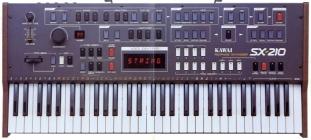
Kawai sx210 bought defective-Nearly fixed

Kawai sx210 bought defective-Nearly fixed

2005-11-23 by brightoutside

I was trying for some time to fix my sx210..At first nothing could be
done.I found after a while that someone had connected wrong some of
the cables..It became operational..but many buttons wouldn't light..
I then found out that one button of the vcf was not in connection(had
broke) so I got it fixed..
Now it's almost in full operation but the only thing I can't do is to
store patches.The only button that isn't functioning is the 
[memory write] and I know it isn't the button itself that has a
problem because I tested it elsewhere and it works. It is the only
button though that has a small chip besides it(is it a chip?it has
only 3 connections-i'm not a technician).
Maybe this chip is not functioning?How can I test it?
I would be very grateful if anyone could tell me.
Thanks,
Christos

Re: Kawai sx210 bought defective-Nearly fixed

2005-11-24 by brightoutside

How dum could I have been!
There is a little button called memory protect and it was on...
My Sx210 is nearly fully fuctional, only some keys don't work at
all..I hope there is a way to fix these also..


--- In kawai_sx210@yahoogroups.com, "brightoutside"
<brightoutside@y...> wrote:
Show quoted textHide quoted text
>
> I was trying for some time to fix my sx210..At first nothing could be
> done.I found after a while that someone had connected wrong some of
> the cables..It became operational..but many buttons wouldn't light..
> I then found out that one button of the vcf was not in connection(had
> broke) so I got it fixed..
> Now it's almost in full operation but the only thing I can't do is to
> store patches.The only button that isn't functioning is the 
> [memory write] and I know it isn't the button itself that has a
> problem because I tested it elsewhere and it works. It is the only
> button though that has a small chip besides it(is it a chip?it has
> only 3 connections-i'm not a technician).
> Maybe this chip is not functioning?How can I test it?
> I would be very grateful if anyone could tell me.
> Thanks,
> Christos
>

Re: Kawai sx210 bought defective-Nearly fixed

2005-11-24 by texhand

--- In kawai_sx210@yahoogroups.com, "brightoutside" 

Great news: I hope the key function  becomes an easy fix also.


<brightoutside@y...> wrote:
Show quoted textHide quoted text
>
> How dum could I have been!
> There is a little button called memory protect and it was on...
> My Sx210 is nearly fully fuctional, only some keys don't work at
> all..I hope there is a way to fix these also..
> 
> 
> 
> 
> --- In kawai_sx210@yahoogroups.com, "brightoutside"
> <brightoutside@y...> wrote:
> >
> > I was trying for some time to fix my sx210..At first nothing could be
> > done.I found after a while that someone had connected wrong some of
> > the cables..It became operational..but many buttons wouldn't light..
> > I then found out that one button of the vcf was not in connection(had
> > broke) so I got it fixed..
> > Now it's almost in full operation but the only thing I can't do is to
> > store patches.The only button that isn't functioning is the 
> > [memory write] and I know it isn't the button itself that has a
> > problem because I tested it elsewhere and it works. It is the only
> > button though that has a small chip besides it(is it a chip?it has
> > only 3 connections-i'm not a technician).
> > Maybe this chip is not functioning?How can I test it?
> > I would be very grateful if anyone could tell me.
> > Thanks,
> > Christos
> >
>

Re: Kawai sx210 bought defective-Nearly fixed

2005-11-24 by gil_we

Clean the key and switch contacts


--- In kawai_sx210@yahoogroups.com, "brightoutside" 
<brightoutside@y...> wrote:
>
> How dum could I have been!
> There is a little button called memory protect and it was on...
> My Sx210 is nearly fully fuctional, only some keys don't work at
> all..I hope there is a way to fix these also..
> 
> 
> 
> 
> --- In kawai_sx210@yahoogroups.com, "brightoutside"
> <brightoutside@y...> wrote:
> >
> > I was trying for some time to fix my sx210..At first nothing 
could be
> > done.I found after a while that someone had connected wrong some 
of
> > the cables..It became operational..but many buttons wouldn't 
light..
> > I then found out that one button of the vcf was not in connection
(had
> > broke) so I got it fixed..
> > Now it's almost in full operation but the only thing I can't do 
is to
Show quoted textHide quoted text
> > store patches.The only button that isn't functioning is the 
> > [memory write] and I know it isn't the button itself that has a
> > problem because I tested it elsewhere and it works. It is the only
> > button though that has a small chip besides it(is it a chip?it has
> > only 3 connections-i'm not a technician).
> > Maybe this chip is not functioning?How can I test it?
> > I would be very grateful if anyone could tell me.
> > Thanks,
> > Christos
> >
>

Θέμα: [kawai_sx210] Re: Kawai sx210 bo ught defective-Nearly fixed

2005-11-25 by Christos Panagiotakis

I cleaned one by one the contacts but many of the keys
didn't play again..So what I did and I don't know if
this is a right thing to do I put cotton balls between
the keys and the plastic that presses the contacts.
Now all keys work except one or two which are playing
continuously.I must have put more cotton than
necessary.
Do you think is another way to fix rather than put
cotton?
Thanks


--- gil_we <gil_we@...> \ufffd\ufffd\ufffd\ufffd\ufffd\ufffd:

> Clean the key and switch contacts
> 
> 
> --- In kawai_sx210@yahoogroups.com, "brightoutside" 
> <brightoutside@y...> wrote:
> >
> > How dum could I have been!
> > There is a little button called memory protect and
> it was on...
> > My Sx210 is nearly fully fuctional, only some keys
> don't work at
> > all..I hope there is a way to fix these also..
> > 
> > 
> > 
> > 
> > --- In kawai_sx210@yahoogroups.com,
> "brightoutside"
> > <brightoutside@y...> wrote:
> > >
> > > I was trying for some time to fix my sx210..At
> first nothing 
> could be
> > > done.I found after a while that someone had
> connected wrong some 
> of
> > > the cables..It became operational..but many
> buttons wouldn't 
> light..
> > > I then found out that one button of the vcf was
> not in connection
> (had
> > > broke) so I got it fixed..
> > > Now it's almost in full operation but the only
> thing I can't do 
> is to
> > > store patches.The only button that isn't
> functioning is the 
> > > [memory write] and I know it isn't the button
> itself that has a
> > > problem because I tested it elsewhere and it
> works. It is the only
> > > button though that has a small chip besides
> it(is it a chip?it has
> > > only 3 connections-i'm not a technician).
> > > Maybe this chip is not functioning?How can I
> test it?
> > > I would be very grateful if anyone could tell
> me.
> > > Thanks,
> > > Christos
> > >
> >
> 
> 
> 
> 
> 
> 
> 
> ------------------------ Yahoo! Groups Sponsor
> --------------------~--> 
> Get fast access to your favorite Yahoo! Groups. Make
> Yahoo! your home page
>
http://us.click.yahoo.com/dpRU5A/wUILAA/yQLSAA/QnLolB/TM
>
--------------------------------------------------------------------~->
> 
> 
>  
> Yahoo! Groups Links
> 
> 
>     kawai_sx210-unsubscribe@yahoogroups.com
> 
>  
> 
> 
> 
> 


___________________________________________________________ 
\ufffd\ufffd\ufffd\ufffd\ufffd\ufffd\ufffd\ufffd\ufffd\ufffd\ufffd\ufffd\ufffd\ufffd Yahoo!; 
\ufffd\ufffd\ufffd\ufffd\ufffd\ufffd\ufffd\ufffd\ufffd\ufffd \ufffd\ufffd \ufffd\ufffd\ufffd\ufffd\ufffd\ufffd\ufffd\ufffd\ufffd\ufffd \ufffd\ufffd\ufffd\ufffd\ufffd\ufffd\ufffd\ufffd (spam); \ufffd\ufffd Yahoo! Mail 
\ufffd\ufffd\ufffd\ufffd\ufffd\ufffd\ufffd\ufffd \ufffd\ufffd\ufffd \ufffd\ufffd\ufffd\ufffd\ufffd\ufffd\ufffd\ufffd \ufffd\ufffd\ufffd\ufffd\ufffd\ufffd \ufffd\ufffd\ufffd\ufffd\ufffd\ufffd\ufffd\ufffd\ufffd \ufffd\ufffd\ufffd\ufffd \ufffd\ufffd\ufffd \ufffd\ufffd\ufffd\ufffd\ufffd\ufffd\ufffd\ufffd\ufffd\ufffd\ufffd 
\ufffd\ufffd\ufffd\ufffd\ufffd\ufffd\ufffd\ufffd\ufffd http://login.yahoo.com/config/mail?.intl=gr

ÈÝìá: [kawai_sx210] Re: Kawai sx210 bought defective-Nearly fixed

2005-11-26 by gil_we

I am not sure I get your description about the cootin ball ? ....

What you should do is to clean the contacts on the main keyboard 
boards, placed under the keys. The rubber should be taken off, then 
clean the circuit contacts with some alchohol and relace.

There are small rubbers place under each key which tends to fall when 
you take the keyboard apart, make sure they don't fall off or get 
lost.


-- In kawai_sx210@yahoogroups.com, Christos Panagiotakis 
<brightoutside@y...> wrote:
>
> I cleaned one by one the contacts but many of the keys
> didn't play again..So what I did and I don't know if
> this is a right thing to do I put cotton balls between
> the keys and the plastic that presses the contacts.
> Now all keys work except one or two which are playing
> continuously.I must have put more cotton than
> necessary.
> Do you think is another way to fix rather than put
> cotton?
> Thanks
> 
> 
> --- gil_we <gil_we@y...> Ýãñáøå:
> 
> > Clean the key and switch contacts
> > 
> > 
> > --- In kawai_sx210@yahoogroups.com, "brightoutside" 
> > <brightoutside@y...> wrote:
> > >
> > > How dum could I have been!
> > > There is a little button called memory protect and
> > it was on...
> > > My Sx210 is nearly fully fuctional, only some keys
> > don't work at
> > > all..I hope there is a way to fix these also..
> > > 
> > > 
> > > 
> > > 
> > > --- In kawai_sx210@yahoogroups.com,
> > "brightoutside"
> > > <brightoutside@y...> wrote:
> > > >
> > > > I was trying for some time to fix my sx210..At
> > first nothing 
> > could be
> > > > done.I found after a while that someone had
> > connected wrong some 
> > of
> > > > the cables..It became operational..but many
> > buttons wouldn't 
> > light..
> > > > I then found out that one button of the vcf was
> > not in connection
> > (had
> > > > broke) so I got it fixed..
> > > > Now it's almost in full operation but the only
> > thing I can't do 
> > is to
> > > > store patches.The only button that isn't
> > functioning is the 
> > > > [memory write] and I know it isn't the button
> > itself that has a
> > > > problem because I tested it elsewhere and it
> > works. It is the only
> > > > button though that has a small chip besides
> > it(is it a chip?it has
> > > > only 3 connections-i'm not a technician).
> > > > Maybe this chip is not functioning?How can I
> > test it?
> > > > I would be very grateful if anyone could tell
> > me.
> > > > Thanks,
> > > > Christos
> > > >
> > >
> > 
> > 
> > 
> > 
> > 
> > 
> > 
> > ------------------------ Yahoo! Groups Sponsor
> > --------------------~--> 
> > Get fast access to your favorite Yahoo! Groups. Make
> > Yahoo! your home page
> >
> http://us.click.yahoo.com/dpRU5A/wUILAA/yQLSAA/QnLolB/TM
> >
> --------------------------------------------------------------------
~->
Show quoted textHide quoted text
> > 
> > 
> >  
> > Yahoo! Groups Links
> > 
> > 
> >     kawai_sx210-unsubscribe@yahoogroups.com
> > 
> >  
> > 
> > 
> > 
> > 
> 
> 
> 
> 	
> 
> 	
> 		
> ___________________________________________________________ 
> ×ñçóéìïðïéåßôå Yahoo!; 
> ÂáñåèÞêáôå ôá åíï÷ëçôéêÜ ìçíýìáôá (spam); Ôï Yahoo! Mail 
> äéáèÝôåé ôçí êáëýôåñç äõíáôÞ ðñïóôáóßá êáôÜ ôùí åíï÷ëçôéêþí 
> ìçíõìÜôùí http://login.yahoo.com/config/mail?.intl=gr
>
Θέμα: [kawai_sx210] Re: Kawai sx210 bo ught defective-Nearly fixed

2005-11-26 by Christos Panagiotakis

Yes I already did that..but still many keys were not
playing.So I put the cotton between the key and the
small rubber that you mention. So that it has more
pressure to the contact.
Maybe over the years these rubbers have loosened very
much and don't work well.


--- gil_we <gil_we@...> \ufffd\ufffd\ufffd\ufffd\ufffd\ufffd:

> I am not sure I get your description about the
> cootin ball ? ....
> 
> What you should do is to clean the contacts on the
> main keyboard 
> boards, placed under the keys. The rubber should be
> taken off, then 
> clean the circuit contacts with some alchohol and
> relace.
> 
> There are small rubbers place under each key which
> tends to fall when 
> you take the keyboard apart, make sure they don't
> fall off or get 
> lost.
> 
> 
> 
> -- In kawai_sx210@yahoogroups.com, Christos
> Panagiotakis 
> <brightoutside@y...> wrote:
> >
> > I cleaned one by one the contacts but many of the
> keys
> > didn't play again..So what I did and I don't know
> if
> > this is a right thing to do I put cotton balls
> between
> > the keys and the plastic that presses the
> contacts.
> > Now all keys work except one or two which are
> playing
> > continuously.I must have put more cotton than
> > necessary.
> > Do you think is another way to fix rather than put
> > cotton?
> > Thanks
> > 
> > 
> > --- gil_we <gil_we@y...> \ufffd\ufffd\ufffd\ufffd\ufffd\ufffd:
> > 
> > > Clean the key and switch contacts
> > > 
> > > 
> > > --- In kawai_sx210@yahoogroups.com,
> "brightoutside" 
> > > <brightoutside@y...> wrote:
> > > >
> > > > How dum could I have been!
> > > > There is a little button called memory protect
> and
> > > it was on...
> > > > My Sx210 is nearly fully fuctional, only some
> keys
> > > don't work at
> > > > all..I hope there is a way to fix these also..
> > > > 
> > > > 
> > > > 
> > > > 
> > > > --- In kawai_sx210@yahoogroups.com,
> > > "brightoutside"
> > > > <brightoutside@y...> wrote:
> > > > >
> > > > > I was trying for some time to fix my
> sx210..At
> > > first nothing 
> > > could be
> > > > > done.I found after a while that someone had
> > > connected wrong some 
> > > of
> > > > > the cables..It became operational..but many
> > > buttons wouldn't 
> > > light..
> > > > > I then found out that one button of the vcf
> was
> > > not in connection
> > > (had
> > > > > broke) so I got it fixed..
> > > > > Now it's almost in full operation but the
> only
> > > thing I can't do 
> > > is to
> > > > > store patches.The only button that isn't
> > > functioning is the 
> > > > > [memory write] and I know it isn't the
> button
> > > itself that has a
> > > > > problem because I tested it elsewhere and it
> > > works. It is the only
> > > > > button though that has a small chip besides
> > > it(is it a chip?it has
> > > > > only 3 connections-i'm not a technician).
> > > > > Maybe this chip is not functioning?How can I
> > > test it?
> > > > > I would be very grateful if anyone could
> tell
> > > me.
> > > > > Thanks,
> > > > > Christos
> > > > >
> > > >
> > > 
> > > 
> > > 
> > > 
> > > 
> > > 
> > > 
> > > ------------------------ Yahoo! Groups Sponsor
> > > --------------------~--> 
> > > Get fast access to your favorite Yahoo! Groups.
> Make
> > > Yahoo! your home page
> > >
> >
>
http://us.click.yahoo.com/dpRU5A/wUILAA/yQLSAA/QnLolB/TM
> > >
> >
>
--------------------------------------------------------------------
> ~->
> > > 
> > > 
> > >  
> > > Yahoo! Groups Links
> > > 
> > > 
> > >     kawai_sx210-unsubscribe@yahoogroups.com
> > > 
> > >  
> > > 
> > > 
> > > 
> > > 
> > 
> > 
> > 
> > 	
> > 
> > 	
> > 		
> >
>
___________________________________________________________
> 
> > \ufffd\ufffd\ufffd\ufffd\ufffd\ufffd\ufffd\ufffd\ufffd\ufffd\ufffd\ufffd\ufffd\ufffd Yahoo!; 
> > \ufffd\ufffd\ufffd\ufffd\ufffd\ufffd\ufffd\ufffd\ufffd\ufffd \ufffd\ufffd \ufffd\ufffd\ufffd\ufffd\ufffd\ufffd\ufffd\ufffd\ufffd\ufffd \ufffd\ufffd\ufffd\ufffd\ufffd\ufffd\ufffd\ufffd (spam); \ufffd\ufffd
> Yahoo! Mail 
> > \ufffd\ufffd\ufffd\ufffd\ufffd\ufffd\ufffd\ufffd \ufffd\ufffd\ufffd \ufffd\ufffd\ufffd\ufffd\ufffd\ufffd\ufffd\ufffd \ufffd\ufffd\ufffd\ufffd\ufffd\ufffd \ufffd\ufffd\ufffd\ufffd\ufffd\ufffd\ufffd\ufffd\ufffd \ufffd\ufffd\ufffd\ufffd \ufffd\ufffd\ufffd
> \ufffd\ufffd\ufffd\ufffd\ufffd\ufffd\ufffd\ufffd\ufffd\ufffd\ufffd 
> > \ufffd\ufffd\ufffd\ufffd\ufffd\ufffd\ufffd\ufffd\ufffd
> http://login.yahoo.com/config/mail?.intl=gr
> >
> 
> 
> 
> 
> 
> 
> ------------------------ Yahoo! Groups Sponsor
> --------------------~--> 
> AIDS in India: A "lurking bomb." Click and help stop
> AIDS now.
>
http://us.click.yahoo.com/VpTY2A/lzNLAA/yQLSAA/QnLolB/TM
>
--------------------------------------------------------------------~->
> 
> 
>  
> Yahoo! Groups Links
> 
> 
>     kawai_sx210-unsubscribe@yahoogroups.com
> 
>  
> 
> 
> 


___________________________________________________________ 
\ufffd\ufffd\ufffd\ufffd\ufffd\ufffd\ufffd\ufffd\ufffd\ufffd\ufffd\ufffd\ufffd\ufffd Yahoo!; 
\ufffd\ufffd\ufffd\ufffd\ufffd\ufffd\ufffd\ufffd\ufffd\ufffd \ufffd\ufffd \ufffd\ufffd\ufffd\ufffd\ufffd\ufffd\ufffd\ufffd\ufffd\ufffd \ufffd\ufffd\ufffd\ufffd\ufffd\ufffd\ufffd\ufffd (spam); \ufffd\ufffd Yahoo! Mail 
\ufffd\ufffd\ufffd\ufffd\ufffd\ufffd\ufffd\ufffd \ufffd\ufffd\ufffd \ufffd\ufffd\ufffd\ufffd\ufffd\ufffd\ufffd\ufffd \ufffd\ufffd\ufffd\ufffd\ufffd\ufffd \ufffd\ufffd\ufffd\ufffd\ufffd\ufffd\ufffd\ufffd\ufffd \ufffd\ufffd\ufffd\ufffd \ufffd\ufffd\ufffd \ufffd\ufffd\ufffd\ufffd\ufffd\ufffd\ufffd\ufffd\ufffd\ufffd\ufffd 
\ufffd\ufffd\ufffd\ufffd\ufffd\ufffd\ufffd\ufffd\ufffd http://login.yahoo.com/config/mail?.intl=gr

ÈÝìá: [kawai_sx210] Re: Kawai sx210 bought defective-Nearly fixed

2005-11-26 by gil_we

Have you tried to celan the RUBBER contacts (black round rubbers) ?
you should use an eraser to do that, the type that you find on the 
top of pencils.

--- In kawai_sx210@yahoogroups.com, Christos Panagiotakis 
<brightoutside@y...> wrote:
>
> Yes I already did that..but still many keys were not
> playing.So I put the cotton between the key and the
> small rubber that you mention. So that it has more
> pressure to the contact.
> Maybe over the years these rubbers have loosened very
> much and don't work well.
> 
> 
> --- gil_we <gil_we@y...> Ýãñáøå:
> 
> > I am not sure I get your description about the
> > cootin ball ? ....
> > 
> > What you should do is to clean the contacts on the
> > main keyboard 
> > boards, placed under the keys. The rubber should be
> > taken off, then 
> > clean the circuit contacts with some alchohol and
> > relace.
> > 
> > There are small rubbers place under each key which
> > tends to fall when 
> > you take the keyboard apart, make sure they don't
> > fall off or get 
> > lost.
> > 
> > 
> > 
> > -- In kawai_sx210@yahoogroups.com, Christos
> > Panagiotakis 
> > <brightoutside@y...> wrote:
> > >
> > > I cleaned one by one the contacts but many of the
> > keys
> > > didn't play again..So what I did and I don't know
> > if
> > > this is a right thing to do I put cotton balls
> > between
> > > the keys and the plastic that presses the
> > contacts.
> > > Now all keys work except one or two which are
> > playing
> > > continuously.I must have put more cotton than
> > > necessary.
> > > Do you think is another way to fix rather than put
> > > cotton?
> > > Thanks
> > > 
> > > 
> > > --- gil_we <gil_we@y...> Ýãñáøå:
> > > 
> > > > Clean the key and switch contacts
> > > > 
> > > > 
> > > > --- In kawai_sx210@...m,
> > "brightoutside" 
> > > > <brightoutside@y...> wrote:
> > > > >
> > > > > How dum could I have been!
> > > > > There is a little button called memory protect
> > and
> > > > it was on...
> > > > > My Sx210 is nearly fully fuctional, only some
> > keys
> > > > don't work at
> > > > > all..I hope there is a way to fix these also..
> > > > > 
> > > > > 
> > > > > 
> > > > > 
> > > > > --- In kawai_sx210@yahoogroups.com,
> > > > "brightoutside"
> > > > > <brightoutside@y...> wrote:
> > > > > >
> > > > > > I was trying for some time to fix my
> > sx210..At
> > > > first nothing 
> > > > could be
> > > > > > done.I found after a while that someone had
> > > > connected wrong some 
> > > > of
> > > > > > the cables..It became operational..but many
> > > > buttons wouldn't 
> > > > light..
> > > > > > I then found out that one button of the vcf
> > was
> > > > not in connection
> > > > (had
> > > > > > broke) so I got it fixed..
> > > > > > Now it's almost in full operation but the
> > only
> > > > thing I can't do 
> > > > is to
> > > > > > store patches.The only button that isn't
> > > > functioning is the 
> > > > > > [memory write] and I know it isn't the
> > button
> > > > itself that has a
> > > > > > problem because I tested it elsewhere and it
> > > > works. It is the only
> > > > > > button though that has a small chip besides
> > > > it(is it a chip?it has
> > > > > > only 3 connections-i'm not a technician).
> > > > > > Maybe this chip is not functioning?How can I
> > > > test it?
> > > > > > I would be very grateful if anyone could
> > tell
> > > > me.
> > > > > > Thanks,
> > > > > > Christos
> > > > > >
> > > > >
> > > > 
> > > > 
> > > > 
> > > > 
> > > > 
> > > > 
> > > > 
> > > > ------------------------ Yahoo! Groups Sponsor
> > > > --------------------~--> 
> > > > Get fast access to your favorite Yahoo! Groups.
> > Make
> > > > Yahoo! your home page
> > > >
> > >
> >
> http://us.click.yahoo.com/dpRU5A/wUILAA/yQLSAA/QnLolB/TM
> > > >
> > >
> >
> --------------------------------------------------------------------
> > ~->
> > > > 
> > > > 
> > > >  
> > > > Yahoo! Groups Links
> > > > 
> > > > 
> > > >     kawai_sx210-unsubscribe@yahoogroups.com
> > > > 
> > > >  
> > > > 
> > > > 
> > > > 
> > > > 
> > > 
> > > 
> > > 
> > > 	
> > > 
> > > 	
> > > 		
> > >
> >
> ___________________________________________________________
> > 
> > > ×ñçóéìïðïéåßôå Yahoo!; 
> > > ÂáñåèÞêáôå ôá åíï÷ëçôéêÜ ìçíýìáôá (spam); Ôï
> > Yahoo! Mail 
> > > äéáèÝôåé ôçí êáëýôåñç äõíáôÞ ðñïóôáóßá êáôÜ ôùí
> > åíï÷ëçôéêþí 
> > > ìçíõìÜôùí
> > http://login.yahoo.com/config/mail?.intl=gr
> > >
> > 
> > 
> > 
> > 
> > 
> > 
> > ------------------------ Yahoo! Groups Sponsor
> > --------------------~--> 
> > AIDS in India: A "lurking bomb." Click and help stop
> > AIDS now.
> >
> http://us.click.yahoo.com/VpTY2A/lzNLAA/yQLSAA/QnLolB/TM
> >
> --------------------------------------------------------------------
~->
Show quoted textHide quoted text
> > 
> > 
> >  
> > Yahoo! Groups Links
> > 
> > 
> >     kawai_sx210-unsubscribe@yahoogroups.com
> > 
> >  
> > 
> > 
> > 
> 
> 
> 
> 	
> 
> 	
> 		
> ___________________________________________________________ 
> ×ñçóéìïðïéåßôå Yahoo!; 
> ÂáñåèÞêáôå ôá åíï÷ëçôéêÜ ìçíýìáôá (spam); Ôï Yahoo! Mail 
> äéáèÝôåé ôçí êáëýôåñç äõíáôÞ ðñïóôáóßá êáôÜ ôùí åíï÷ëçôéêþí 
> ìçíõìÜôùí http://login.yahoo.com/config/mail?.intl=gr
>

Θέμα: [kawai_sx210] Re: Kawai sx210 bo ught defective-Nearly fixed

2005-11-26 by Christos Panagiotakis

Thanks I'll try that..


--- gil_we <gil_we@...> \ufffd\ufffd\ufffd\ufffd\ufffd\ufffd:

> Have you tried to celan the RUBBER contacts (black
> round rubbers) ?
> you should use an eraser to do that, the type that
> you find on the 
> top of pencils.
> 
> --- In kawai_sx210@yahoogroups.com, Christos
> Panagiotakis 
> <brightoutside@y...> wrote:
> >
> > Yes I already did that..but still many keys were
> not
> > playing.So I put the cotton between the key and
> the
> > small rubber that you mention. So that it has more
> > pressure to the contact.
> > Maybe over the years these rubbers have loosened
> very
> > much and don't work well.
> > 
> > 
> > --- gil_we <gil_we@y...> \ufffd\ufffd\ufffd\ufffd\ufffd\ufffd:
> > 
> > > I am not sure I get your description about the
> > > cootin ball ? ....
> > > 
> > > What you should do is to clean the contacts on
> the
> > > main keyboard 
> > > boards, placed under the keys. The rubber should
> be
> > > taken off, then 
> > > clean the circuit contacts with some alchohol
> and
> > > relace.
> > > 
> > > There are small rubbers place under each key
> which
> > > tends to fall when 
> > > you take the keyboard apart, make sure they
> don't
> > > fall off or get 
> > > lost.
> > > 
> > > 
> > > 
> > > -- In kawai_sx210@yahoogroups.com, Christos
> > > Panagiotakis 
> > > <brightoutside@y...> wrote:
> > > >
> > > > I cleaned one by one the contacts but many of
> the
> > > keys
> > > > didn't play again..So what I did and I don't
> know
> > > if
> > > > this is a right thing to do I put cotton balls
> > > between
> > > > the keys and the plastic that presses the
> > > contacts.
> > > > Now all keys work except one or two which are
> > > playing
> > > > continuously.I must have put more cotton than
> > > > necessary.
> > > > Do you think is another way to fix rather than
> put
> > > > cotton?
> > > > Thanks
> > > > 
> > > > 
> > > > --- gil_we <gil_we@y...> \ufffd\ufffd\ufffd\ufffd\ufffd\ufffd:
> > > > 
> > > > > Clean the key and switch contacts
> > > > > 
> > > > > 
> > > > > --- In kawai_sx210@yahoogroups.com,
> > > "brightoutside" 
> > > > > <brightoutside@y...> wrote:
> > > > > >
> > > > > > How dum could I have been!
> > > > > > There is a little button called memory
> protect
> > > and
> > > > > it was on...
> > > > > > My Sx210 is nearly fully fuctional, only
> some
> > > keys
> > > > > don't work at
> > > > > > all..I hope there is a way to fix these
> also..
> > > > > > 
> > > > > > 
> > > > > > 
> > > > > > 
> > > > > > --- In kawai_sx210@yahoogroups.com,
> > > > > "brightoutside"
> > > > > > <brightoutside@y...> wrote:
> > > > > > >
> > > > > > > I was trying for some time to fix my
> > > sx210..At
> > > > > first nothing 
> > > > > could be
> > > > > > > done.I found after a while that someone
> had
> > > > > connected wrong some 
> > > > > of
> > > > > > > the cables..It became operational..but
> many
> > > > > buttons wouldn't 
> > > > > light..
> > > > > > > I then found out that one button of the
> vcf
> > > was
> > > > > not in connection
> > > > > (had
> > > > > > > broke) so I got it fixed..
> > > > > > > Now it's almost in full operation but
> the
> > > only
> > > > > thing I can't do 
> > > > > is to
> > > > > > > store patches.The only button that isn't
> > > > > functioning is the 
> > > > > > > [memory write] and I know it isn't the
> > > button
> > > > > itself that has a
> > > > > > > problem because I tested it elsewhere
> and it
> > > > > works. It is the only
> > > > > > > button though that has a small chip
> besides
> > > > > it(is it a chip?it has
> > > > > > > only 3 connections-i'm not a
> technician).
> > > > > > > Maybe this chip is not functioning?How
> can I
> > > > > test it?
> > > > > > > I would be very grateful if anyone could
> > > tell
> > > > > me.
> > > > > > > Thanks,
> > > > > > > Christos
> > > > > > >
> > > > > >
> > > > > 
> > > > > 
> > > > > 
> > > > > 
> > > > > 
> > > > > 
> > > > > 
> > > > > ------------------------ Yahoo! Groups
> Sponsor
> > > > > --------------------~--> 
> > > > > Get fast access to your favorite Yahoo!
> Groups.
> > > Make
> > > > > Yahoo! your home page
> > > > >
> > > >
> > >
> >
>
http://us.click.yahoo.com/dpRU5A/wUILAA/yQLSAA/QnLolB/TM
> > > > >
> > > >
> > >
> >
>
--------------------------------------------------------------------
> > > ~->
> > > > > 
> > > > > 
> > > > >  
> > > > > Yahoo! Groups Links
> > > > > 
> > > > > 
> > > > >     kawai_sx210-unsubscribe@yahoogroups.com
> > > > > 
> > > > >  
> > > > > 
> > > > > 
> > > > > 
> > > > > 
> > > > 
> > > > 
> > > > 
> > > > 	
> > > > 
> > > > 	
> > > > 		
> > > >
> > >
> >
>
___________________________________________________________
> > > 
> > > > \ufffd\ufffd\ufffd\ufffd\ufffd\ufffd\ufffd\ufffd\ufffd\ufffd\ufffd\ufffd\ufffd\ufffd Yahoo!; 
> > > > \ufffd\ufffd\ufffd\ufffd\ufffd\ufffd\ufffd\ufffd\ufffd\ufffd \ufffd\ufffd \ufffd\ufffd\ufffd\ufffd\ufffd\ufffd\ufffd\ufffd\ufffd\ufffd \ufffd\ufffd\ufffd\ufffd\ufffd\ufffd\ufffd\ufffd (spam); \ufffd\ufffd
> > > Yahoo! Mail 
> > > > \ufffd\ufffd\ufffd\ufffd\ufffd\ufffd\ufffd\ufffd \ufffd\ufffd\ufffd \ufffd\ufffd\ufffd\ufffd\ufffd\ufffd\ufffd\ufffd \ufffd\ufffd\ufffd\ufffd\ufffd\ufffd \ufffd\ufffd\ufffd\ufffd\ufffd\ufffd\ufffd\ufffd\ufffd \ufffd\ufffd\ufffd\ufffd
> \ufffd\ufffd\ufffd
> > > \ufffd\ufffd\ufffd\ufffd\ufffd\ufffd\ufffd\ufffd\ufffd\ufffd\ufffd 
> > > > \ufffd\ufffd\ufffd\ufffd\ufffd\ufffd\ufffd\ufffd\ufffd
> 
=== message truncated ===


___________________________________________________________ 
\ufffd\ufffd\ufffd\ufffd\ufffd\ufffd\ufffd\ufffd\ufffd\ufffd\ufffd\ufffd\ufffd\ufffd Yahoo!; 
\ufffd\ufffd\ufffd\ufffd\ufffd\ufffd\ufffd\ufffd\ufffd\ufffd \ufffd\ufffd \ufffd\ufffd\ufffd\ufffd\ufffd\ufffd\ufffd\ufffd\ufffd\ufffd \ufffd\ufffd\ufffd\ufffd\ufffd\ufffd\ufffd\ufffd (spam); \ufffd\ufffd Yahoo! Mail 
\ufffd\ufffd\ufffd\ufffd\ufffd\ufffd\ufffd\ufffd \ufffd\ufffd\ufffd \ufffd\ufffd\ufffd\ufffd\ufffd\ufffd\ufffd\ufffd \ufffd\ufffd\ufffd\ufffd\ufffd\ufffd \ufffd\ufffd\ufffd\ufffd\ufffd\ufffd\ufffd\ufffd\ufffd \ufffd\ufffd\ufffd\ufffd \ufffd\ufffd\ufffd \ufffd\ufffd\ufffd\ufffd\ufffd\ufffd\ufffd\ufffd\ufffd\ufffd\ufffd 
\ufffd\ufffd\ufffd\ufffd\ufffd\ufffd\ufffd\ufffd\ufffd http://login.yahoo.com/config/mail?.intl=gr

ÈÝìá: [kawai_sx210] Re: Kawai sx210 bought defective-Nearly fixed

2005-11-28 by texhand

--- In kawai_sx210@yahoogroups.com, Christos Panagiotakis 

I would use one of the factory patch settings to judge the keyboard,
If you have not programmed with subtractive synthesis on this keyboard
before. It takes a while to ge use to it.


<brightoutside@y...> wrote:
Show quoted textHide quoted text
>
> I cleaned one by one the contacts but many of the keys
> didn't play again..So what I did and I don't know if
> this is a right thing to do I put cotton balls between
> the keys and the plastic that presses the contacts.
> Now all keys work except one or two which are playing
> continuously.I must have put more cotton than
> necessary.
> Do you think is another way to fix rather than put
> cotton?
> Thanks
> 
> 
> --- gil_we <gil_we@y...> Ýãñáøå:
> 
> > Clean the key and switch contacts
> > 
> > 
> > --- In kawai_sx210@yahoogroups.com, "brightoutside" 
> > <brightoutside@y...> wrote:
> > >
> > > How dum could I have been!
> > > There is a little button called memory protect and
> > it was on...
> > > My Sx210 is nearly fully fuctional, only some keys
> > don't work at
> > > all..I hope there is a way to fix these also..
> > > 
> > > 
> > > 
> > > 
> > > --- In kawai_sx210@yahoogroups.com,
> > "brightoutside"
> > > <brightoutside@y...> wrote:
> > > >
> > > > I was trying for some time to fix my sx210..At
> > first nothing 
> > could be
> > > > done.I found after a while that someone had
> > connected wrong some 
> > of
> > > > the cables..It became operational..but many
> > buttons wouldn't 
> > light..
> > > > I then found out that one button of the vcf was
> > not in connection
> > (had
> > > > broke) so I got it fixed..
> > > > Now it's almost in full operation but the only
> > thing I can't do 
> > is to
> > > > store patches.The only button that isn't
> > functioning is the 
> > > > [memory write] and I know it isn't the button
> > itself that has a
> > > > problem because I tested it elsewhere and it
> > works. It is the only
> > > > button though that has a small chip besides
> > it(is it a chip?it has
> > > > only 3 connections-i'm not a technician).
> > > > Maybe this chip is not functioning?How can I
> > test it?
> > > > I would be very grateful if anyone could tell
> > me.
> > > > Thanks,
> > > > Christos
> > > >
> > >
> > 
> > 
> > 
> > 
> > 
> > 
> > 
> > ------------------------ Yahoo! Groups Sponsor
> > --------------------~--> 
> > Get fast access to your favorite Yahoo! Groups. Make
> > Yahoo! your home page
> >
> http://us.click.yahoo.com/dpRU5A/wUILAA/yQLSAA/QnLolB/TM
> >
> --------------------------------------------------------------------~->
> > 
> > 
> >  
> > Yahoo! Groups Links
> > 
> > 
> >     kawai_sx210-unsubscribe@yahoogroups.com
> > 
> >  
> > 
> > 
> > 
> > 
> 
> 
> 
> 	
> 
> 	
> 		
> ___________________________________________________________ 
> ×ñçóéìïðïéåßôå Yahoo!; 
> ÂáñåèÞêáôå ôá åíï÷ëçôéêÜ ìçíýìáôá (spam); Ôï Yahoo! Mail 
> äéáèÝôåé ôçí êáëýôåñç äõíáôÞ ðñïóôáóßá êáôÜ ôùí åíï÷ëçôéêþí 
> ìçíõìÜôùí http://login.yahoo.com/config/mail?.intl=gr
>

Re: Kawai sx210 bought defective-Nearly fixed

2005-12-02 by lnz2166

--- Yasou Christos, I repair synths on the side and I just got a SX-
210 tha a customer brought in  in pieces. What I noticed about these 
boards is that if the buttons were pushed hard because of dirty 
contacts, they had a tendancy to lift the solder pad. You might want 
to look very close at the solder pads. I had to repair 6 of the 
switch solder pads


In kawai_sx210@yahoogroups.com, "brightoutside" <brightoutside@y...> 
wrote:
>
> I was trying for some time to fix my sx210..At first nothing could 
be
> done.I found after a while that someone had connected wrong some of
> the cables..It became operational..but many buttons wouldn't 
light..
> I then found out that one button of the vcf was not in connection
(had
> broke) so I got it fixed..
> Now it's almost in full operation but the only thing I can't do is 
to
Show quoted textHide quoted text
> store patches.The only button that isn't functioning is the 
> [memory write] and I know it isn't the button itself that has a
> problem because I tested it elsewhere and it works. It is the only
> button though that has a small chip besides it(is it a chip?it has
> only 3 connections-i'm not a technician).
> Maybe this chip is not functioning?How can I test it?
> I would be very grateful if anyone could tell me.
> Thanks,
> Christos
>

Θέμα: [kawai_sx210] Re: Kawai sx210 bo ught defective-Nearly fixed

2005-12-02 by Christos Panagiotakis

Hi to you too!It was the same problem in mine..but I
fixed it with simple soldering.the problem that I have
now is that some notes sound whenever they like..Not
so often but once in a while it plays a note by itself
and you have to press the key to stop..
I don't know exactly what seems to be the problem.

--- lnz2166 <lnz2166@...> \ufffd\ufffd\ufffd\ufffd\ufffd\ufffd:

> --- Yasou Christos, I repair synths on the side and
> I just got a SX-
> 210 tha a customer brought in  in pieces. What I
> noticed about these 
> boards is that if the buttons were pushed hard
> because of dirty 
> contacts, they had a tendancy to lift the solder
> pad. You might want 
> to look very close at the solder pads. I had to
> repair 6 of the 
> switch solder pads
> 
> 
> 
> In kawai_sx210@yahoogroups.com, "brightoutside"
> <brightoutside@y...> 
> wrote:
> >
> > I was trying for some time to fix my sx210..At
> first nothing could 
> be
> > done.I found after a while that someone had
> connected wrong some of
> > the cables..It became operational..but many
> buttons wouldn't 
> light..
> > I then found out that one button of the vcf was
> not in connection
> (had
> > broke) so I got it fixed..
> > Now it's almost in full operation but the only
> thing I can't do is 
> to
> > store patches.The only button that isn't
> functioning is the 
> > [memory write] and I know it isn't the button
> itself that has a
> > problem because I tested it elsewhere and it
> works. It is the only
> > button though that has a small chip besides it(is
> it a chip?it has
> > only 3 connections-i'm not a technician).
> > Maybe this chip is not functioning?How can I test
> it?
> > I would be very grateful if anyone could tell me.
> > Thanks,
> > Christos
> >
> 
> 
> 
> 
> 
> 
> ------------------------ Yahoo! Groups Sponsor
> --------------------~--> 
> 1.2 million kids a year are victims of human
> trafficking. Stop slavery.
>
http://us.click.yahoo.com/WpTY2A/izNLAA/yQLSAA/QnLolB/TM
>
--------------------------------------------------------------------~->
> 
> 
>  
> Yahoo! Groups Links
> 
> 
>     kawai_sx210-unsubscribe@yahoogroups.com
> 
>  
> 
> 
> 
> 


___________________________________________________________ 
\ufffd\ufffd\ufffd\ufffd\ufffd\ufffd\ufffd\ufffd\ufffd\ufffd\ufffd\ufffd\ufffd\ufffd Yahoo!; 
\ufffd\ufffd\ufffd\ufffd\ufffd\ufffd\ufffd\ufffd\ufffd\ufffd \ufffd\ufffd \ufffd\ufffd\ufffd\ufffd\ufffd\ufffd\ufffd\ufffd\ufffd\ufffd \ufffd\ufffd\ufffd\ufffd\ufffd\ufffd\ufffd\ufffd (spam); \ufffd\ufffd Yahoo! Mail 
\ufffd\ufffd\ufffd\ufffd\ufffd\ufffd\ufffd\ufffd \ufffd\ufffd\ufffd \ufffd\ufffd\ufffd\ufffd\ufffd\ufffd\ufffd\ufffd \ufffd\ufffd\ufffd\ufffd\ufffd\ufffd \ufffd\ufffd\ufffd\ufffd\ufffd\ufffd\ufffd\ufffd\ufffd \ufffd\ufffd\ufffd\ufffd \ufffd\ufffd\ufffd \ufffd\ufffd\ufffd\ufffd\ufffd\ufffd\ufffd\ufffd\ufffd\ufffd\ufffd 
\ufffd\ufffd\ufffd\ufffd\ufffd\ufffd\ufffd\ufffd\ufffd http://login.yahoo.com/config/mail?.intl=gr

Move to quarantaine

This moves the raw source file on disk only. The archive index is not changed automatically, so you still need to run a manual refresh afterward.