Yahoo Groups archive

Homebrew_PCBs

Archive for Homebrew_PCBs.

Index last updated: 2026-03-30 01:05 UTC

Thread

Toner transfer - un-even surface theory...

Toner transfer - un-even surface theory...

2006-03-02 by lcdpublishing

Hi Guys,

I etched a board the other day using some new PCB material I got. I
did the usual cleaning and polishing process that has been working
good for me. However, I did have some toner transfer problems - and
even etching problems on these PCBs.

The best I could determine is that the suface of the copper is very
slightly rippled - sort of like the threads in fabric - but more
course. This seems to be the cause of the toner transfer problem -
toner not sticking in these areas.

After etching, I also found that some small spots didn't etch all
the way through - ie. a dot of copper is left on the board. I am
guessing that this was a small void in the glass backing (FR4) and
when the copper was applied, it was thicker in the area of the
dimple - thus taking much longer to etch. Something like this, I
don't believe there is anything at all that can be done to correct
it so I am not too concerned at this time.

Howver, the toner transfer process seems to require that you have a
smooth and flat surface for good transfer and adhesion. If I had a
micro scope, or some such device, I would look much more closely at
the surface texture of the copper to validate this. With the naked
eye, or even a loupe, I can't really see much deformation on the
surface. I do suspect though, that even a deformation of .0001"
would be enough to cause problems.

When pressing the paper onto the PCB, I use a paper based shop towel
between the iron and the PCB to act as a pad and to also help
accomodate surface irregularities. However, I am going to look for
something that will work better.

I guess what I am saying is this. The next time you get "Missed
spots" with toner transfer, take a really close look at that area on
the copper to see if it is in fact flat and smooth.

Chris
Re: Toner transfer - un-even surface theory...

2006-03-02 by dl5012

Hi Chris,

--- In Homebrew_PCBs@yahoogroups.com, "lcdpublishing"
<lcdpublishing@...> wrote:

> I guess what I am saying is this. The next time you get "Missed
> spots" with toner transfer, take a really close look at that area on
> the copper to see if it is in fact flat and smooth.

I've been using a green Scotch Brite type of scrubber for decades and
that has worked fine for me. I've used ruby tape (red adhesive tape),
rubon transfers, Sharpie marker, and now toner transfer.

I scrub the board in one direction until the surface looks clean, then
I rotate 90 degrees and do again. I finish off with a cotton swab and
98% IPA and let the boards air dry.

When I have problems with toner adhesion, it's usually because there
was some dust or lint on the board. Another source could be some oily
residue left on the board during the cleaning process.

The Scotch Brite cleaning method has been well documented and widely
used by many with no prolems.

If you're having adhesion problems, make sure it's not because the
board is dirty or you're not applying enough heat. The two problems
I've had are dust/lint and insufficient heat. When you're using the
paper transfer method, you can't see this as your transfering. I use
inkjet transparencies and I can see the problem areas as I'm ironing.
With transparencies, I can see areas that don't seem to be melting
enough and I can selective apply more heat/pressure to those areas. I
can also see when areas are getting too much heat and avoid them.

Apparently there's a gelatin type of coating on the injket
transparencies that makes it easier for the transparency to release
the toner after ironing. With inkjet transparencies, I heat the toner
enough to see visible (but not bad) toner spreading/melting. Then I
let things cool to the touch, but may still be warm. Then I peel the
transparency off. On rare occasions, I didn't apply enough heat and
toner is staying on the transparency. In those cases, I stop peeling
as soon as I notice a problem and apply more heat.

Toner adhesion doesn't have to be as good as you'd think. I had a
case where some toner lifted during etch and bridged two adjacent
traces. When I finished, there was a copper bridge that I needed to
remove. I could have etched the board longer, but it was only that
one area that needed more etching and etching the whole board would
have caused over etching on everything else.

Regards,
Dennis

Re: [Homebrew_PCBs] Toner transfer - un-even surface theory...

2006-03-02 by Stefan Trethan

On Thu, 02 Mar 2006 16:24:08 +0100, lcdpublishing
<lcdpublishing@...> wrote:

> Hi Guys,
>
> I etched a board the other day using some new PCB material I got. I
> did the usual cleaning and polishing process that has been working
> good for me. However, I did have some toner transfer problems - and
> even etching problems on these PCBs.
>
> The best I could determine is that the suface of the copper is very
> slightly rippled - sort of like the threads in fabric - but more
> course. This seems to be the cause of the toner transfer problem -
> toner not sticking in these areas.

You are seeing the glass fabric of the PCB. This is normal, and varies
between PCB brands.
What do you use again to fuse the toner? I don't have problems with _very_
patternd boards.
To me this seems amplified by the light reflection, there doesn't seem to
be much depth to it.

>
> After etching, I also found that some small spots didn't etch all
> the way through - ie. a dot of copper is left on the board. I am
> guessing that this was a small void in the glass backing (FR4) and
> when the copper was applied, it was thicker in the area of the
> dimple - thus taking much longer to etch. Something like this, I
> don't believe there is anything at all that can be done to correct
> it so I am not too concerned at this time.

Well, usually they apply a foil of even thickness ;-)
Did you think they suqeegee molten copper onto it?

There probably was some "dirt" of sorts on the spot that acted as a bit of
a resist.

>
> Howver, the toner transfer process seems to require that you have a
> smooth and flat surface for good transfer and adhesion. If I had a
> micro scope, or some such device, I would look much more closely at
> the surface texture of the copper to validate this. With the naked
> eye, or even a loupe, I can't really see much deformation on the
> surface. I do suspect though, that even a deformation of .0001"
> would be enough to cause problems.

i can see the pattern well on some boards, but it never seemed to be a
problem.

>
> When pressing the paper onto the PCB, I use a paper based shop towel
> between the iron and the PCB to act as a pad and to also help
> accomodate surface irregularities. However, I am going to look for
> something that will work better.
>
> I guess what I am saying is this. The next time you get "Missed
> spots" with toner transfer, take a really close look at that area on
> the copper to see if it is in fact flat and smooth.
>
> Chris

Certainly requires further investigating, but i don't think the glass
pattern is causing your problems.

ST

Re: Toner transfer - un-even surface theory...

2006-03-02 by fenrir_co

--- In Homebrew_PCBs@yahoogroups.com, "lcdpublishing"
<lcdpublishing@...> wrote:
>
> Hi Guys,
>
> I etched a board the other day using some new PCB material I got. I
> did the usual cleaning and polishing process that has been working
> good for me. However, I did have some toner transfer problems - and
> even etching problems on these PCBs.
>
> The best I could determine is that the suface of the copper is very
> slightly rippled - sort of like the threads in fabric - but more
> course. This seems to be the cause of the toner transfer problem -
> toner not sticking in these areas.

It's been mentioned before, but I'll say it again: there is no way to
consitantly get perfect transfers with an iron. I would blame the
un-evenness of the iron itself, combined with the steam holes, more
than the PCB. The GBC Creative 9" laminator from Staples is only $50,
$40 if you wait for it to go on sale. The rollers are rubber
coated, so that even if the board has slight un-evenness, it will
still get consistent pressure. This won't, however, do .064" boards,
according to pulsar.gs, only .032". The HT210 will with modification,
but it's about 3x more expensive. I have had perfect transfers ever
since I switched, with both Press'n'Peel Blue, and toner on glossy
laser paper.

Having said that, there are a few suggestions to make the iron work
better. Initial board prep is important, but I think that some of the
methods used here are overkill. I have always had perfect transfers
by sanding with 1000 grit sandpaper (I think scotch bright is /too/
rough, and steel wool will leave oil), wiping it down once with 91%
isopropyl alcohol, then wiping down with another clean paper towel
once the dust from the sanding is removed. Use Bounty 'Glass' paper
towels, as they don't leave residue like some other ones I've tried
do. I used an iron with P'n'P for a long time before the laminators
were available cheaply. A lot of the problem is air being trapped
under whatever you're ironing (and sealed in by the traces), keeping
it from transferring. Cut slits in the pattern where there's no toner
with an X-acto knife in order to let more air out while you're
ironing. Find an iron that has a /really/ flat bottom, I've found that
cheap or travel irons tend to be 'flatter' than the more expensive
models. The White Westinghouse iron I have has to be used on the
Polyester mode...while the iron I used before it I put up all the way
(as I've seen it often suggested to use irons on the highest temp),
this one will burn paper or melt press'n'peel at anything higher than
this. So test it before using it on anything important. Also, start
from one edge of the board, and get about half an inch 'stuck' to the
metal. Keep the other end of the transfer sheet held up and slowly
work from one side to the other, this will also help prevent trapped
air.

> After etching, I also found that some small spots didn't etch all
> the way through - ie. a dot of copper is left on the board. I am
> guessing that this was a small void in the glass backing (FR4) and
> when the copper was applied, it was thicker in the area of the
> dimple - thus taking much longer to etch. Something like this, I
> don't believe there is anything at all that can be done to correct
> it so I am not too concerned at this time.

If you are etching face-down in the etchant (which I reccomend as
etching 'sideways' tends to create a more un-even etch, most of the
time I have seen that it etches faster higher up on the board so that
the top half will be 'done' while the bottom half will still have
copper - rotate the board to prevent this), then you need to make sure
there are no air bubbles trapped against it - I had this problem occur
randomly and am pretty sure that's what caused it. Shake it every so
often while etching to make sure the gas produced isn't trapped there.
The holder I use to keep the boards or brass upside-down is tilted
just a little so that air will hopefully go to the side, off of the
project. Even if it's completely sideways, I've seen bubbles 'stick'
to it, preventing etching. However, sometimes I have found no reason
for this to occur, I suspect there is some contamination of the board
or even possibly a section where the copper (or brass) itself has
contamination, creating an alloy that isn't as easy to etch. I am
going to start wiping it down with 91% isopropyl before etching to see
if it stops doing it, hopefully this will not remove or soften the
toner.

>
> Howver, the toner transfer process seems to require that you have a
> smooth and flat surface for good transfer and adhesion. If I had a
> micro scope, or some such device, I would look much more closely at
> the surface texture of the copper to validate this. With the naked
> eye, or even a loupe, I can't really see much deformation on the
> surface. I do suspect though, that even a deformation of .0001"
> would be enough to cause problems.
>
> When pressing the paper onto the PCB, I use a paper based shop towel
> between the iron and the PCB to act as a pad and to also help
> accomodate surface irregularities. However, I am going to look for
> something that will work better.

One more reason to get a laminator rather than sticking with the
iron... eventually you'll get frustrated. I got /very/ good at
transferring with press'n'peel and I'd /still/ wind up having to
re-draw lines every so often, it's just too difficult to maintain the
steady, strong pressure that the laminator can. But even the laminator
won't deal with big dents or other defects. And if you're doing thick
boards, a laminator is still expensive...

Re: Toner transfer - un-even surface theory...

2006-03-02 by lcdpublishing

Hi Stefan,

Answers to your questions...

I am still using the iron method - that fuser I got from my friend
was a dead one.

I suspect that the copper is an applied sheet bonded to the glass
with adhesives and a press of some sort. However, if the copper
sheet isn't flat, consistant thickness to begin with, then the
resulting product would have variations too.

The funny part about this last board is that the only places I had
trouble were in the areas where I remember seeing texture problems.
Furthermore, this happened to be an area of a very wide trace
(.187") and most of it didn't stick. All the surrounding traces
which were .010 ~ .015" wide were fine.

As for cleaning, I used 0000 steel wool and acetone - scrub one
direction, then 90 degrees to the original.

All around pretty strange. I have 10 sheets of this material so I
will have plenty of opportunities to investigate further :-)


--- In Homebrew_PCBs@yahoogroups.com, "Stefan Trethan"
<stefan_trethan@...> wrote:
>
> On Thu, 02 Mar 2006 16:24:08 +0100, lcdpublishing
> <lcdpublishing@...> wrote:
>
> > Hi Guys,
> >
> > I etched a board the other day using some new PCB material I
got. I
> > did the usual cleaning and polishing process that has been
working
> > good for me. However, I did have some toner transfer problems -
and
> > even etching problems on these PCBs.
> >
> > The best I could determine is that the suface of the copper is
very
> > slightly rippled - sort of like the threads in fabric - but more
> > course. This seems to be the cause of the toner transfer
problem -
> > toner not sticking in these areas.
>
> You are seeing the glass fabric of the PCB. This is normal, and
varies
> between PCB brands.
> What do you use again to fuse the toner? I don't have problems
with _very_
> patternd boards.
> To me this seems amplified by the light reflection, there doesn't
seem to
> be much depth to it.
>
> >
> > After etching, I also found that some small spots didn't etch all
> > the way through - ie. a dot of copper is left on the board. I am
> > guessing that this was a small void in the glass backing (FR4)
and
> > when the copper was applied, it was thicker in the area of the
> > dimple - thus taking much longer to etch. Something like this, I
> > don't believe there is anything at all that can be done to
correct
> > it so I am not too concerned at this time.
>
> Well, usually they apply a foil of even thickness ;-)
> Did you think they suqeegee molten copper onto it?
>
> There probably was some "dirt" of sorts on the spot that acted as
a bit of
> a resist.
>
> >
> > Howver, the toner transfer process seems to require that you
have a
> > smooth and flat surface for good transfer and adhesion. If I
had a
> > micro scope, or some such device, I would look much more closely
at
> > the surface texture of the copper to validate this. With the
naked
> > eye, or even a loupe, I can't really see much deformation on the
> > surface. I do suspect though, that even a deformation of .0001"
> > would be enough to cause problems.
>
> i can see the pattern well on some boards, but it never seemed to
be a
> problem.
>
> >
> > When pressing the paper onto the PCB, I use a paper based shop
towel
> > between the iron and the PCB to act as a pad and to also help
> > accomodate surface irregularities. However, I am going to look
for
> > something that will work better.
> >
> > I guess what I am saying is this. The next time you get "Missed
> > spots" with toner transfer, take a really close look at that
area on
> > the copper to see if it is in fact flat and smooth.
> >
> > Chris
>
> Certainly requires further investigating, but i don't think the
glass
> pattern is causing your problems.
>
> ST
>

Re: Toner transfer - un-even surface theory...

2006-03-02 by soffee83

Chris,

Funny, I've suspected that a while back myself. Mine was actually more
noticeable with doing "back-side" label transfers on some white
single-sided CEM-1(?), where I could really see that "cloth" texture.
I think I've gotten significant texture on the copper as well from
aggressively over-cleaning, or having to clean and re-transfer too
many times, maybe on boards with a lighter copper weight, also
probably with rougher abrasives rather than proper chemicals and finer
stuff. I'm trying to stay in the habit of being more careful there.

I've got an eighth inch piece of aluminum plate JBWeld'ed to my iron
for more consistent heat and flatness. For a long while, I've also
been meaning to cut a chunk of ply or particleboard that I could lay
on a bathroom scale on the kitchen counter, and do my transfers on it,
to get a better idea of the exact amount of pressure and time I was
using on the more successful attempts, but I haven't been etching much
lately.

I've gotten the little "speckles" of copper you mention too, but
didn't figure it was a substrate texture issue. I had guessed it was
more a sign of a good "even" etching which may have just needed a bit
more time, like the leftover stuff wasn't in the usual big, wide
"splotches", where the etchant hadn't moved enough or was too dirty.
Don't know much chemistry, but could there maybe somehow be tiny areas
where the copper composition isn't 100% consistent on our cheaper
board material, and takes longer to etch? FWIW, if they're large
enough and have enough surrounding blank space, you can sometimes
"sit" on them for a few seconds with the soldering iron and they'll
slide right off, sort of like those !%$#$ *!&#%$ small isolated pads
and holes that you actually 'want' on the board.

** Just noticed the aforementioned copper content suspicion in that
other reply, so I guess there's now a second "humble" opinion.**

As Dennis suggests, I'd usually rather be safe and pull mine out early
if there are lots of areas (narrow traces in particular) which look to
be thoroughly etched already. I built a tank a while ago and it was a
night and day difference for uniform, "even" etching. Sad part is,
it's more trouble setting it up and cleaning it for the tiny PCB's I'm
usually making, and the heater and design of it requires me to use a
whole load of etchant each time, even for little stuff. I'm trying to
move to Sodium Persulfate, but with the FeCl3 I can re-use a giant 2
litre bottle of old crap with the heated tank and bubblers, but that
stuff's still a mess that I'd rather stay away from. When I finally
get some of that green Pulsar TRF, I'm going to try out the wipe-on
technique for the occasional "quickie" boards.

Like Fenrir_co, I had my toner/iron techniques down to a science, and
somehow on my most recent etch, it seemed the toner demons were on me
with a vengeance. I'm still convinced that there's a reason for those
occurrences. In theory, it would seem that if you knew the exact
pressure and time you needed, and were doing a board which could more
or less fit entirely under the iron's base, the temperature would be
the only variable, and I'd guess there'd be a decent way to check that
somewhere. ???

I'm getting more and more into that laminator idea, but I'm really not
into having to bump down to a thinner board for certain things, and
I've built up quite a supply of thick stock here already. I may look
for a heavier, used one, but I've got a $50 Staples gift certificate
from Christmas, plus they personally sent me a slightly "weaker" $5
one a while back for bitching them out in a letter about the alleged
"self-cancelling" rebate offer many of us tried to get after
Thanksgiving.

Just wondering (and being too lazy to search)-

What is the actual process on those laminator passes, do you make
multiple runs, and how do you know how many? Do you feed raw boards in
with just the photo paper on top, and are they indeed as effective
with the same paper we're all using for ironing, or do you have to
move to Press'N'Peel or something for 100% consistent results? Also,
are there specific details on what they all handle, or maybe a decent
list of what brand/model options they have for us weirdos who insist
on feeding "non-paper" items into the machines? (My 2-sided stuff was
something like .093!)

Thanks! (and sorry to slightly hijack the thread Chris)

George

Re: Toner transfer - un-even surface theory...

2006-03-03 by fenrir_co

--- In Homebrew_PCBs@yahoogroups.com, "soffee83" <soffee83@...> wrote:
>
> As Dennis suggests, I'd usually rather be safe and pull mine out
early
> if there are lots of areas (narrow traces in particular) which look
to
> be thoroughly etched already. I built a tank a while ago and it was
a
> night and day difference for uniform, "even" etching. Sad part is,
> it's more trouble setting it up and cleaning it for the tiny PCB's
I'm
> usually making, and the heater and design of it requires me to use a
> whole load of etchant each time, even for little stuff. I'm trying
to
> move to Sodium Persulfate, but with the FeCl3 I can re-use a giant 2
> litre bottle of old crap with the heated tank and bubblers, but that
> stuff's still a mess that I'd rather stay away from. When I finally
> get some of that green Pulsar TRF, I'm going to try out the wipe-on
> technique for the occasional "quickie" boards.

I built my own etching tank. Three times, in fact. The only things I
did were A) make a huge mess everywhere and 2) find out that the
copper etches too fast where the bubbles hit, causing horribly uneven
etching. You may have a better design than the one I have, but I
now use the etchant in a large sweater box (13 qt, #5 plastic) from
Wal-mart, with a plastic sheet of acrylic to hold the
board/brass/whatever face down. Four plastic feet made of cheap pen
caps glued on, one side shorter than the other so it's a little
tilted, a handle on the top that's not too tall to put the lid of the
container back on. I made little plastic tabs as well so I can just
slide the board in and out of the holder. Put directly in the sun,
takes about two hours for a .005" thick piece of brass, less than that
for PCBs. You could cover it with a black trash bag to retain more
heat. Just make sure the thing doesn't dry out in the sun and crack -
replace twice a year, depending. And 40 volume H2O2 from Sally Beauty
supply works well to regenerate FeCl3. If you wanted to be picky, you
could put it in a glass tray with sterno underneath to boil off as
much water as possible, but I do a lot of etching and still haven't
had to do this yet.

> Like Fenrir_co, I had my toner/iron techniques down to a science,
and
> somehow on my most recent etch, it seemed the toner demons were on
me
> with a vengeance. I'm still convinced that there's a reason for
those
> occurrences. In theory, it would seem that if you knew the exact
> pressure and time you needed, and were doing a board which could
more
> or less fit entirely under the iron's base, the temperature would be
> the only variable, and I'd guess there'd be a decent way to check
that
> somewhere. ???

Don't forget that the metal shoe of an iron is not the actual area
being heated, there are coils or rods inside that heat, causing uneven
heating in the main plate. This doesn't matter for clothes, but is not
even enough for PCBs, which is why you should move the iron around in
order to try to hit the whole board with the correct temperature.
However, the air bubbles under the transfer sheet are the bigger
problem, once I figured this out and started cutting slits in the
Press'n'Peel, the transfers improved to nearly 80-90% success. The
pattern I use the most takes forever to cut out all the potential 'air
pockets' so it's annoying, but works better.

> I'm getting more and more into that laminator idea, but I'm really
not
> into having to bump down to a thinner board for certain things, and
> I've built up quite a supply of thick stock here already. I may look
> for a heavier, used one, but I've got a $50 Staples gift certificate
> from Christmas, plus they personally sent me a slightly "weaker" $5
> one a while back for bitching them out in a letter about the alleged
> "self-cancelling" rebate offer many of us tried to get after
> Thanksgiving.

I did see in a few other posts around here that you /can/ put the
.064" boards through the laminators if you put them in slightly
angled, so it grabs a corner first. Just make sure it's got
enough room so it's not going to hit the sides of the opening. Not
sure how this would strain the laminator gears though.

> Just wondering (and being too lazy to search)-
>
> What is the actual process on those laminator passes, do you make
> multiple runs, and how do you know how many? Do you feed raw boards
in
> with just the photo paper on top, and are they indeed as effective
> with the same paper we're all using for ironing, or do you have to
> move to Press'N'Peel or something for 100% consistent results? Also,
> are there specific details on what they all handle, or maybe a
decent
> list of what brand/model options they have for us weirdos who insist
> on feeding "non-paper" items into the machines? (My 2-sided stuff
was
> something like .093!)
>
> Thanks! (and sorry to slightly hijack the thread Chris)
>
> George

I have used the laminator with both press'n'peel blue, and HP Glossy
Laser Photo Paper. The only difference is that the press'n'peel is
about 7.5x more expensive than the laser paper, but is about 7.5x
easier to remove They both do perfect transfers with the laminator (I
use the paper with a Xerox DocuColor 12 at staples - b/w copies are
.06, while a $129.99 b/w laser printer would equal about 2150 copies
at the store. Other than having to drive, which isn't often since I
don't do much custom work, it isn't worth it for me to buy a laser),
you just have to soak the laser paper in water with a little automatic
dishwashing detergent and peel it off, then scrub off what's left with
a Dobie (or other) non-scratch scuff sponge for teflon. Then rinse
well. None of the toner came off any of my attempts. A few pinholes
where the photocopy hadn't been 100% perfect. The Press'n'Peel also
came off perfectly, with the advantage of not having any more work
after that. Up to you how much you want to spend. I'm currently going
to test a DocuColor 12 and a Xerox 1652 with Hammermill Laser Gloss
paper, which is thinner than the HP and may come off with less
scrubbing.

If I have time, I'll write up some information for the files area,
though I do more custom brass engraving and etching than PCB
development (I only do the PCB etching for friends or customers who
want to experiment without having to set up chemicals). The general
technique is pretty much exactly the same though.

Re: Toner transfer - un-even surface theory...

2006-03-03 by fenrir_co

>Also,
> are there specific details on what they all handle, or maybe a
>decent
> list of what brand/model options they have for us weirdos who insist
> on feeding "non-paper" items into the machines? (My 2-sided stuff
>was
> something like .093!)
>
> Thanks! (and sorry to slightly hijack the thread Chris)
>
> George
>

Oh, forgot to add the last few bits to the answer: How to run through
the laminator. I simply put the transfer sheet face down on top of the
board or the brass and run it through. You do run the risk of the
thing going up into the gears if it doesn't attach properly. To
prevent this, buy some laser address labels and use that to tape down
the leading edge (scotch tape will melt!). You don't need much, so one
sheet of labels will go a long way. If you don't want to buy a whole
package, most office supply stores will sell them by the sheet in the
copy center, though they'll probably wonder why you don't want
anything actually /printed/ on them.

I don't know much about how much thickness the laminators will take.
Since they're really only designed for [carrier pouch - laminate -
paper - laminate - carrier pouch], even .032" boards are probably
pushing the boundaries of what they'll do. The GBC laminators at
Staples are the only ones I've seen mentioned often, I've also seen a
Xerox one that has a widely adjustable temperature gauge that looks
pretty heavy duty. I tried a Duck Tape brand one from wal-mart ages
ago and it didn't get anywhere /near/ hot enough to make the transfer,
which is why I never tried another commercial laminator until I saw
pulsar.gs suggesting to use the GBC ones.

Re: Toner transfer - un-even surface theory...

2006-03-03 by fenrir_co

Update on the Hammermill Color Laser Gloss paper. Total failure.
Difficult to transfer with the laminator. I think the paper thickness
also has something to do with it, as it got air bubbles from the heat
while going though the laminator, while the HP laser photo paper is
heavier and doesn't bubble. However, that doesn't explain why the
transfer refused to stick (You would think that toner from the exact
same machine would stick the same) and the ones that did transfer,
rubbed off with the scrubby sponge. Just to prove it wasn't a fluke I
tried another one made on the HP laser photo paper and it worked
perfectly. It's as if different types of paper give the toner
completely different chemical properties. Toner doesn't get
'absorbed', so I'm not sure why this would happen.

Re: Toner transfer - un-even surface theory...

2006-03-03 by lcdpublishing

That is a really neat idea and it mimics what others are doing with
either Fusers or laminators. It creates that small pressure point.

I also noticed that his PCB material looks as though it has ridges -
very similar to what mine looked like that gave me fits the other
day.

I am going to have to give that a try this weekend.

Thanks for pointing that one out!

Chris


--- In Homebrew_PCBs@yahoogroups.com, "alan00463" <alan00463@...>
wrote:
>
> I saw this iron-on technique (first photo) the other day
> while browsing for TRF paper.
>
http://www.pulsar.gs/PCB/a_Pages/5_Support/4b_Tips_Tricks/Tips_Tricks
.html#Anchor-11481
> Has anybody tried this? Successful or not?
>

Re: [Homebrew_PCBs] Re: Toner transfer - un-even surface theory...

2006-03-03 by Stefan Trethan

On Fri, 03 Mar 2006 19:39:27 +0100, alan00463 <alan00463@...> wrote:

> I saw this iron-on technique (first photo) the other day
>
> while browsing for TRF paper.
>
> http://www.pulsar.gs/PCB/a_Pages/5_Support/4b_Tips_Tricks/Tips_Tricks.html#Anchor-11481
>
> Has anybody tried this? Successful or not?
>


Seems to me awfully difficult.
("A crutch, a rubber crutch" if i may quote bob pease)

I mean it's ok to want to avoid a laminator or fuser, but come on!

Probably better than nothing, but as you see he still doesn't get perfect
transfers, which you will get with the real deal.


ST

Re: Toner transfer - un-even surface theory...

2006-03-04 by fenrir_co

--- In Homebrew_PCBs@yahoogroups.com, "kilocycles" <kilocycles@...>
wrote:
>
> That's just great. I got the Brother 2040 to get *away* from the
> freakin' copy machine!
>
> Ted

The new Brother MFC line (I tried about three types) are the only
printer I could not get to transfer at /all/ with the iron or the
laminator when I was still testing transparencies. I have not tried it
with the laser photo paper, but I suspect the fuser temperature is
much higher than other laser printers.

Both Canon and HP laser personal copiers worked perfectly well with
press'n'peel. I did not get any perfect transfers with transparencies.
The toner density on these seemed too low, it needs the extra layer of
press'n'peel (or green TRF) to etch properly. I'd stay away from
Brother printers after this, their new models must have a completely
redesigned toner system.

I have not tried any home color laser printers. However, I do notice
that the black toner in a color laser photocopier tends to be much,
much denser and even than the black in a monochrome copier. I suspect
this is because it needs to be 'better' in order to print good
quality copies of photos, etc. With a black printer, you're not going
to notice if the toner isn't as solid and glossy, especially if you're
just using it for text on paper. I would suspect that a home color
laser would also be like this.

Anyone using diptrace, can you answer a question...

2006-03-04 by Tony Harris

Hi all,

a few weeks ago, someone had talked about diptrace and I downloaded it to try before purchasing it. I can't seem to figure out a way to generate prints from it that I can use to expose PCB's with (I use negative resist boards). If anyone can tell me what I need to do, I'd be most appreciative. I really enjoy the software, but when I'm doing small prototypes, I don't want to have to spend 500+ dollars to get prototypes made (several boards I play around making are 8x10" which cost a bit much when being made...)

-Tony


[Non-text portions of this message have been removed]

Re: Toner transfer - un-even surface theory...

2006-03-04 by kilocycles

Tony,
That's consistent with what Techniks (P-n-P Blue) support told me.
Some of the new laser printers use higher temperatures. However, the
maximum temperature that Press-n-Peel with withstand is greater than
the toner temperature requirements, If I can find a heat source hot
enough.

I just got a bit overexcited when I followed the excellent link to the
site of the previous post, and then there was the caveat about the
Brother series printers and using copiers instead! I've posted on the
problem with the Brothers here before. 1st attempt, less than 25%
transfer using P-n-P Blue; subsequent attempts using Epson Glossy
Photo paper and Staples 24# inkjet paper yielded mixed results. I was
able to touch up and use a board from the Glossy; the paper looked
perfect while soaking, but during the latter stages of gently rubbing
off the paper, most of the image came with it.

I have a sample inkjet transparency I'm going to try next. I'll also
try the homebrew roller technique shown in the link.

I'm keeping my eye out for a GBC 9" laminator. I'd like to see if the
rubber roller end bearings can be routed out in a slot to allow
greater than .032" capacity PCBs, with a lever device to move the
roller back and forth in the slots for different thicknesses. I do
have a lot of that .032" stock, but I bought it primarily to make
enclosures. It tends to warp a bit lengthwise, especially when using
double-sided stock for single-sided boards (one side etched away). I
haven't had a problem using it double-sided, though.

I have some examples on my web site at http:/www.kx4om.com. Click on
the link at the bottom of the page under "Making Printed Circuit
Boards". Also, there are a few under "Completed Projects" that show
some of the boards.

73,
Ted
--- In Homebrew_PCBs@yahoogroups.com, "fenrir_co" <fenrir@...> wrote:
>
> --- In Homebrew_PCBs@yahoogroups.com, "kilocycles" <kilocycles@>
> wrote:
> >
> > That's just great. I got the Brother 2040 to get *away* from the
> > freakin' copy machine!
> >
> > Ted
>
> The new Brother MFC line (I tried about three types) are the only
> printer I could not get to transfer at /all/ with the iron or the
> laminator when I was still testing transparencies. I have not tried it
> with the laser photo paper, but I suspect the fuser temperature is
> much higher than other laser printers.
>
> Both Canon and HP laser personal copiers worked perfectly well with
> press'n'peel. I did not get any perfect transfers with transparencies.
> The toner density on these seemed too low, it needs the extra layer of
> press'n'peel (or green TRF) to etch properly. I'd stay away from
> Brother printers after this, their new models must have a completely
> redesigned toner system.
>
> I have not tried any home color laser printers. However, I do notice
> that the black toner in a color laser photocopier tends to be much,
> much denser and even than the black in a monochrome copier. I suspect
> this is because it needs to be 'better' in order to print good
> quality copies of photos, etc. With a black printer, you're not going
> to notice if the toner isn't as solid and glossy, especially if you're
> just using it for text on paper. I would suspect that a home color
> laser would also be like this.
---snip---

Re: Anyone using diptrace, can you answer a question...

2006-03-04 by kilocycles

Tony,
If you don't have the PDF tutorial, you can get it from the DipTrace site.

I like to export my Eagle Lite boards to Photoshop (or the free
Paint.net program from Washington State University and Microsoft)for
final editing, and I initially didn't see a way to do that in
DipTrace. Then, I read the tutorial.

When you have a board ready to print, click File...Preview, and one of
the pushbuttons at the top right of the next screen that comes up is
"Save". You can save the board image as a bitmap for use in any image
editing software. I mention Paint.net because, like Photoshop and
other high-end programs, it allows you to work with layers. So does
The Gimp (free, open source; Windows and Linux), but it is a bit more
involved to learn than Paint.net; it's more like Photoshop($$$$) in
it's full range of features.

By the way, there's a DipTrace Yahoo group, it's "diptr". Lots of
great info over there.

73,
Ted KX4OM

--- In Homebrew_PCBs@yahoogroups.com, Tony Harris <kg4wfx@...> wrote:
>
> Hi all,
>
> a few weeks ago, someone had talked about diptrace and I
downloaded it to try before purchasing it. I can't seem to figure out
a way to generate prints from it that I can use to expose PCB's with
(I use negative resist boards). If anyone can tell me what I need to
do, I'd be most appreciative. I really enjoy the software, but when
I'm doing small prototypes, I don't want to have to spend 500+ dollars
to get prototypes made (several boards I play around making are 8x10"
which cost a bit much when being made...)
>
> -Tony
>
>
>
>
> [Non-text portions of this message have been removed]
>

Re: Toner transfer - un-even surface theory...

2006-03-04 by fenrir_co

--- In Homebrew_PCBs@yahoogroups.com, "kilocycles" <kilocycles@...>
wrote:

> I just got a bit overexcited when I followed the excellent link to
the
> site of the previous post, and then there was the caveat about the
> Brother series printers and using copiers instead! I've posted on
the
> problem with the Brothers here before. 1st attempt, less than 25%
> transfer using P-n-P Blue; subsequent attempts using Epson Glossy
> Photo paper and Staples 24# inkjet paper yielded mixed results. I
was
> able to touch up and use a board from the Glossy; the paper looked
> perfect while soaking, but during the latter stages of gently
rubbing
> off the paper, most of the image came with it.

While the inkjet papers and transparencies are a good idea as far as
transfer, they're not so good for the laser printer. Sometimes the
'coating' for ink comes off on the rollers and the fuser module,
making the laser printer dirty, unable to feed paper properly, etc.
This can also eventually ruin an inkjet's rollers. I would suggest
using a cleaning kit for the printer quite often if you run a lot of
inkjet paper through it. But I do suggest you try the HP Glossy Laser
Photo Paper, which comes 100 sheets to a package for about $20. I've
tried multiple brands of transparencies and glossy papers now, and
this one has worked the best for me. Two runs through the laminator,
drop into cold water and let soak, peel then scrub with a 'teflon
safe' sponge, and the transfer is over 95% perfect, usually 99-100%,
with just a few little 'dots' or 'lines' that need to be gone over
with a permanent marker. I can look up the product # of the paper if
you want me to.

Re: [Homebrew_PCBs] Anyone using diptrace, can you answer a question...

2006-03-04 by Mycroft2152

Hi Tony,

It's pretty simple, you don't need any graphics
program.

Just go to the print preview and print the page.
Select the layer you want to print. Mak sure you are
at 100%

For the trace side of the board with test, click the
Flip text button. for thew top, select flp text and
mirror.

TANSTAAFL!

Myc


--- Tony Harris <kg4wfx@...> wrote:

> Hi all,
>
> a few weeks ago, someone had talked about diptrace
> and I downloaded it to try before purchasing it. I
> can't seem to figure out a way to generate prints
> from it that I can use to expose PCB's with (I use
> negative resist boards). If anyone can tell me what
> I need to do, I'd be most appreciative. I really
> enjoy the software, but when I'm doing small
> prototypes, I don't want to have to spend 500+
> dollars to get prototypes made (several boards I
> play around making are 8x10" which cost a bit much
> when being made...)
>
> -Tony
>
>
>
>
> [Non-text portions of this message have been
> removed]
>
>


__________________________________________________
Do You Yahoo!?
Tired of spam? Yahoo! Mail has the best spam protection around
http://mail.yahoo.com

Re: [Homebrew_PCBs] Re: Toner transfer - un-even surface theory...

2006-03-05 by Yngve Dahlstrom

Stefan Trethan <stefan_trethan@...> wrote: On Fri, 03 Mar 2006 19:39:27 +0100, alan00463 wrote:

> I saw this iron-on technique (first photo) the other day
>
> while browsing for TRF paper.
>
> http://www.pulsar.gs/PCB/a_Pages/5_Support/4b_Tips_Tricks/Tips_Tricks.html#Anchor-11481
>
> Has anybody tried this? Successful or not?
>


Seems to me awfully difficult.
("A crutch, a rubber crutch" if i may quote bob pease)

I mean it's ok to want to avoid a laminator or fuser, but come on!

Probably better than nothing, but as you see he still doesn't get perfect
transfers, which you will get with the real deal.

The last board I did I finished it off with a 6" rubber roller from my photo lab, came out perfect.

I placed paper and board inside a newspaper with about 6 sheets above the board and the iron on top. Move it about for some minutes without using very much pressure. When it's hot and good remove the top sheets and run the roller a few times pressing down hard. There did seem to be some spreading of the toner but I'm not sure how much because of the rather wide traces and spacings.

I'm still experimenting on papers and techniques, I'll make a write-up once I have more consistent results. Don't hold your breath.

- YD.


---------------------------------
Yahoo! Mail
Use Photomail to share photos without annoying attachments.

[Non-text portions of this message have been removed]

RE: HP Paper Was-Toner transfer - un-even surface theory...

2006-03-05 by kilocycles

---snip---

subsequent attempts using Epson Glossy
> > Photo paper and Staples 24# inkjet paper yielded mixed results. I
> was
> > able to touch up and use a board from the Glossy; the paper looked
> > perfect while soaking, but during the latter stages of gently
> rubbing
> > off the paper, most of the image came with it.
---snip---

But I do suggest you try the HP Glossy Laser
> Photo Paper, which comes 100 sheets to a package for about $20. I've
> tried multiple brands of transparencies and glossy papers now, and
> this one has worked the best for me. Two runs through the laminator,
> drop into cold water and let soak, peel then scrub with a 'teflon
> safe' sponge, and the transfer is over 95% perfect, usually 99-100%,
> with just a few little 'dots' or 'lines' that need to be gone over
> with a permanent marker. I can look up the product # of the paper if
> you want me to.

Sounds like it worth a try; I can always use some paper for photos,
anyway. The Epson glossy paper I used started lifting immediately
when soaking, which was a pleasant surprise. I found that there was
some left-over residue that's been described here before between the
traces that I had to clean out carefully with a scraper. It had the
consistency of starch. Also, the large foil-filled areas had some
defects. I tried my usual Sharpie, but when I etched, the Sharpie
areas etched away much more than the toner-covered areas (can't
believe I'm complimenting my Brother print toner!) I've since
switched to Staedler Lumicolor red for minor area touch-ups, and
fingernail polish for more extensive areas.

I would appreciate your getting the exact product number of the paper.

Thanks,
Ted

Re: Anyone using diptrace, can you answer a question...

2006-03-05 by kilocycles

--- In Homebrew_PCBs@yahoogroups.com, Mycroft2152 <mycroft2152@...> wrote:
>
> Hi Tony,
>
> It's pretty simple, you don't need any graphics
> program.
>
> Just go to the print preview and print the page.
> Select the layer you want to print. Mak sure you are
> at 100%
>
> For the trace side of the board with test, click the
> Flip text button. for thew top, select flp text and
> mirror.
>
> TANSTAAFL!
>
> Myc
---snip---

Tony,
Myc knows what he's talkng about :) . He convinced me to start making
the switch from Eagle Lite to DipTrace. So far, I've done the tutorial
for making components and started my custom library.

Now I've got to run over to the diptr group and ask him a question there.

Ted

Re: HP Paper Was-Toner transfer - un-even surface theory...

2006-03-05 by fenrir_co

> But I do suggest you try the HP Glossy Laser
> > Photo Paper, which comes 100 sheets to a package for about $20.
I've
> > tried multiple brands of transparencies and glossy papers now, and
> > this one has worked the best for me. Two runs through the
laminator,
> > drop into cold water and let soak, peel then scrub with a 'teflon
> > safe' sponge, and the transfer is over 95% perfect, usually
99-100%,
> > with just a few little 'dots' or 'lines' that need to be gone over
> > with a permanent marker. I can look up the product # of the paper
if
> > you want me to.
>
> Sounds like it worth a try; I can always use some paper for photos,
> anyway. The Epson glossy paper I used started lifting immediately
> when soaking, which was a pleasant surprise. I found that there was
> some left-over residue that's been described here before between the
> traces that I had to clean out carefully with a scraper. It had the
> consistency of starch. Also, the large foil-filled areas had some
> defects. I tried my usual Sharpie, but when I etched, the Sharpie
> areas etched away much more than the toner-covered areas (can't
> believe I'm complimenting my Brother print toner!) I've since
> switched to Staedler Lumicolor red for minor area touch-ups, and
> fingernail polish for more extensive areas.
>
> I would appreciate your getting the exact product number of the
paper.
>
> Thanks,
> Ted

Don't forget this is /laser/ photo paper, so if you only have a black
and white laser printer, you won't be able to use it in an inkjet for
photos.

HP Photo Paper

Laser - Glossy
7.5 mil/58lb thickness
97 brightness

Q6608A

UPC: 8 29160 63872 0

I know both Staples and Office Depot now carry this one. It's pretty
thick, so you have to let it soak for awhile. But it seems to actually
affect the adhesion of the toner to the metal - using other brands of
glossy laser paper or transparencies on the same machine did not work
nearly as well.

Re: HP Paper Was-Toner transfer - un-even surface theory...

2006-03-05 by soffee83

--- In Homebrew_PCBs@yahoogroups.com, "kilocycles" <kilocycles@...>
wrote:when I etched, the Sharpie areas etched away much more than the
>toner-covered areas (can't

I get that a bit as well. I'm usually extra careful now to let the wet
Sharpie crap dry thoroughly, and then redraw over top of it once or
twice, until it's nice and "dense" looking. I sometimes use a regular
"fat-tipped" marker for wide stuff too.

I was wondering if there were any easy techniques for masking really
large areas, like the whole back side, for instance? Seems like it
might help for doing double-sided stuff, if you could hit it one at a
time, while covering the other side with tape,etc. I hate trying to
protect the delicate toner work on one side during all the pressing
and heating for the second one.

-George

Re: [Homebrew_PCBs] Re: HP Paper Was-Toner transfer - un-even surface theory...

2006-03-05 by Stefan Trethan

On Mon, 06 Mar 2006 00:27:54 +0100, soffee83 <soffee83@...> wrote:

> I get that a bit as well. I'm usually extra careful now to let the wet
>
> Sharpie crap dry thoroughly, and then redraw over top of it once or
>
> twice, until it's nice and "dense" looking. I sometimes use a regular
>
> "fat-tipped" marker for wide stuff too.
>


Staedtler permanent OHP red will hold up best in my experience, but fresh
pens are also better there, so get the refill bottle.

>
> I was wondering if there were any easy techniques for masking really
>
> large areas, like the whole back side, for instance? Seems like it
>
> might help for doing double-sided stuff, if you could hit it one at a
>
> time, while covering the other side with tape,etc. I hate trying to
>
> protect the delicate toner work on one side during all the pressing
>
> and heating for the second one.

Just do them both at once then you don't need to protect anything.

ST

Re: HP Paper Was-Toner transfer - un-even surface theory...

2006-03-06 by fenrir_co

--- In Homebrew_PCBs@yahoogroups.com, "soffee83" <soffee83@...> wrote:
>
> --- In Homebrew_PCBs@yahoogroups.com, "kilocycles" <kilocycles@>
> wrote:when I etched, the Sharpie areas etched away much more than
>the
> >toner-covered areas (can't
>
> I get that a bit as well. I'm usually extra careful now to let the
>wet
> Sharpie crap dry thoroughly, and then redraw over top of it once or
> twice, until it's nice and "dense" looking. I sometimes use a
>regular
> "fat-tipped" marker for wide stuff too.

I have found that the Sharpie CD markers leave a denser ink than
standard sharpie markers. The older kind seem to work better, but the
current ones they have out still work better than 'plain' sharpies

I use Faber-Castell Multi-Mark 1523 Permanent markers for fine detail
touchup. It seems to hold up well. I used to use DecoArt 'No-Prep
Metal Paint' (craft store, not sure if Wal-Mart has it) with an extra
fine paintbrush before I found these markers (as even XF sharpies are
not fine enough). The metal paint should work better for larger areas
than any marker though. It comes off with acetone along with the
toner.

> I was wondering if there were any easy techniques for masking really
> large areas, like the whole back side, for instance? Seems like it
> might help for doing double-sided stuff, if you could hit it one at
a
> time, while covering the other side with tape,etc. I hate trying to
> protect the delicate toner work on one side during all the pressing
> and heating for the second one.
>
> -George

I mentioned before, I use Rust-Oleum Painter's Touch oil based
spraypaint to do the 'back' side of brass when I etch stencils, etc. A
little acetone, and it'll bubble up and you can peel it right off once
it dries back out a little bit. Not sure how this would affect the
fiberglass part of the board. Just let it dry for two days or there'll
be wet paint residue under it (which you can wipe right off with an
acetone soaked towel). Don't use latex paint. If it hardens too much,
it's very difficult to remove.

Re: HP Paper Was-Toner transfer - un-even surface theory...

2006-03-06 by soffee83

--- In Homebrew_PCBs@yahoogroups.com, "fenrir_co" <fenrir@...> wrote:

Much Thanks! -- And more thanks on the reply to the previous laminator
questions (read them when they came in). I've got that spray paint
here already.

BTW- If anyone didn't see it, Pulsar also had something in their tips
area implying that Sharpie ink will indeed take that green TRF (a
concern of mine). Not sure how well. I guess we'd have to see it.

Stefan (if you're here)- Are you talking about the "etching" of both
sides at once, or the transfer (where I have the trouble)? If the
latter, doesn't all the new heat and pressure,etc. jeopardize the
fragile paper/toner and all, already on the back?

I know everybody seems happy with it, but that .03 board thing just
seems sort of weird to me. My current assortment is something like .
048 for the SS, and .093(!) for the double-sided. I'm not sure I'd be
into bumping down to any thinner stuff just yet, especially not with
boards that I'll have controls or buttons on.

It sucks that there aren't more DIY details on those sort of things
out there. It looks like we jump from little rinky-dink plastic office
appliances (basically "misusing" them), up to painstaking electrical
modifications of mid-sized commercial stuff, which also wasn't
intended for PCB's. No offense to anyone here. I may very well end up
moving to one of the laminators myself soon. It almost sounds like
with the surprising results some of us have gotten lately with the old
iron techniques, plus the news that Pulsar had about the lo-tech dowel
method, then with all the weird grills, heaters, presses, and
everything else out there, somebody would've come up with something
solid and simple.

I used a thick, red rubber roller from a Xerox or something, I
destroyed at work long ago, to make a drum finishing machine. That
thing and an electric typewriter I dissected have brought me two nice
rollers, molded onto solid metal spindles. I'm wondering if just a
basic iron (or heating element), with a smooth flat aluminum base,
mounted upside-down in a stand, could be used with one of them, in a
height adjustable attachment, maybe with a knob or crank locked onto
one side of the roller's spindle? Main differences, I guess, would be
the temperature, and the feed rate (which shouldn't be hard to
control). I can't see the temperature of a cheaper laminator being all
that consistent anyway, plus we'd be dealing with as much torque as we
needed (hand/arm powered), and the roller/pressure system could be
much higher without straining any "man-made" motors. Also, the iron
base area is probably closer to most board widths, than a device made
for a sheet of paper.

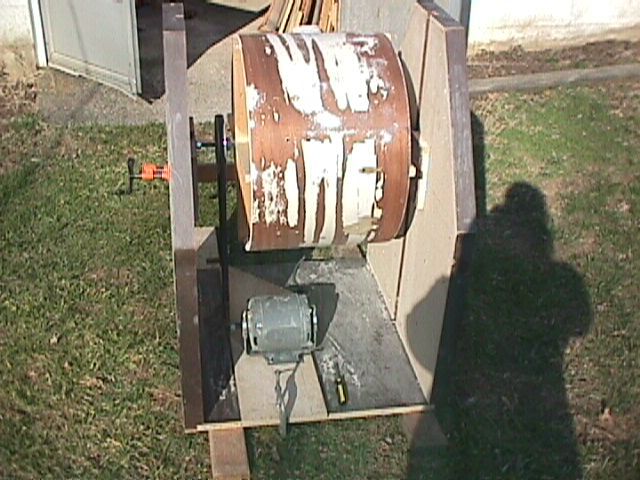
By some act of God, I happened to have an old fuzzy picture of the
roller thing on a CD under the desk here-

<http://i5.photobucket.com/albums/y193/Jidis/roller2.jpg>

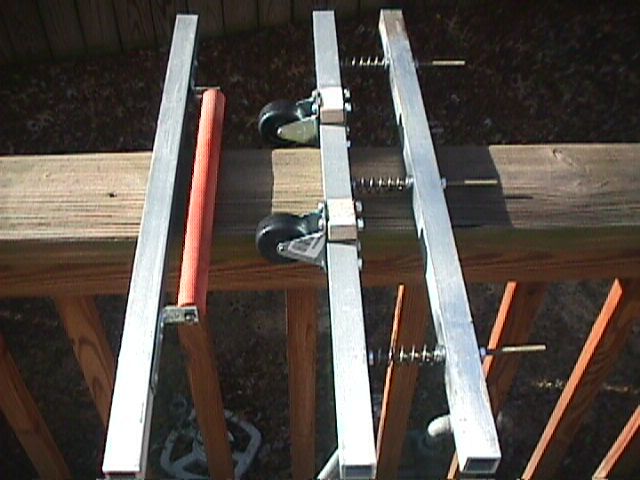
Hard to see, but it slides up and down in the grooves inside this
thing-

<http://i5.photobucket.com/albums/y193/Jidis/front.jpg>

The spring loaded thing with the caster wheels is just for drums. Any
PCB contraption could obviously be much smaller than all this junk,
but even with stuff that big and the varieties in the depth, it wasn't
hard to work out that "grooved" thing for adjustments. The roller is
just mounted with a couple steel "L" brackets, with enlarged drill
holes.

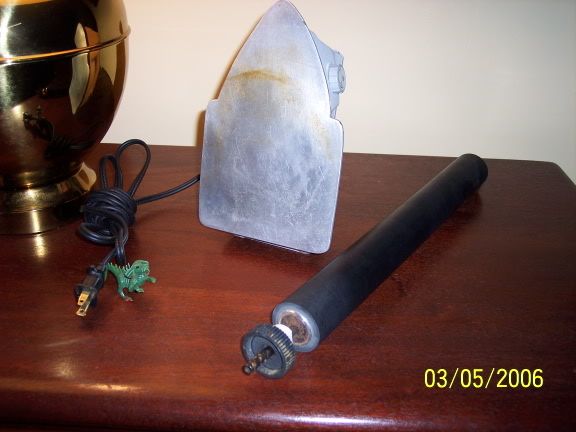
Here's a group shot of the big electric typewriter roller and a lamp
and the aluminum-clad iron and a plastic dinosaur-

<http://i5.photobucket.com/albums/y193/Jidis/rolleriron.jpg>

The red roller has a nice "grip" to it. It's slightly softer, and the
rubber's about an eighth inch thick. They're both solid as crap, and
quite long. The black one is about 15", the red is over a foot. I
don't know what their thoughts are on heat, but I'm guessing that
copier the red one was in, must have had a bit.

Admittedly, I've got NO knowledge of laminator (or even laser printer)
guts. Is a flat, smooth, heated metal bed, and a rotating, cranked,
rubber roller anything at all similar to what would be in them (aside
from the better controlled feed and temperatures)? I guess if Stefan's
"both sides at once" suggestion means what I think it does, the
laminators are doing consistent heat from both sides simultaneously?

Sorry for all that text,

George

Re: HP Paper Was-Toner transfer - un-even surface theory...

2006-03-06 by fenrir_co

> Admittedly, I've got NO knowledge of laminator (or even laser
printer)
> guts. Is a flat, smooth, heated metal bed, and a rotating, cranked,
> rubber roller anything at all similar to what would be in them
(aside
> from the better controlled feed and temperatures)? I guess if
Stefan's
> "both sides at once" suggestion means what I think it does, the
> laminators are doing consistent heat from both sides simultaneously?
>
> Sorry for all that text,
>
> George

Only drawing on data I've researched over the years. Commercial
laminators, such as is used to apply dry film photoresist to boards,
have large, metal rollers, that are heated internally. The part that
makes a laminator better than any iron even by someone experienced, is
that the laminator usually has /two/ rollers, both applying a high
point of direct pressure that prevents air from being trapped or heat
becoming uneven. The GBC laminators have rubber coated rollers
(silicone or teflon most likely, as the heat on these laminators is
pretty intense) that are heated above and below (At least Pulsar says
that both rollers are heated) so that, while they don't have as direct
a heating system as an expensive laminator, tend to have a much more
consistent heat. The springs that hold the rollers together also seem
to be very strong, as you cannot pull the board back out once it's
started to go through.

Rather than the dowel that Pulsar.gs is suggesting, I would suggest
something metal. A chrome plumbing pipe might be too weak, you can
find thicker piping but you bust make sure it has a nice even, smooth
surface. Leave the iron sitting on it - using a thicker pipe, or even
a solid metal rod if you can find one, will allow it to retain heat
better as well. Then try the Pulsar trick, though to me it looks
rather difficult and if you do use a metal 'roller' you have to make
sure you don't burn yourself if it slips.

Another idea would be to suspend the iron upside-down, and make a
'metal rolling pin' so that you can put the board on top of the iron
and use pressure with the roller rather than the iron. I can't think
of an easy way to make this safe, however.

I'm sure you'll come up with some better ideas. The HP Laser paper I
use comes out so well with the roller that maybe if you use this stuff
it'll be easier to iron on than whatever you're currently using. Just
remember, start from one side and slowly go to the other. Tilt the
iron, so you're using the heated edge rather than the whole bottom, to
make better contact, but only after everything is heated up.

Re: [Homebrew_PCBs] Re: HP Paper Was-Toner transfer - un-even surface theory...

2006-03-06 by Stefan Trethan

On Mon, 06 Mar 2006 05:34:06 +0100, soffee83 <soffee83@...> wrote:

>
>
> Stefan (if you're here)- Are you talking about the "etching" of both
>
> sides at once, or the transfer (where I have the trouble)? If the
>
> latter, doesn't all the new heat and pressure,etc. jeopardize the
>
> fragile paper/toner and all, already on the back?
>

I mean both, both at once.

I put both sides of artwork against the PCB, and inside a folded piece of
thin cardboard.
Then i feed this through the fuser.
Just to be sure i feed it through again, minus the cardboard, other side
up.

Does both sides nicely.

Fusing again is not destructive, as long as you leave the paper on.

>
>
> I used a thick, red rubber roller from a Xerox or something, I
>
> destroyed at work long ago, to make a drum finishing machine. That
>
> thing and an electric typewriter I dissected have brought me two nice
>
> rollers, molded onto solid metal spindles. I'm wondering if just a
>
> basic iron (or heating element), with a smooth flat aluminum base,
>
> mounted upside-down in a stand, could be used with one of them, in a
>
> height adjustable attachment, maybe with a knob or crank locked onto
>
> one side of the roller's spindle? Main differences, I guess, would be
>
> the temperature, and the feed rate (which shouldn't be hard to
>
> control). I can't see the temperature of a cheaper laminator being all
>
> that consistent anyway, plus we'd be dealing with as much torque as we
>
> needed (hand/arm powered), and the roller/pressure system could be
>
> much higher without straining any "man-made" motors. Also, the iron
>
> base area is probably closer to most board widths, than a device made
>
> for a sheet of paper.


Appears to me as if a fuser is much easier to force into service for our
puropses.

ST

Re: HP Paper Was-Toner transfer - un-even surface theory...

2006-03-06 by kilocycles

Ahhh...missed that part. I don't think I've heard of laser photo
paper before; where have I been. I guess I can also use it in my
laser printer for high-quality B&W prints; I'm into B&W photography
anyway. It will be interesting to see if the interpreted resolution
of "the Brother" can come close to the hi-res I get from my Canon ink jet.

Thanks for getting the paper info for me.

Cheers,
Ted

>
> Don't forget this is /laser/ photo paper, so if you only have a black
> and white laser printer, you won't be able to use it in an inkjet for
> photos.
>
> HP Photo Paper
>
> Laser - Glossy
> 7.5 mil/58lb thickness
> 97 brightness
>
> Q6608A
>
> UPC: 8 29160 63872 0
>
> I know both Staples and Office Depot now carry this one. It's pretty
> thick, so you have to let it soak for awhile. But it seems to actually
> affect the adhesion of the toner to the metal - using other brands of
> glossy laser paper or transparencies on the same machine did not work
> nearly as well.
>

Re: HP Paper Was-Toner transfer - un-even surface theory...

2006-03-06 by kilocycles

I did a post on using Scotch 33+ electrical tape for doing exactly
that, covering the second side of a double-sided board. It must have
been in the diptr forum. It's thin, pliable, and won't cause leakage
where the tape overlaps if you run you fingernail or a pencil down the
seam.

For large defect areas on the printed side, I use fingernail polish.
I suspect one could etch for 6 months and that lacquer-based substance
wouldn't deteriorate! It cleans up with acetone, which *is* still
used in fingernail polish remover.

Cheers,
Ted

For --- In Homebrew_PCBs@yahoogroups.com, "soffee83" <soffee83@...> wrote:
>
> --- In Homebrew_PCBs@yahoogroups.com, "kilocycles" <kilocycles@>
> wrote:when I etched, the Sharpie areas etched away much more than the
> >toner-covered areas (can't
>
> I get that a bit as well. I'm usually extra careful now to let the wet
> Sharpie crap dry thoroughly, and then redraw over top of it once or
> twice, until it's nice and "dense" looking. I sometimes use a regular
> "fat-tipped" marker for wide stuff too.
>
> I was wondering if there were any easy techniques for masking really
> large areas, like the whole back side, for instance? Seems like it
> might help for doing double-sided stuff, if you could hit it one at a
> time, while covering the other side with tape,etc. I hate trying to
> protect the delicate toner work on one side during all the pressing
> and heating for the second one.
>
> -George
>

Re: HP Paper Was-Toner transfer - un-even surface theory...

2006-03-07 by soffee83

--- In Homebrew_PCBs@yahoogroups.com, "kilocycles" <kilocycles@...>
wrote:
> I did a post on using Scotch 33+ electrical tape

Ted, Thanks! I'll keep that in mind next time I need to do that.

I got to thinking about the upside-down iron and roller/crank again.
It hadn't occurred to me that the toner/paper side of the board would
actually be "sliding" across the aluminum plate (doh!). Probably a "no
go" now. It sucks too, because I removed some "gear wheel" off the
axle of the roller, and it had two nice holes in the flat side, and
recessed, hex-head set screws to hold it on, so it would've been easy
as crap to attach a handle to, as well as mounting the roller itself.

-George

Re: [Homebrew_PCBs] Re: HP Paper Was-Toner transfer - un-even surface theory...

2006-03-07 by Stefan Trethan

On Tue, 07 Mar 2006 10:57:57 +0100, soffee83 <soffee83@...> wrote:

>
> I got to thinking about the upside-down iron and roller/crank again.
>
> It hadn't occurred to me that the toner/paper side of the board would
>
> actually be "sliding" across the aluminum plate (doh!). Probably a "no
>
> go" now. It sucks too, because I removed some "gear wheel" off the
>
> axle of the roller, and it had two nice holes in the flat side, and
>
> recessed, hex-head set screws to hold it on, so it would've been easy
>
> as crap to attach a handle to, as well as mounting the roller itself.
>
>
> -George
>


The trick is, instead of the iron you use a hollow aluminum roller with a
lamp inside for heat.
On the other side you use a heat proof silicone roller.

A fuser already has all those components.

ST

Re: HP Paper Was-Toner transfer - un-even surface theory...

2006-03-07 by soffee83

--- In Homebrew_PCBs@yahoogroups.com, "Stefan Trethan"
<stefan_trethan@...> wrote:
> On the other side you use a heat proof silicone roller.
> A fuser already has all those components.

Thanks! The rubber roller idea was mainly because I already have them,
and they have such a nice "grip". I've also got the aluminum-clad iron
with a nice smooth surface, but I guess it wouldn't work, unless I set
it up so that the board just sat on the iron, and the roller moved
across it, while being forced downward. :(

I must say, I don't care for that dowel idea I saw. Just seems like
you're creating a nice "leverage" to stress the board or something.
Maybe a "fixed" roller for a dowel, with some backup support on either
side, set in a bit lower. I guess it's getting kind of ridiculous,
especially since I've already got the "extra flat" iron base, which is
probably one of the reasons they had come up with the rolling dowel
thing. I guess consistent time (or brief, repeated time) and pressure
would be the way to go with the iron, I just need to get a means of
keeping tabs on it (the scale idea), and find a heat sensor or
thermometer, so I can make sure my iron stays at the same temp.

Ideally, I want the laminator, but I still can't get over that ".03x"
idea. I've already got too much thicker stuff, and if it was a good
enough system, it would be nice to even have the option of running
"non-PCB" materials too, since it would be feeding them "through" the
heated rollers (for long stuff). It also seems like, with a unit made
to run various paper and thin plastic sheets,etc., you'd either be
slightly changing the pressure as the thickness varied, or risking too
much stress on the mechanics (or both). However, with the easy setup
and consistency, and the firsthand feedback from here, it is the
obvious choice.

I still wish someone would rig something together just for the PCB's,
either using the guts of a readily available cheap laminator, or some
common commercial heating and rolling parts. When you think about how
worthless a broken copier or printer is to "regular" people, we
probably wouldn't have much trouble obtaining one. I could probably
rig the roller/pressure/feed part somehow, but unfortunately, with
what I've heard on DIY mods, the electrical half of it, and the
understanding of the technical theory behind laser printers,etc., I
myself wouldn't be capable of devising anything without some more
specific instructions.

If anybody knows of some good online info on gutting printers,
laminators,etc. for this stuff, please let me know.

Thanks!

George

Re: [Homebrew_PCBs] Re: HP Paper Was-Toner transfer - un-even surface theory...

2006-03-07 by Stefan Trethan

On Tue, 07 Mar 2006 20:59:59 +0100, soffee83 <soffee83@...> wrote:

> Ideally, I want the laminator, but I still can't get over that ".03x"
>
> idea. I've already got too much thicker stuff, and if it was a good
>
> enough system, it would be nice to even have the option of running
>
> "non-PCB" materials too, since it would be feeding them "through" the
>
> heated rollers (for long stuff). It also seems like, with a unit made
>
> to run various paper and thin plastic sheets,etc., you'd either be
>
> slightly changing the pressure as the thickness varied, or risking too
>
> much stress on the mechanics (or both). However, with the easy setup
>
> and consistency, and the firsthand feedback from here, it is the
>
> obvious choice.

That's why i use a fuser, a thickness restriction doesn't sound good to me
either, and i'm cheap.


> I still wish someone would rig something together just for the PCB's,
>
> either using the guts of a readily available cheap laminator, or some
>
> common commercial heating and rolling parts. When you think about how
>
> worthless a broken copier or printer is to "regular" people, we
>
> probably wouldn't have much trouble obtaining one. I could probably
>
> rig the roller/pressure/feed part somehow, but unfortunately, with
>
> what I've heard on DIY mods, the electrical half of it, and the
>
> understanding of the technical theory behind laser printers,etc., I
>
> myself wouldn't be capable of devising anything without some more
>
> specific instructions.

There isn't much to understand really. You just take out the fuser unit,
look that it has enough travel for thick boards , rig up a temperature
controller and a slow motor, done.

>
>
> If anybody knows of some good online info on gutting printers,
>
> laminators,etc. for this stuff, please let me know.
>

I wrote a page on using a fuser for PCBs years ago:
<http://www.trethan.at.tf/pub/fuser/fuser_as_laminator.html>

It's not much, and it's very old and probably obsolete in points, but it's
something.
There's also pictures of the one i use:

<http://www.trethan.at.tf//pub/img1/>

those starting with fuser, ignore the others almost all obsolete.
It's out of a copier and thus very wide, which i find practical.

Others have done the same, even replicated my simple temperature
controller and found it working.

ST

Re: HP Paper Was-Toner transfer - un-even surface theory...

2006-03-07 by Mike Phillips

Would your fuser example be applicable to hacking the fuser out of a
laser printer with a bad power supply? I have an old Mac laser
printer. They were made by HP at the time.

Mike


--- In Homebrew_PCBs@yahoogroups.com, "Stefan Trethan"
<stefan_trethan@...> wrote:
>
> On Tue, 07 Mar 2006 20:59:59 +0100, soffee83 <soffee83@...> wrote:
>
> > Ideally, I want the laminator, but I still can't get over that ".03x"
> >
> > idea. I've already got too much thicker stuff, and if it was a good
> >
> > enough system, it would be nice to even have the option of running
> >
> > "non-PCB" materials too, since it would be feeding them "through" the
> >
> > heated rollers (for long stuff). It also seems like, with a unit made
> >
> > to run various paper and thin plastic sheets,etc., you'd either be
> >
> > slightly changing the pressure as the thickness varied, or risking too
> >
> > much stress on the mechanics (or both). However, with the easy setup
> >
> > and consistency, and the firsthand feedback from here, it is the
> >
> > obvious choice.
>
> That's why i use a fuser, a thickness restriction doesn't sound good
to me
> either, and i'm cheap.
>
>
> > I still wish someone would rig something together just for the PCB's,
> >
> > either using the guts of a readily available cheap laminator, or some
> >
> > common commercial heating and rolling parts. When you think about how
> >
> > worthless a broken copier or printer is to "regular" people, we
> >
> > probably wouldn't have much trouble obtaining one. I could probably
> >
> > rig the roller/pressure/feed part somehow, but unfortunately, with
> >
> > what I've heard on DIY mods, the electrical half of it, and the
> >
> > understanding of the technical theory behind laser printers,etc., I
> >
> > myself wouldn't be capable of devising anything without some more
> >
> > specific instructions.
>
> There isn't much to understand really. You just take out the fuser
unit,
> look that it has enough travel for thick boards , rig up a
temperature
> controller and a slow motor, done.
>
> >
> >
> > If anybody knows of some good online info on gutting printers,
> >
> > laminators,etc. for this stuff, please let me know.
> >
>
> I wrote a page on using a fuser for PCBs years ago:
> <http://www.trethan.at.tf/pub/fuser/fuser_as_laminator.html>
>
> It's not much, and it's very old and probably obsolete in points,
but it's
> something.
> There's also pictures of the one i use:
>
> <http://www.trethan.at.tf//pub/img1/>
>
> those starting with fuser, ignore the others almost all obsolete.
> It's out of a copier and thus very wide, which i find practical.
>
> Others have done the same, even replicated my simple temperature
> controller and found it working.
>
> ST
>

Re: HP Paper Was-Toner transfer - un-even surface theory...

2006-03-08 by fenrir_co

> I must say, I don't care for that dowel idea I saw. Just seems like
> you're creating a nice "leverage" to stress the board or something.
> Maybe a "fixed" roller for a dowel, with some backup support on
either
> side, set in a bit lower. I guess it's getting kind of ridiculous,
> especially since I've already got the "extra flat" iron base, which
is
> probably one of the reasons they had come up with the rolling dowel
> thing. I guess consistent time (or brief, repeated time) and
pressure
> would be the way to go with the iron, I just need to get a means of
> keeping tabs on it (the scale idea), and find a heat sensor or
> thermometer, so I can make sure my iron stays at the same temp.

An idea came to me after I sent that message out a few days ago: Built
a frame out of wood and fill with metal pipes or dowels (I suggest
metal as they will retain heat better) to create a line of 'rollers'
like those rolling conveyer belts they have at UPS or such. Make sure
you the surface area is larger than the board and iron and make sure
whatever you use close to perfectly round and smooth so it can rotate
inside the frame. Use bits of laser labels to adhere the transfer
sheet to the board, and iron it on top of this setup. If you use metal
pipes, leave the iron on top of them for awhile to heat them up. I am
thinking face down might work better than face up, but make sure the
board rolls back and forth across the surface. That way it's like the
dowel tip from pulsar, but with multiple 'high points of pressure' so
it's like half of a laminator, and with less chance of the thing
slipping away. Example: (view with monospace font!)

+-----------------------------+
| --------------------------- |
|{ Dowel )|
| --------------------------- |
| --------------------------- |
|{ Dowel )|
| --------------------------- |
| --------------------------- |
|{ Dowel )|
| --------------------------- |
| --------------------------- |
|{ Dowel )|
| --------------------------- |
| --------------------------- |
|{ Dowel )|
| --------------------------- |
| --------------------------- |
|{ Dowel )|
| --------------------------- |
+-----------------------------+

Re: [Homebrew_PCBs] Re: HP Paper Was-Toner transfer - un-even surface theory...

2006-03-08 by Stefan Trethan

I believe multiple pressure points might actually be inferior.
The reason to use a roller is to ensure every point receives high pressure
at some time, with multiple rollers this is not ensured if they are not
prefectly parallel.

(Extreme: a flat plate can be seen as infinitely many rollers).

ST


On Wed, 08 Mar 2006 04:30:12 +0100, fenrir_co <fenrir@...>
wrote:

> An idea came to me after I sent that message out a few days ago: Built
>
> a frame out of wood and fill with metal pipes or dowels (I suggest
>
> metal as they will retain heat better) to create a line of 'rollers'
>
> like those rolling conveyer belts they have at UPS or such. Make sure
>
> you the surface area is larger than the board and iron and make sure
>
> whatever you use close to perfectly round and smooth so it can rotate
>
> inside the frame. Use bits of laser labels to adhere the transfer
>
> sheet to the board, and iron it on top of this setup. If you use metal
>
> pipes, leave the iron on top of them for awhile to heat them up. I am
>
> thinking face down might work better than face up, but make sure the
>
> board rolls back and forth across the surface. That way it's like the
>
> dowel tip from pulsar, but with multiple 'high points of pressure' so
>
> it's like half of a laminator, and with less chance of the thing
>
> slipping away. Example: (view with monospace font!)

Re: HP Paper Was-Toner transfer - un-even surface theory...

2006-03-09 by soffee83

--- In Homebrew_PCBs@yahoogroups.com, "Stefan Trethan"
<stefan_trethan@...> wrote:
>with multiple rollers this is not ensured if they are not
> prefectly parallel.

I mentioned in the post about the dowel thing, that I'd feel safer
with that small "row of rollers" deal, but with the two outer ones
sunk down just a tiny bit, so you'd really just be getting constant
pressure on the center one, which would be constantly changing
location on the board.

The "see-saw" dowel thing sounds too much like the "score and snap"
technique you'd use for cutting glass or board stock. ;)

Where's the damn guy that gives away the big GBC laminator in MY town?
(I'm actually going to start keeping an eye out tonight for that, or a
big, dead laser printer. I'll grab the local for-sale paper and check
the flea markets over the weekend)

-George