re: New Video with Mellotron Mk. VI
2013-03-17 by Rick Reger
Yahoo Groups archive
Archive for newmellotrongroup.v1.
Index last updated: 2026-03-30 01:16 UTC
Thread
2013-03-17 by Rick Reger
2013-03-17 by John Wright
On Mar 17, 2013, at 13:24, Rick Reger <rjtr2958@yahoo.com> wrote:
Hey everyone -If you're interested, I just posted a new video that features some Mellotron Mk. VI.It also includes D6 Clavinet, Moog Voyager, Nord Electro 3 (with the Mellotron Sample Library) and Fender Rhodes.Have a great rest of the weekend.Rick
2013-03-17 by Robert
--- On Sun, 3/17/13, Rick Reger <rjtr2958@yahoo.com> wrote:
From: Rick Reger <rjtr2958@yahoo.com>
Subject: [newmellotrongroup] re: New Video with Mellotron Mk. VI
To: "newmellotrongroup@yahoogroups.com" <newmellotrongroup@yahoogroups.com>
Date: Sunday, March 17, 2013, 1:24 PMHey everyone -If you're interested, I just posted a new video that features some Mellotron Mk. VI.http://www.youtube.com/watch?v=-QotLuE0rPsIt also includes D6 Clavinet, Moog Voyager, Nord Electro 3 (with the Mellotron Sample Library) and Fender Rhodes.Have a great rest of the weekend.Rick
2013-03-17 by Rick Reger
--- On Sun, 3/17/13, Rick Reger <rjtr2958@yahoo.com> wrote:
From: Rick Reger <rjtr2958@yahoo.com>
Subject: [newmellotrongroup] re: New Video with Mellotron Mk. VI
To: "newmellotrongroup@yahoogroups.com" <newmellotrongroup@yahoogroups.com>
Date: Sunday, March 17, 2013, 1:24 PMHey everyone -If you're interested, I just posted a new video that features some Mellotron Mk. VI.http://www.youtube.com/watch?v=-QotLuE0rPsIt also includes D6 Clavinet, Moog Voyager, Nord Electro 3 (with the Mellotron Sample Library) and Fender Rhodes.Have a great rest of the weekend.Rick
2013-03-17 by Rick Reger
On Mar 17, 2013, at 13:24, Rick Reger <rjtr2958@yahoo.com> wrote:
Hey everyone -If you're interested, I just posted a new video that features some Mellotron Mk. VI.http://www.youtube.com/watch?v=-QotLuE0rPsIt also includes D6 Clavinet, Moog Voyager, Nord Electro 3 (with the Mellotron Sample Library) and Fender Rhodes.Have a great rest of the weekend.Rick
2013-03-18 by lsf5275@aol.com
http://www.youtube.com/watch?v=-QotLuE0rPs
2013-03-18 by marabus
On 3/17/13 1:24 PM, Rick Reger wrote:Hey everyone -
If you're interested, I just posted a new video that features some Mellotron Mk. VI.
It also includes D6 Clavinet, Moog Voyager, Nord Electro 3 (with the Mellotron Sample Library) and Fender Rhodes.
Have a great rest of the weekend.
Rick
2013-03-18 by Rick Reger
On 3/17/13 1:24 PM, Rick Reger wrote:Hey everyone -If you're interested, I just posted a new video that features some Mellotron Mk. VI.http://www.youtube.com/watch?v=-QotLuE0rPsIt also includes D6 Clavinet, Moog Voyager, Nord Electro 3 (with the Mellotron Sample Library) and Fender Rhodes.Have a great rest of the weekend.Rick
2013-03-18 by Rick Reger
http://www.youtube.com/watch?v=-QotLuE0rPs
2013-03-18 by lsf5275@aol.com
Thanks Frank.It's only fair to add that the fact that I was able to play that relatively fast lead line on the Mk. VI and it sounded ok was due to your tips on improving the action.Thanks again.RickFrom: "lsf5275@aol.com" <lsf5275@aol.com>
To: newmellotrongroup@yahoogroups.com
Sent: Sunday, March 17, 2013 11:37 PM
Subject: Re: [newmellotrongroup] re: New Video with Mellotron Mk. VIReally nice Rick!FrankIn a message dated 3/17/2013 1:24:22 P.M. Eastern Daylight Time, rjtr2958@yahoo.com writes:http://www.youtube.com/watch?v=-QotLuE0rPs
2013-03-18 by matthew meixner
Thanks Frank.It's only fair to add that the fact that I was able to play that relatively fast lead line on the Mk. VI and it sounded ok was due to your tips on improving the action.Thanks again.RickFrom: "lsf5275@aol.com" <lsf5275@aol.com>
To: newmellotrongroup@yahoogroups.com
Sent: Sunday, March 17, 2013 11:37 PM
Subject: Re: [newmellotrongroup] re: New Video with Mellotron Mk. VIReally nice Rick!FrankIn a message dated 3/17/2013 1:24:22 P.M. Eastern Daylight Time, rjtr2958@yahoo.com writes:http://www.youtube.com/watch?v=-QotLuE0rPs
2013-03-19 by Bruce Daily
Thanks Frank.It's only fair to add that the fact that I was able to play that relatively fast lead line on the Mk. VI and it sounded ok was due to your tips on improving the action.Thanks again.RickFrom: "lsf5275@aol.com" <lsf5275@aol.com>
To: newmellotrongroup@yahoogroups.com
Sent: Sunday, March 17, 2013 11:37 PM
Subject: Re: [newmellotrongroup] re: New Video with Mellotron Mk. VIReally nice Rick!FrankIn a message dated 3/17/2013 1:24:22 P.M. Eastern Daylight Time, rjtr2958@yahoo.com writes:http://www.youtube.com/watch?v=-QotLuE0rPs
2013-03-19 by lsf5275@aol.com
Ummm.... Little purple pills?-Bruce D.#1221From: matthew meixner <ccstickleback@yahoo.com>
To: "newmellotrongroup@yahoogroups.com" <newmellotrongroup@yahoogroups.com>
Sent: Monday, March 18, 2013 11:43 AM
Subject: Re: [newmellotrongroup] re: New Video with Mellotron Mk. VIHi gang,What is this method for improving action?MattFrom: "lsf5275@aol.com" <lsf5275@aol.com>
To: newmellotrongroup@yahoogroups.com
Sent: Monday, March 18, 2013 12:31 PM
Subject: Re: [newmellotrongroup] re: New Video with Mellotron Mk. VIWell, I'm happy I could do at least something to help.In a message dated 3/18/2013 12:38:31 P.M. Eastern Daylight Time, rjtr2958@yahoo.com writes:Thanks Frank.It's only fair to add that the fact that I was able to play that relatively fast lead line on the Mk. VI and it sounded ok was due to your tips on improving the action.Thanks again.RickFrom: "lsf5275@aol.com" <lsf5275@aol.com>
To: newmellotrongroup@yahoogroups.com
Sent: Sunday, March 17, 2013 11:37 PM
Subject: Re: [newmellotrongroup] re: New Video with Mellotron Mk. VIReally nice Rick!FrankIn a message dated 3/17/2013 1:24:22 P.M. Eastern Daylight Time, rjtr2958@yahoo.com writes:http://www.youtube.com/watch?v=-QotLuE0rPs
2013-03-19 by tron400
--- In newmellotrongroup@yahoogroups.com, Bruce Daily <pocotron@...> wrote:
>
> Ummm....  Little purple pills?
> Â
> Â
> Â -Bruce D.
> Â #1221
>
>
> ________________________________
> From: matthew meixner <ccstickleback@...>
> To: "newmellotrongroup@yahoogroups.com" <newmellotrongroup@yahoogroups.com>
> Sent: Monday, March 18, 2013 11:43 AM
> Subject: Re: [newmellotrongroup] re: New Video with Mellotron Mk. VI
>
>
> Â
>
> Hi gang,
> Â
> What is this method for improving action?Â
> Â
> Matt
>
>
> ________________________________
> From: "lsf5275@..." <lsf5275@...>
> To: newmellotrongroup@yahoogroups.com
> Sent: Monday, March 18, 2013 12:31 PM
> Subject: Re: [newmellotrongroup] re: New Video with Mellotron Mk. VI
>
> Â
> Well, I'm happy I could do at least something to help.
>
> In a message dated 3/18/2013 12:38:31 P.M. Eastern Daylight Time,
> rjtr2958@... writes:
> Â
> >Thanks Frank.
> >Â
> >It's only fair to add that the fact that I was able to play that relatively fast lead line on the Mk. VI and it sounded ok was due to your tips on improving the action.
> >Â
> >Thanks again.
> >Â
> >Rick
> >
> >
> >
> >________________________________
> >From: "lsf5275@..." <lsf5275@...>
> >To: newmellotrongroup@yahoogroups.com
> >Sent: Sunday, March 17, 2013 11:37 PM
> >Subject: Re: [newmellotrongroup] re: New Video with Mellotron Mk. VI
> >
> >Â
> >Really nice Rick!
> >
> >Frank
> >
> >In a message dated 3/17/2013 1:24:22 P.M. Eastern Daylight Time, rjtr2958@... writes:
> >http://www.youtube.com/watch?v=-QotLuE0rPs
>
2013-03-19 by lsf5275@aol.com
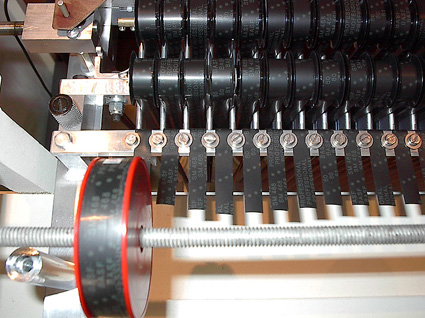
Following is the method I learned from Jerry K and Ken L recently (for M400's only!).
DISCLAIMER: This is what I remember with the remainder of my aging brain cells. If I've missed anything or something is unclear or illogical, please correct.
1. Carefully remove the L-shaped stop bar over the keys.
2. Adjust the hex nuts at the rear of each key so that all the keys float evenly and not too high.
3. Replace the stop bar.
Then for each key:
1. Back off the pinch roller and pad screw until there is no sound and no tape movement.
2. Adjust the pinch roller screw until the tape just starts to move (remove the back panel so you can see the tape movement).
3. Adjust the pad screw until sound appears.
4. Adjust the pinch roller screw until the tape stalls, then turn the screw 1.5 turns clockwise.
5. Adjust the pad screw until there is no sound, then turn the screw 3/4 turn clockwise.
4. Repeat steps 4 and 5.
After following this procedure, I can easily and effortlessly do a glissando across the keyboard.
Bernie
--- In newmellotrongroup@yahoogroups.com, Bruce Daily <pocotron@...> wrote:
>
> Ummm....  Little purple pills?
> Â
> Â
> Â -Bruce D.
> Â #1221
>
>
> ________________________________
> From: matthew meixner <ccstickleback@...>
> To: "newmellotrongroup@yahoogroups.comnewmellotrongroup@yahoogroups.com>
> Sent: Monday, March 18, 2013 11:43 AM
> Subject: Re: [newmellotrongroup] re: New Video with Mellotron Mk. VI
>
>
> Â
>
> Hi gang,
> Â
> What is this method for improving action?Â
> Â
> Matt
>
>
> ________________________________
> From: "lsf5275@..." <lsf5275@...>
> To: newmellotrongroup@yahoogroups.com
> Sent: Monday, March 18, 2013 12:31 PM
> Subject: Re: [newmellotrongroup] re: New Video with Mellotron Mk. VI
>
> Â
> Well, I'm happy I could do at least something to help.
>
> In a message dated 3/18/2013 12:38:31 P.M. Eastern Daylight Time,
> rjtr2958@... writes:
> Â
> >Thanks Frank.
> >Â
> >It's only fair to add that the fact that I was able to play that relatively fast lead line on the Mk. VI and it sounded ok was due to your tips on improving the action.
> >Â
> >Thanks again.
> >Â
> >Rick
> >
> >
> >
> >________________________________
> >From: "lsf5275@..." <lsf5275@...>
> >To: newmellotrongroup@yahoogroups.com
> >Sent: Sunday, March 17, 2013 11:37 PM
> >Subject: Re: [newmellotrongroup] re: New Video with Mellotron Mk. VI
> >
> >Â
> >Really nice Rick!
> >
> >Frank
> >
> >In a message dated 3/17/2013 1:24:22 P.M. Eastern Daylight Time, rjtr2958@... writes:
> >http://www.youtube.com/watch?v=-QotLuE0rPs
>
2013-03-19 by tronbros
On 19 Mar 2013, at 16:25, "tron400" <tron400@yahoo.com> wrote:
Following is the method I learned from Jerry K and Ken L recently (for M400's only!).
DISCLAIMER: This is what I remember with the remainder of my aging brain cells. If I've missed anything or something is unclear or illogical, please correct.
1. Carefully remove the L-shaped stop bar over the keys.
2. Adjust the hex nuts at the rear of each key so that all the keys float evenly and not too high.
3. Replace the stop bar.
Then for each key:
1. Back off the pinch roller and pad screw until there is no sound and no tape movement.
2. Adjust the pinch roller screw until the tape just starts to move (remove the back panel so you can see the tape movement).
3. Adjust the pad screw until sound appears.
4. Adjust the pinch roller screw until the tape stalls, then turn the screw 1.5 turns clockwise.
5. Adjust the pad screw until there is no sound, then turn the screw 3/4 turn clockwise.
4. Repeat steps 4 and 5.
After following this procedure, I can easily and effortlessly do a glissando across the keyboard.
Bernie
--- In newmellotrongroup@yahoogroups.com, Bruce Daily <pocotron@...> wrote:
>
> Ummm....  Little purple pills?
> Â
> Â
> Â -Bruce D.
> Â #1221
>
>
> ________________________________
> From: matthew meixner <ccstickleback@...>
> To: "newmellotrongroup@yahoogroups.comnewmellotrongroup@yahoogroups.com>
> Sent: Monday, March 18, 2013 11:43 AM
> Subject: Re: [newmellotrongroup] re: New Video with Mellotron Mk. VI
>
>
> Â
>
> Hi gang,
> Â
> What is this method for improving action?Â
> Â
> Matt
>
>
> ________________________________
> From: "lsf5275@..." <lsf5275@...>
> To: newmellotrongroup@yahoogroups.com
> Sent: Monday, March 18, 2013 12:31 PM
> Subject: Re: [newmellotrongroup] re: New Video with Mellotron Mk. VI
>
> Â
> Well, I'm happy I could do at least something to help.
>
> In a message dated 3/18/2013 12:38:31 P.M. Eastern Daylight Time,
> rjtr2958@... writes:
> Â
> >Thanks Frank.
> >Â
> >It's only fair to add that the fact that I was able to play that relatively fast lead line on the Mk. VI and it sounded ok was due to your tips on improving the action.
> >Â
> >Thanks again.
> >Â
> >Rick
> >
> >
> >
> >________________________________
> >From: "lsf5275@..." <lsf5275@...>
> >To: newmellotrongroup@yahoogroups.com
> >Sent: Sunday, March 17, 2013 11:37 PM
> >Subject: Re: [newmellotrongroup] re: New Video with Mellotron Mk. VI
> >
> >Â
> >Really nice Rick!
> >
> >Frank
> >
> >In a message dated 3/17/2013 1:24:22 P.M. Eastern Daylight Time, rjtr2958@... writes:
> >http://www.youtube.com/watch?v=-QotLuE0rPs
>
2013-03-19 by tronbros
On 19 Mar 2013, at 17:13, tronbros <tronbros@aol.com> wrote:
mmmm......odd but if it works. I have forwarded our pad and roller adjustment method, which we use all the time, to this list on more than one occasion. All I can say is that the key spring tension needs to done with the bar in place as that is the method by which you gauge! Let the key drop, then bring it back up until it just touches the bar and add 1/8 turn of the nut. A visual check on floating keys could be anywhere!Best,MFollowing is the method I learned from Jerry K and Ken L recently (for M400's only!).
DISCLAIMER: This is what I remember with the remainder of my aging brain cells. If I've missed anything or something is unclear or illogical, please correct.
1. Carefully remove the L-shaped stop bar over the keys.
2. Adjust the hex nuts at the rear of each key so that all the keys float evenly and not too high.
3. Replace the stop bar.
Then for each key:
1. Back off the pinch roller and pad screw until there is no sound and no tape movement.
2. Adjust the pinch roller screw until the tape just starts to move (remove the back panel so you can see the tape movement).
3. Adjust the pad screw until sound appears.
4. Adjust the pinch roller screw until the tape stalls, then turn the screw 1.5 turns clockwise.
5. Adjust the pad screw until there is no sound, then turn the screw 3/4 turn clockwise.
4. Repeat steps 4 and 5.
After following this procedure, I can easily and effortlessly do a glissando across the keyboard.
Bernie
--- In newmellotrongroup@yahoogroups.com, Bruce Daily <pocotron@...> wrote:
>
> Ummm....  Little purple pills?
> Â
> Â
> Â -Bruce D.
> Â #1221
>
>
> ________________________________
> From: matthew meixner <ccstickleback@...>
> To: "newmellotrongroup@yahoogroups.comnewmellotrongroup@yahoogroups.com>
> Sent: Monday, March 18, 2013 11:43 AM
> Subject: Re: [newmellotrongroup] re: New Video with Mellotron Mk. VI
>
>
> Â
>
> Hi gang,
> Â
> What is this method for improving action?Â
> Â
> Matt
>
>
> ________________________________
> From: "lsf5275@..." <lsf5275@...>
> To: newmellotrongroup@yahoogroups.com
> Sent: Monday, March 18, 2013 12:31 PM
> Subject: Re: [newmellotrongroup] re: New Video with Mellotron Mk. VI
>
> Â
> Well, I'm happy I could do at least something to help.
>
> In a message dated 3/18/2013 12:38:31 P.M. Eastern Daylight Time,
> rjtr2958@... writes:
> Â
> >Thanks Frank.
> >Â
> >It's only fair to add that the fact that I was able to play that relatively fast lead line on the Mk. VI and it sounded ok was due to your tips on improving the action.
> >Â
> >Thanks again.
> >Â
> >Rick
> >
> >
> >
> >________________________________
> >From: "lsf5275@..." <lsf5275@...>
> >To: newmellotrongroup@yahoogroups.com
> >Sent: Sunday, March 17, 2013 11:37 PM
> >Subject: Re: [newmellotrongroup] re: New Video with Mellotron Mk. VI
> >
> >Â
> >Really nice Rick!
> >
> >Frank
> >
> >In a message dated 3/17/2013 1:24:22 P.M. Eastern Daylight Time, rjtr2958@... writes:
> >http://www.youtube.com/watch?v=-QotLuE0rPs
>
2013-03-19 by tron400
--- In newmellotrongroup@yahoogroups.com, lsf5275@... wrote:
>
> Nah... that's over-simplification. A properly working keyboard is all
> dependant on relationships. It's not just how fast you can play it, it's about
> consistency. Does each key played maximize the sound of the tape passing
> under it? Is there consistency in volume and EQ from note to note? When
> blending tracks, does the blend sound similar from note to note? Example:
> Blending strings and cello... a little more cello than strings on this key... a
> little more strings than cello on the next, and so on, all over the keyboard.
>
> It is possible to not only get an incredibly light action, but incredible
> presence and consistency from note to note, track by track, to the maximum
> capability of the recorded tape if the keyboard is set up exactly right.
> This is very subjective and the formula you show below is a compromise.
>
> Even changing frames can change playability. Different frames often have
> different amounts of friction in the 35 individual tape paths, due to spring
> tension, whether the turnbuckles are set up correctly and how much they
> rub against the separators, how well the plastic rollers spin, etc. It's all
> about friction, friction, friction.
>
> That leads me to pinch rollers. New ones are far superior to old ones. They
> grab the tape with less pressure. Pressure pads with good felt, properly
> aligned to the heads require less pressure. Friction, friction, friction.
>
> So here's a simple formula to get the most out of every frame. You need
> enough roller pressure on each key to pull the tape all the way to the end
> without loss of pitch. No more... no less. You need enough pressure from the
> pad (once properly aligned to the head) such that when a key is depressed,
> as the tape moves progressively forward, consistency of volume is
> maintained for the full time the key is depressed.
>
> As the tape gets pulled forward, the return spring tension increases.
> Especially near the end, as the turnbuckles approach the limits of their travel,
> tape tension is going to tend to lift the pressure pad a bit, causing loss
> of volume and clarity, The objective, therefore is to only apply enough
> pressure pad adjustment to keep that pad against the head until the tape is
> at the end. No more, no less.
>
> Making these adjustments means going back and forth a bit setting pad and
> corresponding roller tension for each key.
>
> These adjustments are ENTIRELY subjective, although less so on a Mellotron
> that has been properly set up by an expert. When I work on a machine, for
> me the keyboard and head block are the heart and soul of the machine. Power
> supplies, motors and preamps are easier. Component values and performance
> aren't subjective... they are measured. Keyboard setup takes hours of work.
> Head azimuths must be set first. When they re right, then you can match the
> pads to the heads.
>
> You want your Mellotron to sound and play great? Perfect it. But remember.
> Friction is the enemy. The less, the better, The less you need to pull the
> tape, the better. Old pinch rollers can not be "reconditioned". Buying new
> ones is one of the very best investments you can make.
>
> It's all about relationships.
>
> Frank
>
>
>
> In a message dated 3/19/2013 12:26:18 P.M. Eastern Daylight Time,
> tron400@... writes:
>
>
>
>
> Following is the method I learned from Jerry K and Ken L recently (for
> M400's only!).
>
> DISCLAIMER: This is what I remember with the remainder of my aging brain
> cells. If I've missed anything or something is unclear or illogical, please
> correct.
>
> 1. Carefully remove the L-shaped stop bar over the keys.
> 2. Adjust the hex nuts at the rear of each key so that all the keys float
> evenly and not too high.
> 3. Replace the stop bar.
>
> Then for each key:
>
> 1. Back off the pinch roller and pad screw until there is no sound and no
> tape movement.
> 2. Adjust the pinch roller screw until the tape just starts to move
> (remove the back panel so you can see the tape movement).
> 3. Adjust the pad screw until sound appears.
> 4. Adjust the pinch roller screw until the tape stalls, then turn the
> screw 1.5 turns clockwise.
> 5. Adjust the pad screw until there is no sound, then turn the screw 3/4
> turn clockwise.
> 4. Repeat steps 4 and 5.
>
> After following this procedure, I can easily and effortlessly do a
> glissando across the keyboard.
>
> Bernie
>
> --- In _newmellotrongroup@yahoogroups.com_
> (mailto:newmellotrongroup@yahoogroups.com) , Bruce Daily <pocotron@> wrote:
> >
> > Ummm....Ã Ã Little purple pills?
> > Ã
> > Ã
> > Ã -Bruce D.
> > Ã #1221
> >
> >
> > ________________________________
> > From: matthew meixner <ccstickleback@>
> > To: "_newmellotrongroup@yahoogroups.com_
> (mailto:newmellotrongroup@yahoogroups.com) _newmellotrongroup@yahoogroups.com_
> (mailto:newmellotrongroup@yahoogroups.com) >
> > Sent: Monday, March 18, 2013 11:43 AM
> > Subject: Re: [newmellotrongroup] re: New Video with Mellotron Mk. VI
> >
> >
> > Ã
> >
> > Hi gang,
> > Ã
> > What is this method for improving action?Ã
> > Ã
> > Matt
> >
> >
> > ________________________________
> > From: "lsf5275@" <lsf5275@>
> > To: _newmellotrongroup@yahoogroups.com_
> (mailto:newmellotrongroup@yahoogroups.com)
> > Sent: Monday, March 18, 2013 12:31 PM
> > Subject: Re: [newmellotrongroup] re: New Video with Mellotron Mk. VI
> >
> > Ã
> > Well, I'm happy I could do at least something to help.
> >
> > In a message dated 3/18/2013 12:38:31 P.M. Eastern Daylight Time,
> > rjtr2958@ writes:
> > Ã
> > >Thanks Frank.
> > >Ã
> > >It's only fair to add that the fact that I was able to play that
> relatively fast lead line on the Mk. VI and it sounded ok was due to your tips on
> improving the action.
> > >Ã
> > >Thanks again.
> > >Ã
> > >Rick
> > >
> > >
> > >
> > >________________________________
> > >From: "lsf5275@" <lsf5275@>
> > >To: _newmellotrongroup@yahoogroups.com_
> (mailto:newmellotrongroup@yahoogroups.com)
> > >Sent: Sunday, March 17, 2013 11:37 PM
> > >Subject: Re: [newmellotrongroup] re: New Video with Mellotron Mk. VI
> > >
> > >Ã
> > >Really nice Rick!
> > >
> > >Frank
> > >
> > >In a message dated 3/17/2013 1:24:22 P.M. Eastern Daylight Time,
> rjtr2958@ writes:
> > >_http://www.youtube.com/watch?v=-QotLuE0rPs_
> (http://www.youtube.com/watch?v=-QotLuE0rPs)
> >
>
2013-03-19 by tron400
--- In newmellotrongroup@yahoogroups.com, tronbros <tronbros@...> wrote:
>
> mmmm......odd but if it works. I have forwarded our pad and roller adjustment method, which we use all the time, to this list on more than one occasion. All I can say is that the key spring tension needs to done with the bar in place as that is the method by which you gauge! Let the key drop, then bring it back up until it just touches the bar and add 1/8 turn of the nut. A visual check on floating keys could be anywhere!
>
> Best,
>
> M
>
> 1963 to 2013 - 50 years of mellotrons
>
> mellotronics.com on my iPad
>
>
>
>
> On 19 Mar 2013, at 16:25, "tron400" <tron400@...> wrote:
>
> > Following is the method I learned from Jerry K and Ken L recently (for M400's only!).
> >
> > DISCLAIMER: This is what I remember with the remainder of my aging brain cells. If I've missed anything or something is unclear or illogical, please correct.
> >
> > 1. Carefully remove the L-shaped stop bar over the keys.
> > 2. Adjust the hex nuts at the rear of each key so that all the keys float evenly and not too high.
> > 3. Replace the stop bar.
> >
> > Then for each key:
> >
> > 1. Back off the pinch roller and pad screw until there is no sound and no tape movement.
> > 2. Adjust the pinch roller screw until the tape just starts to move (remove the back panel so you can see the tape movement).
> > 3. Adjust the pad screw until sound appears.
> > 4. Adjust the pinch roller screw until the tape stalls, then turn the screw 1.5 turns clockwise.
> > 5. Adjust the pad screw until there is no sound, then turn the screw 3/4 turn clockwise.
> > 4. Repeat steps 4 and 5.
> >
> > After following this procedure, I can easily and effortlessly do a glissando across the keyboard.
> >
> > Bernie
> >
> > --- In newmellotrongroup@yahoogroups.com, Bruce Daily <pocotron@> wrote:
> > >
> > > Ummm....Ã Ã Little purple pills?
> > > Ã
> > > Ã
> > > Ã -Bruce D.
> > > Ã #1221
> > >
> > >
> > > ________________________________
> > > From: matthew meixner <ccstickleback@>
> > > To: "newmellotrongroup@...@yahoogroups.com>
> > > Sent: Monday, March 18, 2013 11:43 AM
> > > Subject: Re: [newmellotrongroup] re: New Video with Mellotron Mk. VI
> > >
> > >
> > > Ã
> > >
> > > Hi gang,
> > > Ã
> > > What is this method for improving action?Ã
> > > Ã
> > > Matt
> > >
> > >
> > > ________________________________
> > > From: "lsf5275@" <lsf5275@>
> > > To: newmellotrongroup@yahoogroups.com
> > > Sent: Monday, March 18, 2013 12:31 PM
> > > Subject: Re: [newmellotrongroup] re: New Video with Mellotron Mk. VI
> > >
> > > Ã
> > > Well, I'm happy I could do at least something to help.
> > >
> > > In a message dated 3/18/2013 12:38:31 P.M. Eastern Daylight Time,
> > > rjtr2958@ writes:
> > > Ã
> > > >Thanks Frank.
> > > >Ã
> > > >It's only fair to add that the fact that I was able to play that relatively fast lead line on the Mk. VI and it sounded ok was due to your tips on improving the action.
> > > >Ã
> > > >Thanks again.
> > > >Ã
> > > >Rick
> > > >
> > > >
> > > >
> > > >________________________________
> > > >From: "lsf5275@" <lsf5275@>
> > > >To: newmellotrongroup@yahoogroups.com
> > > >Sent: Sunday, March 17, 2013 11:37 PM
> > > >Subject: Re: [newmellotrongroup] re: New Video with Mellotron Mk. VI
> > > >
> > > >Ã
> > > >Really nice Rick!
> > > >
> > > >Frank
> > > >
> > > >In a message dated 3/17/2013 1:24:22 P.M. Eastern Daylight Time, rjtr2958@ writes:
> > > >http://www.youtube.com/watch?v=-QotLuE0rPs
> > >
> >
> >
>
2013-03-19 by tronbros
On 19 Mar 2013, at 19:01, "tron400" <tron400@yahoo.com> wrote:
Martin,
If you're purchased an M400 from someone and don't know how many hands it's passed through before it got to you, how do you know the bar is set at the correct height? It looks like the range of adjustment is pretty wide.
Bernie
--- In newmellotrongroup@yahoogroups.com, tronbros <tronbros@...> wrote:
>
> mmmm......odd but if it works. I have forwarded our pad and roller adjustment method, which we use all the time, to this list on more than one occasion. All I can say is that the key spring tension needs to done with the bar in place as that is the method by which you gauge! Let the key drop, then bring it back up until it just touches the bar and add 1/8 turn of the nut. A visual check on floating keys could be anywhere!
>
> Best,
>
> M
>
> 1963 to 2013 - 50 years of mellotrons
>
> mellotronics.com on my iPad
>
>
>
>
> On 19 Mar 2013, at 16:25, "tron400" <tron400@...> wrote:
>
> > Following is the method I learned from Jerry K and Ken L recently (for M400's only!).
> >
> > DISCLAIMER: This is what I remember with the remainder of my aging brain cells. If I've missed anything or something is unclear or illogical, please correct.
> >
> > 1. Carefully remove the L-shaped stop bar over the keys.
> > 2. Adjust the hex nuts at the rear of each key so that all the keys float evenly and not too high.
> > 3. Replace the stop bar.
> >
> > Then for each key:
> >
> > 1. Back off the pinch roller and pad screw until there is no sound and no tape movement.
> > 2. Adjust the pinch roller screw until the tape just starts to move (remove the back panel so you can see the tape movement).
> > 3. Adjust the pad screw until sound appears.
> > 4. Adjust the pinch roller screw until the tape stalls, then turn the screw 1.5 turns clockwise.
> > 5. Adjust the pad screw until there is no sound, then turn the screw 3/4 turn clockwise.
> > 4. Repeat steps 4 and 5.
> >
> > After following this procedure, I can easily and effortlessly do a glissando across the keyboard.
> >
> > Bernie
> >
> > --- In newmellotrongroup@yahoogroups.com, Bruce Daily <pocotron@> wrote:
> > >
> > > Ummm....  Little purple pills?
> > > Â
> > > Â
> > > Â -Bruce D.
> > > Â #1221
> > >
> > >
> > > ________________________________
> > > From: matthew meixner <ccstickleback@>
> > > To: "newmellotrongroup@...@yahoogroups.com>
> > > Sent: Monday, March 18, 2013 11:43 AM
> > > Subject: Re: [newmellotrongroup] re: New Video with Mellotron Mk. VI
> > >
> > >
> > > Â
> > >
> > > Hi gang,
> > > Â
> > > What is this method for improving action?Â
> > > Â
> > > Matt
> > >
> > >
> > > ________________________________
> > > From: "lsf5275@" <lsf5275@>
> > > To: newmellotrongroup@yahoogroups.com
> > > Sent: Monday, March 18, 2013 12:31 PM
> > > Subject: Re: [newmellotrongroup] re: New Video with Mellotron Mk. VI
> > >
> > > Â
> > > Well, I'm happy I could do at least something to help.
> > >
> > > In a message dated 3/18/2013 12:38:31 P.M. Eastern Daylight Time,
> > > rjtr2958@ writes:
> > > Â
> > > >Thanks Frank.
> > > >Â
> > > >It's only fair to add that the fact that I was able to play that relatively fast lead line on the Mk. VI and it sounded ok was due to your tips on improving the action.
> > > >Â
> > > >Thanks again.
> > > >Â
> > > >Rick
> > > >
> > > >
> > > >
> > > >________________________________
> > > >From: "lsf5275@" <lsf5275@>
> > > >To: newmellotrongroup@yahoogroups.com
> > > >Sent: Sunday, March 17, 2013 11:37 PM
> > > >Subject: Re: [newmellotrongroup] re: New Video with Mellotron Mk. VI
> > > >
> > > >Â
> > > >Really nice Rick!
> > > >
> > > >Frank
> > > >
> > > >In a message dated 3/17/2013 1:24:22 P.M. Eastern Daylight Time, rjtr2958@ writes:
> > > >http://www.youtube.com/watch?v=-QotLuE0rPs
> > >
> >
> >
>
2013-03-19 by lsf5275@aol.com
On 19 Mar 2013, at 19:01, "tron400" <tron400@yahoo.com> wrote:
Martin,
If you're purchased an M400 from someone and don't know how many hands it's passed through before it got to you, how do you know the bar is set at the correct height? It looks like the range of adjustment is pretty wide.
Bernie
--- In newmellotrongroup@yahoogroups.com, tronbros <tronbros@...> wrote:
>
> mmmm......odd but if it works. I have forwarded our pad and roller adjustment method, which we use all the time, to this list on more than one occasion. All I can say is that the key spring tension needs to done with the bar in place as that is the method by which you gauge! Let the key drop, then bring it back up until it just touches the bar and add 1/8 turn of the nut. A visual check on floating keys could be anywhere!
>
> Best,
>
> M
>
> 1963 to 2013 - 50 years of mellotrons
>
> mellotronics.com on my iPad
>
>
>
>
> On 19 Mar 2013, at 16:25, "tron400" <tron400@...> wrote:
>
> > Following is the method I learned from Jerry K and Ken L recently (for M400's only!).
> >
> > DISCLAIMER: This is what I remember with the remainder of my aging brain cells. If I've missed anything or something is unclear or illogical, please correct.
> >
> > 1. Carefully remove the L-shaped stop bar over the keys.
> > 2. Adjust the hex nuts at the rear of each key so that all the keys float evenly and not too high.
> > 3. Replace the stop bar.
> >
> > Then for each key:
> >
> > 1. Back off the pinch roller and pad screw until there is no sound and no tape movement.
> > 2. Adjust the pinch roller screw until the tape just starts to move (remove the back panel so you can see the tape movement).
> > 3. Adjust the pad screw until sound appears.
> > 4. Adjust the pinch roller screw until the tape stalls, then turn the screw 1.5 turns clockwise.
> > 5. Adjust the pad screw until there is no sound, then turn the screw 3/4 turn clockwise.
> > 4. Repeat steps 4 and 5.
> >
> > After following this procedure, I can easily and effortlessly do a glissando across the keyboard.
> >
> > Bernie
> >
> > --- In newmellotrongroup@yahoogroups.com, Bruce Daily <pocotron@> wrote:
> > >
> > > Ummm....  Little purple pills?
> > > Â
> > > Â
> > > Â -Bruce D.
> > > Â #1221
> > >
> > >
> > > ________________________________
> > > From: matthew meixner <ccstickleback@>
> > > To: "newmellotrongroup@...@yahoogroups.com>
> > > Sent: Monday, March 18, 2013 11:43 AM
> > > Subject: Re: [newmellotrongroup] re: New Video with Mellotron Mk. VI
> > >
> > >
> > > Â
> > >
> > > Hi gang,
> > > Â
> > > What is this method for improving action?Â
> > > Â
> > > Matt
> > >
> > >
> > > ________________________________
> > > From: "lsf5275@" <lsf5275@>
> > > To: newmellotrongroup@yahoogroups.com
> > > Sent: Monday, March 18, 2013 12:31 PM
> > > Subject: Re: [newmellotrongroup] re: New Video with Mellotron Mk. VI
> > >
> > > Â
> > > Well, I'm happy I could do at least something to help.
> > >
> > > In a message dated 3/18/2013 12:38:31 P.M. Eastern Daylight Time,
> > > rjtr2958@ writes:
> > > Â
> > > >Thanks Frank.
> > > >Â
> > > >It's only fair to add that the fact that I was able to play that relatively fast lead line on the Mk. VI and it sounded ok was due to your tips on improving the action.
> > > >Â
> > > >Thanks again.
> > > >Â
> > > >Rick
> > > >
> > > >
> > > >
> > > >________________________________
> > > >From: "lsf5275@" <lsf5275@>
> > > >To: newmellotrongroup@yahoogroups.com
> > > >Sent: Sunday, March 17, 2013 11:37 PM
> > > >Subject: Re: [newmellotrongroup] re: New Video with Mellotron Mk. VI
> > > >
> > > >Â
> > > >Really nice Rick!
> > > >
> > > >Frank
> > > >
> > > >In a message dated 3/17/2013 1:24:22 P.M. Eastern Daylight Time, rjtr2958@ writes:
> > > >http://www.youtube.com/watch?v=-QotLuE0rPs
> > >
> >
> >
>
2013-03-19 by tron400
--- In newmellotrongroup@yahoogroups.com, tronbros <tronbros@...> wrote:
>
> Bernie,
>
> We know the key depth we want to achieve and that determines the bar height. If you want a good feel, 1/2" white key depth then you set the bar at a height that will give you that. The key tension is then established by the method I previously described once the bar is set. We also aim for the top of a black key to be around 1/32" above the height of an already depressed white key.
>
> The main problem with the pad a roller settings you described is that they assume the same adjustment for either a good pad/roller or a bad pad/roller and that just isn't possible. You can only make the final pressure adjustments ONCE the pad or roller is doing what it's supposed to, thus reinforcing that initial setting. AND ALWAYS ADJUST THE PAD FIRST!!
>
> Best,
>
> M
>
> 1963 to 2013 - 50 years of mellotrons
>
> mellotronics.com on my iPad
>
>
>
>
> On 19 Mar 2013, at 19:01, "tron400" <tron400@...> wrote:
>
> > Martin,
> >
> > If you're purchased an M400 from someone and don't know how many hands it's passed through before it got to you, how do you know the bar is set at the correct height? It looks like the range of adjustment is pretty wide.
> >
> > Bernie
> >
> > --- In newmellotrongroup@yahoogroups.com, tronbros <tronbros@> wrote:
> > >
> > > mmmm......odd but if it works. I have forwarded our pad and roller adjustment method, which we use all the time, to this list on more than one occasion. All I can say is that the key spring tension needs to done with the bar in place as that is the method by which you gauge! Let the key drop, then bring it back up until it just touches the bar and add 1/8 turn of the nut. A visual check on floating keys could be anywhere!
> > >
> > > Best,
> > >
> > > M
> > >
> > > 1963 to 2013 - 50 years of mellotrons
> > >
> > > mellotronics.com on my iPad
> > >
> > >
> > >
> > >
> > > On 19 Mar 2013, at 16:25, "tron400" <tron400@> wrote:
> > >
> > > > Following is the method I learned from Jerry K and Ken L recently (for M400's only!).
> > > >
> > > > DISCLAIMER: This is what I remember with the remainder of my aging brain cells. If I've missed anything or something is unclear or illogical, please correct.
> > > >
> > > > 1. Carefully remove the L-shaped stop bar over the keys.
> > > > 2. Adjust the hex nuts at the rear of each key so that all the keys float evenly and not too high.
> > > > 3. Replace the stop bar.
> > > >
> > > > Then for each key:
> > > >
> > > > 1. Back off the pinch roller and pad screw until there is no sound and no tape movement.
> > > > 2. Adjust the pinch roller screw until the tape just starts to move (remove the back panel so you can see the tape movement).
> > > > 3. Adjust the pad screw until sound appears.
> > > > 4. Adjust the pinch roller screw until the tape stalls, then turn the screw 1.5 turns clockwise.
> > > > 5. Adjust the pad screw until there is no sound, then turn the screw 3/4 turn clockwise.
> > > > 4. Repeat steps 4 and 5.
> > > >
> > > > After following this procedure, I can easily and effortlessly do a glissando across the keyboard.
> > > >
> > > > Bernie
> > > >
> > > > --- In newmellotrongroup@yahoogroups.com, Bruce Daily <pocotron@> wrote:
> > > > >
> > > > > Ummm....Ãâ Ãâ Little purple pills?
> > > > > Ãâ
> > > > > Ãâ
> > > > > Ãâ -Bruce D.
> > > > > Ãâ #1221
> > > > >
> > > > >
> > > > > ________________________________
> > > > > From: matthew meixner <ccstickleback@>
> > > > > To: "newmellotrongroup@@yahoogroups.com>
> > > > > Sent: Monday, March 18, 2013 11:43 AM
> > > > > Subject: Re: [newmellotrongroup] re: New Video with Mellotron Mk. VI
> > > > >
> > > > >
> > > > > Ãâ
> > > > >
> > > > > Hi gang,
> > > > > Ãâ
> > > > > What is this method for improving action?Ãâ
> > > > > Ãâ
> > > > > Matt
> > > > >
> > > > >
> > > > > ________________________________
> > > > > From: "lsf5275@" <lsf5275@>
> > > > > To: newmellotrongroup@yahoogroups.com
> > > > > Sent: Monday, March 18, 2013 12:31 PM
> > > > > Subject: Re: [newmellotrongroup] re: New Video with Mellotron Mk. VI
> > > > >
> > > > > Ãâ
> > > > > Well, I'm happy I could do at least something to help.
> > > > >
> > > > > In a message dated 3/18/2013 12:38:31 P.M. Eastern Daylight Time,
> > > > > rjtr2958@ writes:
> > > > > Ãâ
> > > > > >Thanks Frank.
> > > > > >Ãâ
> > > > > >It's only fair to add that the fact that I was able to play that relatively fast lead line on the Mk. VI and it sounded ok was due to your tips on improving the action.
> > > > > >Ãâ
> > > > > >Thanks again.
> > > > > >Ãâ
> > > > > >Rick
> > > > > >
> > > > > >
> > > > > >
> > > > > >________________________________
> > > > > >From: "lsf5275@" <lsf5275@>
> > > > > >To: newmellotrongroup@yahoogroups.com
> > > > > >Sent: Sunday, March 17, 2013 11:37 PM
> > > > > >Subject: Re: [newmellotrongroup] re: New Video with Mellotron Mk. VI
> > > > > >
> > > > > >Ãâ
> > > > > >Really nice Rick!
> > > > > >
> > > > > >Frank
> > > > > >
> > > > > >In a message dated 3/17/2013 1:24:22 P.M. Eastern Daylight Time, rjtr2958@ writes:
> > > > > >http://www.youtube.com/watch?v=-QotLuE0rPs
> > > > >
> > > >
> > > >
> > >
> >
> >
>
2013-03-19 by tron400
--- In newmellotrongroup@yahoogroups.com, tronbros <tronbros@...> wrote:
>
> Bernie,
>
> We know the key depth we want to achieve and that determines the bar height. If you want a good feel, 1/2" white key depth then you set the bar at a height that will give you that. The key tension is then established by the method I previously described once the bar is set. We also aim for the top of a black key to be around 1/32" above the height of an already depressed white key.
>
> The main problem with the pad a roller settings you described is that they assume the same adjustment for either a good pad/roller or a bad pad/roller and that just isn't possible. You can only make the final pressure adjustments ONCE the pad or roller is doing what it's supposed to, thus reinforcing that initial setting. AND ALWAYS ADJUST THE PAD FIRST!!
>
> Best,
>
> M
>
> 1963 to 2013 - 50 years of mellotrons
>
> mellotronics.com on my iPad
>
>
>
>
> On 19 Mar 2013, at 19:01, "tron400" <tron400@...> wrote:
>
> > Martin,
> >
> > If you're purchased an M400 from someone and don't know how many hands it's passed through before it got to you, how do you know the bar is set at the correct height? It looks like the range of adjustment is pretty wide.
> >
> > Bernie
> >
> > --- In newmellotrongroup@yahoogroups.com, tronbros <tronbros@> wrote:
> > >
> > > mmmm......odd but if it works. I have forwarded our pad and roller adjustment method, which we use all the time, to this list on more than one occasion. All I can say is that the key spring tension needs to done with the bar in place as that is the method by which you gauge! Let the key drop, then bring it back up until it just touches the bar and add 1/8 turn of the nut. A visual check on floating keys could be anywhere!
> > >
> > > Best,
> > >
> > > M
> > >
> > > 1963 to 2013 - 50 years of mellotrons
> > >
> > > mellotronics.com on my iPad
> > >
> > >
> > >
> > >
> > > On 19 Mar 2013, at 16:25, "tron400" <tron400@> wrote:
> > >
> > > > Following is the method I learned from Jerry K and Ken L recently (for M400's only!).
> > > >
> > > > DISCLAIMER: This is what I remember with the remainder of my aging brain cells. If I've missed anything or something is unclear or illogical, please correct.
> > > >
> > > > 1. Carefully remove the L-shaped stop bar over the keys.
> > > > 2. Adjust the hex nuts at the rear of each key so that all the keys float evenly and not too high.
> > > > 3. Replace the stop bar.
> > > >
> > > > Then for each key:
> > > >
> > > > 1. Back off the pinch roller and pad screw until there is no sound and no tape movement.
> > > > 2. Adjust the pinch roller screw until the tape just starts to move (remove the back panel so you can see the tape movement).
> > > > 3. Adjust the pad screw until sound appears.
> > > > 4. Adjust the pinch roller screw until the tape stalls, then turn the screw 1.5 turns clockwise.
> > > > 5. Adjust the pad screw until there is no sound, then turn the screw 3/4 turn clockwise.
> > > > 4. Repeat steps 4 and 5.
> > > >
> > > > After following this procedure, I can easily and effortlessly do a glissando across the keyboard.
> > > >
> > > > Bernie
> > > >
> > > > --- In newmellotrongroup@yahoogroups.com, Bruce Daily <pocotron@> wrote:
> > > > >
> > > > > Ummm....Ãâ Ãâ Little purple pills?
> > > > > Ãâ
> > > > > Ãâ
> > > > > Ãâ -Bruce D.
> > > > > Ãâ #1221
> > > > >
> > > > >
> > > > > ________________________________
> > > > > From: matthew meixner <ccstickleback@>
> > > > > To: "newmellotrongroup@@yahoogroups.com>
> > > > > Sent: Monday, March 18, 2013 11:43 AM
> > > > > Subject: Re: [newmellotrongroup] re: New Video with Mellotron Mk. VI
> > > > >
> > > > >
> > > > > Ãâ
> > > > >
> > > > > Hi gang,
> > > > > Ãâ
> > > > > What is this method for improving action?Ãâ
> > > > > Ãâ
> > > > > Matt
> > > > >
> > > > >
> > > > > ________________________________
> > > > > From: "lsf5275@" <lsf5275@>
> > > > > To: newmellotrongroup@yahoogroups.com
> > > > > Sent: Monday, March 18, 2013 12:31 PM
> > > > > Subject: Re: [newmellotrongroup] re: New Video with Mellotron Mk. VI
> > > > >
> > > > > Ãâ
> > > > > Well, I'm happy I could do at least something to help.
> > > > >
> > > > > In a message dated 3/18/2013 12:38:31 P.M. Eastern Daylight Time,
> > > > > rjtr2958@ writes:
> > > > > Ãâ
> > > > > >Thanks Frank.
> > > > > >Ãâ
> > > > > >It's only fair to add that the fact that I was able to play that relatively fast lead line on the Mk. VI and it sounded ok was due to your tips on improving the action.
> > > > > >Ãâ
> > > > > >Thanks again.
> > > > > >Ãâ
> > > > > >Rick
> > > > > >
> > > > > >
> > > > > >
> > > > > >________________________________
> > > > > >From: "lsf5275@" <lsf5275@>
> > > > > >To: newmellotrongroup@yahoogroups.com
> > > > > >Sent: Sunday, March 17, 2013 11:37 PM
> > > > > >Subject: Re: [newmellotrongroup] re: New Video with Mellotron Mk. VI
> > > > > >
> > > > > >Ãâ
> > > > > >Really nice Rick!
> > > > > >
> > > > > >Frank
> > > > > >
> > > > > >In a message dated 3/17/2013 1:24:22 P.M. Eastern Daylight Time, rjtr2958@ writes:
> > > > > >http://www.youtube.com/watch?v=-QotLuE0rPs
> > > > >
> > > >
> > > >
> > >
> >
> >
>
2015-05-17 by Rick Reger
2015-05-17 by Bill Rudloff
On May 17, 2015, at 11:49 AM, Rick Reger rjtr2958@yahoo.com [newmellotrongroup] <newmellotrongroup@yahoogroups.com> wrote:
Hey Mellotronists -Hope all is well with you. FYI, I just posted a new video that includes some Mk. VI parts.Nothing special, just the 3 violins and Mk. II Brass (half speed) sounds. But if you want to give it a look, here's the link:Lots of Moog Voyager stuff.Rick
2015-05-17 by Tom Doncourt
2015-05-17 by Rick Reger
2015-05-17 by Rick Reger
Hey Mellotronists -Hope all is well with you. FYI, I just posted a new video that includes some Mk. VI parts.Nothing special, just the 3 violins and Mk. II Brass (half speed) sounds. But if you want to give it a look, here's the link:Lots of Moog Voyager stuff.Rick
2015-05-17 by Robert
On Sun, 5/17/15, Rick Reger rjtr2958@yahoo.com [newmellotrongroup] <newmellotrongroup@yahoogroups.com> wrote:
Subject: [newmellotrongroup] New Video with Mellotron Mk. VI
To: "newmellotrongroup@yahoogroups.com" <newmellotrongroup@yahoogroups.com>
Date: Sunday, May 17, 2015, 12:49 PM
Hey Mellotronists -
Hope all is well with you. FYI, I just posted a new video that
includes some Mk. VI parts.
Nothing special, just the 3 violins and Mk. II Brass (half speed)
sounds. But if you want to give it a look, here's the
link:
Pelog
#1
Pelog
#1View
on www.youtube.comPreview
by Yahoo
Lots of
Moog Voyager stuff.
Rick
Visit Your Group
• Privacy • Unsubscribe • Terms of Use
.
#yiv8839284806 #yiv8839284806 --
#yiv8839284806ygrp-mkp {
border:1px solid #d8d8d8;font-family:Arial;margin:10px
0;padding:0 10px;}
#yiv8839284806 #yiv8839284806ygrp-mkp hr {
border:1px solid #d8d8d8;}
#yiv8839284806 #yiv8839284806ygrp-mkp #yiv8839284806hd {
color:#628c2a;font-size:85%;font-weight:700;line-height:122%;margin:10px
0;}
#yiv8839284806 #yiv8839284806ygrp-mkp #yiv8839284806ads {
margin-bottom:10px;}
#yiv8839284806 #yiv8839284806ygrp-mkp .yiv8839284806ad {
padding:0 0;}
#yiv8839284806 #yiv8839284806ygrp-mkp .yiv8839284806ad p {
margin:0;}
#yiv8839284806 #yiv8839284806ygrp-mkp .yiv8839284806ad a {
color:#0000ff;text-decoration:none;}
#yiv8839284806 #yiv8839284806ygrp-sponsor
#yiv8839284806ygrp-lc {
font-family:Arial;}
#yiv8839284806 #yiv8839284806ygrp-sponsor
#yiv8839284806ygrp-lc #yiv8839284806hd {
margin:10px
0px;font-weight:700;font-size:78%;line-height:122%;}
#yiv8839284806 #yiv8839284806ygrp-sponsor
#yiv8839284806ygrp-lc .yiv8839284806ad {
margin-bottom:10px;padding:0 0;}
#yiv8839284806 #yiv8839284806actions {
font-family:Verdana;font-size:11px;padding:10px 0;}
#yiv8839284806 #yiv8839284806activity {
background-color:#e0ecee;float:left;font-family:Verdana;font-size:10px;padding:10px;}
#yiv8839284806 #yiv8839284806activity span {
font-weight:700;}
#yiv8839284806 #yiv8839284806activity span:first-child {
text-transform:uppercase;}
#yiv8839284806 #yiv8839284806activity span a {
color:#5085b6;text-decoration:none;}
#yiv8839284806 #yiv8839284806activity span span {
color:#ff7900;}
#yiv8839284806 #yiv8839284806activity span
.yiv8839284806underline {
text-decoration:underline;}
#yiv8839284806 .yiv8839284806attach {
clear:both;display:table;font-family:Arial;font-size:12px;padding:10px
0;width:400px;}
#yiv8839284806 .yiv8839284806attach div a {
text-decoration:none;}
#yiv8839284806 .yiv8839284806attach img {
border:none;padding-right:5px;}
#yiv8839284806 .yiv8839284806attach label {
display:block;margin-bottom:5px;}
#yiv8839284806 .yiv8839284806attach label a {
text-decoration:none;}
#yiv8839284806 blockquote {
margin:0 0 0 4px;}
#yiv8839284806 .yiv8839284806bold {
font-family:Arial;font-size:13px;font-weight:700;}
#yiv8839284806 .yiv8839284806bold a {
text-decoration:none;}
#yiv8839284806 dd.yiv8839284806last p a {
font-family:Verdana;font-weight:700;}
#yiv8839284806 dd.yiv8839284806last p span {
margin-right:10px;font-family:Verdana;font-weight:700;}
#yiv8839284806 dd.yiv8839284806last p
span.yiv8839284806yshortcuts {
margin-right:0;}
#yiv8839284806 div.yiv8839284806attach-table div div a {
text-decoration:none;}
#yiv8839284806 div.yiv8839284806attach-table {
width:400px;}
#yiv8839284806 div.yiv8839284806file-title a, #yiv8839284806
div.yiv8839284806file-title a:active, #yiv8839284806
div.yiv8839284806file-title a:hover, #yiv8839284806
div.yiv8839284806file-title a:visited {
text-decoration:none;}
#yiv8839284806 div.yiv8839284806photo-title a,
#yiv8839284806 div.yiv8839284806photo-title a:active,
#yiv8839284806 div.yiv8839284806photo-title a:hover,
#yiv8839284806 div.yiv8839284806photo-title a:visited {
text-decoration:none;}
#yiv8839284806 div#yiv8839284806ygrp-mlmsg
#yiv8839284806ygrp-msg p a span.yiv8839284806yshortcuts {
font-family:Verdana;font-size:10px;font-weight:normal;}
#yiv8839284806 .yiv8839284806green {
color:#628c2a;}
#yiv8839284806 .yiv8839284806MsoNormal {
margin:0 0 0 0;}
#yiv8839284806 o {
font-size:0;}
#yiv8839284806 #yiv8839284806photos div {
float:left;width:72px;}
#yiv8839284806 #yiv8839284806photos div div {
border:1px solid
#666666;height:62px;overflow:hidden;width:62px;}
#yiv8839284806 #yiv8839284806photos div label {
color:#666666;font-size:10px;overflow:hidden;text-align:center;white-space:nowrap;width:64px;}
#yiv8839284806 #yiv8839284806reco-category {
font-size:77%;}
#yiv8839284806 #yiv8839284806reco-desc {
font-size:77%;}
#yiv8839284806 .yiv8839284806replbq {
margin:4px;}
#yiv8839284806 #yiv8839284806ygrp-actbar div a:first-child {
margin-right:2px;padding-right:5px;}
#yiv8839284806 #yiv8839284806ygrp-mlmsg {
font-size:13px;font-family:Arial, helvetica, clean,
sans-serif;}
#yiv8839284806 #yiv8839284806ygrp-mlmsg table {
font-size:inherit;font:100%;}
#yiv8839284806 #yiv8839284806ygrp-mlmsg select,
#yiv8839284806 input, #yiv8839284806 textarea {
font:99% Arial, Helvetica, clean, sans-serif;}
#yiv8839284806 #yiv8839284806ygrp-mlmsg pre, #yiv8839284806
code {
font:115% monospace;}
#yiv8839284806 #yiv8839284806ygrp-mlmsg * {
line-height:1.22em;}
#yiv8839284806 #yiv8839284806ygrp-mlmsg #yiv8839284806logo {
padding-bottom:10px;}
#yiv8839284806 #yiv8839284806ygrp-msg p a {
font-family:Verdana;}
#yiv8839284806 #yiv8839284806ygrp-msg
p#yiv8839284806attach-count span {
color:#1E66AE;font-weight:700;}
#yiv8839284806 #yiv8839284806ygrp-reco
#yiv8839284806reco-head {
color:#ff7900;font-weight:700;}
#yiv8839284806 #yiv8839284806ygrp-reco {
margin-bottom:20px;padding:0px;}
#yiv8839284806 #yiv8839284806ygrp-sponsor #yiv8839284806ov
li a {
font-size:130%;text-decoration:none;}
#yiv8839284806 #yiv8839284806ygrp-sponsor #yiv8839284806ov
li {
font-size:77%;list-style-type:square;padding:6px 0;}
#yiv8839284806 #yiv8839284806ygrp-sponsor #yiv8839284806ov
ul {
margin:0;padding:0 0 0 8px;}
#yiv8839284806 #yiv8839284806ygrp-text {
font-family:Georgia;}
#yiv8839284806 #yiv8839284806ygrp-text p {
margin:0 0 1em 0;}
#yiv8839284806 #yiv8839284806ygrp-text tt {
font-size:120%;}
#yiv8839284806 #yiv8839284806ygrp-vital ul li:last-child {
border-right:none !important;
}
#yiv8839284806
2015-05-17 by Rick Reger
On Sun, 5/17/15, Rick Reger rjtr2958@yahoo.com [newmellotrongroup] <newmellotrongroup@yahoogroups.com> wrote:
Subject: [newmellotrongroup] New Video with Mellotron Mk. VI
To: "newmellotrongroup@yahoogroups.com" <newmellotrongroup@yahoogroups.com>
Date: Sunday, May 17, 2015, 12:49 PM
Hey Mellotronists -
Hope all is well with you. FYI, I just posted a new video that
includes some Mk. VI parts.
Nothing special, just the 3 violins and Mk. II Brass (half speed)
sounds. But if you want to give it a look, here's the
link:
Pelog
#1
Pelog
#1View
on www.youtube.comPreview
by Yahoo
Lots of
Moog Voyager stuff.
Rick
Visit Your Group
• Privacy • Unsubscribe • Terms of Use
.
#yiv8839284806 #yiv8839284806 --
#yiv8839284806ygrp-mkp {
border:1px solid #d8d8d8;font-family:Arial;margin:10px
0;padding:0 10px;}
#yiv8839284806 #yiv8839284806ygrp-mkp hr {
border:1px solid #d8d8d8;}
#yiv8839284806 #yiv8839284806ygrp-mkp #yiv8839284806hd {
color:#628c2a;font-size:85%;font-weight:700;line-height:122%;margin:10px
0;}
#yiv8839284806 #yiv8839284806ygrp-mkp #yiv8839284806ads {
margin-bottom:10px;}
#yiv8839284806 #yiv8839284806ygrp-mkp .yiv8839284806ad {
padding:0 0;}
#yiv8839284806 #yiv8839284806ygrp-mkp .yiv8839284806ad p {
margin:0;}
#yiv8839284806 #yiv8839284806ygrp-mkp .yiv8839284806ad a {
color:#0000ff;text-decoration:none;}
#yiv8839284806 #yiv8839284806ygrp-sponsor
#yiv8839284806ygrp-lc {
font-family:Arial;}
#yiv8839284806 #yiv8839284806ygrp-sponsor
#yiv8839284806ygrp-lc #yiv8839284806hd {
margin:10px
0px;font-weight:700;font-size:78%;line-height:122%;}
#yiv8839284806 #yiv8839284806ygrp-sponsor
#yiv8839284806ygrp-lc .yiv8839284806ad {
margin-bottom:10px;padding:0 0;}
#yiv8839284806 #yiv8839284806actions {
font-family:Verdana;font-size:11px;padding:10px 0;}
#yiv8839284806 #yiv8839284806activity {
background-color:#e0ecee;float:left;font-family:Verdana;font-size:10px;padding:10px;}
#yiv8839284806 #yiv8839284806activity span {
font-weight:700;}
#yiv8839284806 #yiv8839284806activity span:first-child {
text-transform:uppercase;}
#yiv8839284806 #yiv8839284806activity span a {
color:#5085b6;text-decoration:none;}
#yiv8839284806 #yiv8839284806activity span span {
color:#ff7900;}
#yiv8839284806 #yiv8839284806activity span
.yiv8839284806underline {
text-decoration:underline;}
#yiv8839284806 .yiv8839284806attach {
clear:both;display:table;font-family:Arial;font-size:12px;padding:10px
0;width:400px;}
#yiv8839284806 .yiv8839284806attach div a {
text-decoration:none;}
#yiv8839284806 .yiv8839284806attach img {
border:none;padding-right:5px;}
#yiv8839284806 .yiv8839284806attach label {
display:block;margin-bottom:5px;}
#yiv8839284806 .yiv8839284806attach label a {
text-decoration:none;}
#yiv8839284806 blockquote {
margin:0 0 0 4px;}
#yiv8839284806 .yiv8839284806bold {
font-family:Arial;font-size:13px;font-weight:700;}
#yiv8839284806 .yiv8839284806bold a {
text-decoration:none;}
#yiv8839284806 dd.yiv8839284806last p a {
font-family:Verdana;font-weight:700;}
#yiv8839284806 dd.yiv8839284806last p span {
margin-right:10px;font-family:Verdana;font-weight:700;}
#yiv8839284806 dd.yiv8839284806last p
span.yiv8839284806yshortcuts {
margin-right:0;}
#yiv8839284806 div.yiv8839284806attach-table div div a {
text-decoration:none;}
#yiv8839284806 div.yiv8839284806attach-table {
width:400px;}
#yiv8839284806 div.yiv8839284806file-title a, #yiv8839284806
div.yiv8839284806file-title a:active, #yiv8839284806
div.yiv8839284806file-title a:hover, #yiv8839284806
div.yiv8839284806file-title a:visited {
text-decoration:none;}
#yiv8839284806 div.yiv8839284806photo-title a,
#yiv8839284806 div.yiv8839284806photo-title a:active,
#yiv8839284806 div.yiv8839284806photo-title a:hover,
#yiv8839284806 div.yiv8839284806photo-title a:visited {
text-decoration:none;}
#yiv8839284806 div#yiv8839284806ygrp-mlmsg
#yiv8839284806ygrp-msg p a span.yiv8839284806yshortcuts {
font-family:Verdana;font-size:10px;font-weight:normal;}
#yiv8839284806 .yiv8839284806green {
color:#628c2a;}
#yiv8839284806 .yiv8839284806MsoNormal {
margin:0 0 0 0;}
#yiv8839284806 o {
font-size:0;}
#yiv8839284806 #yiv8839284806photos div {
float:left;width:72px;}
#yiv8839284806 #yiv8839284806photos div div {
border:1px solid
#666666;height:62px;overflow:hidden;width:62px;}
#yiv8839284806 #yiv8839284806photos div label {
color:#666666;font-size:10px;overflow:hidden;text-align:center;white-space:nowrap;width:64px;}
#yiv8839284806 #yiv8839284806reco-category {
font-size:77%;}
#yiv8839284806 #yiv8839284806reco-desc {
font-size:77%;}
#yiv8839284806 .yiv8839284806replbq {
margin:4px;}
#yiv8839284806 #yiv8839284806ygrp-actbar div a:first-child {
margin-right:2px;padding-right:5px;}
#yiv8839284806 #yiv8839284806ygrp-mlmsg {
font-size:13px;font-family:Arial, helvetica, clean,
sans-serif;}
#yiv8839284806 #yiv8839284806ygrp-mlmsg table {
font-size:inherit;font:100%;}
#yiv8839284806 #yiv8839284806ygrp-mlmsg select,
#yiv8839284806 input, #yiv8839284806 textarea {
font:99% Arial, Helvetica, clean, sans-serif;}
#yiv8839284806 #yiv8839284806ygrp-mlmsg pre, #yiv8839284806
code {
font:115% monospace;}
#yiv8839284806 #yiv8839284806ygrp-mlmsg * {
line-height:1.22em;}
#yiv8839284806 #yiv8839284806ygrp-mlmsg #yiv8839284806logo {
padding-bottom:10px;}
#yiv8839284806 #yiv8839284806ygrp-msg p a {
font-family:Verdana;}
#yiv8839284806 #yiv8839284806ygrp-msg
p#yiv8839284806attach-count span {
color:#1E66AE;font-weight:700;}
#yiv8839284806 #yiv8839284806ygrp-reco
#yiv8839284806reco-head {
color:#ff7900;font-weight:700;}
#yiv8839284806 #yiv8839284806ygrp-reco {
margin-bottom:20px;padding:0px;}
#yiv8839284806 #yiv8839284806ygrp-sponsor #yiv8839284806ov
li a {
font-size:130%;text-decoration:none;}
#yiv8839284806 #yiv8839284806ygrp-sponsor #yiv8839284806ov
li {
font-size:77%;list-style-type:square;padding:6px 0;}
#yiv8839284806 #yiv8839284806ygrp-sponsor #yiv8839284806ov
ul {
margin:0;padding:0 0 0 8px;}
#yiv8839284806 #yiv8839284806ygrp-text {
font-family:Georgia;}
#yiv8839284806 #yiv8839284806ygrp-text p {
margin:0 0 1em 0;}
#yiv8839284806 #yiv8839284806ygrp-text tt {
font-size:120%;}
#yiv8839284806 #yiv8839284806ygrp-vital ul li:last-child {
border-right:none !important;
}
#yiv8839284806
2015-05-17 by Bill Rudloff
On May 17, 2015, at 4:16 PM, Rick Reger rjtr2958@yahoo.com [newmellotrongroup] <newmellotrongroup@yahoogroups.com> wrote:
Thanks for checking it out Bill and for the kind words.Rick
From: "Bill Rudloff doctorwho8@aol.com [newmellotrongroup]" <newmellotrongroup@yahoogroups.com>
To: "newmellotrongroup@yahoogroups.com" <newmellotrongroup@yahoogroups.com>
Sent: Sunday, May 17, 2015 12:52 PM
Subject: Re: [newmellotrongroup] New Video with Mellotron Mk. VI
Great stuff!Bill Rudloff
Sent from my iPhone4
On May 17, 2015, at 11:49 AM, Rick Reger rjtr2958@yahoo.com [newmellotrongroup] <newmellotrongroup@yahoogroups.com> wrote:Hey Mellotronists -Hope all is well with you. FYI, I just posted a new video that includes some Mk. VI parts.Nothing special, just the 3 violins and Mk. II Brass (half speed) sounds. But if you want to give it a look, here's the link:Lots of Moog Voyager stuff.Rick
2015-05-18 by Rick Reger
Thanks for checking it out Bill and for the kind words.Rick
From: "Bill Rudloff doctorwho8@aol.com [newmellotrongroup]" <newmellotrongroup@yahoogroups.com>
To: "newmellotrongroup@yahoogroups.com" <newmellotrongroup@yahoogroups.com>
Sent: Sunday, May 17, 2015 12:52 PM
Subject: Re: [newmellotrongroup] New Video with Mellotron Mk. VI
Great stuff!Bill Rudloff
Sent from my iPhone4
On May 17, 2015, at 11:49 AM, Rick Reger rjtr2958@yahoo.com [newmellotrongroup] <newmellotrongroup@yahoogroups.com> wrote:Hey Mellotronists -Hope all is well with you. FYI, I just posted a new video that includes some Mk. VI parts.Nothing special, just the 3 violins and Mk. II Brass (half speed) sounds. But if you want to give it a look, here's the link:Lots of Moog Voyager stuff.Rick