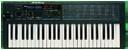
Korg Poly800/EX800 Users group photo

Yahoo Groups archive

Korg Poly800/EX800 Users

Index last updated: 2026-04-28 23:27 UTC

Thread

Not getting anything at the MSM5232 DCO outputs

Not getting anything at the MSM5232 DCO outputs

2009-06-15 by crustypaul

Thanks to the apparently dead search function on this group i'be just trawled through about threee thousand odd posts by hand and still haven't come up with a solution to the problem with my poly800 mk2.

Its been mentioned a few times before but nobody has offered a solution. Basically all the lights come on, i can change and save parameters, all the midi and sysex seems to work fine as i've loaded in the factory soundbank, but all i ever get out of the thing is filtered noise and no DCO tones. The noise source, envelopes, delay and filter are definately working but theres no DCO's.

I've re-written the firmware onto a fresh eprom and even replaced the MSM5232 with one i know is working fine. The +-5V supplies appear to be fine and the NJM2069 is also working properly. There just doesn't seem to be anywaveforms from any of the MSM5232's DCO outputs and nothing at the NJM2069 mixer inputs. 

If i turn the volume right up and play some keys i can hear a tone very very faintly that does change with the envelope settings, but it doesn't track the keyboard with pitch.

Any ideas of what i should be lookling at next would be gratefully received.

Re: [korgpolyex] Not getting anything at the MSM5232 DCO outputs

2009-06-16 by Gordon JC Pearce

On Mon, 2009-06-15 at 23:32 +0000, crustypaul wrote:

>  in the factory soundbank, but all i ever get out of the thing is
> filtered noise and no DCO tones. The noise source, envelopes, delay
> and filter are definately working but theres no DCO's.

Okay, either the DCOs aren't running or they are not making it out to
the filter.  Note that I'm working from a Poly-800, not a Poly-800 Mk 2,
but most of the guts should be the same.

When you play a note, one of the little pairs of diodes in the row of
eight pairs that stick up should light.  This feeds the VCA control
voltage for each oscillator to the MSM5232.  It goes through one of the
notorious 4051 multiplexers.  If you find there's a signal on pin 3 of
IC12 but not much on the outputs, you've got a dead multiplexer.

IC6 is a 4053 multiplexer, used to switch the square/saw outputs.  Check
to see if pins 1, 2, 12 and 13 have any sort of signal when you play
notes.  If not, guess what?  Another stuffed mux.

The only other thing I can think of is that there's something amiss on
the digital side, and the MSM5232 is never seeing a /WR pulse from the
address decoder.  That's going to be a flowery twat to diagnose without
an oscilloscope.

Gordon

Re: Not getting anything at the MSM5232 DCO outputs

2009-06-16 by crustypaul

Hi Gorden, i was wondering if you'd reply :)
Right, none of the diode pairs light up when i play a note but when i hold down keys and look at the outputs from the 4051 at IC12 on a scope, they all peak at around +4v, sustain at +1 and then drop to about -4v at rest. Theres all kinds of junk at pin 3.

On the 4053 at IC6, pins 1 & 2 seem to have a pulse of around 0.5v when i play a key and pins 12 & 13 do the same but more like 0.75v.

One thing that might show a problem is that while pin 20 of the MSM5232 (CLK1) shows the correct clock input on my scope, at pin 19 which is meant to be CLK2 and have the same waveform all i'm getting is a constant +5V or so.

All of the other test points from the poly800 mk1 schematic seem more or less correct, if not quite as square cornered as on the diagrams.

Thanks for your help.
Show quoted textHide quoted text
> 
> Okay, either the DCOs aren't running or they are not making it out to
> the filter.  Note that I'm working from a Poly-800, not a Poly-800 Mk 2,
> but most of the guts should be the same.
> 
> When you play a note, one of the little pairs of diodes in the row of
> eight pairs that stick up should light.  This feeds the VCA control
> voltage for each oscillator to the MSM5232.  It goes through one of the
> notorious 4051 multiplexers.  If you find there's a signal on pin 3 of
> IC12 but not much on the outputs, you've got a dead multiplexer.
> 
> IC6 is a 4053 multiplexer, used to switch the square/saw outputs.  Check
> to see if pins 1, 2, 12 and 13 have any sort of signal when you play
> notes.  If not, guess what?  Another stuffed mux.
> 
> The only other thing I can think of is that there's something amiss on
> the digital side, and the MSM5232 is never seeing a /WR pulse from the
> address decoder.  That's going to be a flowery twat to diagnose without
> an oscilloscope.
> 
> Gordon
>

Re: [korgpolyex] Re: Not getting anything at the MSM5232 DCO outputs

2009-06-16 by Gordon JC Pearce

On Tue, 2009-06-16 at 11:27 +0000, crustypaul wrote:

> One thing that might show a problem is that while pin 20 of the
> MSM5232 (CLK1) shows the correct clock input on my scope, at pin 19
> which is meant to be CLK2 and have the same waveform all i'm getting
> is a constant +5V or so.

Oooh, okay.  Does this change when you pull the MSM5232?

CLK1 and CLK2 are generated by IC17 and IC18 at points J and K.  Going
by the diagram they should be 1MHz squarewaves, possibly with a bit of a
phase shift between them.  Until I sit down and get a proper look at
what's going on with IC17, 18, 19 and 20 I can't really say what all
that is, but it looks like it uses the flipflop to maybe introduce a 90
degree phase shift for the clocks.

Anyway, one of them being a steady 5V isn't good.

Gordon

problem with MSM5232 DCO outputs

2009-06-16 by Michael Hawkins

Interesting indeed.

If one clock (CLK1) is working and the other is not then you should still hear one out of every two notes when in single mode. And when in double mode you should hear just DCO1 (which gets its clock from CLK1) while DCO2 would be dead (getting its clock from CLK2).

If you don't hear any DCO's at all (holding down eight notes for example) then check for write pules on MSM5232 pin 12. If there's no write pulse then check IC16 (40H32). You will most likely need a scope for that although a logic probe with hold mode can do the trick sometimes. And check for the ALE signal on pin 13. If there's no ALE signal then check IC27 (40H000).

If CLK2 is stuck at +5V then you will need to work you way back through the detune circuit (IC's 17 (40H074), 18 (40H000), 19 (40H151) and 20 (40H393).

These form a modulated phase shifter (thus detune).

Mike.

Re: [korgpolyex] problem with MSM5232 DCO outputs

2009-06-16 by Gordon JC Pearce

On Tue, 2009-06-16 at 05:11 -0700, Michael Hawkins wrote:


> If CLK2 is stuck at +5V then you will need to work you way back
> through the detune circuit (IC's 17 (40H074), 18 (40H000), 19 (40H151)
> and 20 (40H393).
> 
> These form a modulated phase shifter (thus detune).

Aaaah, clever!

Gordon

Re: problem with MSM5232 DCO outputs

2009-06-16 by crustypaul

The 5v at CLK2 is still there when the MSM5232 is pulled but i'm not getting any DCO tones no matter how many keys i press or how DCO1&2 are prpgrammed. What should i actually be getting on the DCO outputs when no key is pressed, as i seem to have a steady 4.6v on every output?

I'm getting some kind of pulse on pin 12 of the MSM5232 when i press a key, at least my scope seems to retrigger. I'm also getting a pulse waveform at the ALE pin so i assume thats working fine.

I think i'll take some measurements around the MSM5232 and IC's 16-20 on my mates Poly800 mk1 and try to work out whats not working right in mine.

Thanks again for all the help.

Re: problem with MSM5232 DCO outputs

2009-07-28 by crustypaul

Well, i finally got around to replacing the logic IC's in my mkII and the whole 'DCO's not working' problem came down to a dead 40H074 at IC17. 

It seems that neither DCO will sound at all if either CLK signal to the MSM5232 isn't working, which is odd as i would assume that each DCO has its own dedicated CLK signal. 

Everythings working fine now it appears. Thanks for peoples help.

Move to quarantaine

This moves the raw source file on disk only. The archive index is not changed automatically, so you still need to run a manual refresh afterward.