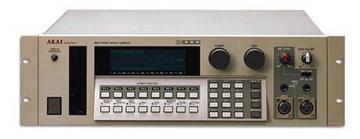
Akai S1000 / S1100 samplers group photo

Yahoo Groups archive

Akai S1000 / S1100 samplers

Index last updated: 2026-04-28 23:15 UTC

Thread

CD ROM Drive & Ext. HD for my Akai S1000HD ????

CD ROM Drive & Ext. HD for my Akai S1000HD ????

2007-07-04 by Gary M. Thomas

Hello everyone, I really appreciate the helpful responses to my 
question about adding RAM to my Akai S1000HD.  Ya' know, the unit has 
not even arrived yet, and I am already trying to make plans to improve 
it... LOL

I also wanted to ask about adding a CD-ROM drive and and an External 
Hard Drive, please.  The Akai S1000HD has already had a few upgrades... 
This is what the former owner wrote about it, in the EBay auction:

BOTH SCSI & DIGITAL AES/EBU OPTICAL OUT CARDS ARE INSTALLED! OS 4.40. 
INCLUDES MANUAL, POWER CORD & BOX. 16 MB RAM (UP TO 32) & 40 MB HD

So, when I want to add an external HD, is there a particular hard drive 
that ya'll would recommend?  And when I add a CD-ROM drive (for loading 
my S1000 sample CDs), what would be the best way to go about picking 
the one that'll work best for this sampler?

Thanks again for all your tremendous help!

Gary

Re: [akaiS1000S1100Samplers] CD ROM Drive & Ext. HD for my Akai S1000HD ????

2007-07-04 by Robert Cary

I use a Matsushita (Panasonic) CR-508B CD drive,
which I picked up for around \ufffd10. It works
flawlessly. Not sure about hard drives as I've
never tried.

--- "Gary M. Thomas" <GMThomas@...> wrote:

> Hello everyone, I really appreciate the helpful
> responses to my 
> question about adding RAM to my Akai S1000HD. 
> Ya' know, the unit has 
> not even arrived yet, and I am already trying
> to make plans to improve 
> it... LOL
> 
> I also wanted to ask about adding a CD-ROM
> drive and and an External 
> Hard Drive, please.  The Akai S1000HD has
> already had a few upgrades... 
> This is what the former owner wrote about it,
> in the EBay auction:
> 
> BOTH SCSI & DIGITAL AES/EBU OPTICAL OUT CARDS
> ARE INSTALLED! OS 4.40. 
> INCLUDES MANUAL, POWER CORD & BOX. 16 MB RAM
> (UP TO 32) & 40 MB HD
> 
> So, when I want to add an external HD, is there
> a particular hard drive 
> that ya'll would recommend?  And when I add a
> CD-ROM drive (for loading 
> my S1000 sample CDs), what would be the best
> way to go about picking 
> the one that'll work best for this sampler?
> 
> Thanks again for all your tremendous help!
> 
> Gary  
> 
> 
> 
>  
> Yahoo! Groups Links
> 
http://groups.yahoo.com/group/akaiS1000S1100Samplers/
> 
http://groups.yahoo.com/group/akaiS1000S1100Samplers/join
>     (Yahoo! ID required)
> 
mailto:akaiS1000S1100Samplers-digest@yahoogroups.com
> 
>    
>
mailto:akaiS1000S1100Samplers-fullfeatured@yahoogroups.com
> 
>
akaiS1000S1100Samplers-unsubscribe@yahoogroups.com
> 
> 


___________________________________________________________ 
What kind of emailer are you? Find out today - get a free analysis of your email personality. Take the quiz at the Yahoo! Mail Championship. 
http://uk.rd.yahoo.com/evt=44106/*http://mail.yahoo.net/uk

Re: [akaiS1000S1100Samplers] CD ROM Drive & Ext. HD for my Akai S1000HD ????

2007-07-04 by PeWe

>>>
Show quoted textHide quoted text
----- Original Message ----- 
From: Gary M. Thomas
To: akaiS1000S1100Samplers@yahoogroups.com
Sent: Wednesday, July 04, 2007 5:12 PM
Subject: [akaiS1000S1100Samplers] CD ROM Drive & Ext. HD for my Akai S1000HD 
????


>BOTH SCSI & DIGITAL AES/EBU OPTICAL OUT CARDS ARE INSTALLED! OS 4.40.
>INCLUDES MANUAL, POWER CORD & BOX. 16 MB RAM (UP TO 32) & 40 MB HD

So, - if there are 16 MB RAM installed there must be 2 8MB cards inside the 
machine, - otherwise it would be :

1 2MBcard ( standard factory RAM size ) = 2MB
2 - 4 2MB cards = 4 / 6 and 8MB
1 2MB card +1 8MB card = 10MB
2 2MB cards +1 8MB card = 12MB
3 2MB    "     " "     "       "   = 14MB
2 2MB card w/ 2 8MB cards = 20MB
3 8MB cards = 24MB
1 2MB card w/ 3 8MB cards = 26MB

2 8MB cards = 16MB, - and so on ..., - so your mainboard is already modified 
to adress 8MB cards which is pretty good.

You see, you can mix 2MB and 8MB cards. Be sure the 2MB cards are in the 1st 
2 slots if you upgrade w/ 2MB cards \ufffdcause you possibly won\ufffdt find 8MB cards
In principle, you would be fine w/ 20MB in a S1000, - it has 16 voices 
only, - even 16MB is good for working w/ an S-1000.

>So, when I want to add an external HD, is there a particular hard drive
>that ya'll would recommend? And when I add a CD-ROM drive (for loading
>my S1000 sample CDs), what would be the best way to go about picking
>the one that'll work best for this sampler?

Try to find a used old and cheap CD-ROM drive w/ 2x or 4x speed, the S-1000 
isn\ufffdt a fast reader.
Old Apple SCSI drives work as also do old TEACs here at my place.

Depending on harddrives, the S1000(HD/PB) can only adress up to 520MB of HD 
space, - so old "small" SCSI-drives are recommended but these are hard to 
find. I myself have good experiences w/ Quantum Fireball, Conner and Seagate 
harddrives. I have some w/ 1GB disc space and these are formatted to 
500MB, - this works. The S-1000/1100 does soft formatting /arranging of HD 
only, - so it\ufffds recommended to use a formatting program running on an old 
Mac OS 8 / 9 to format used harddrives which probably might have data of not 
AKAI sampler related usage loaded.
The S-1000 itself is SCSI ID #6 fixed,- so any other drives being connected 
to the IB-103 SCSI connector must have another different SCSI-ID between #0 
to #5.

If the S-100HD is arrived, look for the small IB-104 manual, the one for the 
AES/EBU optical /electric interface. If it\ufffds not there, mail your private 
e-mail addy, - I have the PDF.

>Thanks again for all your tremendous help!
>Gary

all the best

PeWe
Move to quarantaine

This moves the raw source file on disk only. The archive index is not changed automatically, so you still need to run a manual refresh afterward.