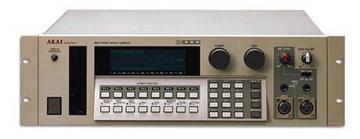
Akai S1000 / S1100 samplers group photo

Yahoo Groups archive

Akai S1000 / S1100 samplers

Index last updated: 2026-04-28 23:15 UTC

Thread

Monitoring/Filtering Problem...

Monitoring/Filtering Problem...

2006-02-26 by tehronporter

Ok. I when I am monitoring my turntable the sound coming out of the 
s1000 is nice and clear....but after I sample it and assign it to a 
program the sample is filtered already. So I have to go under the 
program edit menu and instead of putting the filter at.... +00 (which 
is the default) I have to put it at something like..+25 for the sample 
to sound normal. 
What does the + whatever do? I mean when it was set at 00 it was 
filtering the sample even though the frequency off the filter was set 
to 99. 
If anyone understands my question please help me out! 

Also it seems that the sample is played louder when I'm in monitor 
mode. Say I have a program called samples...the samples that are 
assigned to that program sound louder when I edit them in "monitor" 
mode instead of when I have it set to "samples"..


PLEASE HELP ME!!!

Re: Monitoring/Filtering Problem...

2006-02-27 by Gilles Coudert

Try this:

1. Switch on the sampler.
2. Format a HD floppy.
3. Save the Operating System onto it (Disk - Save - Operating System)
4. Tweak the blank 'Test Program' so the filter cutoff setting is +25 
or whatever you want it to be. Adjust anything else you want, to 
create a default program.
5. Save the Test Program to the floppy (without wiping it first!)
6. Reboot the sampler with the floppy inside the drive - you'll have 
to do this every time, but you won't have to tweak the cutoff 
frequency every time.

Hope this helps,

Gilles

Move to quarantaine

This moves the raw source file on disk only. The archive index is not changed automatically, so you still need to run a manual refresh afterward.