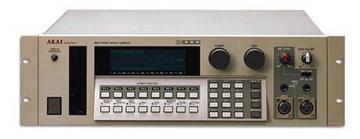
Akai S1000 / S1100 samplers group photo

Yahoo Groups archive

Akai S1000 / S1100 samplers

Index last updated: 2026-04-13 23:33 UTC

Thread

Easiest card reader solution?

Easiest card reader solution?

2015-11-19 by ccherot@...

Hi there folks. So I have been getting dizzy looking through all the card reader threads trying to find the simplest solution for getting a card reader of some kind to work in the S1100. Basically I want to get away from using the ZIP disks. I would really rather not have to open up the unit and mess with cables and all that as I am just not very adept at all that. Is there a solution that you can just plug right into the SCSI connector on the back?


If I do have to open it up and install something, what is the easiest solution for that route?


Cheers,


C

Re: [akaiS1000S1100Samplers] Easiest card reader solution?

2015-11-19 by Ewan Colsell

you could always put it in an external scsi case.

ewan.
Show quoted textHide quoted text
On 19 November 2015 at 02:15, ccherot@... [akaiS1000S1100Samplers] <akaiS1000S1100Samplers@yahoogroups.com> wrote:

Hi there folks. So I have been getting dizzy looking through all the card reader threads trying to find the simplest solution for getting a card reader of some kind to work in the S1100. Basically I want to get away from using the ZIP disks. I would really rather not have to open up the unit and mess with cables and all that as I am just not very adept at all that. Is there a solution that you can just plug right into the SCSI connector on the back?


If I do have to open it up and install something, what is the easiest solution for that route?


Cheers,


C


Re: [akaiS1000S1100Samplers] Easiest card reader solution?

2015-11-19 by Simon Hughes

I have this and its great. You can make a 60MB hard drive with each CF so just need to source some 64MB CF cards. I got a load of Cisco ones which work fine. I found the larger ones are hit and miss a lot of them caused audio dropouts on the samples. But can highly reccomend this as a solution. I stuck mine in an old SCSI CD rom caddy !
Show quoted textHide quoted text
From: mailto:akaiS1000S1100Samplers@yahoogroups.com 
Sent: Thursday, November 19, 2015 7:27 AM
To: akaiS1000S1100Samplers@yahoogroups.com 
Subject: Re: [akaiS1000S1100Samplers] Easiest card reader solution?

  
I've had my eye on this solution, don't know if it's the same as the previous reply.

Rich.

http://m.alibaba.com/product/50005988514/CF-RaizinMonster-CF-to-SCSI-convertor.html

Re: Easiest card reader solution?

2016-06-11 by djrectape@...

Hi,

I bought a cf raizin monster and set the jumper on 4 and 1 to be be on id n°5.

I can copy banks from my cdrom to my transend cf 1gb x80.

The problem is when I want to play the sounds from my cf card, they not playing properly : some kind of glitches. They are altered.

Can anybody help me???

Thanks

Franck

Re: [akaiS1000S1100Samplers] Re: Easiest card reader solution?

2016-06-11 by Richard Beacham

Hi there,

I have had this issue when I used a 20gb 20gb HD. It's to do with the drive being larger than the maximum the akais1100/1000- can format (540mb)

I could load and playback the samples perfectly on my s3000xl but not the 1100.

Since using the raisin monster and CF solution and 4 x 1gb cards (one of them a transcend) I have had no issues. So I'm not really much help, apart from I know exactly the problem you are having.
I would suggest using the latest eproms/firmware, and trying another CF card for starters.

Also, I could only get the CF cards to work properly after formatting them in a windows pc running a Freeware program called 'disk image' and a USB CF reader.

To set it up, I copied the image of the akai- arranged CF card using "disk image" and saved it to the PC.
I then wrote the image back to the CF card. Put it back in the 1100/raisin monster, and select "arr" to format it again. I then saved the TEST PROGRAM to the card, wiped internal memory of the default samples and program and raised them back in from the CF card.

That worked a treat on all 4 CF cards all from different vendors.

Hope that helps as I feel you pain and frustration😭

Rich

Show quoted textHide quoted text
On 11 Jun 2016 10:42, "djrectape@gmail.com [akaiS1000S1100Samplers]" <akaiS1000S1100Samplers@yahoogroups.com> wrote:

Hi,


I bought a cf raizin monster and set the jumper on 4 and 1 to be be on id n°5.

I can copy banks from my cdrom to my transend cf 1gb x80.

The problem is when I want to play the sounds from my cf card, they not playing properly : some kind of glitches. They are altered.

Can anybody help me???

Thanks

Franck

Re: [akaiS1000S1100Samplers] Re: Easiest card reader solution?

2016-06-11 by Richard Beacham

Oh yes, I also had the same issue on my S1000 until I installed v2 eproms.
You didn't state which sampler you have or which version of firmware it's running. Make sure whichever model you have, that it's running the latest firmware. I noticed a massive difference in that my pc and scsi HD could play nice with the samplers after the EPROM upgrade.

Good luck, and please do let us know how you get on 😃

Rich

Show quoted textHide quoted text
On 11 Jun 2016 11:17, Richard Beacham <richie.beach@rocketmail.com> wrote:

Hi there,

I have had this issue when I used a 20gb 20gb HD. It's to do with the drive being larger than the maximum the akais1100/1000- can format (540mb)

I could load and playback the samples perfectly on my s3000xl but not the 1100.

Since using the raisin monster and CF solution and 4 x 1gb cards (one of them a transcend) I have had no issues. So I'm not really much help, apart from I know exactly the problem you are having.
I would suggest using the latest eproms/firmware, and trying another CF card for starters.

Also, I could only get the CF cards to work properly after formatting them in a windows pc running a Freeware program called 'disk image' and a USB CF reader.

To set it up, I copied the image of the akai- arranged CF card using "disk image" and saved it to the PC.
I then wrote the image back to the CF card. Put it back in the 1100/raisin monster, and select "arr" to format it again. I then saved the TEST PROGRAM to the card, wiped internal memory of the default samples and program and raised them back in from the CF card.

That worked a treat on all 4 CF cards all from different vendors.

Hope that helps as I feel you pain and frustration😭

Rich

On 11 Jun 2016 10:42, "djrectape@gmail.com [akaiS1000S1100Samplers]" <akaiS1000S1100Samplers@yahoogroups.com> wrote:

Hi,


I bought a cf raizin monster and set the jumper on 4 and 1 to be be on id n°5.

I can copy banks from my cdrom to my transend cf 1gb x80.

The problem is when I want to play the sounds from my cf card, they not playing properly : some kind of glitches. They are altered.

Can anybody help me???

Thanks

Franck

Re: Easiest card reader solution?

2016-06-11 by djrectape@...

Thanks for your quick help guys!

I will try what you suggest with disk image.

I have an s1000 and the latest eprom v4.4.

I was thinking it could be with the internal scsi cable because it has 3 connections and only 2 are used (one on the scsi board reversed and one on the raizin.

I doesn't put a jumper on T because in the manual it seems to be terminated as it is.

I used the power cable of the previous FD drive.

I bought 3 transend 1gb x80 thinking they'll work because of the rather slow speed and capacity.

You confirm a card can be writen on and still not be 100% usable?

I'll let you know.

Peace

Re: [akaiS1000S1100Samplers] Easiest card reader solution?

2016-06-11 by Richard Beacham

Yeah, I had problems with 3 of the CF cards putting them straight into the Raizin Monster and hit 'arr' .

Some formatted without errors but couldn't save and others just failed to format. Doing it on Disk image worked every time for me (transcend, Lexar, Bytestore and Integra

Could well be the internal scsi cable if its got an open connection like you say, but theres only one way to prove that! :)

I also used the FDD power cable

I never touched any jumpers on the sampler.

Good luck and all the Best

Rich


On 11 Jun 2016, at 12:27, djrectape@... [akaiS1000S1100Samplers] <akaiS1000S1100Samplers@yahoogroups.com> wrote:

Thanks for your quick help guys!


I will try what you suggest with disk image.

I have an s1000 and the latest eprom v4.4.

I was thinking it could be with the internal scsi cable because it has 3 connections and only 2 are used (one on the scsi board reversed and one on the raizin.

I doesn't put a jumper on T because in the manual it seems to be terminated as it is.

I used the power cable of the previous FD drive.

I bought 3 transend 1gb x80 thinking they'll work because of the rather slow speed and capacity.

You confirm a card can be writen on and still not be 100% usable?

I'll let you know.

Peace


Re: [akaiS1000S1100Samplers] Easiest card reader solution?

2016-06-11 by djrectape@...

I've downloaded disk image here Freeware Disk Image software download

I've installed it, launch and then go to disk to image.

Then I see the akai arranged disk in the browser but can't tic the box. It says This disk can't be selected...

Re: [akaiS1000S1100Samplers] Re: Easiest card reader solution?

2016-06-11 by Richard Beacham

I have an old xp machine, which I keep for scsi comms to the samplers. Can you run the .exe in compatibility mode?

Show quoted textHide quoted text
On 11 Jun 2016 13:52, "djrectape@gmail.com [akaiS1000S1100Samplers]" <akaiS1000S1100Samplers@yahoogroups.com> wrote:

I'm on windows 10, what os are you using?


Franck

Re: [akaiS1000S1100Samplers] Re: Easiest card reader solution?

2016-06-11 by Richard Beacham

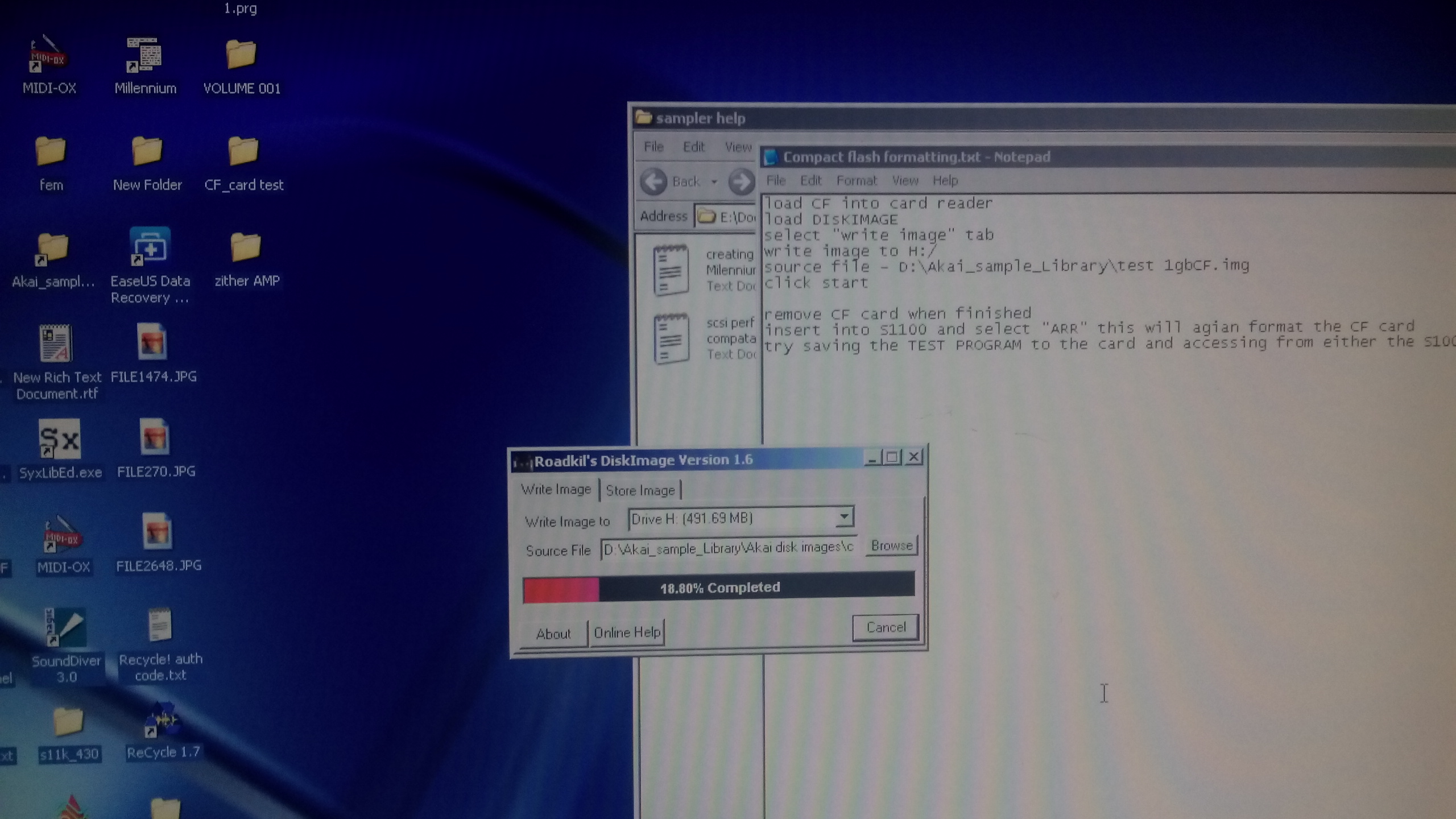
I've just checked my setup and its Roadkil's Diskimage v1.6

See pic for details and a little text file I had made to remind me how to do the process

Hope this helps

Show quoted textHide quoted text
On 11 Jun 2016 14:21, Richard Beacham <richie.beach@rocketmail.com> wrote:

I have an old xp machine, which I keep for scsi comms to the samplers. Can you run the .exe in compatibility mode?

On 11 Jun 2016 13:52, "djrectape@gmail.com [akaiS1000S1100Samplers]" <akaiS1000S1100Samplers@yahoogroups.com> wrote:

I'm on windows 10, what os are you using?


Franck

Attachments

Re: Easiest card reader solution?

2016-06-11 by djrectape@...

And to let everybody knowns, you can use chicken translator free to copy akai cdrom or cd image directly to the cf card.

Peace!

Re: Easiest card reader solution?

2016-06-15 by djrectape@...

Hi,

I was to quick to tell everything's ok.

In fact some samples play great and some are still glitchy...

I changed the scsi internal so this one have only two connectors.

Do you know if the problem is related to the raizin monster or this would be the same with other card readers?

I'm not sure to understand properly your last step with the roadkill's method :

After the re-arrange I copy the test program to the card and reload it from the card. Do I need to use the wipe function?

Is this last step vital or just to see if it's work? because I can hear the test program with no problem but when I add programs from Chicken translator or the fdd, they're not fully functional.

I'm trying right now with an other card. Finger crossed.

All the time lost in those old samplers...

Re: Easiest card reader solution?

2016-06-16 by richie.beach@...

Hi there, sorry for the late reply…

My test was to wipe the default samples from the sampler memory and then load them back in from the CF card to see if there was any corruption..

If I remember correctly, The reason I came up with the convoluted way of formatting with Roadkill, was because I had 4 CF cards and I could only get one to work by formatting with the S1100 'ARR' function.

So I took the working card and copied the drive image to the pc via a usb card reader and Roadkill.

I then put in the non working CF cards into the USB card reader and transferred the image of the working CF card to each of the non-working cards from Roadkill…

I then put each one in turn into the S1100 and hit 'ARR' and the formatting worked every time on all 3 other cards.

to test each one I just copied the default program and samples to the Cards, wiped the samplers memory and loaded them back to test.

Interestingly, the original CF card failed about a week later (this was the only card that roadkill didn't 'format' first) as I was unable to save samples to it any more.
So I copied the process which I had used for the 3 other cards detailed above, and since then I haven had an issue on any of the 4 cards.

It appears -i don't know why - that roadkill, whatever it does seems to stabilise (for want of a better word) the cards before you arrange them in the sampler!

Anyway, now you have a working card, why not create an image of it using roadkill and restore that image to the knackered card, and arrange it again in the S1100 -like I did, and who knows, it may start working for you properly :)

Good luck

Rich
Re: Easiest card reader solution?

2016-07-24 by scott@...

I'm not sure how much help this will be, but I was an early adopter of using SCSI SD solutions. I purchased a SCSIforSamplers drive years ago.

I can echo everyone's issues with reliability of the cards and more importantly the little connectors internal to the drive. the SCSIforSamplers solution has both an SD and a Compact Flash slot on the front and by far, the robustness of the CF connector makes it the most reliable. Often the SD interface needs adjustment, jiggling, and cajoling to make work. There's also a SmartMedia interface on the drive, but who uses that?

:)

Best.

Scott
SoundEngine.com
Cool sounds & recordings. Download now.
SoundEngine


Re: Easiest card reader solution?

2017-04-12 by cchubi1@...

I'm propaply going to get that HxC floppy emulator even though, I'vot got SCSI card on my s1000. EPROMs seem not too high priced so I wouldn't be worried about booting from the emulator.

Can you use any SD card with the HxC or does the s1000 need some specific size or something?

Move to quarantaine

This moves the raw source file on disk only. The archive index is not changed automatically, so you still need to run a manual refresh afterward.