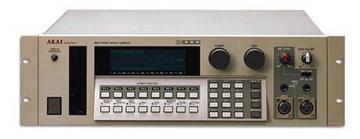
Cheers Mario had a good read about SCSI and ended up buying the scsi2sd, I'm going to get a little enclosure - there's some cool 3D printed options online for those interested but they use the 25db adapter so I messaged this person and they're going to make me a custom 50 pin one: https://www.etsy.com/au/listing/271099755/scsi2sd-35-external-case-housing?ga_order=most_relevant&ga_search_type=all&ga_view_type=gallery&ga_search_query=scsi2sd&ref=sr_gallery_1


> On 19 Apr 2016, at 7:41 AM, Mario Villar hdigipro@yahoo.com [akaiS1000S1100Samplers] <akaiS1000S1100Samplers@yahoogroups.com> wrote:
>
> Hi Robin
>
> It's a matter of trial and error regarding the CF size. As a rule of thumb, since our Akais don't recognize any HDD beyond 512 MB (if i'm certain), it's a waste of space anything more than 1GB.
> For the SD to SCSI you only need your sampler to be fitted with the SCSI card IB-103 (if there is not already fitted).
> There are somo cards that only have the external SCSI connector, this is, if you're going to fit the SD card inside, will not serve the purpose.
> I personally prefer fitting the SD to SCSI adaptor inside an external SCSI CD or HDD case, this way you'll be able to use it in other samplers simply changing the SD card.
> In this case, you treat the adapter like an external HDD, with no need to fiddle inside the guts of your Akai finding a suitable power source and a suitable place inside. Some people use a modified FDD faceplate and put the adaptor inside. That way, you'll be able to change the SD card without opening the sampler.
>
> More link that maybe are useful :
>
> Solving Akai Sampler SCSI & CD-ROM Compatibility Problems
>
>
>
>
>
>
>
>
> Solving Akai Sampler SCSI & CD-ROM Compatibility Pro...
> Using a sampler without some sort of hard drive is just not an option these days, which means that some understanding of SCSI is necessary. Devoted Akai...
> Ver en www.soundonsound...
> Vista previa por Yahoo
>
>
> scsi for samplers | donsolaris.com
>
>
>
>
>
>
>
>
>
>
> scsi for samplers | donsolaris.com
> If you own a lot of samplers, Blackbox is a more economical solution than filling each sampler with its own SCSI to CF (or SCSI2SD) interface.
> Ver en www.donsolaris.com
> Vista previa por Yahoo
>
>
> Mario Villar Corbo
> (099) 440 638
> ____________________________________________________________
>
> Mi espacio personal : http://vulneratomnes.blogspot.com
>
>
> El Domingo, 17 de abril, 2016 14:45:52, "Robin Gee-Cutting djdevant@yahoo.com [akaiS1000S1100Samplers]" <akaiS1000S1100Samplers@yahoogroups.com> escribió:
>
>
>
> If I go the cf card reader as long as I get 233x speed will any sized card work (say 32GB)?
>
> Also the SD to SCSI you linked me, how exactly would I install that?  What other parts would I need?
>
> Thank you very much for all the help!
>
> On 29 Mar 2016, at 12:10 AM, Mario Villar hdigipro@... [akaiS1000S1100Samplers] <akaiS1000S1100Samplers@yahoogroups.com> wrote:
>
>>
>> Hi
>> I'm not really sure about the FDD emulator to work flawlessly on our Akais. The S1000 and S1100 doesn't work with a PC FDD right out of the box without any modifications. I've seen, although, work very well with old Commodore Amiga FDD instead.
>> Since this FDD emulator is designed to replace a PC FDD, it seems to be that will work on any device that uses DOS file format, that's not our case.
>> Fortunately, solutions arise. With a little modification, this emulator can be set to work on our samplers.
>> First, a firmware update on the FDD emulator has to be made, and changing jumpers prior to test.
>> I've not done it yet, but if your Akai has more than 1Mword of RAM you should consider getting a SCSI storage option, be it a CF card or a SD to SCSI device (this is the option surely i'll go for, cheap and reliable : http://shop.codesrc.com/index.php?route=product/product&product_id=58)
>> Be aware that if you'll go for the CF route, NOT all the cards are compatible with the Akai. The reason is that our samplers were designed to work with either a CD ROM or a HDD, and they expect the speed of the card be the same of the CD ROM attached to the SCSI bus. You should go for a card that has a 233x speed.
>> Regards
>>
>>
>>
>> Mario Villar Corbo
>> (099) 440 638
>> ____________________________________________________________
>>
>> Mi espacio personal : http://vulneratomnes.blogspot.com
>>
>>
>> El Domingo, 27 de marzo, 2016 9:26:47, "scott@... [akaiS1000S1100Samplers]" <akaiS1000S1100Samplers@yahoogroups.com> escribió:
>>
>>
>>
>> Hi Robin:
>>
>> This site claims to have the S1100 manual - in sections - as well as a ZIP of the service manual.
>>
>> Akai S1000 / S1100 | Martin78.com
>>
>> Akai S1000 / S1100 | Martin78.com
>> I have S1100 unit. This is my favorite sampler because it has very good, bright, clear sound and very nice 18db filter. It has good fx board based on motorola d...
>> View on martin78.com
>> Preview by Yahoo
>>
>>
>>
>> Best,
>>
>> Scott
>> SoundEngine.com
>
>
>
>
Message
Re: [akaiS1000S1100Samplers] Re: Some s1100 questions
2016-04-20 by Robin Gee-Cutting
Attachments
- No local attachments were found for this message.