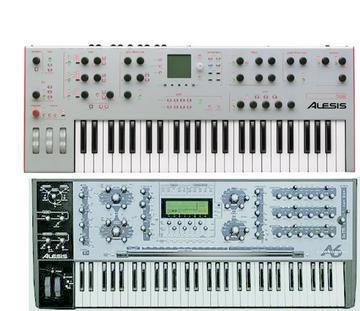
Alesis Andromeda A6 group photo

Yahoo Groups archive

Alesis Andromeda A6

Index last updated: 2026-04-28 22:41 UTC

Thread

A6 issues; patches not changing, screens switching, etc...

A6 issues; patches not changing, screens switching, etc...

2009-02-12 by Mike Thompson

Hello,

I joined the group because I am trying to repair an A6 for a friend that was bought used, and 
was having an issue where the screen would just change in the middle of a patch.  I tried 
updating the Os, doing hard resets, etc... but nothing fixed it until I just disassembled the 
entire unit and reseated one of the boards, reseated all cables and then I found that when we 
tapped hard on the chassis right above the pitch wheel box, thats when the screen would 
change.  So we narrowed it down to what seemed to be a grounding issue.  Now the screens 
don't switch anymore after reassembly, but now the mix patch selections don't work and 
then the screen goes weird and gets hieroglyphics in it.  

Tried another OS update and hard reset but still not working right.  Any suggestions?  I am 
pretty sure this is hardware related.

Re: [Andromeda_A6-ION] A6 issues; patches not changing, screens switching, etc...

2009-02-12 by Bob S.

Your guess is right, you have a cold or broken solder joint or a power issue.
I would verify all power supply voltages are what they need to be and are clean, free of noise. If still intermittent, buy a can of freeze mist and with that and the back of a pencil to freeze and tap to find the bad connection.
Let me take a guess, this unit was possibly dropped, possibly with physical damage, like the one I saw on EBay a little while back.....
Bob
El Segundo, CA
Show quoted textHide quoted text
----- Original Message -----
Sent: Thursday, February 12, 2009 8:07 AM
Subject: [Andromeda_A6-ION] A6 issues; patches not changing, screens switching, etc...

Hello,

I joined the group because I am trying to repair an A6 for a friend that was bought used, and
was having an issue where the screen would just change in the middle of a patch. I tried
updating the Os, doing hard resets, etc... but nothing fixed it until I just disassembled the
entire unit and reseated one of the boards, reseated all cables and then I found that when we
tapped hard on the chassis right above the pitch wheel box, thats when the screen would
change. So we narrowed it down to what seemed to be a grounding issue. Now the screens
don't switch anymore after reassembly, but now the mix patch selections don't work and
then the screen goes weird and gets hieroglyphics in it.

Tried another OS update and hard reset but still not working right. Any suggestions? I am
pretty sure this is hardware related.

Re: A6 issues; patches not changing, screens switching, etc...

2009-02-17 by tmste76

I'm trying reparing my Andromeda too. My problem consist in knob 
jittering, so whee a patch is on, it starts changing values by itself.
I uploaded in the files section the Official Operating Manual and 
schematics where you can find many solutions to the most common 
problem.knobs jittering, it seems that most of the times is a flat 
cable problem, especially the one of 60 pins. I've able to build one 
for a few dollars. Unfortunately that was not my problem. On the 
operating manual it says to control if the resistence R&£ has been 
removed as written on one of the ECN(electronic component news). I got 
that resistence andI would like to try to remove it.
Other problems: in debug mode(soft button 2) the ribbon controller 
doesn't pass the passive test. RElated to knob jittering Left front 
panel doesn't pass the test, OSC2 frequency and fine tuning are out of 
range. I'm pretty shure it's not a knob failure.
Last problem: output very low from all outputs, headphoones included.

Any suggestion? Thanks
Stef

Re: [Andromeda_A6-ION] Re: A6 issues; patches not changing, screens switching, etc...

2009-02-17 by Bob S.

Too bad....I gave you 2 things to try and you didn't listen to a word of my recommendations.....

(I'm only an electrical engineer for over 30 years that works on NASA satellites, what do I know....)

Bob
El Segundo, CA


-----Original Message-----
Show quoted textHide quoted text
>From: tmste76 <tmste76@...>
>Sent: Feb 17, 2009 3:10 PM
>To: Andromeda_A6-ION@yahoogroups.com
>Subject: [Andromeda_A6-ION] Re: A6 issues; patches not changing, screens switching, etc...
>
>I'm trying reparing my Andromeda too. My problem consist in knob 
>jittering, so whee a patch is on, it starts changing values by itself.
>I uploaded in the files section the Official Operating Manual and 
>schematics where you can find many solutions to the most common 
>problem.knobs jittering, it seems that most of the times is a flat 
>cable problem, especially the one of 60 pins. I've able to build one 
>for a few dollars. Unfortunately that was not my problem. On the 
>operating manual it says to control if the resistence R&£ has been 
>removed as written on one of the ECN(electronic component news). I got 
>that resistence andI would like to try to remove it.
>Other problems: in debug mode(soft button 2) the ribbon controller 
>doesn't pass the passive test. RElated to knob jittering Left front 
>panel doesn't pass the test, OSC2 frequency and fine tuning are out of 
>range. I'm pretty shure it's not a knob failure.
>Last problem: output very low from all outputs, headphoones included.
>
>Any suggestion? Thanks
>Stef  
>

Re: A6 issues; patches not changing, screens switching, etc...

2009-02-17 by tmste76

Thaks Bob, I trust you a lot. So You think my knobs jittering may be 
solved with your 2 advices:

"verify all power supply voltages are what they need to be and are 
clean, free of noise.  If still intermittent, buy a can of freeze mist 
and with that and the back of a pencil to freeze and tap to find the 
bad connection"

I'm sure my problems are in the front panel left board. 
Probably also with schematics and a tester I don't know where to find 
the power supply of each board and I don't know how much it must be.
If you can Help me, otherwise I'll try with the Freeze Mist.
When you say to tap with the back of the pencil, do you mean a 
machanical action on components?

Thanks a lot Bob!

Stef

Re: A6 issues; patches not changing, screens switching, etc...

2009-02-18 by tmste76

What I found on the Service Manual about my problem:
Chapter: Knobs Jitter or Don't Reach Maximum Value or Don't Work

° Make sure the ribbon cable going from the Main board to the Front 
Panel Left board is
securely seated.  DONE(Replaced)
° Make sure the large 60-pin ribbon cable going across the Front 
Panel boards is properly.  DONE(Replaced)
seated.
° Make sure the caps and resistors at the Main Mux (upper left corner 
of page 2 of the
Main PCB schematic) are the correct value and are properly soldered.
° Knob jitter can be caused by voltages exceeding 5V at the ADC mux 
input on the Main
board. Check the inputs to U21 on the Main board. If any voltages 
exceed 5V, find the
source (probably the tuning or temperature bus from the ASICs). One 
of the ASICs
might be bad. DONE voltages OK, no-one >5V.[ECN was written to remove 
R62 on Main PCB – make sure it was done. I GOT IT!!!
° Swap Front Panels to see if the problem is with the Front Panel or 
Main Board.
° Make sure the unit has the latest software (V1.40.09 or later has 
new anti-jitter knob
code).  DONE
° Make sure the knob caps aren't pushed in so much that they're 
touching the front panel.  DONE
Pull the plastic cap slightly so that it is not sitting against the 
metal.  DONE
° Try looking at the muxed analog pot signal at the input of the pot 
ADC (page 2 of the
Main PCB schematic), U27 pin 1. The waveform should look like 
a "skyline", with each
"building" representing a pot level. If you turn all of the knobs 
down (to the left), the
waveform should be mostly flat, except for things like the pedal 
inputs, which are
normally high. If you see no signal here, it means the pot signal is 
not getting to the ADC and therefore the micro.

Any suggestion to proceed?
That E62 may be the cause?

Thaks especially to Bob.
Stef

Re: A6 issues; patches not changing, screens switching, etc...

2009-02-23 by synthartist69

I bought one with a similiar problem. The main screen suddenely 
changes to edit screens, not any particular one. I haven't received 
the synth yet. The first thing I plan to try to do is see which pots 
are related to the screens I jump to. Then pop the Andy open and 
clean those pots. I also found this information that may apply to the 
problem....

22.24 preventing the screen from jumping:
Mike Peake wrote:
There is a way to reduce the jumping, but only by changing the 
behaviour of the potentiometers. Try
the Pass-Through knob mode which can be accessed by pressing Global, 
then Panel, and then use
the soft pots to set it to Pass-Through: ON. This causes the pots to 
not produce a new value until
you've turned them to the physical location of the stored parameter 
value. The parameter then
becomes active for that Program. The other Pass-Through mode is for 
the soft pots when used in
selecting Mod Sources (a long list so it's a good idea). If you want 
the screen to cease jumping to
new parameter pages, press soft buttons seven and eight together. 
Press them both again to unlock
the function.

Re: A6 issues; patches not changing, screens switching, etc...

2009-03-23 by Mike Thompson

This is similar to the problem we're experiencing.  We are now noticing that when you just tap a certain pot, the lights on the front panel just go nuts.  Also when we're in Mix mode, the patches don't change in the right part of the screen like they do in Program mode.  

I've pulled boards out completely, reseated ribbon cables... what would be recommended for cleaning out the pots anyway?  We have DeOxit but I'm not confident about spraying that crap into this thing.  The other thing to note is that the unit was definitely dropped before my friend owned it so I'm sure that could have caused something to go wrong.  


--- In Andromeda_A6-ION@yahoogroups.com, "tmste76" <tmste76@...> wrote:
Show quoted textHide quoted text
>
> What I found on the Service Manual about my problem:
> Chapter: Knobs Jitter or Don't Reach Maximum Value or Don't Work
> 
> ° Make sure the ribbon cable going from the Main board to the Front 
> Panel Left board is
> securely seated.  DONE(Replaced)
> ° Make sure the large 60-pin ribbon cable going across the Front 
> Panel boards is properly.  DONE(Replaced)
> seated.
> ° Make sure the caps and resistors at the Main Mux (upper left corner 
> of page 2 of the
> Main PCB schematic) are the correct value and are properly soldered.
> ° Knob jitter can be caused by voltages exceeding 5V at the ADC mux 
> input on the Main
> board. Check the inputs to U21 on the Main board. If any voltages 
> exceed 5V, find the
> source (probably the tuning or temperature bus from the ASICs). One 
> of the ASICs
> might be bad. DONE voltages OK, no-one >5V.[ECN was written to remove 
> R62 on Main PCB – make sure it was done. I GOT IT!!!
> ° Swap Front Panels to see if the problem is with the Front Panel or 
> Main Board.
> ° Make sure the unit has the latest software (V1.40.09 or later has 
> new anti-jitter knob
> code).  DONE
> ° Make sure the knob caps aren't pushed in so much that they're 
> touching the front panel.  DONE
> Pull the plastic cap slightly so that it is not sitting against the 
> metal.  DONE
> ° Try looking at the muxed analog pot signal at the input of the pot 
> ADC (page 2 of the
> Main PCB schematic), U27 pin 1. The waveform should look like 
> a "skyline", with each
> "building" representing a pot level. If you turn all of the knobs 
> down (to the left), the
> waveform should be mostly flat, except for things like the pedal 
> inputs, which are
> normally high. If you see no signal here, it means the pot signal is 
> not getting to the ADC and therefore the micro.
> 
> Any suggestion to proceed?
> That E62 may be the cause?
> 
> Thaks especially to Bob.
> Stef
>

Re: [Andromeda_A6-ION] Re: A6 issues; patches not changing, screens switching, etc...

2009-03-23 by James Pound

Box it up, ship it across the country and back to yourself. It will probably work fine. something about that vibration riding on the UPS truck seems to fix a lot of my problems! Seriously though, good luck with getting it lined out!
Show quoted textHide quoted text

--- On Mon, 3/23/09, Mike Thompson wrote:

From: Mike Thompson
Subject: [Andromeda_A6-ION] Re: A6 issues; patches not changing, screens switching, etc...
To: Andromeda_A6-ION@yahoogroups.com
Date: Monday, March 23, 2009, 11:59 AM

This is similar to the problem we're experiencing. We are now noticing that when you just tap a certain pot, the lights on the front panel just go nuts. Also when we're in Mix mode, the patches don't change in the right part of the screen like they do in Program mode.

I've pulled boards out completely, reseated ribbon cables... what would be recommended for cleaning out the pots anyway? We have DeOxit but I'm not confident about spraying that crap into this thing. The other thing to note is that the unit was definitely dropped before my friend owned it so I'm sure that could have caused something to go wrong.

--- In Andromeda_A6- ION@yahoogroups. com, "tmste76" wrote:
>
>; What I found on the Service Manual about my problem:
> Chapter: Knobs Jitter or Don't Reach Maximum Value or Don't Work
>
> ° Make sure the ribbon cable going from the Main board to the Front
> Panel Left board is
> securely seated. DONE(Replaced)
> ° Make sure the large 60-pin ribbon cable going across the Front
> Panel boards is properly. DONE(Replaced)
> seated.
> ° Make sure the caps and resistors at the Main Mux (upper left corner
> of page 2 of the
> Main PCB schematic) are the correct value and are properly soldered.
> ° Knob jitter can be caused by voltages exceeding 5V at the ADC mux
> input on the Main
> board. Check the inputs to U21 on the Main board. If any voltages
> exceed 5V, find the
> source (probably the tuning or temperature bus from the ASICs). One
> of the ASICs
> might be bad. DONE voltages OK, no-one >5V.[ECN was written to remove
> R62 on Main PCB – make sure it was done. I GOT IT!!!
> ° Swap Front Panels to see if the problem is with the Front Panel or
> Main Board.
> ° Make sure the unit has the latest software (V1.40.09 or later has
> new anti-jitter knob
> code). DONE
> ° Make sure the knob caps aren't pushed in so much that they're
> touching the front panel. DONE
> Pull the plastic cap slightly so that it is not sitting against the
> metal. DONE
> ° Try looking at the muxed analog pot signal at the input of the pot
> ADC (page 2 of the
> Main PCB schematic), U27 pin 1. The waveform should look like
> a "skyline", with each
> "building" representing a pot level. If you turn all of the knobs
> down (to the left), the
> waveform should be mostly flat, except for things like the pedal
> inputs, which are
> normally high. If you see no signal here, it means the pot signal is
> not getting to the ADC and therefore the micro.
>
> Any suggestion to proceed?
> That E62 may be the cause?
>
> Thaks especially to Bob.
> Stef
>

Move to quarantaine

This moves the raw source file on disk only. The archive index is not changed automatically, so you still need to run a manual refresh afterward.