Polysix contact strip
2012-07-23 by tonezone020

Yahoo Groups archive
Archive for polysix.
Index last updated: 2026-03-30 01:17 UTC
Thread
2012-07-23 by tonezone020
2012-07-23 by bastebraak
2012-07-23 by tonezone020
--- In PolySix@yahoogroups.com, bastebraak <bastebraak@...> wrote:
>
>
>
> Is the old one damaged or just not working well. I fixed the contacts on my polysix with a paste i ordered online.
>
>
> Verzonden vanaf Samsung Mobiletonezone020 <swamp.gigs@...> schreef:
> Hi All,
>
> Does anyone know where I can get a couple of 6 bubble contact strips or alternatives for my synth, preferably in the Uk ?
>
> Many thanks in advance,
>
> Tony
>
>
>
> ------------------------------------
>
> Yahoo! Groups Links
>
>
>
>
>
> [Non-text portions of this message have been removed]
>
2012-07-23 by bastebraak
--- In PolySix@yahoogroups.com, bastebraak <bastebraak@...> wrote:
>
>
>
> Is the old one damaged or just not working well. I fixed the contacts on my polysix with a paste i ordered online.
>
>
> Verzonden vanaf Samsung Mobiletonezone020 <swamp.gigs@...> schreef:
> Hi All,
>
> Does anyone know where I can get a couple of 6 bubble contact strips or alternatives for my synth, preferably in the Uk ?
>
> Many thanks in advance,
>
> Tony
>
>
>
> ------------------------------------
>
> Yahoo! Groups Links
>
>
>
>
>
> [Non-text portions of this message have been removed]
>
------------------------------------
Yahoo! Groups Links
[Non-text portions of this message have been removed]
2012-07-23 by Peter Mörck
----- Original Message -----
From: tonezone020
To: PolySix@yahoogroups.com
Sent: Tuesday, July 24, 2012 12:52 AM
Subject: [PolySix] Re: Polysix contact strip
Hi,
Thanks for your message.
I managed to sort the strips out - they had stretched, but with a bit of coaxing the keys are now working.
Been slowly trying to fix the battery leak problem with a tiny bit of success and Old Crow's advice from his site.
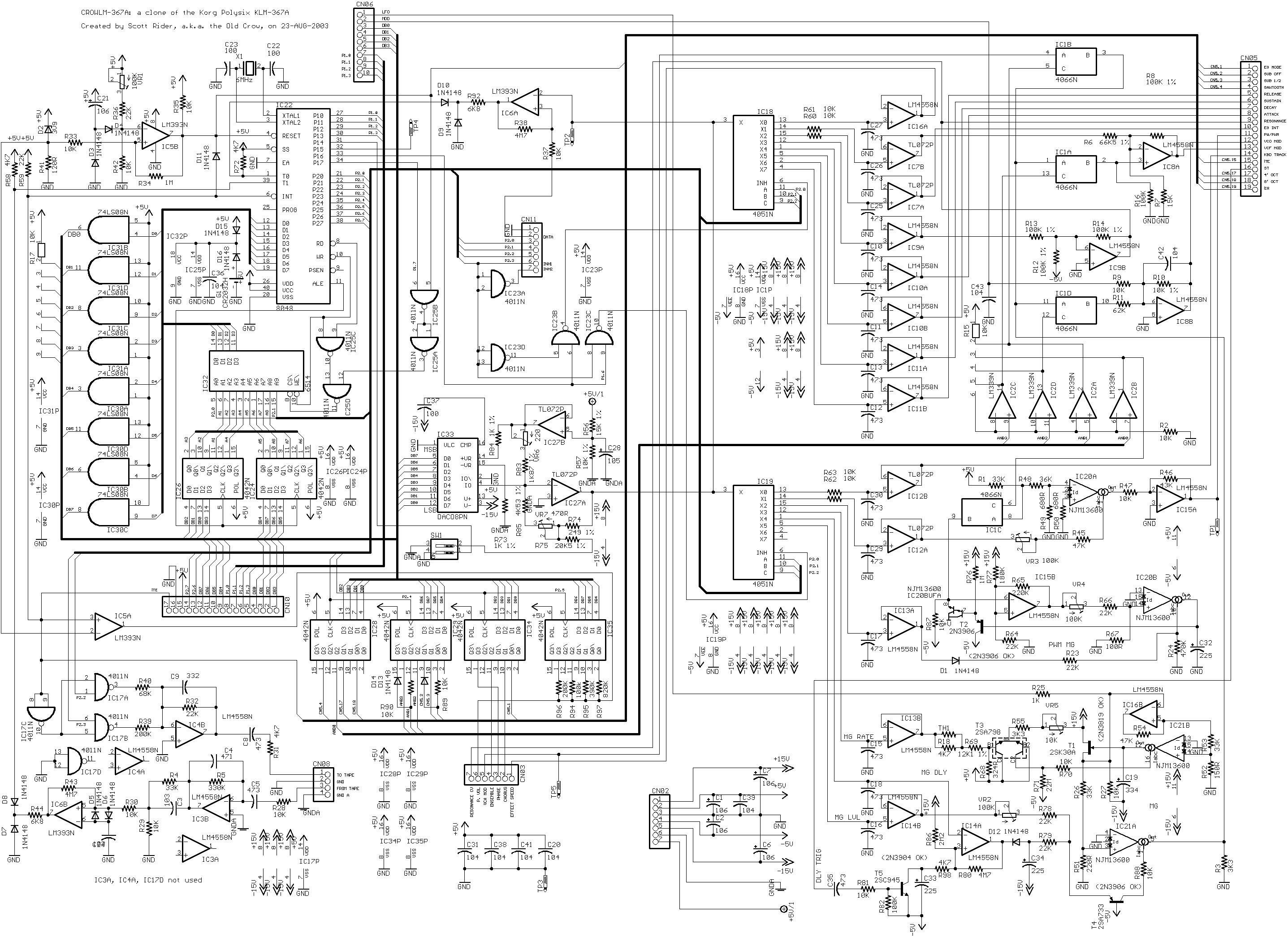
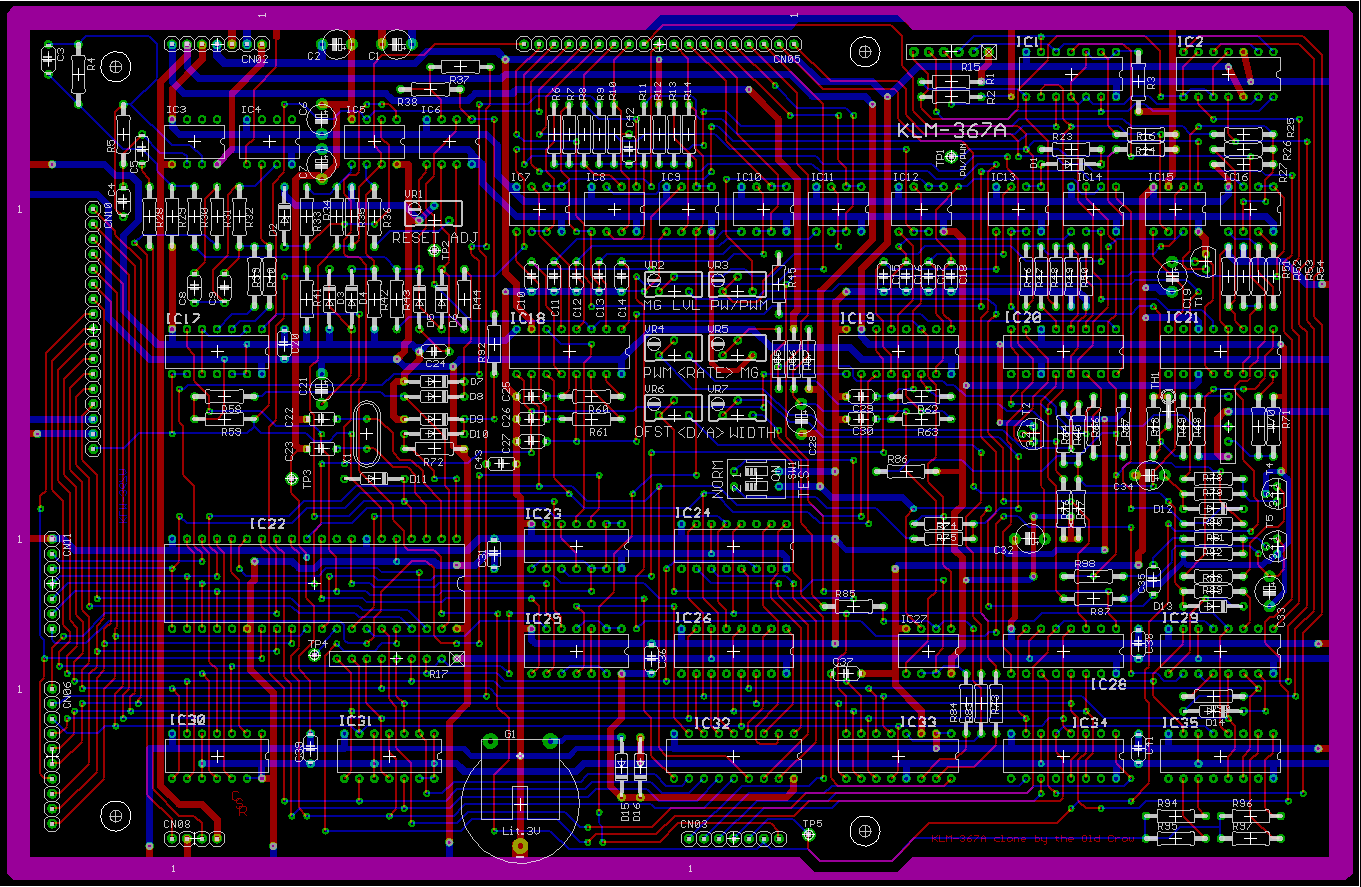
I discovered pin numbers 13 and 14 on IC31 are connected. Do you know if this should be so? There seems to be a copper trace on the underneath circuitry. It also appears to be the same for IC30...
Thanks,
Tony
--- In PolySix@yahoogroups.com, bastebraak <bastebraak@...> wrote:
>
>
>
> Is the old one damaged or just not working well. I fixed the contacts on my polysix with a paste i ordered online.
>
>
> Verzonden vanaf Samsung Mobiletonezone020 <swamp.gigs@...> schreef:
> Hi All,
>
> Does anyone know where I can get a couple of 6 bubble contact strips or alternatives for my synth, preferably in the Uk ?
>
> Many thanks in advance,
>
> Tony
>
>
>
> ------------------------------------
>
> Yahoo! Groups Links
>
>
>
>
>
> [Non-text portions of this message have been removed]
>
[Non-text portions of this message have been removed]
2012-07-23 by tonezone020
--- In PolySix@yahoogroups.com, Peter Mörck <peterm@...> wrote:
>
> Just compare with the schematics?
>
> BR,
> Peter
>
> ----- Original Message -----
> From: tonezone020
> To: PolySix@yahoogroups.com
> Sent: Tuesday, July 24, 2012 12:52 AM
> Subject: [PolySix] Re: Polysix contact strip
>
>
>
> Hi,
>
> Thanks for your message.
>
> I managed to sort the strips out - they had stretched, but with a bit of coaxing the keys are now working.
>
> Been slowly trying to fix the battery leak problem with a tiny bit of success and Old Crow's advice from his site.
>
> I discovered pin numbers 13 and 14 on IC31 are connected. Do you know if this should be so? There seems to be a copper trace on the underneath circuitry. It also appears to be the same for IC30...
>
> Thanks,
>
> Tony
>
> --- In PolySix@yahoogroups.com, bastebraak <bastebraak@> wrote:
> >
> >
> >
> > Is the old one damaged or just not working well. I fixed the contacts on my polysix with a paste i ordered online.
> >
> >
> > Verzonden vanaf Samsung Mobiletonezone020 <swamp.gigs@> schreef:
> > Hi All,
> >
> > Does anyone know where I can get a couple of 6 bubble contact strips or alternatives for my synth, preferably in the Uk ?
> >
> > Many thanks in advance,
> >
> > Tony
> >
> >
> >
> > ------------------------------------
> >
> > Yahoo! Groups Links
> >
> >
> >
> >
> >
> > [Non-text portions of this message have been removed]
> >
>
>
>
>
>
> [Non-text portions of this message have been removed]
>
2012-07-24 by backshall1
>coaxing the keys are now working.
> Just compare with the schematics?
>
> BR,
> Peter
>
> ----- Original Message -----
> From: tonezone020
> To: PolySix@yahoogroups.com <mailto:PolySix%40yahoogroups.com>
> Sent: Tuesday, July 24, 2012 12:52 AM
> Subject: [PolySix] Re: Polysix contact strip
>
>
>
> Hi,
>
> Thanks for your message.
>
> I managed to sort the strips out - they had stretched, but with a bit of
>success and Old Crow's advice from his site.
> Been slowly trying to fix the battery leak problem with a tiny bit of
>this should be so? There seems to be a copper trace on the underneath
> I discovered pin numbers 13 and 14 on IC31 are connected. Do you know if
>bastebraak <bastebraak@> wrote:
> Thanks,
>
> Tony
>
> --- In PolySix@yahoogroups.com <mailto:PolySix%40yahoogroups.com> ,
> >my polysix with a paste i ordered online.
> >
> >
> > Is the old one damaged or just not working well. I fixed the contacts on
> >alternatives for my synth, preferably in the Uk ?
> >
> > Verzonden vanaf Samsung Mobiletonezone020 <swamp.gigs@> schreef:
> > Hi All,
> >
> > Does anyone know where I can get a couple of 6 bubble contact strips or
> >[Non-text portions of this message have been removed]
> > Many thanks in advance,
> >
> > Tony
> >
> >
> >
> > ------------------------------------
> >
> > Yahoo! Groups Links
> >
> >
> >
> >
> >
> > [Non-text portions of this message have been removed]
> >
>
>
>
>
>
> [Non-text portions of this message have been removed]
>
2012-07-24 by Peter Mörck
----- Original Message -----
From: tonezone020
To: PolySix@yahoogroups.com
Sent: Tuesday, July 24, 2012 1:45 AM
Subject: [PolySix] Re: Polysix contact strip
Hi,
Looking at the schematics it's hard to tell - it doesn't seem like there is one for the underside of the board ...
Regards,
Tony
--- In PolySix@yahoogroups.com, Peter Mörck <peterm@...> wrote:
>
> Just compare with the schematics?
>
> BR,
> Peter
>
> ----- Original Message -----
> From: tonezone020
> To: PolySix@yahoogroups.com
> Sent: Tuesday, July 24, 2012 12:52 AM
> Subject: [PolySix] Re: Polysix contact strip
>
>
>
> Hi,
>
> Thanks for your message.
>
> I managed to sort the strips out - they had stretched, but with a bit of coaxing the keys are now working.
>
> Been slowly trying to fix the battery leak problem with a tiny bit of success and Old Crow's advice from his site.
>
> I discovered pin numbers 13 and 14 on IC31 are connected. Do you know if this should be so? There seems to be a copper trace on the underneath circuitry. It also appears to be the same for IC30...
>
> Thanks,
>
> Tony
>
> --- In PolySix@yahoogroups.com, bastebraak <bastebraak@> wrote:
> >
> >
> >
> > Is the old one damaged or just not working well. I fixed the contacts on my polysix with a paste i ordered online.
> >
> >
> > Verzonden vanaf Samsung Mobiletonezone020 <swamp.gigs@> schreef:
> > Hi All,
> >
> > Does anyone know where I can get a couple of 6 bubble contact strips or alternatives for my synth, preferably in the Uk ?
> >
> > Many thanks in advance,
> >
> > Tony
> >
> >
> >
> > ------------------------------------
> >
> > Yahoo! Groups Links
> >
> >
> >
> >
> >
> > [Non-text portions of this message have been removed]
> >
>
>
>
>
>
> [Non-text portions of this message have been removed]
>
[Non-text portions of this message have been removed]
2012-07-24 by tonezone020
--- In PolySix@yahoogroups.com, "backshall1" <backshall1@...> wrote:
>
> Pins 1, 4, 10, 13, 14 are all connected together to +5vdc.
>
>
>
> Don Backshall
>
>
>
> _____
>
> From: PolySix@yahoogroups.com [mailto:PolySix@yahoogroups.com] On Behalf Of
> tonezone020
> Sent: Monday, July 23, 2012 7:46 PM
> To: PolySix@yahoogroups.com
> Subject: [PolySix] Re: Polysix contact strip
>
>
>
>
>
> Hi,
>
> Looking at the schematics it's hard to tell - it doesn't seem like there is
> one for the underside of the board ...
>
> Regards,
>
> Tony
>
> --- In PolySix@yahoogroups.com <mailto:PolySix%40yahoogroups.com> , Peter
> M�rck <peterm@> wrote:
> >
> > Just compare with the schematics?
> >
> > BR,
> > Peter
> >
> > ----- Original Message -----
> > From: tonezone020
> > To: PolySix@yahoogroups.com <mailto:PolySix%40yahoogroups.com>
> > Sent: Tuesday, July 24, 2012 12:52 AM
> > Subject: [PolySix] Re: Polysix contact strip
> >
> >
> >
> > Hi,
> >
> > Thanks for your message.
> >
> > I managed to sort the strips out - they had stretched, but with a bit of
> coaxing the keys are now working.
> >
> > Been slowly trying to fix the battery leak problem with a tiny bit of
> success and Old Crow's advice from his site.
> >
> > I discovered pin numbers 13 and 14 on IC31 are connected. Do you know if
> this should be so? There seems to be a copper trace on the underneath
> circuitry. It also appears to be the same for IC30...
> >
> > Thanks,
> >
> > Tony
> >
> > --- In PolySix@yahoogroups.com <mailto:PolySix%40yahoogroups.com> ,
> bastebraak <bastebraak@> wrote:
> > >
> > >
> > >
> > > Is the old one damaged or just not working well. I fixed the contacts on
> my polysix with a paste i ordered online.
> > >
> > >
> > > Verzonden vanaf Samsung Mobiletonezone020 <swamp.gigs@> schreef:
> > > Hi All,
> > >
> > > Does anyone know where I can get a couple of 6 bubble contact strips or
> alternatives for my synth, preferably in the Uk ?
> > >
> > > Many thanks in advance,
> > >
> > > Tony
> > >
> > >
> > >
> > > ------------------------------------
> > >
> > > Yahoo! Groups Links
> > >
> > >
> > >
> > >
> > >
> > > [Non-text portions of this message have been removed]
> > >
> >
> >
> >
> >
> >
> > [Non-text portions of this message have been removed]
> >
>
>
>
>
>
> [Non-text portions of this message have been removed]
>
2012-07-24 by backshall1
----- Original Message -----
From: tonezone020
To: PolySix@yahoogroups.com <mailto:PolySix%40yahoogroups.com>
Sent: Tuesday, July 24, 2012 1:45 AM
Subject: [PolySix] Re: Polysix contact strip
Hi,
Looking at the schematics it's hard to tell - it doesn't seem like there is
one for the underside of the board ...
Regards,
Tony
--- In PolySix@yahoogroups.com <mailto:PolySix%40yahoogroups.com> , Peter
Mörck <peterm@...> wrote:
>
> Just compare with the schematics?
>
> BR,
> Peter
>
> ----- Original Message -----
> From: tonezone020
> To: PolySix@yahoogroups.com <mailto:PolySix%40yahoogroups.com>
> Sent: Tuesday, July 24, 2012 12:52 AM
> Subject: [PolySix] Re: Polysix contact strip
>
>
>
> Hi,
>
> Thanks for your message.
>
> I managed to sort the strips out - they had stretched, but with a bit of
coaxing the keys are now working.
>
> Been slowly trying to fix the battery leak problem with a tiny bit of
success and Old Crow's advice from his site.
>
> I discovered pin numbers 13 and 14 on IC31 are connected. Do you know if
this should be so? There seems to be a copper trace on the underneath
circuitry. It also appears to be the same for IC30...
>
> Thanks,
>
> Tony
>
> --- In PolySix@yahoogroups.com <mailto:PolySix%40yahoogroups.com> ,
bastebraak <bastebraak@> wrote:
> >
> >
> >
> > Is the old one damaged or just not working well. I fixed the contacts on
my polysix with a paste i ordered online.
> >
> >
> > Verzonden vanaf Samsung Mobiletonezone020 <swamp.gigs@> schreef:
> > Hi All,
> >
> > Does anyone know where I can get a couple of 6 bubble contact strips or
alternatives for my synth, preferably in the Uk ?
> >
> > Many thanks in advance,
> >
> > Tony
> >
> >
> >
> > ------------------------------------
> >
> > Yahoo! Groups Links
> >
> >
> >
> >
> >
> > [Non-text portions of this message have been removed]
> >
>
>
>
>
>
> [Non-text portions of this message have been removed]
>
[Non-text portions of this message have been removed]
[Non-text portions of this message have been removed]
2012-07-24 by backshall1
>[mailto:PolySix@yahoogroups.com <mailto:PolySix%40yahoogroups.com> ] On
> Pins 1, 4, 10, 13, 14 are all connected together to +5vdc.
>
>
>
> Don Backshall
>
>
>
> _____
>
> From: PolySix@yahoogroups.com <mailto:PolySix%40yahoogroups.com>
> tonezone020is
> Sent: Monday, July 23, 2012 7:46 PM
> To: PolySix@yahoogroups.com <mailto:PolySix%40yahoogroups.com>
> Subject: [PolySix] Re: Polysix contact strip
>
>
>
>
>
> Hi,
>
> Looking at the schematics it's hard to tell - it doesn't seem like there
> one for the underside of the board ...<mailto:PolySix%40yahoogroups.com> , Peter
>
> Regards,
>
> Tony
>
> --- In PolySix@yahoogroups.com <mailto:PolySix%40yahoogroups.com>
> M�rck <peterm@> wrote:<mailto:PolySix%40yahoogroups.com>
> >
> > Just compare with the schematics?
> >
> > BR,
> > Peter
> >
> > ----- Original Message -----
> > From: tonezone020
> > To: PolySix@yahoogroups.com <mailto:PolySix%40yahoogroups.com>
> > Sent: Tuesday, July 24, 2012 12:52 AM<mailto:PolySix%40yahoogroups.com> ,
> > Subject: [PolySix] Re: Polysix contact strip
> >
> >
> >
> > Hi,
> >
> > Thanks for your message.
> >
> > I managed to sort the strips out - they had stretched, but with a bit of
> coaxing the keys are now working.
> >
> > Been slowly trying to fix the battery leak problem with a tiny bit of
> success and Old Crow's advice from his site.
> >
> > I discovered pin numbers 13 and 14 on IC31 are connected. Do you know if
> this should be so? There seems to be a copper trace on the underneath
> circuitry. It also appears to be the same for IC30...
> >
> > Thanks,
> >
> > Tony
> >
> > --- In PolySix@yahoogroups.com <mailto:PolySix%40yahoogroups.com>
> bastebraak <bastebraak@> wrote:on
> > >
> > >
> > >
> > > Is the old one damaged or just not working well. I fixed the contacts
> my polysix with a paste i ordered online.or
> > >
> > >
> > > Verzonden vanaf Samsung Mobiletonezone020 <swamp.gigs@> schreef:
> > > Hi All,
> > >
> > > Does anyone know where I can get a couple of 6 bubble contact strips
> alternatives for my synth, preferably in the Uk ?[Non-text portions of this message have been removed]
> > >
> > > Many thanks in advance,
> > >
> > > Tony
> > >
> > >
> > >
> > > ------------------------------------
> > >
> > > Yahoo! Groups Links
> > >
> > >
> > >
> > >
> > >
> > > [Non-text portions of this message have been removed]
> > >
> >
> >
> >
> >
> >
> > [Non-text portions of this message have been removed]
> >
>
>
>
>
>
> [Non-text portions of this message have been removed]
>
2012-07-24 by tonezone020
--- In PolySix@yahoogroups.com, "backshall1" <backshall1@...> wrote:
>
> Yes, there is an error in the schematics. Pin 5 is +5v, not pin 4. Pin 4
> really does go to pin 12 on the 8048. I just checked a clone board and an
> old original KLM-367. They are the same.
>
> Don B.
>
>
>
> _____
>
> From: PolySix@yahoogroups.com [mailto:PolySix@yahoogroups.com] On Behalf Of
> Peter Mörck
> Sent: Monday, July 23, 2012 8:25 PM
> To: PolySix@yahoogroups.com
> Subject: Re: [PolySix] Re: Polysix contact strip
>
>
>
>
>
> You must be looking at the board layout drawing.
> The schematics are different and have no "layers". They just show how it's
> connected without actual physical constraints.
>
> Anyway, I just looked and pins 1,4,10,13,14 of IC31 are tied to +5V :)
>
> By the way,
> I assume there's an error in the schematics indicating pin 4 tied to pin12
> of the 8048, as it's also tied to +5V.
> Either that's pin 5 instead, or vice versa.
>
> IC31 is just a quad AND gate acting as a buffer. Each of the AND gates has
> one of its inputs tied to +5V so whatever appeard on the other input will
> also appear on the output of that gate.
>
> The traces under IC31 are usually attacked by the battery acid though and it
> is good if you do continuity testing around that area.
>
> BR,
> Peter
>
> ----- Original Message -----
> From: tonezone020
> To: PolySix@yahoogroups.com <mailto:PolySix%40yahoogroups.com>
> Sent: Tuesday, July 24, 2012 1:45 AM
> Subject: [PolySix] Re: Polysix contact strip
>
> Hi,
>
> Looking at the schematics it's hard to tell - it doesn't seem like there is
> one for the underside of the board ...
>
> Regards,
>
> Tony
>
> --- In PolySix@yahoogroups.com <mailto:PolySix%40yahoogroups.com> , Peter
> Mörck <peterm@> wrote:
> >
> > Just compare with the schematics?
> >
> > BR,
> > Peter
> >
> > ----- Original Message -----
> > From: tonezone020
> > To: PolySix@yahoogroups.com <mailto:PolySix%40yahoogroups.com>
> > Sent: Tuesday, July 24, 2012 12:52 AM
> > Subject: [PolySix] Re: Polysix contact strip
> >
> >
> >
> > Hi,
> >
> > Thanks for your message.
> >
> > I managed to sort the strips out - they had stretched, but with a bit of
> coaxing the keys are now working.
> >
> > Been slowly trying to fix the battery leak problem with a tiny bit of
> success and Old Crow's advice from his site.
> >
> > I discovered pin numbers 13 and 14 on IC31 are connected. Do you know if
> this should be so? There seems to be a copper trace on the underneath
> circuitry. It also appears to be the same for IC30...
> >
> > Thanks,
> >
> > Tony
> >
> > --- In PolySix@yahoogroups.com <mailto:PolySix%40yahoogroups.com> ,
> bastebraak <bastebraak@> wrote:
> > >
> > >
> > >
> > > Is the old one damaged or just not working well. I fixed the contacts on
> my polysix with a paste i ordered online.
> > >
> > >
> > > Verzonden vanaf Samsung Mobiletonezone020 <swamp.gigs@> schreef:
> > > Hi All,
> > >
> > > Does anyone know where I can get a couple of 6 bubble contact strips or
> alternatives for my synth, preferably in the Uk ?
> > >
> > > Many thanks in advance,
> > >
> > > Tony
> > >
> > >
> > >
> > > ------------------------------------
> > >
> > > Yahoo! Groups Links
> > >
> > >
> > >
> > >
> > >
> > > [Non-text portions of this message have been removed]
> > >
> >
> >
> >
> >
> >
> > [Non-text portions of this message have been removed]
> >
>
> [Non-text portions of this message have been removed]
>
>
>
>
>
> [Non-text portions of this message have been removed]
>
2012-07-24 by tonezone020
--- In PolySix@yahoogroups.com, "tonezone020" <swamp.gigs@...> wrote:
>
> Hi Don and Peter,
>
> Your messages have been very helpful consequently I've discovered anomalies elsewhere...
>
> IC26 p5 doesn't connect to IC34 p5 - should I bridge this ?
>
> IC26 to IC32 connections are all fine.
>
> Also I think there's a mistake in the schematics. Rather than IC34 connecting to IC32 it seems to be IC26 p2, 1, 11, 10 that is connected to IC32 p2, 1, 17, 16
>
> Regards,
>
> Tony
>
>
> --- In PolySix@yahoogroups.com, "backshall1" <backshall1@> wrote:
> >
> > Yes, there is an error in the schematics. Pin 5 is +5v, not pin 4. Pin 4
> > really does go to pin 12 on the 8048. I just checked a clone board and an
> > old original KLM-367. They are the same.
> >
> > Don B.
> >
> >
> >
> > _____
> >
> > From: PolySix@yahoogroups.com [mailto:PolySix@yahoogroups.com] On Behalf Of
> > Peter Mörck
> > Sent: Monday, July 23, 2012 8:25 PM
> > To: PolySix@yahoogroups.com
> > Subject: Re: [PolySix] Re: Polysix contact strip
> >
> >
> >
> >
> >
> > You must be looking at the board layout drawing.
> > The schematics are different and have no "layers". They just show how it's
> > connected without actual physical constraints.
> >
> > Anyway, I just looked and pins 1,4,10,13,14 of IC31 are tied to +5V :)
> >
> > By the way,
> > I assume there's an error in the schematics indicating pin 4 tied to pin12
> > of the 8048, as it's also tied to +5V.
> > Either that's pin 5 instead, or vice versa.
> >
> > IC31 is just a quad AND gate acting as a buffer. Each of the AND gates has
> > one of its inputs tied to +5V so whatever appeard on the other input will
> > also appear on the output of that gate.
> >
> > The traces under IC31 are usually attacked by the battery acid though and it
> > is good if you do continuity testing around that area.
> >
> > BR,
> > Peter
> >
> > ----- Original Message -----
> > From: tonezone020
> > To: PolySix@yahoogroups.com <mailto:PolySix%40yahoogroups.com>
> > Sent: Tuesday, July 24, 2012 1:45 AM
> > Subject: [PolySix] Re: Polysix contact strip
> >
> > Hi,
> >
> > Looking at the schematics it's hard to tell - it doesn't seem like there is
> > one for the underside of the board ...
> >
> > Regards,
> >
> > Tony
> >
> > --- In PolySix@yahoogroups.com <mailto:PolySix%40yahoogroups.com> , Peter
> > Mörck <peterm@> wrote:
> > >
> > > Just compare with the schematics?
> > >
> > > BR,
> > > Peter
> > >
> > > ----- Original Message -----
> > > From: tonezone020
> > > To: PolySix@yahoogroups.com <mailto:PolySix%40yahoogroups.com>
> > > Sent: Tuesday, July 24, 2012 12:52 AM
> > > Subject: [PolySix] Re: Polysix contact strip
> > >
> > >
> > >
> > > Hi,
> > >
> > > Thanks for your message.
> > >
> > > I managed to sort the strips out - they had stretched, but with a bit of
> > coaxing the keys are now working.
> > >
> > > Been slowly trying to fix the battery leak problem with a tiny bit of
> > success and Old Crow's advice from his site.
> > >
> > > I discovered pin numbers 13 and 14 on IC31 are connected. Do you know if
> > this should be so? There seems to be a copper trace on the underneath
> > circuitry. It also appears to be the same for IC30...
> > >
> > > Thanks,
> > >
> > > Tony
> > >
> > > --- In PolySix@yahoogroups.com <mailto:PolySix%40yahoogroups.com> ,
> > bastebraak <bastebraak@> wrote:
> > > >
> > > >
> > > >
> > > > Is the old one damaged or just not working well. I fixed the contacts on
> > my polysix with a paste i ordered online.
> > > >
> > > >
> > > > Verzonden vanaf Samsung Mobiletonezone020 <swamp.gigs@> schreef:
> > > > Hi All,
> > > >
> > > > Does anyone know where I can get a couple of 6 bubble contact strips or
> > alternatives for my synth, preferably in the Uk ?
> > > >
> > > > Many thanks in advance,
> > > >
> > > > Tony
> > > >
> > > >
> > > >
> > > > ------------------------------------
> > > >
> > > > Yahoo! Groups Links
> > > >
> > > >
> > > >
> > > >
> > > >
> > > > [Non-text portions of this message have been removed]
> > > >
> > >
> > >
> > >
> > >
> > >
> > > [Non-text portions of this message have been removed]
> > >
> >
> > [Non-text portions of this message have been removed]
> >
> >
> >
> >
> >
> > [Non-text portions of this message have been removed]
> >
>
2012-07-24 by Peter Mörck
----- Original Message -----
From: tonezone020
To: PolySix@yahoogroups.com
Sent: Tuesday, July 24, 2012 11:59 AM
Subject: [PolySix] Re: Polysix contact strip
Erm,
Correction - that should be IC24 p2, 1, 11, 10 that is connected to IC32 p2, 1, 17, 16
Cheers,
Tony
--- In PolySix@yahoogroups.com, "tonezone020" <swamp.gigs@...> wrote:
>
> Hi Don and Peter,
>
> Your messages have been very helpful consequently I've discovered anomalies elsewhere...
>
> IC26 p5 doesn't connect to IC34 p5 - should I bridge this ?
>
> IC26 to IC32 connections are all fine.
>
> Also I think there's a mistake in the schematics. Rather than IC34 connecting to IC32 it seems to be IC26 p2, 1, 11, 10 that is connected to IC32 p2, 1, 17, 16
>
> Regards,
>
> Tony
>
>
> --- In PolySix@yahoogroups.com, "backshall1" <backshall1@> wrote:
> >
> > Yes, there is an error in the schematics. Pin 5 is +5v, not pin 4. Pin 4
> > really does go to pin 12 on the 8048. I just checked a clone board and an
> > old original KLM-367. They are the same.
> >
> > Don B.
> >
> >
> >
> > _____
> >
> > From: PolySix@yahoogroups.com [mailto:PolySix@yahoogroups.com] On Behalf Of
> > Peter Mörck
> > Sent: Monday, July 23, 2012 8:25 PM
> > To: PolySix@yahoogroups.com
> > Subject: Re: [PolySix] Re: Polysix contact strip
> >
> >
> >
> >
> >
> > You must be looking at the board layout drawing.
> > The schematics are different and have no "layers". They just show how it's
> > connected without actual physical constraints.
> >
> > Anyway, I just looked and pins 1,4,10,13,14 of IC31 are tied to +5V :)
> >
> > By the way,
> > I assume there's an error in the schematics indicating pin 4 tied to pin12
> > of the 8048, as it's also tied to +5V.
> > Either that's pin 5 instead, or vice versa.
> >
> > IC31 is just a quad AND gate acting as a buffer. Each of the AND gates has
> > one of its inputs tied to +5V so whatever appeard on the other input will
> > also appear on the output of that gate.
> >
> > The traces under IC31 are usually attacked by the battery acid though and it
> > is good if you do continuity testing around that area.
> >
> > BR,
> > Peter
> >
> > ----- Original Message -----
> > From: tonezone020
> > To: PolySix@yahoogroups.com <mailto:PolySix%40yahoogroups.com>
> > Sent: Tuesday, July 24, 2012 1:45 AM
> > Subject: [PolySix] Re: Polysix contact strip
> >
> > Hi,
> >
> > Looking at the schematics it's hard to tell - it doesn't seem like there is
> > one for the underside of the board ...
> >
> > Regards,
> >
> > Tony
> >
> > --- In PolySix@yahoogroups.com <mailto:PolySix%40yahoogroups.com> , Peter
> > Mörck <peterm@> wrote:
> > >
> > > Just compare with the schematics?
> > >
> > > BR,
> > > Peter
> > >
> > > ----- Original Message -----
> > > From: tonezone020
> > > To: PolySix@yahoogroups.com <mailto:PolySix%40yahoogroups.com>
> > > Sent: Tuesday, July 24, 2012 12:52 AM
> > > Subject: [PolySix] Re: Polysix contact strip
> > >
> > >
> > >
> > > Hi,
> > >
> > > Thanks for your message.
> > >
> > > I managed to sort the strips out - they had stretched, but with a bit of
> > coaxing the keys are now working.
> > >
> > > Been slowly trying to fix the battery leak problem with a tiny bit of
> > success and Old Crow's advice from his site.
> > >
> > > I discovered pin numbers 13 and 14 on IC31 are connected. Do you know if
> > this should be so? There seems to be a copper trace on the underneath
> > circuitry. It also appears to be the same for IC30...
> > >
> > > Thanks,
> > >
> > > Tony
> > >
> > > --- In PolySix@yahoogroups.com <mailto:PolySix%40yahoogroups.com> ,
> > bastebraak <bastebraak@> wrote:
> > > >
> > > >
> > > >
> > > > Is the old one damaged or just not working well. I fixed the contacts on
> > my polysix with a paste i ordered online.
> > > >
> > > >
> > > > Verzonden vanaf Samsung Mobiletonezone020 <swamp.gigs@> schreef:
> > > > Hi All,
> > > >
> > > > Does anyone know where I can get a couple of 6 bubble contact strips or
> > alternatives for my synth, preferably in the Uk ?
> > > >
> > > > Many thanks in advance,
> > > >
> > > > Tony
> > > >
> > > >
> > > >
> > > > ------------------------------------
> > > >
> > > > Yahoo! Groups Links
> > > >
> > > >
> > > >
> > > >
> > > >
> > > > [Non-text portions of this message have been removed]
> > > >
> > >
> > >
> > >
> > >
> > >
> > > [Non-text portions of this message have been removed]
> > >
> >
> > [Non-text portions of this message have been removed]
> >
> >
> >
> >
> >
> > [Non-text portions of this message have been removed]
> >
>
[Non-text portions of this message have been removed]
2012-07-24 by tonezone020
--- In PolySix@yahoogroups.com, Peter Mörck <peterm@...> wrote:
>
> Hi,
>
> Regarding IC26 pin 5 --> IC34 pin 5:
>
> Yes, they should be connected to eachother.
> But more importantly, do any of them have contact with pin 11 of the 8048 (IC22) ?
> IC26 and IC34 are latches, controlled by pin 11 of the 8048.
> The fact that IC26 and IC34 have pins 5 connected to eachother doesn't necessarily mean any of them will work, unless they in turn are connected to the 8048 pin 11.
> So connection between IC22 pin 11 <--> IC26 pin 5 <--> IC34 pin 5 is what you need.
>
> BR,
> Peter
>
>
>
> ----- Original Message -----
> From: tonezone020
> To: PolySix@yahoogroups.com
> Sent: Tuesday, July 24, 2012 11:59 AM
> Subject: [PolySix] Re: Polysix contact strip
>
>
>
> Erm,
>
> Correction - that should be IC24 p2, 1, 11, 10 that is connected to IC32 p2, 1, 17, 16
>
> Cheers,
>
> Tony
>
> --- In PolySix@yahoogroups.com, "tonezone020" <swamp.gigs@> wrote:
> >
> > Hi Don and Peter,
> >
> > Your messages have been very helpful consequently I've discovered anomalies elsewhere...
> >
> > IC26 p5 doesn't connect to IC34 p5 - should I bridge this ?
> >
> > IC26 to IC32 connections are all fine.
> >
> > Also I think there's a mistake in the schematics. Rather than IC34 connecting to IC32 it seems to be IC26 p2, 1, 11, 10 that is connected to IC32 p2, 1, 17, 16
> >
> > Regards,
> >
> > Tony
> >
> >
> > --- In PolySix@yahoogroups.com, "backshall1" <backshall1@> wrote:
> > >
> > > Yes, there is an error in the schematics. Pin 5 is +5v, not pin 4. Pin 4
> > > really does go to pin 12 on the 8048. I just checked a clone board and an
> > > old original KLM-367. They are the same.
> > >
> > > Don B.
> > >
> > >
> > >
> > > _____
> > >
> > > From: PolySix@yahoogroups.com [mailto:PolySix@yahoogroups.com] On Behalf Of
> > > Peter Mörck
> > > Sent: Monday, July 23, 2012 8:25 PM
> > > To: PolySix@yahoogroups.com
> > > Subject: Re: [PolySix] Re: Polysix contact strip
> > >
> > >
> > >
> > >
> > >
> > > You must be looking at the board layout drawing.
> > > The schematics are different and have no "layers". They just show how it's
> > > connected without actual physical constraints.
> > >
> > > Anyway, I just looked and pins 1,4,10,13,14 of IC31 are tied to +5V :)
> > >
> > > By the way,
> > > I assume there's an error in the schematics indicating pin 4 tied to pin12
> > > of the 8048, as it's also tied to +5V.
> > > Either that's pin 5 instead, or vice versa.
> > >
> > > IC31 is just a quad AND gate acting as a buffer. Each of the AND gates has
> > > one of its inputs tied to +5V so whatever appeard on the other input will
> > > also appear on the output of that gate.
> > >
> > > The traces under IC31 are usually attacked by the battery acid though and it
> > > is good if you do continuity testing around that area.
> > >
> > > BR,
> > > Peter
> > >
> > > ----- Original Message -----
> > > From: tonezone020
> > > To: PolySix@yahoogroups.com <mailto:PolySix%40yahoogroups.com>
> > > Sent: Tuesday, July 24, 2012 1:45 AM
> > > Subject: [PolySix] Re: Polysix contact strip
> > >
> > > Hi,
> > >
> > > Looking at the schematics it's hard to tell - it doesn't seem like there is
> > > one for the underside of the board ...
> > >
> > > Regards,
> > >
> > > Tony
> > >
> > > --- In PolySix@yahoogroups.com <mailto:PolySix%40yahoogroups.com> , Peter
> > > Mörck <peterm@> wrote:
> > > >
> > > > Just compare with the schematics?
> > > >
> > > > BR,
> > > > Peter
> > > >
> > > > ----- Original Message -----
> > > > From: tonezone020
> > > > To: PolySix@yahoogroups.com <mailto:PolySix%40yahoogroups.com>
> > > > Sent: Tuesday, July 24, 2012 12:52 AM
> > > > Subject: [PolySix] Re: Polysix contact strip
> > > >
> > > >
> > > >
> > > > Hi,
> > > >
> > > > Thanks for your message.
> > > >
> > > > I managed to sort the strips out - they had stretched, but with a bit of
> > > coaxing the keys are now working.
> > > >
> > > > Been slowly trying to fix the battery leak problem with a tiny bit of
> > > success and Old Crow's advice from his site.
> > > >
> > > > I discovered pin numbers 13 and 14 on IC31 are connected. Do you know if
> > > this should be so? There seems to be a copper trace on the underneath
> > > circuitry. It also appears to be the same for IC30...
> > > >
> > > > Thanks,
> > > >
> > > > Tony
> > > >
> > > > --- In PolySix@yahoogroups.com <mailto:PolySix%40yahoogroups.com> ,
> > > bastebraak <bastebraak@> wrote:
> > > > >
> > > > >
> > > > >
> > > > > Is the old one damaged or just not working well. I fixed the contacts on
> > > my polysix with a paste i ordered online.
> > > > >
> > > > >
> > > > > Verzonden vanaf Samsung Mobiletonezone020 <swamp.gigs@> schreef:
> > > > > Hi All,
> > > > >
> > > > > Does anyone know where I can get a couple of 6 bubble contact strips or
> > > alternatives for my synth, preferably in the Uk ?
> > > > >
> > > > > Many thanks in advance,
> > > > >
> > > > > Tony
> > > > >
> > > > >
> > > > >
> > > > > ------------------------------------
> > > > >
> > > > > Yahoo! Groups Links
> > > > >
> > > > >
> > > > >
> > > > >
> > > > >
> > > > > [Non-text portions of this message have been removed]
> > > > >
> > > >
> > > >
> > > >
> > > >
> > > >
> > > > [Non-text portions of this message have been removed]
> > > >
> > >
> > > [Non-text portions of this message have been removed]
> > >
> > >
> > >
> > >
> > >
> > > [Non-text portions of this message have been removed]
> > >
> >
>
>
>
>
>
> [Non-text portions of this message have been removed]
>
2012-07-24 by tonezone020
--- In PolySix@yahoogroups.com, "tonezone020" <swamp.gigs@...> wrote:
>
> Hi Peter,
>
> I bridged IC26 pin 5 --> IC34 pin 5 and there's continuity to IC22 pin 11 , however doing so knocked out the Bank A thru to Write switches and when the I change patch switches, the sound played doesn't.
>
> Any pointers to where to look ?
>
> Thanks
>
> Tone
>
>
> --- In PolySix@yahoogroups.com, Peter Mörck <peterm@> wrote:
> >
> > Hi,
> >
> > Regarding IC26 pin 5 --> IC34 pin 5:
> >
> > Yes, they should be connected to eachother.
> > But more importantly, do any of them have contact with pin 11 of the 8048 (IC22) ?
> > IC26 and IC34 are latches, controlled by pin 11 of the 8048.
> > The fact that IC26 and IC34 have pins 5 connected to eachother doesn't necessarily mean any of them will work, unless they in turn are connected to the 8048 pin 11.
> > So connection between IC22 pin 11 <--> IC26 pin 5 <--> IC34 pin 5 is what you need.
> >
> > BR,
> > Peter
> >
> >
> >
> > ----- Original Message -----
> > From: tonezone020
> > To: PolySix@yahoogroups.com
> > Sent: Tuesday, July 24, 2012 11:59 AM
> > Subject: [PolySix] Re: Polysix contact strip
> >
> >
> >
> > Erm,
> >
> > Correction - that should be IC24 p2, 1, 11, 10 that is connected to IC32 p2, 1, 17, 16
> >
> > Cheers,
> >
> > Tony
> >
> > --- In PolySix@yahoogroups.com, "tonezone020" <swamp.gigs@> wrote:
> > >
> > > Hi Don and Peter,
> > >
> > > Your messages have been very helpful consequently I've discovered anomalies elsewhere...
> > >
> > > IC26 p5 doesn't connect to IC34 p5 - should I bridge this ?
> > >
> > > IC26 to IC32 connections are all fine.
> > >
> > > Also I think there's a mistake in the schematics. Rather than IC34 connecting to IC32 it seems to be IC26 p2, 1, 11, 10 that is connected to IC32 p2, 1, 17, 16
> > >
> > > Regards,
> > >
> > > Tony
> > >
> > >
> > > --- In PolySix@yahoogroups.com, "backshall1" <backshall1@> wrote:
> > > >
> > > > Yes, there is an error in the schematics. Pin 5 is +5v, not pin 4. Pin 4
> > > > really does go to pin 12 on the 8048. I just checked a clone board and an
> > > > old original KLM-367. They are the same.
> > > >
> > > > Don B.
> > > >
> > > >
> > > >
> > > > _____
> > > >
> > > > From: PolySix@yahoogroups.com [mailto:PolySix@yahoogroups.com] On Behalf Of
> > > > Peter Mörck
> > > > Sent: Monday, July 23, 2012 8:25 PM
> > > > To: PolySix@yahoogroups.com
> > > > Subject: Re: [PolySix] Re: Polysix contact strip
> > > >
> > > >
> > > >
> > > >
> > > >
> > > > You must be looking at the board layout drawing.
> > > > The schematics are different and have no "layers". They just show how it's
> > > > connected without actual physical constraints.
> > > >
> > > > Anyway, I just looked and pins 1,4,10,13,14 of IC31 are tied to +5V :)
> > > >
> > > > By the way,
> > > > I assume there's an error in the schematics indicating pin 4 tied to pin12
> > > > of the 8048, as it's also tied to +5V.
> > > > Either that's pin 5 instead, or vice versa.
> > > >
> > > > IC31 is just a quad AND gate acting as a buffer. Each of the AND gates has
> > > > one of its inputs tied to +5V so whatever appeard on the other input will
> > > > also appear on the output of that gate.
> > > >
> > > > The traces under IC31 are usually attacked by the battery acid though and it
> > > > is good if you do continuity testing around that area.
> > > >
> > > > BR,
> > > > Peter
> > > >
> > > > ----- Original Message -----
> > > > From: tonezone020
> > > > To: PolySix@yahoogroups.com <mailto:PolySix%40yahoogroups.com>
> > > > Sent: Tuesday, July 24, 2012 1:45 AM
> > > > Subject: [PolySix] Re: Polysix contact strip
> > > >
> > > > Hi,
> > > >
> > > > Looking at the schematics it's hard to tell - it doesn't seem like there is
> > > > one for the underside of the board ...
> > > >
> > > > Regards,
> > > >
> > > > Tony
> > > >
> > > > --- In PolySix@yahoogroups.com <mailto:PolySix%40yahoogroups.com> , Peter
> > > > Mörck <peterm@> wrote:
> > > > >
> > > > > Just compare with the schematics?
> > > > >
> > > > > BR,
> > > > > Peter
> > > > >
> > > > > ----- Original Message -----
> > > > > From: tonezone020
> > > > > To: PolySix@yahoogroups.com <mailto:PolySix%40yahoogroups.com>
> > > > > Sent: Tuesday, July 24, 2012 12:52 AM
> > > > > Subject: [PolySix] Re: Polysix contact strip
> > > > >
> > > > >
> > > > >
> > > > > Hi,
> > > > >
> > > > > Thanks for your message.
> > > > >
> > > > > I managed to sort the strips out - they had stretched, but with a bit of
> > > > coaxing the keys are now working.
> > > > >
> > > > > Been slowly trying to fix the battery leak problem with a tiny bit of
> > > > success and Old Crow's advice from his site.
> > > > >
> > > > > I discovered pin numbers 13 and 14 on IC31 are connected. Do you know if
> > > > this should be so? There seems to be a copper trace on the underneath
> > > > circuitry. It also appears to be the same for IC30...
> > > > >
> > > > > Thanks,
> > > > >
> > > > > Tony
> > > > >
> > > > > --- In PolySix@yahoogroups.com <mailto:PolySix%40yahoogroups.com> ,
> > > > bastebraak <bastebraak@> wrote:
> > > > > >
> > > > > >
> > > > > >
> > > > > > Is the old one damaged or just not working well. I fixed the contacts on
> > > > my polysix with a paste i ordered online.
> > > > > >
> > > > > >
> > > > > > Verzonden vanaf Samsung Mobiletonezone020 <swamp.gigs@> schreef:
> > > > > > Hi All,
> > > > > >
> > > > > > Does anyone know where I can get a couple of 6 bubble contact strips or
> > > > alternatives for my synth, preferably in the Uk ?
> > > > > >
> > > > > > Many thanks in advance,
> > > > > >
> > > > > > Tony
> > > > > >
> > > > > >
> > > > > >
> > > > > > ------------------------------------
> > > > > >
> > > > > > Yahoo! Groups Links
> > > > > >
> > > > > >
> > > > > >
> > > > > >
> > > > > >
> > > > > > [Non-text portions of this message have been removed]
> > > > > >
> > > > >
> > > > >
> > > > >
> > > > >
> > > > >
> > > > > [Non-text portions of this message have been removed]
> > > > >
> > > >
> > > > [Non-text portions of this message have been removed]
> > > >
> > > >
> > > >
> > > >
> > > >
> > > > [Non-text portions of this message have been removed]
> > > >
> > >
> >
> >
> >
> >
> >
> > [Non-text portions of this message have been removed]
> >
>
2012-07-24 by Jed Jorgensen
On Tue, Jul 24, 2012 at 12:42 PM, tonezone020 <swamp.gigs@googlemail.com>wrote:
> **
>
>
> Hi again,
>
> Should IC31 and IC30 pins 7 be connected to each other ? Also, should pin
> 1 from both run to ground ?
>
> As you can tell, I'm a complete novice trying to make sure about reading
> the schematics !
>
> I'm in the UK by the way. Where are you ?
>
> Regards,
>
> Tony
>
>
> --- In PolySix@yahoogroups.com, "tonezone020" <swamp.gigs@...> wrote:
> >
> > Hi Peter,
> >
> > I bridged IC26 pin 5 --> IC34 pin 5 and there's continuity to IC22 pin
> 11 , however doing so knocked out the Bank A thru to Write switches and
> when the I change patch switches, the sound played doesn't.
> >
> > Any pointers to where to look ?
> >
> > Thanks
> >
> > Tone
> >
> >
> > --- In PolySix@yahoogroups.com, Peter M�rck <peterm@> wrote:
> > >
> > > Hi,
> > >
> > > Regarding IC26 pin 5 --> IC34 pin 5:
> > >
> > > Yes, they should be connected to eachother.
> > > But more importantly, do any of them have contact with pin 11 of the
> 8048 (IC22) ?
> > > IC26 and IC34 are latches, controlled by pin 11 of the 8048.
> > > The fact that IC26 and IC34 have pins 5 connected to eachother doesn't
> necessarily mean any of them will work, unless they in turn are connected
> to the 8048 pin 11.
> > > So connection between IC22 pin 11 <--> IC26 pin 5 <--> IC34 pin 5 is
> what you need.
> > >
> > > BR,
> > > Peter
> > >
> > >
> > >
> > > ----- Original Message -----
> > > From: tonezone020
> > > To: PolySix@yahoogroups.com
> > > Sent: Tuesday, July 24, 2012 11:59 AM
> > > Subject: [PolySix] Re: Polysix contact strip
> > >
> > >
> > >
> > > Erm,
> > >
> > > Correction - that should be IC24 p2, 1, 11, 10 that is connected to
> IC32 p2, 1, 17, 16
> > >
> > > Cheers,
> > >
> > > Tony
> > >
> > > --- In PolySix@yahoogroups.com, "tonezone020" <swamp.gigs@> wrote:
> > > >
> > > > Hi Don and Peter,
> > > >
> > > > Your messages have been very helpful consequently I've discovered
> anomalies elsewhere...
> > > >
> > > > IC26 p5 doesn't connect to IC34 p5 - should I bridge this ?
> > > >
> > > > IC26 to IC32 connections are all fine.
> > > >
> > > > Also I think there's a mistake in the schematics. Rather than IC34
> connecting to IC32 it seems to be IC26 p2, 1, 11, 10 that is connected to
> IC32 p2, 1, 17, 16
> > > >
> > > > Regards,
> > > >
> > > > Tony
> > > >
> > > >
> > > > --- In PolySix@yahoogroups.com, "backshall1" <backshall1@> wrote:
> > > > >
> > > > > Yes, there is an error in the schematics. Pin 5 is +5v, not pin 4.
> Pin 4
> > > > > really does go to pin 12 on the 8048. I just checked a clone board
> and an
> > > > > old original KLM-367. They are the same.
> > > > >
> > > > > Don B.
> > > > >
> > > > >
> > > > >
> > > > > _____
> > > > >
> > > > > From: PolySix@yahoogroups.com [mailto:PolySix@yahoogroups.com] On
> Behalf Of
> > > > > Peter M�rck
> > > > > Sent: Monday, July 23, 2012 8:25 PM
> > > > > To: PolySix@yahoogroups.com
> > > > > Subject: Re: [PolySix] Re: Polysix contact strip
> > > > >
> > > > >
> > > > >
> > > > >
> > > > >
> > > > > You must be looking at the board layout drawing.
> > > > > The schematics are different and have no "layers". They just show
> how it's
> > > > > connected without actual physical constraints.
> > > > >
> > > > > Anyway, I just looked and pins 1,4,10,13,14 of IC31 are tied to
> +5V :)
> > > > >
> > > > > By the way,
> > > > > I assume there's an error in the schematics indicating pin 4 tied
> to pin12
> > > > > of the 8048, as it's also tied to +5V.
> > > > > Either that's pin 5 instead, or vice versa.
> > > > >
> > > > > IC31 is just a quad AND gate acting as a buffer. Each of the AND
> gates has
> > > > > one of its inputs tied to +5V so whatever appeard on the other
> input will
> > > > > also appear on the output of that gate.
> > > > >
> > > > > The traces under IC31 are usually attacked by the battery acid
> though and it
> > > > > is good if you do continuity testing around that area.
> > > > >
> > > > > BR,
> > > > > Peter
> > > > >
> > > > > ----- Original Message -----
> > > > > From: tonezone020
> > > > > To: PolySix@yahoogroups.com <mailto:PolySix%40yahoogroups.com>
> > > > > Sent: Tuesday, July 24, 2012 1:45 AM
> > > > > Subject: [PolySix] Re: Polysix contact strip
> > > > >
> > > > > Hi,
> > > > >
> > > > > Looking at the schematics it's hard to tell - it doesn't seem like
> there is
> > > > > one for the underside of the board ...
> > > > >
> > > > > Regards,
> > > > >
> > > > > Tony
> > > > >
> > > > > --- In PolySix@yahoogroups.com <mailto:PolySix%40yahoogroups.com>
> , Peter
> > > > > M�rck <peterm@> wrote:
> > > > > >
> > > > > > Just compare with the schematics?
> > > > > >
> > > > > > BR,
> > > > > > Peter
> > > > > >
> > > > > > ----- Original Message -----
> > > > > > From: tonezone020
> > > > > > To: PolySix@yahoogroups.com <mailto:PolySix%40yahoogroups.com>
> > > > > > Sent: Tuesday, July 24, 2012 12:52 AM
> > > > > > Subject: [PolySix] Re: Polysix contact strip
> > > > > >
> > > > > >
> > > > > >
> > > > > > Hi,
> > > > > >
> > > > > > Thanks for your message.
> > > > > >
> > > > > > I managed to sort the strips out - they had stretched, but with
> a bit of
> > > > > coaxing the keys are now working.
> > > > > >
> > > > > > Been slowly trying to fix the battery leak problem with a tiny
> bit of
> > > > > success and Old Crow's advice from his site.
> > > > > >
> > > > > > I discovered pin numbers 13 and 14 on IC31 are connected. Do you
> know if
> > > > > this should be so? There seems to be a copper trace on the
> underneath
> > > > > circuitry. It also appears to be the same for IC30...
> > > > > >
> > > > > > Thanks,
> > > > > >
> > > > > > Tony
> > > > > >
> > > > > > --- In PolySix@yahoogroups.com <mailto:PolySix%40yahoogroups.com>
> ,
> > > > > bastebraak <bastebraak@> wrote:
> > > > > > >
> > > > > > >
> > > > > > >
> > > > > > > Is the old one damaged or just not working well. I fixed the
> contacts on
> > > > > my polysix with a paste i ordered online.
> > > > > > >
> > > > > > >
> > > > > > > Verzonden vanaf Samsung Mobiletonezone020 <swamp.gigs@>
> schreef:
> > > > > > > Hi All,
> > > > > > >
> > > > > > > Does anyone know where I can get a couple of 6 bubble contact
> strips or
> > > > > alternatives for my synth, preferably in the Uk ?
> > > > > > >
> > > > > > > Many thanks in advance,
> > > > > > >
> > > > > > > Tony
> > > > > > >
> > > > > > >
> > > > > > >
> > > > > > > ------------------------------------
> > > > > > >
> > > > > > > Yahoo! Groups Links
> > > > > > >
> > > > > > >
> > > > > > >
> > > > > > >
> > > > > > >
> > > > > > > [Non-text portions of this message have been removed]
> > > > > > >
> > > > > >
> > > > > >
> > > > > >
> > > > > >
> > > > > >
> > > > > > [Non-text portions of this message have been removed]
> > > > > >
> > > > >
> > > > > [Non-text portions of this message have been removed]
> > > > >
> > > > >
> > > > >
> > > > >
> > > > >
> > > > > [Non-text portions of this message have been removed]
> > > > >
> > > >
> > >
> > >
> > >
> > >
> > >
> > > [Non-text portions of this message have been removed]
> > >
> >
>
>
>
[Non-text portions of this message have been removed]
2012-07-24 by Jed Jorgensen
On Tue, Jul 24, 2012 at 12:21 PM, tonezone020 <swamp.gigs@googlemail.com>wrote:
> **
>
>
> Hi Peter,
>
> I bridged IC26 pin 5 --> IC34 pin 5 and there's continuity to IC22 pin 11
> , however doing so knocked out the Bank A thru to Write switches and when
> the I change patch switches, the sound played doesn't.
>
> Any pointers to where to look ?
>
> Thanks
>
> Tone
>
>
> --- In PolySix@yahoogroups.com, Peter M�rck <peterm@...> wrote:
> >
> > Hi,
> >
> > Regarding IC26 pin 5 --> IC34 pin 5:
> >
> > Yes, they should be connected to eachother.
> > But more importantly, do any of them have contact with pin 11 of the
> 8048 (IC22) ?
> > IC26 and IC34 are latches, controlled by pin 11 of the 8048.
> > The fact that IC26 and IC34 have pins 5 connected to eachother doesn't
> necessarily mean any of them will work, unless they in turn are connected
> to the 8048 pin 11.
> > So connection between IC22 pin 11 <--> IC26 pin 5 <--> IC34 pin 5 is
> what you need.
> >
> > BR,
> > Peter
> >
> >
> >
> > ----- Original Message -----
> > From: tonezone020
> > To: PolySix@yahoogroups.com
> > Sent: Tuesday, July 24, 2012 11:59 AM
> > Subject: [PolySix] Re: Polysix contact strip
> >
> >
> >
> > Erm,
> >
> > Correction - that should be IC24 p2, 1, 11, 10 that is connected to IC32
> p2, 1, 17, 16
> >
> > Cheers,
> >
> > Tony
> >
> > --- In PolySix@yahoogroups.com, "tonezone020" <swamp.gigs@> wrote:
> > >
> > > Hi Don and Peter,
> > >
> > > Your messages have been very helpful consequently I've discovered
> anomalies elsewhere...
> > >
> > > IC26 p5 doesn't connect to IC34 p5 - should I bridge this ?
> > >
> > > IC26 to IC32 connections are all fine.
> > >
> > > Also I think there's a mistake in the schematics. Rather than IC34
> connecting to IC32 it seems to be IC26 p2, 1, 11, 10 that is connected to
> IC32 p2, 1, 17, 16
> > >
> > > Regards,
> > >
> > > Tony
> > >
> > >
> > > --- In PolySix@yahoogroups.com, "backshall1" <backshall1@> wrote:
> > > >
> > > > Yes, there is an error in the schematics. Pin 5 is +5v, not pin 4.
> Pin 4
> > > > really does go to pin 12 on the 8048. I just checked a clone board
> and an
> > > > old original KLM-367. They are the same.
> > > >
> > > > Don B.
> > > >
> > > >
> > > >
> > > > _____
> > > >
> > > > From: PolySix@yahoogroups.com [mailto:PolySix@yahoogroups.com] On
> Behalf Of
> > > > Peter M�rck
> > > > Sent: Monday, July 23, 2012 8:25 PM
> > > > To: PolySix@yahoogroups.com
> > > > Subject: Re: [PolySix] Re: Polysix contact strip
> > > >
> > > >
> > > >
> > > >
> > > >
> > > > You must be looking at the board layout drawing.
> > > > The schematics are different and have no "layers". They just show
> how it's
> > > > connected without actual physical constraints.
> > > >
> > > > Anyway, I just looked and pins 1,4,10,13,14 of IC31 are tied to +5V
> :)
> > > >
> > > > By the way,
> > > > I assume there's an error in the schematics indicating pin 4 tied to
> pin12
> > > > of the 8048, as it's also tied to +5V.
> > > > Either that's pin 5 instead, or vice versa.
> > > >
> > > > IC31 is just a quad AND gate acting as a buffer. Each of the AND
> gates has
> > > > one of its inputs tied to +5V so whatever appeard on the other input
> will
> > > > also appear on the output of that gate.
> > > >
> > > > The traces under IC31 are usually attacked by the battery acid
> though and it
> > > > is good if you do continuity testing around that area.
> > > >
> > > > BR,
> > > > Peter
> > > >
> > > > ----- Original Message -----
> > > > From: tonezone020
> > > > To: PolySix@yahoogroups.com <mailto:PolySix%40yahoogroups.com>
> > > > Sent: Tuesday, July 24, 2012 1:45 AM
> > > > Subject: [PolySix] Re: Polysix contact strip
> > > >
> > > > Hi,
> > > >
> > > > Looking at the schematics it's hard to tell - it doesn't seem like
> there is
> > > > one for the underside of the board ...
> > > >
> > > > Regards,
> > > >
> > > > Tony
> > > >
> > > > --- In PolySix@yahoogroups.com <mailto:PolySix%40yahoogroups.com> ,
> Peter
> > > > M�rck <peterm@> wrote:
> > > > >
> > > > > Just compare with the schematics?
> > > > >
> > > > > BR,
> > > > > Peter
> > > > >
> > > > > ----- Original Message -----
> > > > > From: tonezone020
> > > > > To: PolySix@yahoogroups.com <mailto:PolySix%40yahoogroups.com>
> > > > > Sent: Tuesday, July 24, 2012 12:52 AM
> > > > > Subject: [PolySix] Re: Polysix contact strip
> > > > >
> > > > >
> > > > >
> > > > > Hi,
> > > > >
> > > > > Thanks for your message.
> > > > >
> > > > > I managed to sort the strips out - they had stretched, but with a
> bit of
> > > > coaxing the keys are now working.
> > > > >
> > > > > Been slowly trying to fix the battery leak problem with a tiny bit
> of
> > > > success and Old Crow's advice from his site.
> > > > >
> > > > > I discovered pin numbers 13 and 14 on IC31 are connected. Do you
> know if
> > > > this should be so? There seems to be a copper trace on the underneath
> > > > circuitry. It also appears to be the same for IC30...
> > > > >
> > > > > Thanks,
> > > > >
> > > > > Tony
> > > > >
> > > > > --- In PolySix@yahoogroups.com <mailto:PolySix%40yahoogroups.com>
> ,
> > > > bastebraak <bastebraak@> wrote:
> > > > > >
> > > > > >
> > > > > >
> > > > > > Is the old one damaged or just not working well. I fixed the
> contacts on
> > > > my polysix with a paste i ordered online.
> > > > > >
> > > > > >
> > > > > > Verzonden vanaf Samsung Mobiletonezone020 <swamp.gigs@> schreef:
> > > > > > Hi All,
> > > > > >
> > > > > > Does anyone know where I can get a couple of 6 bubble contact
> strips or
> > > > alternatives for my synth, preferably in the Uk ?
> > > > > >
> > > > > > Many thanks in advance,
> > > > > >
> > > > > > Tony
> > > > > >
> > > > > >
> > > > > >
> > > > > > ------------------------------------
> > > > > >
> > > > > > Yahoo! Groups Links
> > > > > >
> > > > > >
> > > > > >
> > > > > >
> > > > > >
> > > > > > [Non-text portions of this message have been removed]
> > > > > >
> > > > >
> > > > >
> > > > >
> > > > >
> > > > >
> > > > > [Non-text portions of this message have been removed]
> > > > >
> > > >
> > > > [Non-text portions of this message have been removed]
> > > >
> > > >
> > > >
> > > >
> > > >
> > > > [Non-text portions of this message have been removed]
> > > >
> > >
> >
> >
> >
> >
> >
> > [Non-text portions of this message have been removed]
> >
>
>
>
[Non-text portions of this message have been removed]
2012-07-24 by Peter Mörck
----- Original Message -----
From: tonezone020
To: PolySix@yahoogroups.com
Sent: Tuesday, July 24, 2012 9:21 PM
Subject: [PolySix] Re: Polysix contact strip
Hi Peter,
I bridged IC26 pin 5 --> IC34 pin 5 and there's continuity to IC22 pin 11 , however doing so knocked out the Bank A thru to Write switches and when the I change patch switches, the sound played doesn't.
Any pointers to where to look ?
Thanks
Tone
--- In PolySix@yahoogroups.com, Peter Mörck <peterm@...> wrote:
>
> Hi,
>
> Regarding IC26 pin 5 --> IC34 pin 5:
>
> Yes, they should be connected to eachother.
> But more importantly, do any of them have contact with pin 11 of the 8048 (IC22) ?
> IC26 and IC34 are latches, controlled by pin 11 of the 8048.
> The fact that IC26 and IC34 have pins 5 connected to eachother doesn't necessarily mean any of them will work, unless they in turn are connected to the 8048 pin 11.
> So connection between IC22 pin 11 <--> IC26 pin 5 <--> IC34 pin 5 is what you need.
>
> BR,
> Peter
>
>
>
> ----- Original Message -----
> From: tonezone020
> To: PolySix@yahoogroups.com
> Sent: Tuesday, July 24, 2012 11:59 AM
> Subject: [PolySix] Re: Polysix contact strip
>
>
>
> Erm,
>
> Correction - that should be IC24 p2, 1, 11, 10 that is connected to IC32 p2, 1, 17, 16
>
> Cheers,
>
> Tony
>
> --- In PolySix@yahoogroups.com, "tonezone020" <swamp.gigs@> wrote:
> >
> > Hi Don and Peter,
> >
> > Your messages have been very helpful consequently I've discovered anomalies elsewhere...
> >
> > IC26 p5 doesn't connect to IC34 p5 - should I bridge this ?
> >
> > IC26 to IC32 connections are all fine.
> >
> > Also I think there's a mistake in the schematics. Rather than IC34 connecting to IC32 it seems to be IC26 p2, 1, 11, 10 that is connected to IC32 p2, 1, 17, 16
> >
> > Regards,
> >
> > Tony
> >
> >
> > --- In PolySix@yahoogroups.com, "backshall1" <backshall1@> wrote:
> > >
> > > Yes, there is an error in the schematics. Pin 5 is +5v, not pin 4. Pin 4
> > > really does go to pin 12 on the 8048. I just checked a clone board and an
> > > old original KLM-367. They are the same.
> > >
> > > Don B.
> > >
> > >
> > >
> > > _____
> > >
> > > From: PolySix@yahoogroups.com [mailto:PolySix@yahoogroups.com] On Behalf Of
> > > Peter Mörck
> > > Sent: Monday, July 23, 2012 8:25 PM
> > > To: PolySix@yahoogroups.com
> > > Subject: Re: [PolySix] Re: Polysix contact strip
> > >
> > >
> > >
> > >
> > >
> > > You must be looking at the board layout drawing.
> > > The schematics are different and have no "layers". They just show how it's
> > > connected without actual physical constraints.
> > >
> > > Anyway, I just looked and pins 1,4,10,13,14 of IC31 are tied to +5V :)
> > >
> > > By the way,
> > > I assume there's an error in the schematics indicating pin 4 tied to pin12
> > > of the 8048, as it's also tied to +5V.
> > > Either that's pin 5 instead, or vice versa.
> > >
> > > IC31 is just a quad AND gate acting as a buffer. Each of the AND gates has
> > > one of its inputs tied to +5V so whatever appeard on the other input will
> > > also appear on the output of that gate.
> > >
> > > The traces under IC31 are usually attacked by the battery acid though and it
> > > is good if you do continuity testing around that area.
> > >
> > > BR,
> > > Peter
> > >
> > > ----- Original Message -----
> > > From: tonezone020
> > > To: PolySix@yahoogroups.com <mailto:PolySix%40yahoogroups.com>
> > > Sent: Tuesday, July 24, 2012 1:45 AM
> > > Subject: [PolySix] Re: Polysix contact strip
> > >
> > > Hi,
> > >
> > > Looking at the schematics it's hard to tell - it doesn't seem like there is
> > > one for the underside of the board ...
> > >
> > > Regards,
> > >
> > > Tony
> > >
> > > --- In PolySix@yahoogroups.com <mailto:PolySix%40yahoogroups.com> , Peter
> > > Mörck <peterm@> wrote:
> > > >
> > > > Just compare with the schematics?
> > > >
> > > > BR,
> > > > Peter
> > > >
> > > > ----- Original Message -----
> > > > From: tonezone020
> > > > To: PolySix@yahoogroups.com <mailto:PolySix%40yahoogroups.com>
> > > > Sent: Tuesday, July 24, 2012 12:52 AM
> > > > Subject: [PolySix] Re: Polysix contact strip
> > > >
> > > >
> > > >
> > > > Hi,
> > > >
> > > > Thanks for your message.
> > > >
> > > > I managed to sort the strips out - they had stretched, but with a bit of
> > > coaxing the keys are now working.
> > > >
> > > > Been slowly trying to fix the battery leak problem with a tiny bit of
> > > success and Old Crow's advice from his site.
> > > >
> > > > I discovered pin numbers 13 and 14 on IC31 are connected. Do you know if
> > > this should be so? There seems to be a copper trace on the underneath
> > > circuitry. It also appears to be the same for IC30...
> > > >
> > > > Thanks,
> > > >
> > > > Tony
> > > >
> > > > --- In PolySix@yahoogroups.com <mailto:PolySix%40yahoogroups.com> ,
> > > bastebraak <bastebraak@> wrote:
> > > > >
> > > > >
> > > > >
> > > > > Is the old one damaged or just not working well. I fixed the contacts on
> > > my polysix with a paste i ordered online.
> > > > >
> > > > >
> > > > > Verzonden vanaf Samsung Mobiletonezone020 <swamp.gigs@> schreef:
> > > > > Hi All,
> > > > >
> > > > > Does anyone know where I can get a couple of 6 bubble contact strips or
> > > alternatives for my synth, preferably in the Uk ?
> > > > >
> > > > > Many thanks in advance,
> > > > >
> > > > > Tony
> > > > >
> > > > >
> > > > >
> > > > > ------------------------------------
> > > > >
> > > > > Yahoo! Groups Links
> > > > >
> > > > >
> > > > >
> > > > >
> > > > >
> > > > > [Non-text portions of this message have been removed]
> > > > >
> > > >
> > > >
> > > >
> > > >
> > > >
> > > > [Non-text portions of this message have been removed]
> > > >
> > >
> > > [Non-text portions of this message have been removed]
> > >
> > >
> > >
> > >
> > >
> > > [Non-text portions of this message have been removed]
> > >
> >
>
>
>
>
>
> [Non-text portions of this message have been removed]
>
[Non-text portions of this message have been removed]
2012-07-24 by Peter Mörck
----- Original Message -----
From: tonezone020
To: PolySix@yahoogroups.com
Sent: Tuesday, July 24, 2012 9:42 PM
Subject: [PolySix] Re: Polysix contact strip
Hi again,
Should IC31 and IC30 pins 7 be connected to each other ? Also, should pin 1 from both run to ground ?
As you can tell, I'm a complete novice trying to make sure about reading the schematics !
I'm in the UK by the way. Where are you ?
Regards,
Tony
--- In PolySix@yahoogroups.com, "tonezone020" <swamp.gigs@...> wrote:
>
> Hi Peter,
>
> I bridged IC26 pin 5 --> IC34 pin 5 and there's continuity to IC22 pin 11 , however doing so knocked out the Bank A thru to Write switches and when the I change patch switches, the sound played doesn't.
>
> Any pointers to where to look ?
>
> Thanks
>
> Tone
>
>
> --- In PolySix@yahoogroups.com, Peter Mörck <peterm@> wrote:
> >
> > Hi,
> >
> > Regarding IC26 pin 5 --> IC34 pin 5:
> >
> > Yes, they should be connected to eachother.
> > But more importantly, do any of them have contact with pin 11 of the 8048 (IC22) ?
> > IC26 and IC34 are latches, controlled by pin 11 of the 8048.
> > The fact that IC26 and IC34 have pins 5 connected to eachother doesn't necessarily mean any of them will work, unless they in turn are connected to the 8048 pin 11.
> > So connection between IC22 pin 11 <--> IC26 pin 5 <--> IC34 pin 5 is what you need.
> >
> > BR,
> > Peter
> >
> >
> >
> > ----- Original Message -----
> > From: tonezone020
> > To: PolySix@yahoogroups.com
> > Sent: Tuesday, July 24, 2012 11:59 AM
> > Subject: [PolySix] Re: Polysix contact strip
> >
> >
> >
> > Erm,
> >
> > Correction - that should be IC24 p2, 1, 11, 10 that is connected to IC32 p2, 1, 17, 16
> >
> > Cheers,
> >
> > Tony
> >
> > --- In PolySix@yahoogroups.com, "tonezone020" <swamp.gigs@> wrote:
> > >
> > > Hi Don and Peter,
> > >
> > > Your messages have been very helpful consequently I've discovered anomalies elsewhere...
> > >
> > > IC26 p5 doesn't connect to IC34 p5 - should I bridge this ?
> > >
> > > IC26 to IC32 connections are all fine.
> > >
> > > Also I think there's a mistake in the schematics. Rather than IC34 connecting to IC32 it seems to be IC26 p2, 1, 11, 10 that is connected to IC32 p2, 1, 17, 16
> > >
> > > Regards,
> > >
> > > Tony
> > >
> > >
> > > --- In PolySix@yahoogroups.com, "backshall1" <backshall1@> wrote:
> > > >
> > > > Yes, there is an error in the schematics. Pin 5 is +5v, not pin 4. Pin 4
> > > > really does go to pin 12 on the 8048. I just checked a clone board and an
> > > > old original KLM-367. They are the same.
> > > >
> > > > Don B.
> > > >
> > > >
> > > >
> > > > _____
> > > >
> > > > From: PolySix@yahoogroups.com [mailto:PolySix@yahoogroups.com] On Behalf Of
> > > > Peter Mörck
> > > > Sent: Monday, July 23, 2012 8:25 PM
> > > > To: PolySix@yahoogroups.com
> > > > Subject: Re: [PolySix] Re: Polysix contact strip
> > > >
> > > >
> > > >
> > > >
> > > >
> > > > You must be looking at the board layout drawing.
> > > > The schematics are different and have no "layers". They just show how it's
> > > > connected without actual physical constraints.
> > > >
> > > > Anyway, I just looked and pins 1,4,10,13,14 of IC31 are tied to +5V :)
> > > >
> > > > By the way,
> > > > I assume there's an error in the schematics indicating pin 4 tied to pin12
> > > > of the 8048, as it's also tied to +5V.
> > > > Either that's pin 5 instead, or vice versa.
> > > >
> > > > IC31 is just a quad AND gate acting as a buffer. Each of the AND gates has
> > > > one of its inputs tied to +5V so whatever appeard on the other input will
> > > > also appear on the output of that gate.
> > > >
> > > > The traces under IC31 are usually attacked by the battery acid though and it
> > > > is good if you do continuity testing around that area.
> > > >
> > > > BR,
> > > > Peter
> > > >
> > > > ----- Original Message -----
> > > > From: tonezone020
> > > > To: PolySix@yahoogroups.com <mailto:PolySix%40yahoogroups.com>
> > > > Sent: Tuesday, July 24, 2012 1:45 AM
> > > > Subject: [PolySix] Re: Polysix contact strip
> > > >
> > > > Hi,
> > > >
> > > > Looking at the schematics it's hard to tell - it doesn't seem like there is
> > > > one for the underside of the board ...
> > > >
> > > > Regards,
> > > >
> > > > Tony
> > > >
> > > > --- In PolySix@yahoogroups.com <mailto:PolySix%40yahoogroups.com> , Peter
> > > > Mörck <peterm@> wrote:
> > > > >
> > > > > Just compare with the schematics?
> > > > >
> > > > > BR,
> > > > > Peter
> > > > >
> > > > > ----- Original Message -----
> > > > > From: tonezone020
> > > > > To: PolySix@yahoogroups.com <mailto:PolySix%40yahoogroups.com>
> > > > > Sent: Tuesday, July 24, 2012 12:52 AM
> > > > > Subject: [PolySix] Re: Polysix contact strip
> > > > >
> > > > >
> > > > >
> > > > > Hi,
> > > > >
> > > > > Thanks for your message.
> > > > >
> > > > > I managed to sort the strips out - they had stretched, but with a bit of
> > > > coaxing the keys are now working.
> > > > >
> > > > > Been slowly trying to fix the battery leak problem with a tiny bit of
> > > > success and Old Crow's advice from his site.
> > > > >
> > > > > I discovered pin numbers 13 and 14 on IC31 are connected. Do you know if
> > > > this should be so? There seems to be a copper trace on the underneath
> > > > circuitry. It also appears to be the same for IC30...
> > > > >
> > > > > Thanks,
> > > > >
> > > > > Tony
> > > > >
> > > > > --- In PolySix@yahoogroups.com <mailto:PolySix%40yahoogroups.com> ,
> > > > bastebraak <bastebraak@> wrote:
> > > > > >
> > > > > >
> > > > > >
> > > > > > Is the old one damaged or just not working well. I fixed the contacts on
> > > > my polysix with a paste i ordered online.
> > > > > >
> > > > > >
> > > > > > Verzonden vanaf Samsung Mobiletonezone020 <swamp.gigs@> schreef:
> > > > > > Hi All,
> > > > > >
> > > > > > Does anyone know where I can get a couple of 6 bubble contact strips or
> > > > alternatives for my synth, preferably in the Uk ?
> > > > > >
> > > > > > Many thanks in advance,
> > > > > >
> > > > > > Tony
> > > > > >
> > > > > >
> > > > > >
> > > > > > ------------------------------------
> > > > > >
> > > > > > Yahoo! Groups Links
> > > > > >
> > > > > >
> > > > > >
> > > > > >
> > > > > >
> > > > > > [Non-text portions of this message have been removed]
> > > > > >
> > > > >
> > > > >
> > > > >
> > > > >
> > > > >
> > > > > [Non-text portions of this message have been removed]
> > > > >
> > > >
> > > > [Non-text portions of this message have been removed]
> > > >
> > > >
> > > >
> > > >
> > > >
> > > > [Non-text portions of this message have been removed]
> > > >
> > >
> >
> >
> >
> >
> >
> > [Non-text portions of this message have been removed]
> >
>
[Non-text portions of this message have been removed]
2012-07-24 by Peter Mörck
----- Original Message -----
From: "Jed Jorgensen" <jed.jorgensen@gmail.com>
To: <PolySix@yahoogroups.com>
Sent: Tuesday, July 24, 2012 9:55 PM
Subject: Re: [PolySix] Re: Polysix contact strip
Is that a typo (34 vs 24)?
IC26 pin 5 should go to IC24 pin 5.
jed
On Tue, Jul 24, 2012 at 12:21 PM, tonezone020
<swamp.gigs@googlemail.com>wrote:
> **
>
>
> Hi Peter,
>
> I bridged IC26 pin 5 --> IC34 pin 5 and there's continuity to IC22 pin 11
> , however doing so knocked out the Bank A thru to Write switches and when
> the I change patch switches, the sound played doesn't.
>
> Any pointers to where to look ?
>
> Thanks
>
> Tone
>
>
> --- In PolySix@yahoogroups.com, Peter Mörck <peterm@...> wrote:
> >
> > Hi,
> >
> > Regarding IC26 pin 5 --> IC34 pin 5:
> >
> > Yes, they should be connected to eachother.
> > But more importantly, do any of them have contact with pin 11 of the
> 8048 (IC22) ?
> > IC26 and IC34 are latches, controlled by pin 11 of the 8048.
> > The fact that IC26 and IC34 have pins 5 connected to eachother doesn't
> necessarily mean any of them will work, unless they in turn are connected
> to the 8048 pin 11.
> > So connection between IC22 pin 11 <--> IC26 pin 5 <--> IC34 pin 5 is
> what you need.
> >
> > BR,
> > Peter
> >
> >
> >
> > ----- Original Message -----
> > From: tonezone020
> > To: PolySix@yahoogroups.com
> > Sent: Tuesday, July 24, 2012 11:59 AM
> > Subject: [PolySix] Re: Polysix contact strip
> >
> >
> >
> > Erm,
> >
> > Correction - that should be IC24 p2, 1, 11, 10 that is connected to IC32
> p2, 1, 17, 16
> >
> > Cheers,
> >
> > Tony
> >
> > --- In PolySix@yahoogroups.com, "tonezone020" <swamp.gigs@> wrote:
> > >
> > > Hi Don and Peter,
> > >
> > > Your messages have been very helpful consequently I've discovered
> anomalies elsewhere...
> > >
> > > IC26 p5 doesn't connect to IC34 p5 - should I bridge this ?
> > >
> > > IC26 to IC32 connections are all fine.
> > >
> > > Also I think there's a mistake in the schematics. Rather than IC34
> connecting to IC32 it seems to be IC26 p2, 1, 11, 10 that is connected to
> IC32 p2, 1, 17, 16
> > >
> > > Regards,
> > >
> > > Tony
> > >
> > >
> > > --- In PolySix@yahoogroups.com, "backshall1" <backshall1@> wrote:
> > > >
> > > > Yes, there is an error in the schematics. Pin 5 is +5v, not pin 4.
> Pin 4
> > > > really does go to pin 12 on the 8048. I just checked a clone board
> and an
> > > > old original KLM-367. They are the same.
> > > >
> > > > Don B.
> > > >
> > > >
> > > >
> > > > _____
> > > >
> > > > From: PolySix@yahoogroups.com [mailto:PolySix@yahoogroups.com] On
> Behalf Of
> > > > Peter Mörck
> > > > Sent: Monday, July 23, 2012 8:25 PM
> > > > To: PolySix@yahoogroups.com
> > > > Subject: Re: [PolySix] Re: Polysix contact strip
> > > >
> > > >
> > > >
> > > >
> > > >
> > > > You must be looking at the board layout drawing.
> > > > The schematics are different and have no "layers". They just show
> how it's
> > > > connected without actual physical constraints.
> > > >
> > > > Anyway, I just looked and pins 1,4,10,13,14 of IC31 are tied to +5V
> :)
> > > >
> > > > By the way,
> > > > I assume there's an error in the schematics indicating pin 4 tied to
> pin12
> > > > of the 8048, as it's also tied to +5V.
> > > > Either that's pin 5 instead, or vice versa.
> > > >
> > > > IC31 is just a quad AND gate acting as a buffer. Each of the AND
> gates has
> > > > one of its inputs tied to +5V so whatever appeard on the other input
> will
> > > > also appear on the output of that gate.
> > > >
> > > > The traces under IC31 are usually attacked by the battery acid
> though and it
> > > > is good if you do continuity testing around that area.
> > > >
> > > > BR,
> > > > Peter
> > > >
> > > > ----- Original Message -----
> > > > From: tonezone020
> > > > To: PolySix@yahoogroups.com <mailto:PolySix%40yahoogroups.com>
> > > > Sent: Tuesday, July 24, 2012 1:45 AM
> > > > Subject: [PolySix] Re: Polysix contact strip
> > > >
> > > > Hi,
> > > >
> > > > Looking at the schematics it's hard to tell - it doesn't seem like
> there is
> > > > one for the underside of the board ...
> > > >
> > > > Regards,
> > > >
> > > > Tony
> > > >
> > > > --- In PolySix@yahoogroups.com <mailto:PolySix%40yahoogroups.com> ,
> Peter
> > > > Mörck <peterm@> wrote:
> > > > >
> > > > > Just compare with the schematics?
> > > > >
> > > > > BR,
> > > > > Peter
> > > > >
> > > > > ----- Original Message -----
> > > > > From: tonezone020
> > > > > To: PolySix@yahoogroups.com <mailto:PolySix%40yahoogroups.com>
> > > > > Sent: Tuesday, July 24, 2012 12:52 AM
> > > > > Subject: [PolySix] Re: Polysix contact strip
> > > > >
> > > > >
> > > > >
> > > > > Hi,
> > > > >
> > > > > Thanks for your message.
> > > > >
> > > > > I managed to sort the strips out - they had stretched, but with a
> bit of
> > > > coaxing the keys are now working.
> > > > >
> > > > > Been slowly trying to fix the battery leak problem with a tiny bit
> of
> > > > success and Old Crow's advice from his site.
> > > > >
> > > > > I discovered pin numbers 13 and 14 on IC31 are connected. Do you
> know if
> > > > this should be so? There seems to be a copper trace on the
> > > > underneath
> > > > circuitry. It also appears to be the same for IC30...
> > > > >
> > > > > Thanks,
> > > > >
> > > > > Tony
> > > > >
> > > > > --- In PolySix@yahoogroups.com <mailto:PolySix%40yahoogroups.com>
> ,
> > > > bastebraak <bastebraak@> wrote:
> > > > > >
> > > > > >
> > > > > >
> > > > > > Is the old one damaged or just not working well. I fixed the
> contacts on
> > > > my polysix with a paste i ordered online.
> > > > > >
> > > > > >
> > > > > > Verzonden vanaf Samsung Mobiletonezone020 <swamp.gigs@> schreef:
> > > > > > Hi All,
> > > > > >
> > > > > > Does anyone know where I can get a couple of 6 bubble contact
> strips or
> > > > alternatives for my synth, preferably in the Uk ?
> > > > > >
> > > > > > Many thanks in advance,
> > > > > >
> > > > > > Tony
> > > > > >
> > > > > >
> > > > > >
> > > > > > ------------------------------------
> > > > > >
> > > > > > Yahoo! Groups Links
> > > > > >
> > > > > >
> > > > > >
> > > > > >
> > > > > >
> > > > > > [Non-text portions of this message have been removed]
> > > > > >
> > > > >
> > > > >
> > > > >
> > > > >
> > > > >
> > > > > [Non-text portions of this message have been removed]
> > > > >
> > > >
> > > > [Non-text portions of this message have been removed]
> > > >
> > > >
> > > >
> > > >
> > > >
> > > > [Non-text portions of this message have been removed]
> > > >
> > >
> >
> >
> >
> >
> >
> > [Non-text portions of this message have been removed]
> >
>
>
>
[Non-text portions of this message have been removed]
------------------------------------
Yahoo! Groups Links
2012-07-24 by Jed Jorgensen
On Tue, Jul 24, 2012 at 1:35 PM, Peter M�rck <peterm@sunsetselection.com>wrote:
> **
>
>
> Damnit!
> The 14042 below IC26 in the schematics is marked IC34, but I see now
> there's
> another IC34 down in the lower right.
> Ok, add another typo and give it credit for some more confusion...
>
>
> ----- Original Message -----
> From: "Jed Jorgensen" <jed.jorgensen@gmail.com>
> To: <PolySix@yahoogroups.com>
> Sent: Tuesday, July 24, 2012 9:55 PM
> Subject: Re: [PolySix] Re: Polysix contact strip
>
> Is that a typo (34 vs 24)?
>
> IC26 pin 5 should go to IC24 pin 5.
>
> jed
>
> On Tue, Jul 24, 2012 at 12:21 PM, tonezone020
> <swamp.gigs@googlemail.com>wrote:
>
> > **
>
> >
> >
> > Hi Peter,
> >
> > I bridged IC26 pin 5 --> IC34 pin 5 and there's continuity to IC22 pin 11
> > , however doing so knocked out the Bank A thru to Write switches and when
> > the I change patch switches, the sound played doesn't.
> >
> > Any pointers to where to look ?
> >
> > Thanks
> >
> > Tone
> >
> >
> > --- In PolySix@yahoogroups.com, Peter M�rck <peterm@...> wrote:
> > >
> > > Hi,
> > >
> > > Regarding IC26 pin 5 --> IC34 pin 5:
> > >
> > > Yes, they should be connected to eachother.
> > > But more importantly, do any of them have contact with pin 11 of the
> > 8048 (IC22) ?
> > > IC26 and IC34 are latches, controlled by pin 11 of the 8048.
> > > The fact that IC26 and IC34 have pins 5 connected to eachother doesn't
> > necessarily mean any of them will work, unless they in turn are connected
> > to the 8048 pin 11.
> > > So connection between IC22 pin 11 <--> IC26 pin 5 <--> IC34 pin 5 is
> > what you need.
> > >
> > > BR,
> > > Peter
> > >
> > >
> > >
> > > ----- Original Message -----
> > > From: tonezone020
> > > To: PolySix@yahoogroups.com
> > > Sent: Tuesday, July 24, 2012 11:59 AM
> > > Subject: [PolySix] Re: Polysix contact strip
> > >
> > >
> > >
> > > Erm,
> > >
> > > Correction - that should be IC24 p2, 1, 11, 10 that is connected to
> IC32
> > p2, 1, 17, 16
> > >
> > > Cheers,
> > >
> > > Tony
> > >
> > > --- In PolySix@yahoogroups.com, "tonezone020" <swamp.gigs@> wrote:
> > > >
> > > > Hi Don and Peter,
> > > >
> > > > Your messages have been very helpful consequently I've discovered
> > anomalies elsewhere...
> > > >
> > > > IC26 p5 doesn't connect to IC34 p5 - should I bridge this ?
> > > >
> > > > IC26 to IC32 connections are all fine.
> > > >
> > > > Also I think there's a mistake in the schematics. Rather than IC34
> > connecting to IC32 it seems to be IC26 p2, 1, 11, 10 that is connected to
> > IC32 p2, 1, 17, 16
> > > >
> > > > Regards,
> > > >
> > > > Tony
> > > >
> > > >
> > > > --- In PolySix@yahoogroups.com, "backshall1" <backshall1@> wrote:
> > > > >
> > > > > Yes, there is an error in the schematics. Pin 5 is +5v, not pin 4.
> > Pin 4
> > > > > really does go to pin 12 on the 8048. I just checked a clone board
> > and an
> > > > > old original KLM-367. They are the same.
> > > > >
> > > > > Don B.
> > > > >
> > > > >
> > > > >
> > > > > _____
> > > > >
> > > > > From: PolySix@yahoogroups.com [mailto:PolySix@yahoogroups.com] On
> > Behalf Of
> > > > > Peter M�rck
> > > > > Sent: Monday, July 23, 2012 8:25 PM
> > > > > To: PolySix@yahoogroups.com
> > > > > Subject: Re: [PolySix] Re: Polysix contact strip
> > > > >
> > > > >
> > > > >
> > > > >
> > > > >
> > > > > You must be looking at the board layout drawing.
> > > > > The schematics are different and have no "layers". They just show
> > how it's
> > > > > connected without actual physical constraints.
> > > > >
> > > > > Anyway, I just looked and pins 1,4,10,13,14 of IC31 are tied to +5V
> > :)
> > > > >
> > > > > By the way,
> > > > > I assume there's an error in the schematics indicating pin 4 tied
> to
> > pin12
> > > > > of the 8048, as it's also tied to +5V.
> > > > > Either that's pin 5 instead, or vice versa.
> > > > >
> > > > > IC31 is just a quad AND gate acting as a buffer. Each of the AND
> > gates has
> > > > > one of its inputs tied to +5V so whatever appeard on the other
> input
> > will
> > > > > also appear on the output of that gate.
> > > > >
> > > > > The traces under IC31 are usually attacked by the battery acid
> > though and it
> > > > > is good if you do continuity testing around that area.
> > > > >
> > > > > BR,
> > > > > Peter
> > > > >
> > > > > ----- Original Message -----
> > > > > From: tonezone020
> > > > > To: PolySix@yahoogroups.com <mailto:PolySix%40yahoogroups.com>
> > > > > Sent: Tuesday, July 24, 2012 1:45 AM
> > > > > Subject: [PolySix] Re: Polysix contact strip
> > > > >
> > > > > Hi,
> > > > >
> > > > > Looking at the schematics it's hard to tell - it doesn't seem like
> > there is
> > > > > one for the underside of the board ...
> > > > >
> > > > > Regards,
> > > > >
> > > > > Tony
> > > > >
> > > > > --- In PolySix@yahoogroups.com <mailto:PolySix%40yahoogroups.com>
> ,
> > Peter
> > > > > M�rck <peterm@> wrote:
> > > > > >
> > > > > > Just compare with the schematics?
> > > > > >
> > > > > > BR,
> > > > > > Peter
> > > > > >
> > > > > > ----- Original Message -----
> > > > > > From: tonezone020
> > > > > > To: PolySix@yahoogroups.com <mailto:PolySix%40yahoogroups.com>
> > > > > > Sent: Tuesday, July 24, 2012 12:52 AM
> > > > > > Subject: [PolySix] Re: Polysix contact strip
> > > > > >
> > > > > >
> > > > > >
> > > > > > Hi,
> > > > > >
> > > > > > Thanks for your message.
> > > > > >
> > > > > > I managed to sort the strips out - they had stretched, but with a
> > bit of
> > > > > coaxing the keys are now working.
> > > > > >
> > > > > > Been slowly trying to fix the battery leak problem with a tiny
> bit
> > of
> > > > > success and Old Crow's advice from his site.
> > > > > >
> > > > > > I discovered pin numbers 13 and 14 on IC31 are connected. Do you
> > know if
> > > > > this should be so? There seems to be a copper trace on the
> > > > > underneath
> > > > > circuitry. It also appears to be the same for IC30...
> > > > > >
> > > > > > Thanks,
> > > > > >
> > > > > > Tony
> > > > > >
> > > > > > --- In PolySix@yahoogroups.com <mailto:PolySix%40yahoogroups.com
> >
> > ,
> > > > > bastebraak <bastebraak@> wrote:
> > > > > > >
> > > > > > >
> > > > > > >
> > > > > > > Is the old one damaged or just not working well. I fixed the
> > contacts on
> > > > > my polysix with a paste i ordered online.
> > > > > > >
> > > > > > >
> > > > > > > Verzonden vanaf Samsung Mobiletonezone020 <swamp.gigs@>
> schreef:
> > > > > > > Hi All,
> > > > > > >
> > > > > > > Does anyone know where I can get a couple of 6 bubble contact
> > strips or
> > > > > alternatives for my synth, preferably in the Uk ?
> > > > > > >
> > > > > > > Many thanks in advance,
> > > > > > >
> > > > > > > Tony
> > > > > > >
> > > > > > >
> > > > > > >
> > > > > > > ------------------------------------
> > > > > > >
> > > > > > > Yahoo! Groups Links
> > > > > > >
> > > > > > >
> > > > > > >
> > > > > > >
> > > > > > >
> > > > > > > [Non-text portions of this message have been removed]
> > > > > > >
> > > > > >
> > > > > >
> > > > > >
> > > > > >
> > > > > >
> > > > > > [Non-text portions of this message have been removed]
> > > > > >
> > > > >
> > > > > [Non-text portions of this message have been removed]
> > > > >
> > > > >
> > > > >
> > > > >
> > > > >
> > > > > [Non-text portions of this message have been removed]
> > > > >
> > > >
> > >
> > >
> > >
> > >
> > >
> > > [Non-text portions of this message have been removed]
> > >
> >
> >
> >
>
> [Non-text portions of this message have been removed]
>
> ------------------------------------
>
> Yahoo! Groups Links
>
>
>
[Non-text portions of this message have been removed]
2012-07-24 by Jed Jorgensen
On Tue, Jul 24, 2012 at 1:43 PM, Jed Jorgensen <jed.jorgensen@gmail.com>wrote:
> Crow's schematic can be a big help:
>
> http://www.oldcrows.net/~oldcrow/synth/korg/polysix/crowlm367/klm367a_eagle_schem.gif
>
> I also track things using his 'see-through' board layout (from which the
> clones were derived). It is the same as the original (except the battery).
>
> j
>
>
> On Tue, Jul 24, 2012 at 1:35 PM, Peter M�rck <peterm@sunsetselection.com>wrote:
>
>> **
>>
>>
>> Damnit!
>> The 14042 below IC26 in the schematics is marked IC34, but I see now
>> there's
>> another IC34 down in the lower right.
>> Ok, add another typo and give it credit for some more confusion...
>>
>>
>> ----- Original Message -----
>> From: "Jed Jorgensen" <jed.jorgensen@gmail.com>
>> To: <PolySix@yahoogroups.com>
>> Sent: Tuesday, July 24, 2012 9:55 PM
>> Subject: Re: [PolySix] Re: Polysix contact strip
>>
>> Is that a typo (34 vs 24)?
>>
>> IC26 pin 5 should go to IC24 pin 5.
>>
>> jed
>>
>> On Tue, Jul 24, 2012 at 12:21 PM, tonezone020
>> <swamp.gigs@googlemail.com>wrote:
>>
>> > **
>>
>> >
>> >
>> > Hi Peter,
>> >
>> > I bridged IC26 pin 5 --> IC34 pin 5 and there's continuity to IC22 pin
>> 11
>> > , however doing so knocked out the Bank A thru to Write switches and
>> when
>> > the I change patch switches, the sound played doesn't.
>> >
>> > Any pointers to where to look ?
>> >
>> > Thanks
>> >
>> > Tone
>> >
>> >
>> > --- In PolySix@yahoogroups.com, Peter M�rck <peterm@...> wrote:
>> > >
>> > > Hi,
>> > >
>> > > Regarding IC26 pin 5 --> IC34 pin 5:
>> > >
>> > > Yes, they should be connected to eachother.
>> > > But more importantly, do any of them have contact with pin 11 of the
>> > 8048 (IC22) ?
>> > > IC26 and IC34 are latches, controlled by pin 11 of the 8048.
>> > > The fact that IC26 and IC34 have pins 5 connected to eachother doesn't
>> > necessarily mean any of them will work, unless they in turn are
>> connected
>> > to the 8048 pin 11.
>> > > So connection between IC22 pin 11 <--> IC26 pin 5 <--> IC34 pin 5 is
>> > what you need.
>> > >
>> > > BR,
>> > > Peter
>> > >
>> > >
>> > >
>> > > ----- Original Message -----
>> > > From: tonezone020
>> > > To: PolySix@yahoogroups.com
>> > > Sent: Tuesday, July 24, 2012 11:59 AM
>> > > Subject: [PolySix] Re: Polysix contact strip
>> > >
>> > >
>> > >
>> > > Erm,
>> > >
>> > > Correction - that should be IC24 p2, 1, 11, 10 that is connected to
>> IC32
>> > p2, 1, 17, 16
>> > >
>> > > Cheers,
>> > >
>> > > Tony
>> > >
>> > > --- In PolySix@yahoogroups.com, "tonezone020" <swamp.gigs@> wrote:
>> > > >
>> > > > Hi Don and Peter,
>> > > >
>> > > > Your messages have been very helpful consequently I've discovered
>> > anomalies elsewhere...
>> > > >
>> > > > IC26 p5 doesn't connect to IC34 p5 - should I bridge this ?
>> > > >
>> > > > IC26 to IC32 connections are all fine.
>> > > >
>> > > > Also I think there's a mistake in the schematics. Rather than IC34
>> > connecting to IC32 it seems to be IC26 p2, 1, 11, 10 that is connected
>> to
>> > IC32 p2, 1, 17, 16
>> > > >
>> > > > Regards,
>> > > >
>> > > > Tony
>> > > >
>> > > >
>> > > > --- In PolySix@yahoogroups.com, "backshall1" <backshall1@> wrote:
>> > > > >
>> > > > > Yes, there is an error in the schematics. Pin 5 is +5v, not pin 4.
>> > Pin 4
>> > > > > really does go to pin 12 on the 8048. I just checked a clone board
>> > and an
>> > > > > old original KLM-367. They are the same.
>> > > > >
>> > > > > Don B.
>> > > > >
>> > > > >
>> > > > >
>> > > > > _____
>> > > > >
>> > > > > From: PolySix@yahoogroups.com [mailto:PolySix@yahoogroups.com] On
>> > Behalf Of
>> > > > > Peter M�rck
>> > > > > Sent: Monday, July 23, 2012 8:25 PM
>> > > > > To: PolySix@yahoogroups.com
>> > > > > Subject: Re: [PolySix] Re: Polysix contact strip
>> > > > >
>> > > > >
>> > > > >
>> > > > >
>> > > > >
>> > > > > You must be looking at the board layout drawing.
>> > > > > The schematics are different and have no "layers". They just show
>> > how it's
>> > > > > connected without actual physical constraints.
>> > > > >
>> > > > > Anyway, I just looked and pins 1,4,10,13,14 of IC31 are tied to
>> +5V
>> > :)
>> > > > >
>> > > > > By the way,
>> > > > > I assume there's an error in the schematics indicating pin 4 tied
>> to
>> > pin12
>> > > > > of the 8048, as it's also tied to +5V.
>> > > > > Either that's pin 5 instead, or vice versa.
>> > > > >
>> > > > > IC31 is just a quad AND gate acting as a buffer. Each of the AND
>> > gates has
>> > > > > one of its inputs tied to +5V so whatever appeard on the other
>> input
>> > will
>> > > > > also appear on the output of that gate.
>> > > > >
>> > > > > The traces under IC31 are usually attacked by the battery acid
>> > though and it
>> > > > > is good if you do continuity testing around that area.
>> > > > >
>> > > > > BR,
>> > > > > Peter
>> > > > >
>> > > > > ----- Original Message -----
>> > > > > From: tonezone020
>> > > > > To: PolySix@yahoogroups.com <mailto:PolySix%40yahoogroups.com>
>> > > > > Sent: Tuesday, July 24, 2012 1:45 AM
>> > > > > Subject: [PolySix] Re: Polysix contact strip
>> > > > >
>> > > > > Hi,
>> > > > >
>> > > > > Looking at the schematics it's hard to tell - it doesn't seem like
>> > there is
>> > > > > one for the underside of the board ...
>> > > > >
>> > > > > Regards,
>> > > > >
>> > > > > Tony
>> > > > >
>> > > > > --- In PolySix@yahoogroups.com <mailto:PolySix%40yahoogroups.com>
>> ,
>> > Peter
>> > > > > M�rck <peterm@> wrote:
>> > > > > >
>> > > > > > Just compare with the schematics?
>> > > > > >
>> > > > > > BR,
>> > > > > > Peter
>> > > > > >
>> > > > > > ----- Original Message -----
>> > > > > > From: tonezone020
>> > > > > > To: PolySix@yahoogroups.com <mailto:PolySix%40yahoogroups.com>
>> > > > > > Sent: Tuesday, July 24, 2012 12:52 AM
>> > > > > > Subject: [PolySix] Re: Polysix contact strip
>> > > > > >
>> > > > > >
>> > > > > >
>> > > > > > Hi,
>> > > > > >
>> > > > > > Thanks for your message.
>> > > > > >
>> > > > > > I managed to sort the strips out - they had stretched, but with
>> a
>> > bit of
>> > > > > coaxing the keys are now working.
>> > > > > >
>> > > > > > Been slowly trying to fix the battery leak problem with a tiny
>> bit
>> > of
>> > > > > success and Old Crow's advice from his site.
>> > > > > >
>> > > > > > I discovered pin numbers 13 and 14 on IC31 are connected. Do you
>> > know if
>> > > > > this should be so? There seems to be a copper trace on the
>> > > > > underneath
>> > > > > circuitry. It also appears to be the same for IC30...
>> > > > > >
>> > > > > > Thanks,
>> > > > > >
>> > > > > > Tony
>> > > > > >
>> > > > > > --- In PolySix@yahoogroups.com <mailto:
>> PolySix%40yahoogroups.com>
>> > ,
>> > > > > bastebraak <bastebraak@> wrote:
>> > > > > > >
>> > > > > > >
>> > > > > > >
>> > > > > > > Is the old one damaged or just not working well. I fixed the
>> > contacts on
>> > > > > my polysix with a paste i ordered online.
>> > > > > > >
>> > > > > > >
>> > > > > > > Verzonden vanaf Samsung Mobiletonezone020 <swamp.gigs@>
>> schreef:
>> > > > > > > Hi All,
>> > > > > > >
>> > > > > > > Does anyone know where I can get a couple of 6 bubble contact
>> > strips or
>> > > > > alternatives for my synth, preferably in the Uk ?
>> > > > > > >
>> > > > > > > Many thanks in advance,
>> > > > > > >
>> > > > > > > Tony
>> > > > > > >
>> > > > > > >
>> > > > > > >
>> > > > > > > ------------------------------------
>> > > > > > >
>> > > > > > > Yahoo! Groups Links
>> > > > > > >
>> > > > > > >
>> > > > > > >
>> > > > > > >
>> > > > > > >
>> > > > > > > [Non-text portions of this message have been removed]
>> > > > > > >
>> > > > > >
>> > > > > >
>> > > > > >
>> > > > > >
>> > > > > >
>> > > > > > [Non-text portions of this message have been removed]
>> > > > > >
>> > > > >
>> > > > > [Non-text portions of this message have been removed]
>> > > > >
>> > > > >
>> > > > >
>> > > > >
>> > > > >
>> > > > > [Non-text portions of this message have been removed]
>> > > > >
>> > > >
>> > >
>> > >
>> > >
>> > >
>> > >
>> > > [Non-text portions of this message have been removed]
>> > >
>> >
>> >
>> >
>>
>> [Non-text portions of this message have been removed]
>>
>> ------------------------------------
>>
>> Yahoo! Groups Links
>>
>>
>>
>
>
[Non-text portions of this message have been removed]
2012-07-24 by Peter Mörck
----- Original Message -----
From: "Jed Jorgensen" <jed.jorgensen@gmail.com>
To: <PolySix@yahoogroups.com>
Sent: Tuesday, July 24, 2012 10:43 PM
Subject: Re: [PolySix] Re: Polysix contact strip
oops -- meant to post this too:
http://www.oldcrows.net/~oldcrow/synth/korg/polysix/crowlm367/klm367a_img.gif
On Tue, Jul 24, 2012 at 1:43 PM, Jed Jorgensen
<jed.jorgensen@gmail.com>wrote:
> Crow's schematic can be a big help:
>
> http://www.oldcrows.net/~oldcrow/synth/korg/polysix/crowlm367/klm367a_eagle_schem.gif
>
> I also track things using his 'see-through' board layout (from which the
> clones were derived). It is the same as the original (except the battery).
>
> j
>
>
> On Tue, Jul 24, 2012 at 1:35 PM, Peter Mörck
> <peterm@sunsetselection.com>wrote:
>
>> **
>>
>>
>> Damnit!
>> The 14042 below IC26 in the schematics is marked IC34, but I see now
>> there's
>> another IC34 down in the lower right.
>> Ok, add another typo and give it credit for some more confusion...
>>
>>
>> ----- Original Message -----
>> From: "Jed Jorgensen" <jed.jorgensen@gmail.com>
>> To: <PolySix@yahoogroups.com>
>> Sent: Tuesday, July 24, 2012 9:55 PM
>> Subject: Re: [PolySix] Re: Polysix contact strip
>>
>> Is that a typo (34 vs 24)?
>>
>> IC26 pin 5 should go to IC24 pin 5.
>>
>> jed
>>
>> On Tue, Jul 24, 2012 at 12:21 PM, tonezone020
>> <swamp.gigs@googlemail.com>wrote:
>>
>> > **
>>
>> >
>> >
>> > Hi Peter,
>> >
>> > I bridged IC26 pin 5 --> IC34 pin 5 and there's continuity to IC22 pin
>> 11
>> > , however doing so knocked out the Bank A thru to Write switches and
>> when
>> > the I change patch switches, the sound played doesn't.
>> >
>> > Any pointers to where to look ?
>> >
>> > Thanks
>> >
>> > Tone
>> >
>> >
>> > --- In PolySix@yahoogroups.com, Peter Mörck <peterm@...> wrote:
>> > >
>> > > Hi,
>> > >
>> > > Regarding IC26 pin 5 --> IC34 pin 5:
>> > >
>> > > Yes, they should be connected to eachother.
>> > > But more importantly, do any of them have contact with pin 11 of the
>> > 8048 (IC22) ?
>> > > IC26 and IC34 are latches, controlled by pin 11 of the 8048.
>> > > The fact that IC26 and IC34 have pins 5 connected to eachother
>> > > doesn't
>> > necessarily mean any of them will work, unless they in turn are
>> connected
>> > to the 8048 pin 11.
>> > > So connection between IC22 pin 11 <--> IC26 pin 5 <--> IC34 pin 5 is
>> > what you need.
>> > >
>> > > BR,
>> > > Peter
>> > >
>> > >
>> > >
>> > > ----- Original Message -----
>> > > From: tonezone020
>> > > To: PolySix@yahoogroups.com
>> > > Sent: Tuesday, July 24, 2012 11:59 AM
>> > > Subject: [PolySix] Re: Polysix contact strip
>> > >
>> > >
>> > >
>> > > Erm,
>> > >
>> > > Correction - that should be IC24 p2, 1, 11, 10 that is connected to
>> IC32
>> > p2, 1, 17, 16
>> > >
>> > > Cheers,
>> > >
>> > > Tony
>> > >
>> > > --- In PolySix@yahoogroups.com, "tonezone020" <swamp.gigs@> wrote:
>> > > >
>> > > > Hi Don and Peter,
>> > > >
>> > > > Your messages have been very helpful consequently I've discovered
>> > anomalies elsewhere...
>> > > >
>> > > > IC26 p5 doesn't connect to IC34 p5 - should I bridge this ?
>> > > >
>> > > > IC26 to IC32 connections are all fine.
>> > > >
>> > > > Also I think there's a mistake in the schematics. Rather than IC34
>> > connecting to IC32 it seems to be IC26 p2, 1, 11, 10 that is connected
>> to
>> > IC32 p2, 1, 17, 16
>> > > >
>> > > > Regards,
>> > > >
>> > > > Tony
>> > > >
>> > > >
>> > > > --- In PolySix@yahoogroups.com, "backshall1" <backshall1@> wrote:
>> > > > >
>> > > > > Yes, there is an error in the schematics. Pin 5 is +5v, not pin
>> > > > > 4.
>> > Pin 4
>> > > > > really does go to pin 12 on the 8048. I just checked a clone
>> > > > > board
>> > and an
>> > > > > old original KLM-367. They are the same.
>> > > > >
>> > > > > Don B.
>> > > > >
>> > > > >
>> > > > >
>> > > > > _____
>> > > > >
>> > > > > From: PolySix@yahoogroups.com [mailto:PolySix@yahoogroups.com] On
>> > Behalf Of
>> > > > > Peter Mörck
>> > > > > Sent: Monday, July 23, 2012 8:25 PM
>> > > > > To: PolySix@yahoogroups.com
>> > > > > Subject: Re: [PolySix] Re: Polysix contact strip
>> > > > >
>> > > > >
>> > > > >
>> > > > >
>> > > > >
>> > > > > You must be looking at the board layout drawing.
>> > > > > The schematics are different and have no "layers". They just show
>> > how it's
>> > > > > connected without actual physical constraints.
>> > > > >
>> > > > > Anyway, I just looked and pins 1,4,10,13,14 of IC31 are tied to
>> +5V
>> > :)
>> > > > >
>> > > > > By the way,
>> > > > > I assume there's an error in the schematics indicating pin 4 tied
>> to
>> > pin12
>> > > > > of the 8048, as it's also tied to +5V.
>> > > > > Either that's pin 5 instead, or vice versa.
>> > > > >
>> > > > > IC31 is just a quad AND gate acting as a buffer. Each of the AND
>> > gates has
>> > > > > one of its inputs tied to +5V so whatever appeard on the other
>> input
>> > will
>> > > > > also appear on the output of that gate.
>> > > > >
>> > > > > The traces under IC31 are usually attacked by the battery acid
>> > though and it
>> > > > > is good if you do continuity testing around that area.
>> > > > >
>> > > > > BR,
>> > > > > Peter
>> > > > >
>> > > > > ----- Original Message -----
>> > > > > From: tonezone020
>> > > > > To: PolySix@yahoogroups.com <mailto:PolySix%40yahoogroups.com>
>> > > > > Sent: Tuesday, July 24, 2012 1:45 AM
>> > > > > Subject: [PolySix] Re: Polysix contact strip
>> > > > >
>> > > > > Hi,
>> > > > >
>> > > > > Looking at the schematics it's hard to tell - it doesn't seem
>> > > > > like
>> > there is
>> > > > > one for the underside of the board ...
>> > > > >
>> > > > > Regards,
>> > > > >
>> > > > > Tony
>> > > > >
>> > > > > --- In PolySix@yahoogroups.com <mailto:PolySix%40yahoogroups.com>
>> ,
>> > Peter
>> > > > > Mörck <peterm@> wrote:
>> > > > > >
>> > > > > > Just compare with the schematics?
>> > > > > >
>> > > > > > BR,
>> > > > > > Peter
>> > > > > >
>> > > > > > ----- Original Message -----
>> > > > > > From: tonezone020
>> > > > > > To: PolySix@yahoogroups.com <mailto:PolySix%40yahoogroups.com>
>> > > > > > Sent: Tuesday, July 24, 2012 12:52 AM
>> > > > > > Subject: [PolySix] Re: Polysix contact strip
>> > > > > >
>> > > > > >
>> > > > > >
>> > > > > > Hi,
>> > > > > >
>> > > > > > Thanks for your message.
>> > > > > >
>> > > > > > I managed to sort the strips out - they had stretched, but with
>> a
>> > bit of
>> > > > > coaxing the keys are now working.
>> > > > > >
>> > > > > > Been slowly trying to fix the battery leak problem with a tiny
>> bit
>> > of
>> > > > > success and Old Crow's advice from his site.
>> > > > > >
>> > > > > > I discovered pin numbers 13 and 14 on IC31 are connected. Do
>> > > > > > you
>> > know if
>> > > > > this should be so? There seems to be a copper trace on the
>> > > > > underneath
>> > > > > circuitry. It also appears to be the same for IC30...
>> > > > > >
>> > > > > > Thanks,
>> > > > > >
>> > > > > > Tony
>> > > > > >
>> > > > > > --- In PolySix@yahoogroups.com <mailto:
>> PolySix%40yahoogroups.com>
>> > ,
>> > > > > bastebraak <bastebraak@> wrote:
>> > > > > > >
>> > > > > > >
>> > > > > > >
>> > > > > > > Is the old one damaged or just not working well. I fixed the
>> > contacts on
>> > > > > my polysix with a paste i ordered online.
>> > > > > > >
>> > > > > > >
>> > > > > > > Verzonden vanaf Samsung Mobiletonezone020 <swamp.gigs@>
>> schreef:
>> > > > > > > Hi All,
>> > > > > > >
>> > > > > > > Does anyone know where I can get a couple of 6 bubble contact
>> > strips or
>> > > > > alternatives for my synth, preferably in the Uk ?
>> > > > > > >
>> > > > > > > Many thanks in advance,
>> > > > > > >
>> > > > > > > Tony
>> > > > > > >
>> > > > > > >
>> > > > > > >
>> > > > > > > ------------------------------------
>> > > > > > >
>> > > > > > > Yahoo! Groups Links
>> > > > > > >
>> > > > > > >
>> > > > > > >
>> > > > > > >
>> > > > > > >
>> > > > > > > [Non-text portions of this message have been removed]
>> > > > > > >
>> > > > > >
>> > > > > >
>> > > > > >
>> > > > > >
>> > > > > >
>> > > > > > [Non-text portions of this message have been removed]
>> > > > > >
>> > > > >
>> > > > > [Non-text portions of this message have been removed]
>> > > > >
>> > > > >
>> > > > >
>> > > > >
>> > > > >
>> > > > > [Non-text portions of this message have been removed]
>> > > > >
>> > > >
>> > >
>> > >
>> > >
>> > >
>> > >
>> > > [Non-text portions of this message have been removed]
>> > >
>> >
>> >
>> >
>>
>> [Non-text portions of this message have been removed]
>>
>> ------------------------------------
>>
>> Yahoo! Groups Links
>>
>>
>>
>
>
[Non-text portions of this message have been removed]
------------------------------------
Yahoo! Groups Links
2012-07-24 by james meagher
On Tue, Jul 24, 2012 at 4:17 PM, Peter M�rck <peterm@sunsetselection.com>wrote:
> **
>
>
> Oh, nice :)
> Thanks for that.
>
> Right, now listen to Jed, he knows better ;)
> Sorry for the confusion but I was only looking at the old scanned
> schematics, and they're obviously full off mistakes...
>
>
> BR,
> Peter
>
> ----- Original Message -----
> From: "Jed Jorgensen" <jed.jorgensen@gmail.com>
> To: <PolySix@yahoogroups.com>
> Sent: Tuesday, July 24, 2012 10:43 PM
> Subject: Re: [PolySix] Re: Polysix contact strip
>
> oops -- meant to post this too:
>
> http://www.oldcrows.net/~oldcrow/synth/korg/polysix/crowlm367/klm367a_img.gif
>
> On Tue, Jul 24, 2012 at 1:43 PM, Jed Jorgensen
> <jed.jorgensen@gmail.com>wrote:
>
> > Crow's schematic can be a big help:
> >
> >
> http://www.oldcrows.net/~oldcrow/synth/korg/polysix/crowlm367/klm367a_eagle_schem.gif
> >
> > I also track things using his 'see-through' board layout (from which the
> > clones were derived). It is the same as the original (except the
> battery).
> >
> > j
> >
> >
> > On Tue, Jul 24, 2012 at 1:35 PM, Peter M�rck
> > <peterm@sunsetselection.com>wrote:
> >
> >> **
> >>
> >>
> >> Damnit!
> >> The 14042 below IC26 in the schematics is marked IC34, but I see now
> >> there's
> >> another IC34 down in the lower right.
> >> Ok, add another typo and give it credit for some more confusion...
> >>
> >>
> >> ----- Original Message -----
> >> From: "Jed Jorgensen" <jed.jorgensen@gmail.com>
> >> To: <PolySix@yahoogroups.com>
> >> Sent: Tuesday, July 24, 2012 9:55 PM
> >> Subject: Re: [PolySix] Re: Polysix contact strip
> >>
> >> Is that a typo (34 vs 24)?
> >>
> >> IC26 pin 5 should go to IC24 pin 5.
> >>
> >> jed
> >>
> >> On Tue, Jul 24, 2012 at 12:21 PM, tonezone020
> >> <swamp.gigs@googlemail.com>wrote:
> >>
> >> > **
> >>
> >> >
> >> >
> >> > Hi Peter,
> >> >
> >> > I bridged IC26 pin 5 --> IC34 pin 5 and there's continuity to IC22 pin
> >> 11
> >> > , however doing so knocked out the Bank A thru to Write switches and
> >> when
> >> > the I change patch switches, the sound played doesn't.
> >> >
> >> > Any pointers to where to look ?
> >> >
> >> > Thanks
> >> >
> >> > Tone
> >> >
> >> >
> >> > --- In PolySix@yahoogroups.com, Peter M�rck <peterm@...> wrote:
> >> > >
> >> > > Hi,
> >> > >
> >> > > Regarding IC26 pin 5 --> IC34 pin 5:
> >> > >
> >> > > Yes, they should be connected to eachother.
> >> > > But more importantly, do any of them have contact with pin 11 of the
> >> > 8048 (IC22) ?
> >> > > IC26 and IC34 are latches, controlled by pin 11 of the 8048.
> >> > > The fact that IC26 and IC34 have pins 5 connected to eachother
> >> > > doesn't
> >> > necessarily mean any of them will work, unless they in turn are
> >> connected
> >> > to the 8048 pin 11.
> >> > > So connection between IC22 pin 11 <--> IC26 pin 5 <--> IC34 pin 5 is
> >> > what you need.
> >> > >
> >> > > BR,
> >> > > Peter
> >> > >
> >> > >
> >> > >
> >> > > ----- Original Message -----
> >> > > From: tonezone020
> >> > > To: PolySix@yahoogroups.com
> >> > > Sent: Tuesday, July 24, 2012 11:59 AM
> >> > > Subject: [PolySix] Re: Polysix contact strip
> >> > >
> >> > >
> >> > >
> >> > > Erm,
> >> > >
> >> > > Correction - that should be IC24 p2, 1, 11, 10 that is connected to
> >> IC32
> >> > p2, 1, 17, 16
> >> > >
> >> > > Cheers,
> >> > >
> >> > > Tony
> >> > >
> >> > > --- In PolySix@yahoogroups.com, "tonezone020" <swamp.gigs@> wrote:
> >> > > >
> >> > > > Hi Don and Peter,
> >> > > >
> >> > > > Your messages have been very helpful consequently I've discovered
> >> > anomalies elsewhere...
> >> > > >
> >> > > > IC26 p5 doesn't connect to IC34 p5 - should I bridge this ?
> >> > > >
> >> > > > IC26 to IC32 connections are all fine.
> >> > > >
> >> > > > Also I think there's a mistake in the schematics. Rather than IC34
> >> > connecting to IC32 it seems to be IC26 p2, 1, 11, 10 that is connected
> >> to
> >> > IC32 p2, 1, 17, 16
> >> > > >
> >> > > > Regards,
> >> > > >
> >> > > > Tony
> >> > > >
> >> > > >
> >> > > > --- In PolySix@yahoogroups.com, "backshall1" <backshall1@> wrote:
> >> > > > >
> >> > > > > Yes, there is an error in the schematics. Pin 5 is +5v, not pin
> >> > > > > 4.
> >> > Pin 4
> >> > > > > really does go to pin 12 on the 8048. I just checked a clone
> >> > > > > board
> >> > and an
> >> > > > > old original KLM-367. They are the same.
> >> > > > >
> >> > > > > Don B.
> >> > > > >
> >> > > > >
> >> > > > >
> >> > > > > _____
> >> > > > >
> >> > > > > From: PolySix@yahoogroups.com [mailto:PolySix@yahoogroups.com]
> On
> >> > Behalf Of
> >> > > > > Peter M�rck
> >> > > > > Sent: Monday, July 23, 2012 8:25 PM
> >> > > > > To: PolySix@yahoogroups.com
> >> > > > > Subject: Re: [PolySix] Re: Polysix contact strip
> >> > > > >
> >> > > > >
> >> > > > >
> >> > > > >
> >> > > > >
> >> > > > > You must be looking at the board layout drawing.
> >> > > > > The schematics are different and have no "layers". They just
> show
> >> > how it's
> >> > > > > connected without actual physical constraints.
> >> > > > >
> >> > > > > Anyway, I just looked and pins 1,4,10,13,14 of IC31 are tied to
> >> +5V
> >> > :)
> >> > > > >
> >> > > > > By the way,
> >> > > > > I assume there's an error in the schematics indicating pin 4
> tied
> >> to
> >> > pin12
> >> > > > > of the 8048, as it's also tied to +5V.
> >> > > > > Either that's pin 5 instead, or vice versa.
> >> > > > >
> >> > > > > IC31 is just a quad AND gate acting as a buffer. Each of the AND
> >> > gates has
> >> > > > > one of its inputs tied to +5V so whatever appeard on the other
> >> input
> >> > will
> >> > > > > also appear on the output of that gate.
> >> > > > >
> >> > > > > The traces under IC31 are usually attacked by the battery acid
> >> > though and it
> >> > > > > is good if you do continuity testing around that area.
> >> > > > >
> >> > > > > BR,
> >> > > > > Peter
> >> > > > >
> >> > > > > ----- Original Message -----
> >> > > > > From: tonezone020
> >> > > > > To: PolySix@yahoogroups.com <mailto:PolySix%40yahoogroups.com>
> >> > > > > Sent: Tuesday, July 24, 2012 1:45 AM
> >> > > > > Subject: [PolySix] Re: Polysix contact strip
> >> > > > >
> >> > > > > Hi,
> >> > > > >
> >> > > > > Looking at the schematics it's hard to tell - it doesn't seem
> >> > > > > like
> >> > there is
> >> > > > > one for the underside of the board ...
> >> > > > >
> >> > > > > Regards,
> >> > > > >
> >> > > > > Tony
> >> > > > >
> >> > > > > --- In PolySix@yahoogroups.com <mailto:
> PolySix%40yahoogroups.com>
> >> ,
> >> > Peter
> >> > > > > M�rck <peterm@> wrote:
> >> > > > > >
> >> > > > > > Just compare with the schematics?
> >> > > > > >
> >> > > > > > BR,
> >> > > > > > Peter
> >> > > > > >
> >> > > > > > ----- Original Message -----
> >> > > > > > From: tonezone020
> >> > > > > > To: PolySix@yahoogroups.com <mailto:PolySix%40yahoogroups.com
> >
> >> > > > > > Sent: Tuesday, July 24, 2012 12:52 AM
> >> > > > > > Subject: [PolySix] Re: Polysix contact strip
> >> > > > > >
> >> > > > > >
> >> > > > > >
> >> > > > > > Hi,
> >> > > > > >
> >> > > > > > Thanks for your message.
> >> > > > > >
> >> > > > > > I managed to sort the strips out - they had stretched, but
> with
> >> a
> >> > bit of
> >> > > > > coaxing the keys are now working.
> >> > > > > >
> >> > > > > > Been slowly trying to fix the battery leak problem with a tiny
> >> bit
> >> > of
> >> > > > > success and Old Crow's advice from his site.
> >> > > > > >
> >> > > > > > I discovered pin numbers 13 and 14 on IC31 are connected. Do
> >> > > > > > you
> >> > know if
> >> > > > > this should be so? There seems to be a copper trace on the
> >> > > > > underneath
> >> > > > > circuitry. It also appears to be the same for IC30...
> >> > > > > >
> >> > > > > > Thanks,
> >> > > > > >
> >> > > > > > Tony
> >> > > > > >
> >> > > > > > --- In PolySix@yahoogroups.com <mailto:
> >> PolySix%40yahoogroups.com>
> >> > ,
> >> > > > > bastebraak <bastebraak@> wrote:
> >> > > > > > >
> >> > > > > > >
> >> > > > > > >
> >> > > > > > > Is the old one damaged or just not working well. I fixed the
> >> > contacts on
> >> > > > > my polysix with a paste i ordered online.
> >> > > > > > >
> >> > > > > > >
> >> > > > > > > Verzonden vanaf Samsung Mobiletonezone020 <swamp.gigs@>
> >> schreef:
> >> > > > > > > Hi All,
> >> > > > > > >
> >> > > > > > > Does anyone know where I can get a couple of 6 bubble
> contact
> >> > strips or
> >> > > > > alternatives for my synth, preferably in the Uk ?
> >> > > > > > >
> >> > > > > > > Many thanks in advance,
> >> > > > > > >
> >> > > > > > > Tony
> >> > > > > > >
> >> > > > > > >
> >> > > > > > >
> >> > > > > > > ------------------------------------
> >> > > > > > >
> >> > > > > > > Yahoo! Groups Links
> >> > > > > > >
> >> > > > > > >
> >> > > > > > >
> >> > > > > > >
> >> > > > > > >
> >> > > > > > > [Non-text portions of this message have been removed]
> >> > > > > > >
> >> > > > > >
> >> > > > > >
> >> > > > > >
> >> > > > > >
> >> > > > > >
> >> > > > > > [Non-text portions of this message have been removed]
> >> > > > > >
> >> > > > >
> >> > > > > [Non-text portions of this message have been removed]
> >> > > > >
> >> > > > >
> >> > > > >
> >> > > > >
> >> > > > >
> >> > > > > [Non-text portions of this message have been removed]
> >> > > > >
> >> > > >
> >> > >
> >> > >
> >> > >
> >> > >
> >> > >
> >> > > [Non-text portions of this message have been removed]
> >> > >
> >> >
> >> >
> >> >
> >>
> >> [Non-text portions of this message have been removed]
> >>
> >> ------------------------------------
> >>
> >> Yahoo! Groups Links
> >>
> >>
> >>
> >
> >
>
> [Non-text portions of this message have been removed]
>
> ------------------------------------
>
> Yahoo! Groups Links
>
>
>
--
C'est La Guerre Moving Pictures Inc.
364 Home Street
Winnipeg, Manitoba
R3G 1X4
(204) 918 9317
[Non-text portions of this message have been removed]
2012-07-24 by Jed Jorgensen
On Tue, Jul 24, 2012 at 2:17 PM, Peter M�rck <peterm@sunsetselection.com>wrote:
> **
>
>
> Oh, nice :)
> Thanks for that.
>
> Right, now listen to Jed, he knows better ;)
> Sorry for the confusion but I was only looking at the old scanned
> schematics, and they're obviously full off mistakes...
>
>
> BR,
> Peter
>
> ----- Original Message -----
> From: "Jed Jorgensen" <jed.jorgensen@gmail.com>
> To: <PolySix@yahoogroups.com>
> Sent: Tuesday, July 24, 2012 10:43 PM
> Subject: Re: [PolySix] Re: Polysix contact strip
>
> oops -- meant to post this too:
>
> http://www.oldcrows.net/~oldcrow/synth/korg/polysix/crowlm367/klm367a_img.gif
>
> On Tue, Jul 24, 2012 at 1:43 PM, Jed Jorgensen
> <jed.jorgensen@gmail.com>wrote:
>
> > Crow's schematic can be a big help:
> >
> >
> http://www.oldcrows.net/~oldcrow/synth/korg/polysix/crowlm367/klm367a_eagle_schem.gif
> >
> > I also track things using his 'see-through' board layout (from which the
> > clones were derived). It is the same as the original (except the
> battery).
> >
> > j
> >
> >
> > On Tue, Jul 24, 2012 at 1:35 PM, Peter M�rck
> > <peterm@sunsetselection.com>wrote:
> >
> >> **
>
> >>
> >>
> >> Damnit!
> >> The 14042 below IC26 in the schematics is marked IC34, but I see now
> >> there's
> >> another IC34 down in the lower right.
> >> Ok, add another typo and give it credit for some more confusion...
> >>
> >>
> >> ----- Original Message -----
> >> From: "Jed Jorgensen" <jed.jorgensen@gmail.com>
> >> To: <PolySix@yahoogroups.com>
> >> Sent: Tuesday, July 24, 2012 9:55 PM
> >> Subject: Re: [PolySix] Re: Polysix contact strip
> >>
> >> Is that a typo (34 vs 24)?
> >>
> >> IC26 pin 5 should go to IC24 pin 5.
> >>
> >> jed
> >>
> >> On Tue, Jul 24, 2012 at 12:21 PM, tonezone020
> >> <swamp.gigs@googlemail.com>wrote:
> >>
> >> > **
> >>
> >> >
> >> >
> >> > Hi Peter,
> >> >
> >> > I bridged IC26 pin 5 --> IC34 pin 5 and there's continuity to IC22 pin
> >> 11
> >> > , however doing so knocked out the Bank A thru to Write switches and
> >> when
> >> > the I change patch switches, the sound played doesn't.
> >> >
> >> > Any pointers to where to look ?
> >> >
> >> > Thanks
> >> >
> >> > Tone
> >> >
> >> >
> >> > --- In PolySix@yahoogroups.com, Peter M�rck <peterm@...> wrote:
> >> > >
> >> > > Hi,
> >> > >
> >> > > Regarding IC26 pin 5 --> IC34 pin 5:
> >> > >
> >> > > Yes, they should be connected to eachother.
> >> > > But more importantly, do any of them have contact with pin 11 of the
> >> > 8048 (IC22) ?
> >> > > IC26 and IC34 are latches, controlled by pin 11 of the 8048.
> >> > > The fact that IC26 and IC34 have pins 5 connected to eachother
> >> > > doesn't
> >> > necessarily mean any of them will work, unless they in turn are
> >> connected
> >> > to the 8048 pin 11.
> >> > > So connection between IC22 pin 11 <--> IC26 pin 5 <--> IC34 pin 5 is
> >> > what you need.
> >> > >
> >> > > BR,
> >> > > Peter
> >> > >
> >> > >
> >> > >
> >> > > ----- Original Message -----
> >> > > From: tonezone020
> >> > > To: PolySix@yahoogroups.com
> >> > > Sent: Tuesday, July 24, 2012 11:59 AM
> >> > > Subject: [PolySix] Re: Polysix contact strip
> >> > >
> >> > >
> >> > >
> >> > > Erm,
> >> > >
> >> > > Correction - that should be IC24 p2, 1, 11, 10 that is connected to
> >> IC32
> >> > p2, 1, 17, 16
> >> > >
> >> > > Cheers,
> >> > >
> >> > > Tony
> >> > >
> >> > > --- In PolySix@yahoogroups.com, "tonezone020" <swamp.gigs@> wrote:
> >> > > >
> >> > > > Hi Don and Peter,
> >> > > >
> >> > > > Your messages have been very helpful consequently I've discovered
> >> > anomalies elsewhere...
> >> > > >
> >> > > > IC26 p5 doesn't connect to IC34 p5 - should I bridge this ?
> >> > > >
> >> > > > IC26 to IC32 connections are all fine.
> >> > > >
> >> > > > Also I think there's a mistake in the schematics. Rather than IC34
> >> > connecting to IC32 it seems to be IC26 p2, 1, 11, 10 that is connected
> >> to
> >> > IC32 p2, 1, 17, 16
> >> > > >
> >> > > > Regards,
> >> > > >
> >> > > > Tony
> >> > > >
> >> > > >
> >> > > > --- In PolySix@yahoogroups.com, "backshall1" <backshall1@> wrote:
> >> > > > >
> >> > > > > Yes, there is an error in the schematics. Pin 5 is +5v, not pin
> >> > > > > 4.
> >> > Pin 4
> >> > > > > really does go to pin 12 on the 8048. I just checked a clone
> >> > > > > board
> >> > and an
> >> > > > > old original KLM-367. They are the same.
> >> > > > >
> >> > > > > Don B.
> >> > > > >
> >> > > > >
> >> > > > >
> >> > > > > _____
> >> > > > >
> >> > > > > From: PolySix@yahoogroups.com [mailto:PolySix@yahoogroups.com]
> On
> >> > Behalf Of
> >> > > > > Peter M�rck
> >> > > > > Sent: Monday, July 23, 2012 8:25 PM
> >> > > > > To: PolySix@yahoogroups.com
> >> > > > > Subject: Re: [PolySix] Re: Polysix contact strip
> >> > > > >
> >> > > > >
> >> > > > >
> >> > > > >
> >> > > > >
> >> > > > > You must be looking at the board layout drawing.
> >> > > > > The schematics are different and have no "layers". They just
> show
> >> > how it's
> >> > > > > connected without actual physical constraints.
> >> > > > >
> >> > > > > Anyway, I just looked and pins 1,4,10,13,14 of IC31 are tied to
> >> +5V
> >> > :)
> >> > > > >
> >> > > > > By the way,
> >> > > > > I assume there's an error in the schematics indicating pin 4
> tied
> >> to
> >> > pin12
> >> > > > > of the 8048, as it's also tied to +5V.
> >> > > > > Either that's pin 5 instead, or vice versa.
> >> > > > >
> >> > > > > IC31 is just a quad AND gate acting as a buffer. Each of the AND
> >> > gates has
> >> > > > > one of its inputs tied to +5V so whatever appeard on the other
> >> input
> >> > will
> >> > > > > also appear on the output of that gate.
> >> > > > >
> >> > > > > The traces under IC31 are usually attacked by the battery acid
> >> > though and it
> >> > > > > is good if you do continuity testing around that area.
> >> > > > >
> >> > > > > BR,
> >> > > > > Peter
> >> > > > >
> >> > > > > ----- Original Message -----
> >> > > > > From: tonezone020
> >> > > > > To: PolySix@yahoogroups.com <mailto:PolySix%40yahoogroups.com>
> >> > > > > Sent: Tuesday, July 24, 2012 1:45 AM
> >> > > > > Subject: [PolySix] Re: Polysix contact strip
> >> > > > >
> >> > > > > Hi,
> >> > > > >
> >> > > > > Looking at the schematics it's hard to tell - it doesn't seem
> >> > > > > like
> >> > there is
> >> > > > > one for the underside of the board ...
> >> > > > >
> >> > > > > Regards,
> >> > > > >
> >> > > > > Tony
> >> > > > >
> >> > > > > --- In PolySix@yahoogroups.com <mailto:
> PolySix%40yahoogroups.com>
> >> ,
> >> > Peter
> >> > > > > M�rck <peterm@> wrote:
> >> > > > > >
> >> > > > > > Just compare with the schematics?
> >> > > > > >
> >> > > > > > BR,
> >> > > > > > Peter
> >> > > > > >
> >> > > > > > ----- Original Message -----
> >> > > > > > From: tonezone020
> >> > > > > > To: PolySix@yahoogroups.com <mailto:PolySix%40yahoogroups.com
> >
> >> > > > > > Sent: Tuesday, July 24, 2012 12:52 AM
> >> > > > > > Subject: [PolySix] Re: Polysix contact strip
> >> > > > > >
> >> > > > > >
> >> > > > > >
> >> > > > > > Hi,
> >> > > > > >
> >> > > > > > Thanks for your message.
> >> > > > > >
> >> > > > > > I managed to sort the strips out - they had stretched, but
> with
> >> a
> >> > bit of
> >> > > > > coaxing the keys are now working.
> >> > > > > >
> >> > > > > > Been slowly trying to fix the battery leak problem with a tiny
> >> bit
> >> > of
> >> > > > > success and Old Crow's advice from his site.
> >> > > > > >
> >> > > > > > I discovered pin numbers 13 and 14 on IC31 are connected. Do
> >> > > > > > you
> >> > know if
> >> > > > > this should be so? There seems to be a copper trace on the
> >> > > > > underneath
> >> > > > > circuitry. It also appears to be the same for IC30...
> >> > > > > >
> >> > > > > > Thanks,
> >> > > > > >
> >> > > > > > Tony
> >> > > > > >
> >> > > > > > --- In PolySix@yahoogroups.com <mailto:
> >> PolySix%40yahoogroups.com>
> >> > ,
> >> > > > > bastebraak <bastebraak@> wrote:
> >> > > > > > >
> >> > > > > > >
> >> > > > > > >
> >> > > > > > > Is the old one damaged or just not working well. I fixed the
> >> > contacts on
> >> > > > > my polysix with a paste i ordered online.
> >> > > > > > >
> >> > > > > > >
> >> > > > > > > Verzonden vanaf Samsung Mobiletonezone020 <swamp.gigs@>
> >> schreef:
> >> > > > > > > Hi All,
> >> > > > > > >
> >> > > > > > > Does anyone know where I can get a couple of 6 bubble
> contact
> >> > strips or
> >> > > > > alternatives for my synth, preferably in the Uk ?
> >> > > > > > >
> >> > > > > > > Many thanks in advance,
> >> > > > > > >
> >> > > > > > > Tony
> >> > > > > > >
> >> > > > > > >
> >> > > > > > >
> >> > > > > > > ------------------------------------
> >> > > > > > >
> >> > > > > > > Yahoo! Groups Links
> >> > > > > > >
> >> > > > > > >
> >> > > > > > >
> >> > > > > > >
> >> > > > > > >
> >> > > > > > > [Non-text portions of this message have been removed]
> >> > > > > > >
> >> > > > > >
> >> > > > > >
> >> > > > > >
> >> > > > > >
> >> > > > > >
> >> > > > > > [Non-text portions of this message have been removed]
> >> > > > > >
> >> > > > >
> >> > > > > [Non-text portions of this message have been removed]
> >> > > > >
> >> > > > >
> >> > > > >
> >> > > > >
> >> > > > >
> >> > > > > [Non-text portions of this message have been removed]
> >> > > > >
> >> > > >
> >> > >
> >> > >
> >> > >
> >> > >
> >> > >
> >> > > [Non-text portions of this message have been removed]
> >> > >
> >> >
> >> >
> >> >
> >>
> >> [Non-text portions of this message have been removed]
> >>
> >> ------------------------------------
> >>
> >> Yahoo! Groups Links
> >>
> >>
> >>
> >
> >
>
> [Non-text portions of this message have been removed]
>
> ------------------------------------
>
> Yahoo! Groups Links
>
>
>
[Non-text portions of this message have been removed]
2012-07-24 by tonezone020
--- In PolySix@yahoogroups.com, Jed Jorgensen <jed.jorgensen@...> wrote:
>
> oops -- meant to post this too:
> http://www.oldcrows.net/~oldcrow/synth/korg/polysix/crowlm367/klm367a_img.gif
>
>
> On Tue, Jul 24, 2012 at 1:43 PM, Jed Jorgensen <jed.jorgensen@...>wrote:
>
> > Crow's schematic can be a big help:
> >
> > http://www.oldcrows.net/~oldcrow/synth/korg/polysix/crowlm367/klm367a_eagle_schem.gif
> >
> > I also track things using his 'see-through' board layout (from which the
> > clones were derived). It is the same as the original (except the battery).
> >
> > j
> >
> >
> > On Tue, Jul 24, 2012 at 1:35 PM, Peter Mörck <peterm@...>wrote:
> >
> >> **
> >>
> >>
> >> Damnit!
> >> The 14042 below IC26 in the schematics is marked IC34, but I see now
> >> there's
> >> another IC34 down in the lower right.
> >> Ok, add another typo and give it credit for some more confusion...
> >>
> >>
> >> ----- Original Message -----
> >> From: "Jed Jorgensen" <jed.jorgensen@...>
> >> To: <PolySix@yahoogroups.com>
> >> Sent: Tuesday, July 24, 2012 9:55 PM
> >> Subject: Re: [PolySix] Re: Polysix contact strip
> >>
> >> Is that a typo (34 vs 24)?
> >>
> >> IC26 pin 5 should go to IC24 pin 5.
> >>
> >> jed
> >>
> >> On Tue, Jul 24, 2012 at 12:21 PM, tonezone020
> >> <swamp.gigs@...>wrote:
> >>
> >> > **
> >>
> >> >
> >> >
> >> > Hi Peter,
> >> >
> >> > I bridged IC26 pin 5 --> IC34 pin 5 and there's continuity to IC22 pin
> >> 11
> >> > , however doing so knocked out the Bank A thru to Write switches and
> >> when
> >> > the I change patch switches, the sound played doesn't.
> >> >
> >> > Any pointers to where to look ?
> >> >
> >> > Thanks
> >> >
> >> > Tone
> >> >
> >> >
> >> > --- In PolySix@yahoogroups.com, Peter Mörck <peterm@> wrote:
> >> > >
> >> > > Hi,
> >> > >
> >> > > Regarding IC26 pin 5 --> IC34 pin 5:
> >> > >
> >> > > Yes, they should be connected to eachother.
> >> > > But more importantly, do any of them have contact with pin 11 of the
> >> > 8048 (IC22) ?
> >> > > IC26 and IC34 are latches, controlled by pin 11 of the 8048.
> >> > > The fact that IC26 and IC34 have pins 5 connected to eachother doesn't
> >> > necessarily mean any of them will work, unless they in turn are
> >> connected
> >> > to the 8048 pin 11.
> >> > > So connection between IC22 pin 11 <--> IC26 pin 5 <--> IC34 pin 5 is
> >> > what you need.
> >> > >
> >> > > BR,
> >> > > Peter
> >> > >
> >> > >
> >> > >
> >> > > ----- Original Message -----
> >> > > From: tonezone020
> >> > > To: PolySix@yahoogroups.com
> >> > > Sent: Tuesday, July 24, 2012 11:59 AM
> >> > > Subject: [PolySix] Re: Polysix contact strip
> >> > >
> >> > >
> >> > >
> >> > > Erm,
> >> > >
> >> > > Correction - that should be IC24 p2, 1, 11, 10 that is connected to
> >> IC32
> >> > p2, 1, 17, 16
> >> > >
> >> > > Cheers,
> >> > >
> >> > > Tony
> >> > >
> >> > > --- In PolySix@yahoogroups.com, "tonezone020" <swamp.gigs@> wrote:
> >> > > >
> >> > > > Hi Don and Peter,
> >> > > >
> >> > > > Your messages have been very helpful consequently I've discovered
> >> > anomalies elsewhere...
> >> > > >
> >> > > > IC26 p5 doesn't connect to IC34 p5 - should I bridge this ?
> >> > > >
> >> > > > IC26 to IC32 connections are all fine.
> >> > > >
> >> > > > Also I think there's a mistake in the schematics. Rather than IC34
> >> > connecting to IC32 it seems to be IC26 p2, 1, 11, 10 that is connected
> >> to
> >> > IC32 p2, 1, 17, 16
> >> > > >
> >> > > > Regards,
> >> > > >
> >> > > > Tony
> >> > > >
> >> > > >
> >> > > > --- In PolySix@yahoogroups.com, "backshall1" <backshall1@> wrote:
> >> > > > >
> >> > > > > Yes, there is an error in the schematics. Pin 5 is +5v, not pin 4.
> >> > Pin 4
> >> > > > > really does go to pin 12 on the 8048. I just checked a clone board
> >> > and an
> >> > > > > old original KLM-367. They are the same.
> >> > > > >
> >> > > > > Don B.
> >> > > > >
> >> > > > >
> >> > > > >
> >> > > > > _____
> >> > > > >
> >> > > > > From: PolySix@yahoogroups.com [mailto:PolySix@yahoogroups.com] On
> >> > Behalf Of
> >> > > > > Peter Mörck
> >> > > > > Sent: Monday, July 23, 2012 8:25 PM
> >> > > > > To: PolySix@yahoogroups.com
> >> > > > > Subject: Re: [PolySix] Re: Polysix contact strip
> >> > > > >
> >> > > > >
> >> > > > >
> >> > > > >
> >> > > > >
> >> > > > > You must be looking at the board layout drawing.
> >> > > > > The schematics are different and have no "layers". They just show
> >> > how it's
> >> > > > > connected without actual physical constraints.
> >> > > > >
> >> > > > > Anyway, I just looked and pins 1,4,10,13,14 of IC31 are tied to
> >> +5V
> >> > :)
> >> > > > >
> >> > > > > By the way,
> >> > > > > I assume there's an error in the schematics indicating pin 4 tied
> >> to
> >> > pin12
> >> > > > > of the 8048, as it's also tied to +5V.
> >> > > > > Either that's pin 5 instead, or vice versa.
> >> > > > >
> >> > > > > IC31 is just a quad AND gate acting as a buffer. Each of the AND
> >> > gates has
> >> > > > > one of its inputs tied to +5V so whatever appeard on the other
> >> input
> >> > will
> >> > > > > also appear on the output of that gate.
> >> > > > >
> >> > > > > The traces under IC31 are usually attacked by the battery acid
> >> > though and it
> >> > > > > is good if you do continuity testing around that area.
> >> > > > >
> >> > > > > BR,
> >> > > > > Peter
> >> > > > >
> >> > > > > ----- Original Message -----
> >> > > > > From: tonezone020
> >> > > > > To: PolySix@yahoogroups.com <mailto:PolySix%40yahoogroups.com>
> >> > > > > Sent: Tuesday, July 24, 2012 1:45 AM
> >> > > > > Subject: [PolySix] Re: Polysix contact strip
> >> > > > >
> >> > > > > Hi,
> >> > > > >
> >> > > > > Looking at the schematics it's hard to tell - it doesn't seem like
> >> > there is
> >> > > > > one for the underside of the board ...
> >> > > > >
> >> > > > > Regards,
> >> > > > >
> >> > > > > Tony
> >> > > > >
> >> > > > > --- In PolySix@yahoogroups.com <mailto:PolySix%40yahoogroups.com>
> >> ,
> >> > Peter
> >> > > > > Mörck <peterm@> wrote:
> >> > > > > >
> >> > > > > > Just compare with the schematics?
> >> > > > > >
> >> > > > > > BR,
> >> > > > > > Peter
> >> > > > > >
> >> > > > > > ----- Original Message -----
> >> > > > > > From: tonezone020
> >> > > > > > To: PolySix@yahoogroups.com <mailto:PolySix%40yahoogroups.com>
> >> > > > > > Sent: Tuesday, July 24, 2012 12:52 AM
> >> > > > > > Subject: [PolySix] Re: Polysix contact strip
> >> > > > > >
> >> > > > > >
> >> > > > > >
> >> > > > > > Hi,
> >> > > > > >
> >> > > > > > Thanks for your message.
> >> > > > > >
> >> > > > > > I managed to sort the strips out - they had stretched, but with
> >> a
> >> > bit of
> >> > > > > coaxing the keys are now working.
> >> > > > > >
> >> > > > > > Been slowly trying to fix the battery leak problem with a tiny
> >> bit
> >> > of
> >> > > > > success and Old Crow's advice from his site.
> >> > > > > >
> >> > > > > > I discovered pin numbers 13 and 14 on IC31 are connected. Do you
> >> > know if
> >> > > > > this should be so? There seems to be a copper trace on the
> >> > > > > underneath
> >> > > > > circuitry. It also appears to be the same for IC30...
> >> > > > > >
> >> > > > > > Thanks,
> >> > > > > >
> >> > > > > > Tony
> >> > > > > >
> >> > > > > > --- In PolySix@yahoogroups.com <mailto:
> >> PolySix%40yahoogroups.com>
> >> > ,
> >> > > > > bastebraak <bastebraak@> wrote:
> >> > > > > > >
> >> > > > > > >
> >> > > > > > >
> >> > > > > > > Is the old one damaged or just not working well. I fixed the
> >> > contacts on
> >> > > > > my polysix with a paste i ordered online.
> >> > > > > > >
> >> > > > > > >
> >> > > > > > > Verzonden vanaf Samsung Mobiletonezone020 <swamp.gigs@>
> >> schreef:
> >> > > > > > > Hi All,
> >> > > > > > >
> >> > > > > > > Does anyone know where I can get a couple of 6 bubble contact
> >> > strips or
> >> > > > > alternatives for my synth, preferably in the Uk ?
> >> > > > > > >
> >> > > > > > > Many thanks in advance,
> >> > > > > > >
> >> > > > > > > Tony
> >> > > > > > >
> >> > > > > > >
> >> > > > > > >
> >> > > > > > > ------------------------------------
> >> > > > > > >
> >> > > > > > > Yahoo! Groups Links
> >> > > > > > >
> >> > > > > > >
> >> > > > > > >
> >> > > > > > >
> >> > > > > > >
> >> > > > > > > [Non-text portions of this message have been removed]
> >> > > > > > >
> >> > > > > >
> >> > > > > >
> >> > > > > >
> >> > > > > >
> >> > > > > >
> >> > > > > > [Non-text portions of this message have been removed]
> >> > > > > >
> >> > > > >
> >> > > > > [Non-text portions of this message have been removed]
> >> > > > >
> >> > > > >
> >> > > > >
> >> > > > >
> >> > > > >
> >> > > > > [Non-text portions of this message have been removed]
> >> > > > >
> >> > > >
> >> > >
> >> > >
> >> > >
> >> > >
> >> > >
> >> > > [Non-text portions of this message have been removed]
> >> > >
> >> >
> >> >
> >> >
> >>
> >> [Non-text portions of this message have been removed]
> >>
> >> ------------------------------------
> >>
> >> Yahoo! Groups Links
> >>
> >>
> >>
> >
> >
>
>
> [Non-text portions of this message have been removed]
>
2012-07-24 by Jed Jorgensen
On Tue, Jul 24, 2012 at 2:26 PM, tonezone020 <swamp.gigs@googlemail.com>wrote:
> **
>
>
> Hi,
>
> I'd been following Old Crows instructions but didn't spot those two
> diagrams Thanks for that, especially the see thru.
>
> Re IC24 IC26 and IC34 - all pins 5s are linked.
>
> The buttons are back except Bank D,Patch 4 and 8 - probably new tacts ?
>
> Patches no longer storing at the moment.
>
> Found dry joint on IC30 Pin 7...
>
> I'll follow the +5 thru and then test again.
>
> Best,
>
> Tone
>
>
> --- In PolySix@yahoogroups.com, Jed Jorgensen <jed.jorgensen@...> wrote:
> >
> > oops -- meant to post this too:
> >
> http://www.oldcrows.net/~oldcrow/synth/korg/polysix/crowlm367/klm367a_img.gif
> >
> >
> > On Tue, Jul 24, 2012 at 1:43 PM, Jed Jorgensen <jed.jorgensen@...>wrote:
>
> >
> > > Crow's schematic can be a big help:
> > >
> > >
> http://www.oldcrows.net/~oldcrow/synth/korg/polysix/crowlm367/klm367a_eagle_schem.gif
> > >
> > > I also track things using his 'see-through' board layout (from which
> the
> > > clones were derived). It is the same as the original (except the
> battery).
> > >
> > > j
> > >
> > >
> > > On Tue, Jul 24, 2012 at 1:35 PM, Peter M�rck <peterm@...>wrote:
> > >
> > >> **
>
> > >>
> > >>
> > >> Damnit!
> > >> The 14042 below IC26 in the schematics is marked IC34, but I see now
> > >> there's
> > >> another IC34 down in the lower right.
> > >> Ok, add another typo and give it credit for some more confusion...
> > >>
> > >>
> > >> ----- Original Message -----
> > >> From: "Jed Jorgensen" <jed.jorgensen@...>
> > >> To: <PolySix@yahoogroups.com>
> > >> Sent: Tuesday, July 24, 2012 9:55 PM
> > >> Subject: Re: [PolySix] Re: Polysix contact strip
> > >>
> > >> Is that a typo (34 vs 24)?
> > >>
> > >> IC26 pin 5 should go to IC24 pin 5.
> > >>
> > >> jed
> > >>
> > >> On Tue, Jul 24, 2012 at 12:21 PM, tonezone020
> > >> <swamp.gigs@...>wrote:
>
> > >>
> > >> > **
> > >>
> > >> >
> > >> >
> > >> > Hi Peter,
> > >> >
> > >> > I bridged IC26 pin 5 --> IC34 pin 5 and there's continuity to IC22
> pin
> > >> 11
> > >> > , however doing so knocked out the Bank A thru to Write switches and
> > >> when
> > >> > the I change patch switches, the sound played doesn't.
> > >> >
> > >> > Any pointers to where to look ?
> > >> >
> > >> > Thanks
> > >> >
> > >> > Tone
> > >> >
> > >> >
> > >> > --- In PolySix@yahoogroups.com, Peter M�rck <peterm@> wrote:
> > >> > >
> > >> > > Hi,
> > >> > >
> > >> > > Regarding IC26 pin 5 --> IC34 pin 5:
> > >> > >
> > >> > > Yes, they should be connected to eachother.
> > >> > > But more importantly, do any of them have contact with pin 11 of
> the
> > >> > 8048 (IC22) ?
> > >> > > IC26 and IC34 are latches, controlled by pin 11 of the 8048.
> > >> > > The fact that IC26 and IC34 have pins 5 connected to eachother
> doesn't
> > >> > necessarily mean any of them will work, unless they in turn are
> > >> connected
> > >> > to the 8048 pin 11.
> > >> > > So connection between IC22 pin 11 <--> IC26 pin 5 <--> IC34 pin 5
> is
> > >> > what you need.
> > >> > >
> > >> > > BR,
> > >> > > Peter
> > >> > >
> > >> > >
> > >> > >
> > >> > > ----- Original Message -----
> > >> > > From: tonezone020
> > >> > > To: PolySix@yahoogroups.com
> > >> > > Sent: Tuesday, July 24, 2012 11:59 AM
> > >> > > Subject: [PolySix] Re: Polysix contact strip
> > >> > >
> > >> > >
> > >> > >
> > >> > > Erm,
> > >> > >
> > >> > > Correction - that should be IC24 p2, 1, 11, 10 that is connected
> to
> > >> IC32
> > >> > p2, 1, 17, 16
> > >> > >
> > >> > > Cheers,
> > >> > >
> > >> > > Tony
> > >> > >
> > >> > > --- In PolySix@yahoogroups.com, "tonezone020" <swamp.gigs@>
> wrote:
> > >> > > >
> > >> > > > Hi Don and Peter,
> > >> > > >
> > >> > > > Your messages have been very helpful consequently I've
> discovered
> > >> > anomalies elsewhere...
> > >> > > >
> > >> > > > IC26 p5 doesn't connect to IC34 p5 - should I bridge this ?
> > >> > > >
> > >> > > > IC26 to IC32 connections are all fine.
> > >> > > >
> > >> > > > Also I think there's a mistake in the schematics. Rather than
> IC34
> > >> > connecting to IC32 it seems to be IC26 p2, 1, 11, 10 that is
> connected
> > >> to
> > >> > IC32 p2, 1, 17, 16
> > >> > > >
> > >> > > > Regards,
> > >> > > >
> > >> > > > Tony
> > >> > > >
> > >> > > >
> > >> > > > --- In PolySix@yahoogroups.com, "backshall1" <backshall1@>
> wrote:
> > >> > > > >
> > >> > > > > Yes, there is an error in the schematics. Pin 5 is +5v, not
> pin 4.
> > >> > Pin 4
> > >> > > > > really does go to pin 12 on the 8048. I just checked a clone
> board
> > >> > and an
> > >> > > > > old original KLM-367. They are the same.
> > >> > > > >
> > >> > > > > Don B.
> > >> > > > >
> > >> > > > >
> > >> > > > >
> > >> > > > > _____
> > >> > > > >
> > >> > > > > From: PolySix@yahoogroups.com [mailto:PolySix@yahoogroups.com]
> On
> > >> > Behalf Of
> > >> > > > > Peter M�rck
> > >> > > > > Sent: Monday, July 23, 2012 8:25 PM
> > >> > > > > To: PolySix@yahoogroups.com
> > >> > > > > Subject: Re: [PolySix] Re: Polysix contact strip
> > >> > > > >
> > >> > > > >
> > >> > > > >
> > >> > > > >
> > >> > > > >
> > >> > > > > You must be looking at the board layout drawing.
> > >> > > > > The schematics are different and have no "layers". They just
> show
> > >> > how it's
> > >> > > > > connected without actual physical constraints.
> > >> > > > >
> > >> > > > > Anyway, I just looked and pins 1,4,10,13,14 of IC31 are tied
> to
> > >> +5V
> > >> > :)
> > >> > > > >
> > >> > > > > By the way,
> > >> > > > > I assume there's an error in the schematics indicating pin 4
> tied
> > >> to
> > >> > pin12
> > >> > > > > of the 8048, as it's also tied to +5V.
> > >> > > > > Either that's pin 5 instead, or vice versa.
> > >> > > > >
> > >> > > > > IC31 is just a quad AND gate acting as a buffer. Each of the
> AND
> > >> > gates has
> > >> > > > > one of its inputs tied to +5V so whatever appeard on the other
> > >> input
> > >> > will
> > >> > > > > also appear on the output of that gate.
> > >> > > > >
> > >> > > > > The traces under IC31 are usually attacked by the battery acid
> > >> > though and it
> > >> > > > > is good if you do continuity testing around that area.
> > >> > > > >
> > >> > > > > BR,
> > >> > > > > Peter
> > >> > > > >
> > >> > > > > ----- Original Message -----
> > >> > > > > From: tonezone020
> > >> > > > > To: PolySix@yahoogroups.com <mailto:PolySix%40yahoogroups.com
> >
> > >> > > > > Sent: Tuesday, July 24, 2012 1:45 AM
> > >> > > > > Subject: [PolySix] Re: Polysix contact strip
> > >> > > > >
> > >> > > > > Hi,
> > >> > > > >
> > >> > > > > Looking at the schematics it's hard to tell - it doesn't seem
> like
> > >> > there is
> > >> > > > > one for the underside of the board ...
> > >> > > > >
> > >> > > > > Regards,
> > >> > > > >
> > >> > > > > Tony
> > >> > > > >
> > >> > > > > --- In PolySix@yahoogroups.com <mailto:
> PolySix%40yahoogroups.com>
> > >> ,
> > >> > Peter
> > >> > > > > M�rck <peterm@> wrote:
> > >> > > > > >
> > >> > > > > > Just compare with the schematics?
> > >> > > > > >
> > >> > > > > > BR,
> > >> > > > > > Peter
> > >> > > > > >
> > >> > > > > > ----- Original Message -----
> > >> > > > > > From: tonezone020
> > >> > > > > > To: PolySix@yahoogroups.com <mailto:
> PolySix%40yahoogroups.com>
> > >> > > > > > Sent: Tuesday, July 24, 2012 12:52 AM
> > >> > > > > > Subject: [PolySix] Re: Polysix contact strip
> > >> > > > > >
> > >> > > > > >
> > >> > > > > >
> > >> > > > > > Hi,
> > >> > > > > >
> > >> > > > > > Thanks for your message.
> > >> > > > > >
> > >> > > > > > I managed to sort the strips out - they had stretched, but
> with
> > >> a
> > >> > bit of
> > >> > > > > coaxing the keys are now working.
> > >> > > > > >
> > >> > > > > > Been slowly trying to fix the battery leak problem with a
> tiny
> > >> bit
> > >> > of
> > >> > > > > success and Old Crow's advice from his site.
> > >> > > > > >
> > >> > > > > > I discovered pin numbers 13 and 14 on IC31 are connected.
> Do you
> > >> > know if
> > >> > > > > this should be so? There seems to be a copper trace on the
> > >> > > > > underneath
> > >> > > > > circuitry. It also appears to be the same for IC30...
> > >> > > > > >
> > >> > > > > > Thanks,
> > >> > > > > >
> > >> > > > > > Tony
> > >> > > > > >
> > >> > > > > > --- In PolySix@yahoogroups.com <mailto:
> > >> PolySix%40yahoogroups.com>
> > >> > ,
> > >> > > > > bastebraak <bastebraak@> wrote:
> > >> > > > > > >
> > >> > > > > > >
> > >> > > > > > >
> > >> > > > > > > Is the old one damaged or just not working well. I fixed
> the
> > >> > contacts on
> > >> > > > > my polysix with a paste i ordered online.
> > >> > > > > > >
> > >> > > > > > >
> > >> > > > > > > Verzonden vanaf Samsung Mobiletonezone020 <swamp.gigs@>
> > >> schreef:
> > >> > > > > > > Hi All,
> > >> > > > > > >
> > >> > > > > > > Does anyone know where I can get a couple of 6 bubble
> contact
> > >> > strips or
> > >> > > > > alternatives for my synth, preferably in the Uk ?
> > >> > > > > > >
> > >> > > > > > > Many thanks in advance,
> > >> > > > > > >
> > >> > > > > > > Tony
> > >> > > > > > >
> > >> > > > > > >
> > >> > > > > > >
> > >> > > > > > > ------------------------------------
> > >> > > > > > >
> > >> > > > > > > Yahoo! Groups Links
> > >> > > > > > >
> > >> > > > > > >
> > >> > > > > > >
> > >> > > > > > >
> > >> > > > > > >
> > >> > > > > > > [Non-text portions of this message have been removed]
> > >> > > > > > >
> > >> > > > > >
> > >> > > > > >
> > >> > > > > >
> > >> > > > > >
> > >> > > > > >
> > >> > > > > > [Non-text portions of this message have been removed]
> > >> > > > > >
> > >> > > > >
> > >> > > > > [Non-text portions of this message have been removed]
> > >> > > > >
> > >> > > > >
> > >> > > > >
> > >> > > > >
> > >> > > > >
> > >> > > > > [Non-text portions of this message have been removed]
> > >> > > > >
> > >> > > >
> > >> > >
> > >> > >
> > >> > >
> > >> > >
> > >> > >
> > >> > > [Non-text portions of this message have been removed]
> > >> > >
> > >> >
> > >> >
> > >> >
> > >>
> > >> [Non-text portions of this message have been removed]
> > >>
> > >> ------------------------------------
> > >>
> > >> Yahoo! Groups Links
> > >>
> > >>
> > >>
> > >
> > >
> >
> >
> > [Non-text portions of this message have been removed]
> >
>
>
>
[Non-text portions of this message have been removed]
2012-07-24 by Jed Jorgensen
On Tue, Jul 24, 2012 at 2:29 PM, Jed Jorgensen <jed.jorgensen@gmail.com>wrote:
> I don't believe IC34 should be directly connected to the others. Double
> check the schematics for that.
>
> J
>
>
> On Tue, Jul 24, 2012 at 2:26 PM, tonezone020 <swamp.gigs@googlemail.com>wrote:
>
>> **
>>
>>
>> Hi,
>>
>> I'd been following Old Crows instructions but didn't spot those two
>> diagrams Thanks for that, especially the see thru.
>>
>> Re IC24 IC26 and IC34 - all pins 5s are linked.
>>
>> The buttons are back except Bank D,Patch 4 and 8 - probably new tacts ?
>>
>> Patches no longer storing at the moment.
>>
>> Found dry joint on IC30 Pin 7...
>>
>> I'll follow the +5 thru and then test again.
>>
>> Best,
>>
>> Tone
>>
>>
>> --- In PolySix@yahoogroups.com, Jed Jorgensen <jed.jorgensen@...> wrote:
>> >
>> > oops -- meant to post this too:
>> >
>> http://www.oldcrows.net/~oldcrow/synth/korg/polysix/crowlm367/klm367a_img.gif
>> >
>> >
>> > On Tue, Jul 24, 2012 at 1:43 PM, Jed Jorgensen <jed.jorgensen@
>> ...>wrote:
>>
>> >
>> > > Crow's schematic can be a big help:
>> > >
>> > >
>> http://www.oldcrows.net/~oldcrow/synth/korg/polysix/crowlm367/klm367a_eagle_schem.gif
>> > >
>> > > I also track things using his 'see-through' board layout (from which
>> the
>> > > clones were derived). It is the same as the original (except the
>> battery).
>> > >
>> > > j
>> > >
>> > >
>> > > On Tue, Jul 24, 2012 at 1:35 PM, Peter M�rck <peterm@...>wrote:
>> > >
>> > >> **
>>
>> > >>
>> > >>
>> > >> Damnit!
>> > >> The 14042 below IC26 in the schematics is marked IC34, but I see now
>> > >> there's
>> > >> another IC34 down in the lower right.
>> > >> Ok, add another typo and give it credit for some more confusion...
>> > >>
>> > >>
>> > >> ----- Original Message -----
>> > >> From: "Jed Jorgensen" <jed.jorgensen@...>
>> > >> To: <PolySix@yahoogroups.com>
>> > >> Sent: Tuesday, July 24, 2012 9:55 PM
>> > >> Subject: Re: [PolySix] Re: Polysix contact strip
>> > >>
>> > >> Is that a typo (34 vs 24)?
>> > >>
>> > >> IC26 pin 5 should go to IC24 pin 5.
>> > >>
>> > >> jed
>> > >>
>> > >> On Tue, Jul 24, 2012 at 12:21 PM, tonezone020
>> > >> <swamp.gigs@...>wrote:
>>
>> > >>
>> > >> > **
>> > >>
>> > >> >
>> > >> >
>> > >> > Hi Peter,
>> > >> >
>> > >> > I bridged IC26 pin 5 --> IC34 pin 5 and there's continuity to IC22
>> pin
>> > >> 11
>> > >> > , however doing so knocked out the Bank A thru to Write switches
>> and
>> > >> when
>> > >> > the I change patch switches, the sound played doesn't.
>> > >> >
>> > >> > Any pointers to where to look ?
>> > >> >
>> > >> > Thanks
>> > >> >
>> > >> > Tone
>> > >> >
>> > >> >
>> > >> > --- In PolySix@yahoogroups.com, Peter M�rck <peterm@> wrote:
>> > >> > >
>> > >> > > Hi,
>> > >> > >
>> > >> > > Regarding IC26 pin 5 --> IC34 pin 5:
>> > >> > >
>> > >> > > Yes, they should be connected to eachother.
>> > >> > > But more importantly, do any of them have contact with pin 11 of
>> the
>> > >> > 8048 (IC22) ?
>> > >> > > IC26 and IC34 are latches, controlled by pin 11 of the 8048.
>> > >> > > The fact that IC26 and IC34 have pins 5 connected to eachother
>> doesn't
>> > >> > necessarily mean any of them will work, unless they in turn are
>> > >> connected
>> > >> > to the 8048 pin 11.
>> > >> > > So connection between IC22 pin 11 <--> IC26 pin 5 <--> IC34 pin
>> 5 is
>> > >> > what you need.
>> > >> > >
>> > >> > > BR,
>> > >> > > Peter
>> > >> > >
>> > >> > >
>> > >> > >
>> > >> > > ----- Original Message -----
>> > >> > > From: tonezone020
>> > >> > > To: PolySix@yahoogroups.com
>> > >> > > Sent: Tuesday, July 24, 2012 11:59 AM
>> > >> > > Subject: [PolySix] Re: Polysix contact strip
>> > >> > >
>> > >> > >
>> > >> > >
>> > >> > > Erm,
>> > >> > >
>> > >> > > Correction - that should be IC24 p2, 1, 11, 10 that is connected
>> to
>> > >> IC32
>> > >> > p2, 1, 17, 16
>> > >> > >
>> > >> > > Cheers,
>> > >> > >
>> > >> > > Tony
>> > >> > >
>> > >> > > --- In PolySix@yahoogroups.com, "tonezone020" <swamp.gigs@>
>> wrote:
>> > >> > > >
>> > >> > > > Hi Don and Peter,
>> > >> > > >
>> > >> > > > Your messages have been very helpful consequently I've
>> discovered
>> > >> > anomalies elsewhere...
>> > >> > > >
>> > >> > > > IC26 p5 doesn't connect to IC34 p5 - should I bridge this ?
>> > >> > > >
>> > >> > > > IC26 to IC32 connections are all fine.
>> > >> > > >
>> > >> > > > Also I think there's a mistake in the schematics. Rather than
>> IC34
>> > >> > connecting to IC32 it seems to be IC26 p2, 1, 11, 10 that is
>> connected
>> > >> to
>> > >> > IC32 p2, 1, 17, 16
>> > >> > > >
>> > >> > > > Regards,
>> > >> > > >
>> > >> > > > Tony
>> > >> > > >
>> > >> > > >
>> > >> > > > --- In PolySix@yahoogroups.com, "backshall1" <backshall1@>
>> wrote:
>> > >> > > > >
>> > >> > > > > Yes, there is an error in the schematics. Pin 5 is +5v, not
>> pin 4.
>> > >> > Pin 4
>> > >> > > > > really does go to pin 12 on the 8048. I just checked a clone
>> board
>> > >> > and an
>> > >> > > > > old original KLM-367. They are the same.
>> > >> > > > >
>> > >> > > > > Don B.
>> > >> > > > >
>> > >> > > > >
>> > >> > > > >
>> > >> > > > > _____
>> > >> > > > >
>> > >> > > > > From: PolySix@yahoogroups.com [mailto:
>> PolySix@yahoogroups.com] On
>> > >> > Behalf Of
>> > >> > > > > Peter M�rck
>> > >> > > > > Sent: Monday, July 23, 2012 8:25 PM
>> > >> > > > > To: PolySix@yahoogroups.com
>> > >> > > > > Subject: Re: [PolySix] Re: Polysix contact strip
>> > >> > > > >
>> > >> > > > >
>> > >> > > > >
>> > >> > > > >
>> > >> > > > >
>> > >> > > > > You must be looking at the board layout drawing.
>> > >> > > > > The schematics are different and have no "layers". They just
>> show
>> > >> > how it's
>> > >> > > > > connected without actual physical constraints.
>> > >> > > > >
>> > >> > > > > Anyway, I just looked and pins 1,4,10,13,14 of IC31 are tied
>> to
>> > >> +5V
>> > >> > :)
>> > >> > > > >
>> > >> > > > > By the way,
>> > >> > > > > I assume there's an error in the schematics indicating pin 4
>> tied
>> > >> to
>> > >> > pin12
>> > >> > > > > of the 8048, as it's also tied to +5V.
>> > >> > > > > Either that's pin 5 instead, or vice versa.
>> > >> > > > >
>> > >> > > > > IC31 is just a quad AND gate acting as a buffer. Each of the
>> AND
>> > >> > gates has
>> > >> > > > > one of its inputs tied to +5V so whatever appeard on the
>> other
>> > >> input
>> > >> > will
>> > >> > > > > also appear on the output of that gate.
>> > >> > > > >
>> > >> > > > > The traces under IC31 are usually attacked by the battery
>> acid
>> > >> > though and it
>> > >> > > > > is good if you do continuity testing around that area.
>> > >> > > > >
>> > >> > > > > BR,
>> > >> > > > > Peter
>> > >> > > > >
>> > >> > > > > ----- Original Message -----
>> > >> > > > > From: tonezone020
>> > >> > > > > To: PolySix@yahoogroups.com <mailto:
>> PolySix%40yahoogroups.com>
>> > >> > > > > Sent: Tuesday, July 24, 2012 1:45 AM
>> > >> > > > > Subject: [PolySix] Re: Polysix contact strip
>> > >> > > > >
>> > >> > > > > Hi,
>> > >> > > > >
>> > >> > > > > Looking at the schematics it's hard to tell - it doesn't
>> seem like
>> > >> > there is
>> > >> > > > > one for the underside of the board ...
>> > >> > > > >
>> > >> > > > > Regards,
>> > >> > > > >
>> > >> > > > > Tony
>> > >> > > > >
>> > >> > > > > --- In PolySix@yahoogroups.com <mailto:
>> PolySix%40yahoogroups.com>
>> > >> ,
>> > >> > Peter
>> > >> > > > > M�rck <peterm@> wrote:
>> > >> > > > > >
>> > >> > > > > > Just compare with the schematics?
>> > >> > > > > >
>> > >> > > > > > BR,
>> > >> > > > > > Peter
>> > >> > > > > >
>> > >> > > > > > ----- Original Message -----
>> > >> > > > > > From: tonezone020
>> > >> > > > > > To: PolySix@yahoogroups.com <mailto:
>> PolySix%40yahoogroups.com>
>> > >> > > > > > Sent: Tuesday, July 24, 2012 12:52 AM
>> > >> > > > > > Subject: [PolySix] Re: Polysix contact strip
>> > >> > > > > >
>> > >> > > > > >
>> > >> > > > > >
>> > >> > > > > > Hi,
>> > >> > > > > >
>> > >> > > > > > Thanks for your message.
>> > >> > > > > >
>> > >> > > > > > I managed to sort the strips out - they had stretched, but
>> with
>> > >> a
>> > >> > bit of
>> > >> > > > > coaxing the keys are now working.
>> > >> > > > > >
>> > >> > > > > > Been slowly trying to fix the battery leak problem with a
>> tiny
>> > >> bit
>> > >> > of
>> > >> > > > > success and Old Crow's advice from his site.
>> > >> > > > > >
>> > >> > > > > > I discovered pin numbers 13 and 14 on IC31 are connected.
>> Do you
>> > >> > know if
>> > >> > > > > this should be so? There seems to be a copper trace on the
>> > >> > > > > underneath
>> > >> > > > > circuitry. It also appears to be the same for IC30...
>> > >> > > > > >
>> > >> > > > > > Thanks,
>> > >> > > > > >
>> > >> > > > > > Tony
>> > >> > > > > >
>> > >> > > > > > --- In PolySix@yahoogroups.com <mailto:
>> > >> PolySix%40yahoogroups.com>
>> > >> > ,
>> > >> > > > > bastebraak <bastebraak@> wrote:
>> > >> > > > > > >
>> > >> > > > > > >
>> > >> > > > > > >
>> > >> > > > > > > Is the old one damaged or just not working well. I fixed
>> the
>> > >> > contacts on
>> > >> > > > > my polysix with a paste i ordered online.
>> > >> > > > > > >
>> > >> > > > > > >
>> > >> > > > > > > Verzonden vanaf Samsung Mobiletonezone020 <swamp.gigs@>
>> > >> schreef:
>> > >> > > > > > > Hi All,
>> > >> > > > > > >
>> > >> > > > > > > Does anyone know where I can get a couple of 6 bubble
>> contact
>> > >> > strips or
>> > >> > > > > alternatives for my synth, preferably in the Uk ?
>> > >> > > > > > >
>> > >> > > > > > > Many thanks in advance,
>> > >> > > > > > >
>> > >> > > > > > > Tony
>> > >> > > > > > >
>> > >> > > > > > >
>> > >> > > > > > >
>> > >> > > > > > > ------------------------------------
>> > >> > > > > > >
>> > >> > > > > > > Yahoo! Groups Links
>> > >> > > > > > >
>> > >> > > > > > >
>> > >> > > > > > >
>> > >> > > > > > >
>> > >> > > > > > >
>> > >> > > > > > > [Non-text portions of this message have been removed]
>> > >> > > > > > >
>> > >> > > > > >
>> > >> > > > > >
>> > >> > > > > >
>> > >> > > > > >
>> > >> > > > > >
>> > >> > > > > > [Non-text portions of this message have been removed]
>> > >> > > > > >
>> > >> > > > >
>> > >> > > > > [Non-text portions of this message have been removed]
>> > >> > > > >
>> > >> > > > >
>> > >> > > > >
>> > >> > > > >
>> > >> > > > >
>> > >> > > > > [Non-text portions of this message have been removed]
>> > >> > > > >
>> > >> > > >
>> > >> > >
>> > >> > >
>> > >> > >
>> > >> > >
>> > >> > >
>> > >> > > [Non-text portions of this message have been removed]
>> > >> > >
>> > >> >
>> > >> >
>> > >> >
>> > >>
>> > >> [Non-text portions of this message have been removed]
>> > >>
>> > >> ------------------------------------
>> > >>
>> > >> Yahoo! Groups Links
>> > >>
>> > >>
>> > >>
>> > >
>> > >
>> >
>> >
>> > [Non-text portions of this message have been removed]
>> >
>>
>>
>>
>
>
[Non-text portions of this message have been removed]
2012-07-24 by Peter Mörck
----- Original Message -----
From: "james meagher" <w.james.meagher@gmail.com>
To: <PolySix@yahoogroups.com>
Sent: Tuesday, July 24, 2012 11:22 PM
Subject: Re: [PolySix] Re: Polysix contact strip
I believe that this is the most clear, complete and up to date Polysix
service manual on the web:
http://www.synfo.nl/servicemanuals/Korg/POLYSIX_SERVICE_MANUAL.pdf
Hope it helps!
James
On Tue, Jul 24, 2012 at 4:17 PM, Peter Mörck
<peterm@sunsetselection.com>wrote:
> **
>
>
> Oh, nice :)
> Thanks for that.
>
> Right, now listen to Jed, he knows better ;)
> Sorry for the confusion but I was only looking at the old scanned
> schematics, and they're obviously full off mistakes...
>
>
> BR,
> Peter
>
> ----- Original Message -----
> From: "Jed Jorgensen" <jed.jorgensen@gmail.com>
> To: <PolySix@yahoogroups.com>
> Sent: Tuesday, July 24, 2012 10:43 PM
> Subject: Re: [PolySix] Re: Polysix contact strip
>
> oops -- meant to post this too:
>
> http://www.oldcrows.net/~oldcrow/synth/korg/polysix/crowlm367/klm367a_img.gif
>
> On Tue, Jul 24, 2012 at 1:43 PM, Jed Jorgensen
> <jed.jorgensen@gmail.com>wrote:
>
> > Crow's schematic can be a big help:
> >
> >
> http://www.oldcrows.net/~oldcrow/synth/korg/polysix/crowlm367/klm367a_eagle_schem.gif
> >
> > I also track things using his 'see-through' board layout (from which the
> > clones were derived). It is the same as the original (except the
> battery).
> >
> > j
> >
> >
> > On Tue, Jul 24, 2012 at 1:35 PM, Peter Mörck
> > <peterm@sunsetselection.com>wrote:
> >
> >> **
> >>
> >>
> >> Damnit!
> >> The 14042 below IC26 in the schematics is marked IC34, but I see now
> >> there's
> >> another IC34 down in the lower right.
> >> Ok, add another typo and give it credit for some more confusion...
> >>
> >>
> >> ----- Original Message -----
> >> From: "Jed Jorgensen" <jed.jorgensen@gmail.com>
> >> To: <PolySix@yahoogroups.com>
> >> Sent: Tuesday, July 24, 2012 9:55 PM
> >> Subject: Re: [PolySix] Re: Polysix contact strip
> >>
> >> Is that a typo (34 vs 24)?
> >>
> >> IC26 pin 5 should go to IC24 pin 5.
> >>
> >> jed
> >>
> >> On Tue, Jul 24, 2012 at 12:21 PM, tonezone020
> >> <swamp.gigs@googlemail.com>wrote:
> >>
> >> > **
> >>
> >> >
> >> >
> >> > Hi Peter,
> >> >
> >> > I bridged IC26 pin 5 --> IC34 pin 5 and there's continuity to IC22
> >> > pin
> >> 11
> >> > , however doing so knocked out the Bank A thru to Write switches and
> >> when
> >> > the I change patch switches, the sound played doesn't.
> >> >
> >> > Any pointers to where to look ?
> >> >
> >> > Thanks
> >> >
> >> > Tone
> >> >
> >> >
> >> > --- In PolySix@yahoogroups.com, Peter Mörck <peterm@...> wrote:
> >> > >
> >> > > Hi,
> >> > >
> >> > > Regarding IC26 pin 5 --> IC34 pin 5:
> >> > >
> >> > > Yes, they should be connected to eachother.
> >> > > But more importantly, do any of them have contact with pin 11 of
> >> > > the
> >> > 8048 (IC22) ?
> >> > > IC26 and IC34 are latches, controlled by pin 11 of the 8048.
> >> > > The fact that IC26 and IC34 have pins 5 connected to eachother
> >> > > doesn't
> >> > necessarily mean any of them will work, unless they in turn are
> >> connected
> >> > to the 8048 pin 11.
> >> > > So connection between IC22 pin 11 <--> IC26 pin 5 <--> IC34 pin 5
> >> > > is
> >> > what you need.
> >> > >
> >> > > BR,
> >> > > Peter
> >> > >
> >> > >
> >> > >
> >> > > ----- Original Message -----
> >> > > From: tonezone020
> >> > > To: PolySix@yahoogroups.com
> >> > > Sent: Tuesday, July 24, 2012 11:59 AM
> >> > > Subject: [PolySix] Re: Polysix contact strip
> >> > >
> >> > >
> >> > >
> >> > > Erm,
> >> > >
> >> > > Correction - that should be IC24 p2, 1, 11, 10 that is connected to
> >> IC32
> >> > p2, 1, 17, 16
> >> > >
> >> > > Cheers,
> >> > >
> >> > > Tony
> >> > >
> >> > > --- In PolySix@yahoogroups.com, "tonezone020" <swamp.gigs@> wrote:
> >> > > >
> >> > > > Hi Don and Peter,
> >> > > >
> >> > > > Your messages have been very helpful consequently I've discovered
> >> > anomalies elsewhere...
> >> > > >
> >> > > > IC26 p5 doesn't connect to IC34 p5 - should I bridge this ?
> >> > > >
> >> > > > IC26 to IC32 connections are all fine.
> >> > > >
> >> > > > Also I think there's a mistake in the schematics. Rather than
> >> > > > IC34
> >> > connecting to IC32 it seems to be IC26 p2, 1, 11, 10 that is
> >> > connected
> >> to
> >> > IC32 p2, 1, 17, 16
> >> > > >
> >> > > > Regards,
> >> > > >
> >> > > > Tony
> >> > > >
> >> > > >
> >> > > > --- In PolySix@yahoogroups.com, "backshall1" <backshall1@> wrote:
> >> > > > >
> >> > > > > Yes, there is an error in the schematics. Pin 5 is +5v, not pin
> >> > > > > 4.
> >> > Pin 4
> >> > > > > really does go to pin 12 on the 8048. I just checked a clone
> >> > > > > board
> >> > and an
> >> > > > > old original KLM-367. They are the same.
> >> > > > >
> >> > > > > Don B.
> >> > > > >
> >> > > > >
> >> > > > >
> >> > > > > _____
> >> > > > >
> >> > > > > From: PolySix@yahoogroups.com [mailto:PolySix@yahoogroups.com]
> On
> >> > Behalf Of
> >> > > > > Peter Mörck
> >> > > > > Sent: Monday, July 23, 2012 8:25 PM
> >> > > > > To: PolySix@yahoogroups.com
> >> > > > > Subject: Re: [PolySix] Re: Polysix contact strip
> >> > > > >
> >> > > > >
> >> > > > >
> >> > > > >
> >> > > > >
> >> > > > > You must be looking at the board layout drawing.
> >> > > > > The schematics are different and have no "layers". They just
> show
> >> > how it's
> >> > > > > connected without actual physical constraints.
> >> > > > >
> >> > > > > Anyway, I just looked and pins 1,4,10,13,14 of IC31 are tied to
> >> +5V
> >> > :)
> >> > > > >
> >> > > > > By the way,
> >> > > > > I assume there's an error in the schematics indicating pin 4
> tied
> >> to
> >> > pin12
> >> > > > > of the 8048, as it's also tied to +5V.
> >> > > > > Either that's pin 5 instead, or vice versa.
> >> > > > >
> >> > > > > IC31 is just a quad AND gate acting as a buffer. Each of the
> >> > > > > AND
> >> > gates has
> >> > > > > one of its inputs tied to +5V so whatever appeard on the other
> >> input
> >> > will
> >> > > > > also appear on the output of that gate.
> >> > > > >
> >> > > > > The traces under IC31 are usually attacked by the battery acid
> >> > though and it
> >> > > > > is good if you do continuity testing around that area.
> >> > > > >
> >> > > > > BR,
> >> > > > > Peter
> >> > > > >
> >> > > > > ----- Original Message -----
> >> > > > > From: tonezone020
> >> > > > > To: PolySix@yahoogroups.com <mailto:PolySix%40yahoogroups.com>
> >> > > > > Sent: Tuesday, July 24, 2012 1:45 AM
> >> > > > > Subject: [PolySix] Re: Polysix contact strip
> >> > > > >
> >> > > > > Hi,
> >> > > > >
> >> > > > > Looking at the schematics it's hard to tell - it doesn't seem
> >> > > > > like
> >> > there is
> >> > > > > one for the underside of the board ...
> >> > > > >
> >> > > > > Regards,
> >> > > > >
> >> > > > > Tony
> >> > > > >
> >> > > > > --- In PolySix@yahoogroups.com <mailto:
> PolySix%40yahoogroups.com>
> >> ,
> >> > Peter
> >> > > > > Mörck <peterm@> wrote:
> >> > > > > >
> >> > > > > > Just compare with the schematics?
> >> > > > > >
> >> > > > > > BR,
> >> > > > > > Peter
> >> > > > > >
> >> > > > > > ----- Original Message -----
> >> > > > > > From: tonezone020
> >> > > > > > To: PolySix@yahoogroups.com <mailto:PolySix%40yahoogroups.com
> >
> >> > > > > > Sent: Tuesday, July 24, 2012 12:52 AM
> >> > > > > > Subject: [PolySix] Re: Polysix contact strip
> >> > > > > >
> >> > > > > >
> >> > > > > >
> >> > > > > > Hi,
> >> > > > > >
> >> > > > > > Thanks for your message.
> >> > > > > >
> >> > > > > > I managed to sort the strips out - they had stretched, but
> with
> >> a
> >> > bit of
> >> > > > > coaxing the keys are now working.
> >> > > > > >
> >> > > > > > Been slowly trying to fix the battery leak problem with a
> >> > > > > > tiny
> >> bit
> >> > of
> >> > > > > success and Old Crow's advice from his site.
> >> > > > > >
> >> > > > > > I discovered pin numbers 13 and 14 on IC31 are connected. Do
> >> > > > > > you
> >> > know if
> >> > > > > this should be so? There seems to be a copper trace on the
> >> > > > > underneath
> >> > > > > circuitry. It also appears to be the same for IC30...
> >> > > > > >
> >> > > > > > Thanks,
> >> > > > > >
> >> > > > > > Tony
> >> > > > > >
> >> > > > > > --- In PolySix@yahoogroups.com <mailto:
> >> PolySix%40yahoogroups.com>
> >> > ,
> >> > > > > bastebraak <bastebraak@> wrote:
> >> > > > > > >
> >> > > > > > >
> >> > > > > > >
> >> > > > > > > Is the old one damaged or just not working well. I fixed
> >> > > > > > > the
> >> > contacts on
> >> > > > > my polysix with a paste i ordered online.
> >> > > > > > >
> >> > > > > > >
> >> > > > > > > Verzonden vanaf Samsung Mobiletonezone020 <swamp.gigs@>
> >> schreef:
> >> > > > > > > Hi All,
> >> > > > > > >
> >> > > > > > > Does anyone know where I can get a couple of 6 bubble
> contact
> >> > strips or
> >> > > > > alternatives for my synth, preferably in the Uk ?
> >> > > > > > >
> >> > > > > > > Many thanks in advance,
> >> > > > > > >
> >> > > > > > > Tony
> >> > > > > > >
> >> > > > > > >
> >> > > > > > >
> >> > > > > > > ------------------------------------
> >> > > > > > >
> >> > > > > > > Yahoo! Groups Links
> >> > > > > > >
> >> > > > > > >
> >> > > > > > >
> >> > > > > > >
> >> > > > > > >
> >> > > > > > > [Non-text portions of this message have been removed]
> >> > > > > > >
> >> > > > > >
> >> > > > > >
> >> > > > > >
> >> > > > > >
> >> > > > > >
> >> > > > > > [Non-text portions of this message have been removed]
> >> > > > > >
> >> > > > >
> >> > > > > [Non-text portions of this message have been removed]
> >> > > > >
> >> > > > >
> >> > > > >
> >> > > > >
> >> > > > >
> >> > > > > [Non-text portions of this message have been removed]
> >> > > > >
> >> > > >
> >> > >
> >> > >
> >> > >
> >> > >
> >> > >
> >> > > [Non-text portions of this message have been removed]
> >> > >
> >> >
> >> >
> >> >
> >>
> >> [Non-text portions of this message have been removed]
> >>
> >> ------------------------------------
> >>
> >> Yahoo! Groups Links
> >>
> >>
> >>
> >
> >
>
> [Non-text portions of this message have been removed]
>
> ------------------------------------
>
> Yahoo! Groups Links
>
>
>
--
C'est La Guerre Moving Pictures Inc.
364 Home Street
Winnipeg, Manitoba
R3G 1X4
(204) 918 9317
[Non-text portions of this message have been removed]
------------------------------------
Yahoo! Groups Links
2012-07-25 by tonezone020
--- In PolySix@yahoogroups.com, Peter Mörck <peterm@...> wrote:
>
> It may be, but it still has the same errors on KLM-367 we have just been
> discussing :)
> Thanks anyway. Looks like a good scan.
>
> BR,
> Peter
>
> ----- Original Message -----
> From: "james meagher" <w.james.meagher@...>
> To: <PolySix@yahoogroups.com>
> Sent: Tuesday, July 24, 2012 11:22 PM
> Subject: Re: [PolySix] Re: Polysix contact strip
>
>
> I believe that this is the most clear, complete and up to date Polysix
> service manual on the web:
> http://www.synfo.nl/servicemanuals/Korg/POLYSIX_SERVICE_MANUAL.pdf
>
> Hope it helps!
> James
>
>
>
> On Tue, Jul 24, 2012 at 4:17 PM, Peter Mörck
> <peterm@...>wrote:
>
> > **
> >
> >
> > Oh, nice :)
> > Thanks for that.
> >
> > Right, now listen to Jed, he knows better ;)
> > Sorry for the confusion but I was only looking at the old scanned
> > schematics, and they're obviously full off mistakes...
> >
> >
> > BR,
> > Peter
> >
> > ----- Original Message -----
> > From: "Jed Jorgensen" <jed.jorgensen@...>
> > To: <PolySix@yahoogroups.com>
> > Sent: Tuesday, July 24, 2012 10:43 PM
> > Subject: Re: [PolySix] Re: Polysix contact strip
> >
> > oops -- meant to post this too:
> >
> > http://www.oldcrows.net/~oldcrow/synth/korg/polysix/crowlm367/klm367a_img.gif
> >
> > On Tue, Jul 24, 2012 at 1:43 PM, Jed Jorgensen
> > <jed.jorgensen@...>wrote:
> >
> > > Crow's schematic can be a big help:
> > >
> > >
> > http://www.oldcrows.net/~oldcrow/synth/korg/polysix/crowlm367/klm367a_eagle_schem.gif
> > >
> > > I also track things using his 'see-through' board layout (from which the
> > > clones were derived). It is the same as the original (except the
> > battery).
> > >
> > > j
> > >
> > >
> > > On Tue, Jul 24, 2012 at 1:35 PM, Peter Mörck
> > > <peterm@...>wrote:
> > >
> > >> **
> > >>
> > >>
> > >> Damnit!
> > >> The 14042 below IC26 in the schematics is marked IC34, but I see now
> > >> there's
> > >> another IC34 down in the lower right.
> > >> Ok, add another typo and give it credit for some more confusion...
> > >>
> > >>
> > >> ----- Original Message -----
> > >> From: "Jed Jorgensen" <jed.jorgensen@...>
> > >> To: <PolySix@yahoogroups.com>
> > >> Sent: Tuesday, July 24, 2012 9:55 PM
> > >> Subject: Re: [PolySix] Re: Polysix contact strip
> > >>
> > >> Is that a typo (34 vs 24)?
> > >>
> > >> IC26 pin 5 should go to IC24 pin 5.
> > >>
> > >> jed
> > >>
> > >> On Tue, Jul 24, 2012 at 12:21 PM, tonezone020
> > >> <swamp.gigs@...>wrote:
> > >>
> > >> > **
> > >>
> > >> >
> > >> >
> > >> > Hi Peter,
> > >> >
> > >> > I bridged IC26 pin 5 --> IC34 pin 5 and there's continuity to IC22
> > >> > pin
> > >> 11
> > >> > , however doing so knocked out the Bank A thru to Write switches and
> > >> when
> > >> > the I change patch switches, the sound played doesn't.
> > >> >
> > >> > Any pointers to where to look ?
> > >> >
> > >> > Thanks
> > >> >
> > >> > Tone
> > >> >
> > >> >
> > >> > --- In PolySix@yahoogroups.com, Peter Mörck <peterm@> wrote:
> > >> > >
> > >> > > Hi,
> > >> > >
> > >> > > Regarding IC26 pin 5 --> IC34 pin 5:
> > >> > >
> > >> > > Yes, they should be connected to eachother.
> > >> > > But more importantly, do any of them have contact with pin 11 of
> > >> > > the
> > >> > 8048 (IC22) ?
> > >> > > IC26 and IC34 are latches, controlled by pin 11 of the 8048.
> > >> > > The fact that IC26 and IC34 have pins 5 connected to eachother
> > >> > > doesn't
> > >> > necessarily mean any of them will work, unless they in turn are
> > >> connected
> > >> > to the 8048 pin 11.
> > >> > > So connection between IC22 pin 11 <--> IC26 pin 5 <--> IC34 pin 5
> > >> > > is
> > >> > what you need.
> > >> > >
> > >> > > BR,
> > >> > > Peter
> > >> > >
> > >> > >
> > >> > >
> > >> > > ----- Original Message -----
> > >> > > From: tonezone020
> > >> > > To: PolySix@yahoogroups.com
> > >> > > Sent: Tuesday, July 24, 2012 11:59 AM
> > >> > > Subject: [PolySix] Re: Polysix contact strip
> > >> > >
> > >> > >
> > >> > >
> > >> > > Erm,
> > >> > >
> > >> > > Correction - that should be IC24 p2, 1, 11, 10 that is connected to
> > >> IC32
> > >> > p2, 1, 17, 16
> > >> > >
> > >> > > Cheers,
> > >> > >
> > >> > > Tony
> > >> > >
> > >> > > --- In PolySix@yahoogroups.com, "tonezone020" <swamp.gigs@> wrote:
> > >> > > >
> > >> > > > Hi Don and Peter,
> > >> > > >
> > >> > > > Your messages have been very helpful consequently I've discovered
> > >> > anomalies elsewhere...
> > >> > > >
> > >> > > > IC26 p5 doesn't connect to IC34 p5 - should I bridge this ?
> > >> > > >
> > >> > > > IC26 to IC32 connections are all fine.
> > >> > > >
> > >> > > > Also I think there's a mistake in the schematics. Rather than
> > >> > > > IC34
> > >> > connecting to IC32 it seems to be IC26 p2, 1, 11, 10 that is
> > >> > connected
> > >> to
> > >> > IC32 p2, 1, 17, 16
> > >> > > >
> > >> > > > Regards,
> > >> > > >
> > >> > > > Tony
> > >> > > >
> > >> > > >
> > >> > > > --- In PolySix@yahoogroups.com, "backshall1" <backshall1@> wrote:
> > >> > > > >
> > >> > > > > Yes, there is an error in the schematics. Pin 5 is +5v, not pin
> > >> > > > > 4.
> > >> > Pin 4
> > >> > > > > really does go to pin 12 on the 8048. I just checked a clone
> > >> > > > > board
> > >> > and an
> > >> > > > > old original KLM-367. They are the same.
> > >> > > > >
> > >> > > > > Don B.
> > >> > > > >
> > >> > > > >
> > >> > > > >
> > >> > > > > _____
> > >> > > > >
> > >> > > > > From: PolySix@yahoogroups.com [mailto:PolySix@yahoogroups.com]
> > On
> > >> > Behalf Of
> > >> > > > > Peter Mörck
> > >> > > > > Sent: Monday, July 23, 2012 8:25 PM
> > >> > > > > To: PolySix@yahoogroups.com
> > >> > > > > Subject: Re: [PolySix] Re: Polysix contact strip
> > >> > > > >
> > >> > > > >
> > >> > > > >
> > >> > > > >
> > >> > > > >
> > >> > > > > You must be looking at the board layout drawing.
> > >> > > > > The schematics are different and have no "layers". They just
> > show
> > >> > how it's
> > >> > > > > connected without actual physical constraints.
> > >> > > > >
> > >> > > > > Anyway, I just looked and pins 1,4,10,13,14 of IC31 are tied to
> > >> +5V
> > >> > :)
> > >> > > > >
> > >> > > > > By the way,
> > >> > > > > I assume there's an error in the schematics indicating pin 4
> > tied
> > >> to
> > >> > pin12
> > >> > > > > of the 8048, as it's also tied to +5V.
> > >> > > > > Either that's pin 5 instead, or vice versa.
> > >> > > > >
> > >> > > > > IC31 is just a quad AND gate acting as a buffer. Each of the
> > >> > > > > AND
> > >> > gates has
> > >> > > > > one of its inputs tied to +5V so whatever appeard on the other
> > >> input
> > >> > will
> > >> > > > > also appear on the output of that gate.
> > >> > > > >
> > >> > > > > The traces under IC31 are usually attacked by the battery acid
> > >> > though and it
> > >> > > > > is good if you do continuity testing around that area.
> > >> > > > >
> > >> > > > > BR,
> > >> > > > > Peter
> > >> > > > >
> > >> > > > > ----- Original Message -----
> > >> > > > > From: tonezone020
> > >> > > > > To: PolySix@yahoogroups.com <mailto:PolySix%40yahoogroups.com>
> > >> > > > > Sent: Tuesday, July 24, 2012 1:45 AM
> > >> > > > > Subject: [PolySix] Re: Polysix contact strip
> > >> > > > >
> > >> > > > > Hi,
> > >> > > > >
> > >> > > > > Looking at the schematics it's hard to tell - it doesn't seem
> > >> > > > > like
> > >> > there is
> > >> > > > > one for the underside of the board ...
> > >> > > > >
> > >> > > > > Regards,
> > >> > > > >
> > >> > > > > Tony
> > >> > > > >
> > >> > > > > --- In PolySix@yahoogroups.com <mailto:
> > PolySix%40yahoogroups.com>
> > >> ,
> > >> > Peter
> > >> > > > > Mörck <peterm@> wrote:
> > >> > > > > >
> > >> > > > > > Just compare with the schematics?
> > >> > > > > >
> > >> > > > > > BR,
> > >> > > > > > Peter
> > >> > > > > >
> > >> > > > > > ----- Original Message -----
> > >> > > > > > From: tonezone020
> > >> > > > > > To: PolySix@yahoogroups.com <mailto:PolySix%40yahoogroups.com
> > >
> > >> > > > > > Sent: Tuesday, July 24, 2012 12:52 AM
> > >> > > > > > Subject: [PolySix] Re: Polysix contact strip
> > >> > > > > >
> > >> > > > > >
> > >> > > > > >
> > >> > > > > > Hi,
> > >> > > > > >
> > >> > > > > > Thanks for your message.
> > >> > > > > >
> > >> > > > > > I managed to sort the strips out - they had stretched, but
> > with
> > >> a
> > >> > bit of
> > >> > > > > coaxing the keys are now working.
> > >> > > > > >
> > >> > > > > > Been slowly trying to fix the battery leak problem with a
> > >> > > > > > tiny
> > >> bit
> > >> > of
> > >> > > > > success and Old Crow's advice from his site.
> > >> > > > > >
> > >> > > > > > I discovered pin numbers 13 and 14 on IC31 are connected. Do
> > >> > > > > > you
> > >> > know if
> > >> > > > > this should be so? There seems to be a copper trace on the
> > >> > > > > underneath
> > >> > > > > circuitry. It also appears to be the same for IC30...
> > >> > > > > >
> > >> > > > > > Thanks,
> > >> > > > > >
> > >> > > > > > Tony
> > >> > > > > >
> > >> > > > > > --- In PolySix@yahoogroups.com <mailto:
> > >> PolySix%40yahoogroups.com>
> > >> > ,
> > >> > > > > bastebraak <bastebraak@> wrote:
> > >> > > > > > >
> > >> > > > > > >
> > >> > > > > > >
> > >> > > > > > > Is the old one damaged or just not working well. I fixed
> > >> > > > > > > the
> > >> > contacts on
> > >> > > > > my polysix with a paste i ordered online.
> > >> > > > > > >
> > >> > > > > > >
> > >> > > > > > > Verzonden vanaf Samsung Mobiletonezone020 <swamp.gigs@>
> > >> schreef:
> > >> > > > > > > Hi All,
> > >> > > > > > >
> > >> > > > > > > Does anyone know where I can get a couple of 6 bubble
> > contact
> > >> > strips or
> > >> > > > > alternatives for my synth, preferably in the Uk ?
> > >> > > > > > >
> > >> > > > > > > Many thanks in advance,
> > >> > > > > > >
> > >> > > > > > > Tony
> > >> > > > > > >
> > >> > > > > > >
> > >> > > > > > >
> > >> > > > > > > ------------------------------------
> > >> > > > > > >
> > >> > > > > > > Yahoo! Groups Links
> > >> > > > > > >
> > >> > > > > > >
> > >> > > > > > >
> > >> > > > > > >
> > >> > > > > > >
> > >> > > > > > > [Non-text portions of this message have been removed]
> > >> > > > > > >
> > >> > > > > >
> > >> > > > > >
> > >> > > > > >
> > >> > > > > >
> > >> > > > > >
> > >> > > > > > [Non-text portions of this message have been removed]
> > >> > > > > >
> > >> > > > >
> > >> > > > > [Non-text portions of this message have been removed]
> > >> > > > >
> > >> > > > >
> > >> > > > >
> > >> > > > >
> > >> > > > >
> > >> > > > > [Non-text portions of this message have been removed]
> > >> > > > >
> > >> > > >
> > >> > >
> > >> > >
> > >> > >
> > >> > >
> > >> > >
> > >> > > [Non-text portions of this message have been removed]
> > >> > >
> > >> >
> > >> >
> > >> >
> > >>
> > >> [Non-text portions of this message have been removed]
> > >>
> > >> ------------------------------------
> > >>
> > >> Yahoo! Groups Links
> > >>
> > >>
> > >>
> > >
> > >
> >
> > [Non-text portions of this message have been removed]
> >
> > ------------------------------------
> >
> > Yahoo! Groups Links
> >
> >
> >
>
>
>
> --
> C'est La Guerre Moving Pictures Inc.
> 364 Home Street
> Winnipeg, Manitoba
> R3G 1X4
> (204) 918 9317
>
>
> [Non-text portions of this message have been removed]
>
>
>
> ------------------------------------
>
> Yahoo! Groups Links
>
2012-07-25 by backshall1
>http://www.oldcrows.net/~oldcrow/synth/korg/polysix/crowlm367/klm367a_img.gi
> It may be, but it still has the same errors on KLM-367 we have just been
> discussing :)
> Thanks anyway. Looks like a good scan.
>
> BR,
> Peter
>
> ----- Original Message -----
> From: "james meagher" <w.james.meagher@...>
> To: <PolySix@yahoogroups.com <mailto:PolySix%40yahoogroups.com> >
> Sent: Tuesday, July 24, 2012 11:22 PM
> Subject: Re: [PolySix] Re: Polysix contact strip
>
>
> I believe that this is the most clear, complete and up to date Polysix
> service manual on the web:
> http://www.synfo.nl/servicemanuals/Korg/POLYSIX_SERVICE_MANUAL.pdf
>
> Hope it helps!
> James
>
>
>
> On Tue, Jul 24, 2012 at 4:17 PM, Peter Mörck
> <peterm@...>wrote:
>
> > **
> >
> >
> > Oh, nice :)
> > Thanks for that.
> >
> > Right, now listen to Jed, he knows better ;)
> > Sorry for the confusion but I was only looking at the old scanned
> > schematics, and they're obviously full off mistakes...
> >
> >
> > BR,
> > Peter
> >
> > ----- Original Message -----
> > From: "Jed Jorgensen" <jed.jorgensen@...>
> > To: <PolySix@yahoogroups.com <mailto:PolySix%40yahoogroups.com> >
> > Sent: Tuesday, July 24, 2012 10:43 PM
> > Subject: Re: [PolySix] Re: Polysix contact strip
> >
> > oops -- meant to post this too:
> >
> >
> >http://www.oldcrows.net/~oldcrow/synth/korg/polysix/crowlm367/klm367a_eagle_
> > On Tue, Jul 24, 2012 at 1:43 PM, Jed Jorgensen
> > <jed.jorgensen@...>wrote:
> >
> > > Crow's schematic can be a big help:
> > >
> > >
> >
> > >the
> > > I also track things using his 'see-through' board layout (from which
> > > clones were derived). It is the same as the original (except theand
> > battery).
> > >
> > > j
> > >
> > >
> > > On Tue, Jul 24, 2012 at 1:35 PM, Peter Mörck
> > > <peterm@...>wrote:
> > >
> > >> **
> > >>
> > >>
> > >> Damnit!
> > >> The 14042 below IC26 in the schematics is marked IC34, but I see now
> > >> there's
> > >> another IC34 down in the lower right.
> > >> Ok, add another typo and give it credit for some more confusion...
> > >>
> > >>
> > >> ----- Original Message -----
> > >> From: "Jed Jorgensen" <jed.jorgensen@...>
> > >> To: <PolySix@yahoogroups.com <mailto:PolySix%40yahoogroups.com> >
> > >> Sent: Tuesday, July 24, 2012 9:55 PM
> > >> Subject: Re: [PolySix] Re: Polysix contact strip
> > >>
> > >> Is that a typo (34 vs 24)?
> > >>
> > >> IC26 pin 5 should go to IC24 pin 5.
> > >>
> > >> jed
> > >>
> > >> On Tue, Jul 24, 2012 at 12:21 PM, tonezone020
> > >> <swamp.gigs@...>wrote:
> > >>
> > >> > **
> > >>
> > >> >
> > >> >
> > >> > Hi Peter,
> > >> >
> > >> > I bridged IC26 pin 5 --> IC34 pin 5 and there's continuity to IC22
> > >> > pin
> > >> 11
> > >> > , however doing so knocked out the Bank A thru to Write switches
> > >> whenPeter Mörck <peterm@> wrote:
> > >> > the I change patch switches, the sound played doesn't.
> > >> >
> > >> > Any pointers to where to look ?
> > >> >
> > >> > Thanks
> > >> >
> > >> > Tone
> > >> >
> > >> >
> > >> > --- In PolySix@yahoogroups.com <mailto:PolySix%40yahoogroups.com> ,
> > >> > >to
> > >> > > Hi,
> > >> > >
> > >> > > Regarding IC26 pin 5 --> IC34 pin 5:
> > >> > >
> > >> > > Yes, they should be connected to eachother.
> > >> > > But more importantly, do any of them have contact with pin 11 of
> > >> > > the
> > >> > 8048 (IC22) ?
> > >> > > IC26 and IC34 are latches, controlled by pin 11 of the 8048.
> > >> > > The fact that IC26 and IC34 have pins 5 connected to eachother
> > >> > > doesn't
> > >> > necessarily mean any of them will work, unless they in turn are
> > >> connected
> > >> > to the 8048 pin 11.
> > >> > > So connection between IC22 pin 11 <--> IC26 pin 5 <--> IC34 pin 5
> > >> > > is
> > >> > what you need.
> > >> > >
> > >> > > BR,
> > >> > > Peter
> > >> > >
> > >> > >
> > >> > >
> > >> > > ----- Original Message -----
> > >> > > From: tonezone020
> > >> > > To: PolySix@yahoogroups.com <mailto:PolySix%40yahoogroups.com>
> > >> > > Sent: Tuesday, July 24, 2012 11:59 AM
> > >> > > Subject: [PolySix] Re: Polysix contact strip
> > >> > >
> > >> > >
> > >> > >
> > >> > > Erm,
> > >> > >
> > >> > > Correction - that should be IC24 p2, 1, 11, 10 that is connected
> > >> IC32, "tonezone020" <swamp.gigs@> wrote:
> > >> > p2, 1, 17, 16
> > >> > >
> > >> > > Cheers,
> > >> > >
> > >> > > Tony
> > >> > >
> > >> > > --- In PolySix@yahoogroups.com <mailto:PolySix%40yahoogroups.com>
> > >> > > >discovered
> > >> > > > Hi Don and Peter,
> > >> > > >
> > >> > > > Your messages have been very helpful consequently I've
> > >> > anomalies elsewhere...<mailto:PolySix%40yahoogroups.com> , "backshall1" <backshall1@> wrote:
> > >> > > >
> > >> > > > IC26 p5 doesn't connect to IC34 p5 - should I bridge this ?
> > >> > > >
> > >> > > > IC26 to IC32 connections are all fine.
> > >> > > >
> > >> > > > Also I think there's a mistake in the schematics. Rather than
> > >> > > > IC34
> > >> > connecting to IC32 it seems to be IC26 p2, 1, 11, 10 that is
> > >> > connected
> > >> to
> > >> > IC32 p2, 1, 17, 16
> > >> > > >
> > >> > > > Regards,
> > >> > > >
> > >> > > > Tony
> > >> > > >
> > >> > > >
> > >> > > > --- In PolySix@yahoogroups.com
> > >> > > > >pin
> > >> > > > > Yes, there is an error in the schematics. Pin 5 is +5v, not
> > >> > > > > 4.<mailto:PolySix%40yahoogroups.com> [mailto:PolySix@yahoogroups.com
> > >> > Pin 4
> > >> > > > > really does go to pin 12 on the 8048. I just checked a clone
> > >> > > > > board
> > >> > and an
> > >> > > > > old original KLM-367. They are the same.
> > >> > > > >
> > >> > > > > Don B.
> > >> > > > >
> > >> > > > >
> > >> > > > >
> > >> > > > > _____
> > >> > > > >
> > >> > > > > From: PolySix@yahoogroups.com
> > On<mailto:PolySix%40yahoogroups.com>
> > >> > Behalf Of
> > >> > > > > Peter Mörck
> > >> > > > > Sent: Monday, July 23, 2012 8:25 PM
> > >> > > > > To: PolySix@yahoogroups.com
> > >> > > > > Subject: Re: [PolySix] Re: Polysix contact stripto
> > >> > > > >
> > >> > > > >
> > >> > > > >
> > >> > > > >
> > >> > > > >
> > >> > > > > You must be looking at the board layout drawing.
> > >> > > > > The schematics are different and have no "layers". They just
> > show
> > >> > how it's
> > >> > > > > connected without actual physical constraints.
> > >> > > > >
> > >> > > > > Anyway, I just looked and pins 1,4,10,13,14 of IC31 are tied
> > >> +5Vother
> > >> > :)
> > >> > > > >
> > >> > > > > By the way,
> > >> > > > > I assume there's an error in the schematics indicating pin 4
> > tied
> > >> to
> > >> > pin12
> > >> > > > > of the 8048, as it's also tied to +5V.
> > >> > > > > Either that's pin 5 instead, or vice versa.
> > >> > > > >
> > >> > > > > IC31 is just a quad AND gate acting as a buffer. Each of the
> > >> > > > > AND
> > >> > gates has
> > >> > > > > one of its inputs tied to +5V so whatever appeard on the
> > >> inputacid
> > >> > will
> > >> > > > > also appear on the output of that gate.
> > >> > > > >
> > >> > > > > The traces under IC31 are usually attacked by the battery
> > >> > though and it<mailto:PolySix%40yahoogroups.com> <mailto:PolySix%40yahoogroups.com>
> > >> > > > > is good if you do continuity testing around that area.
> > >> > > > >
> > >> > > > > BR,
> > >> > > > > Peter
> > >> > > > >
> > >> > > > > ----- Original Message -----
> > >> > > > > From: tonezone020
> > >> > > > > To: PolySix@yahoogroups.com
> > >> > > > > Sent: Tuesday, July 24, 2012 1:45 AM<mailto:PolySix%40yahoogroups.com> <mailto:
> > >> > > > > Subject: [PolySix] Re: Polysix contact strip
> > >> > > > >
> > >> > > > > Hi,
> > >> > > > >
> > >> > > > > Looking at the schematics it's hard to tell - it doesn't seem
> > >> > > > > like
> > >> > there is
> > >> > > > > one for the underside of the board ...
> > >> > > > >
> > >> > > > > Regards,
> > >> > > > >
> > >> > > > > Tony
> > >> > > > >
> > >> > > > > --- In PolySix@yahoogroups.com
> > PolySix%40yahoogroups.com><mailto:PolySix%40yahoogroups.com> <mailto:PolySix%40yahoogroups.com
> > >> ,
> > >> > Peter
> > >> > > > > Mörck <peterm@> wrote:
> > >> > > > > >
> > >> > > > > > Just compare with the schematics?
> > >> > > > > >
> > >> > > > > > BR,
> > >> > > > > > Peter
> > >> > > > > >
> > >> > > > > > ----- Original Message -----
> > >> > > > > > From: tonezone020
> > >> > > > > > To: PolySix@yahoogroups.com
> > >Do
> > >> > > > > > Sent: Tuesday, July 24, 2012 12:52 AM
> > >> > > > > > Subject: [PolySix] Re: Polysix contact strip
> > >> > > > > >
> > >> > > > > >
> > >> > > > > >
> > >> > > > > > Hi,
> > >> > > > > >
> > >> > > > > > Thanks for your message.
> > >> > > > > >
> > >> > > > > > I managed to sort the strips out - they had stretched, but
> > with
> > >> a
> > >> > bit of
> > >> > > > > coaxing the keys are now working.
> > >> > > > > >
> > >> > > > > > Been slowly trying to fix the battery leak problem with a
> > >> > > > > > tiny
> > >> bit
> > >> > of
> > >> > > > > success and Old Crow's advice from his site.
> > >> > > > > >
> > >> > > > > > I discovered pin numbers 13 and 14 on IC31 are connected.
> > >> > > > > > you<mailto:PolySix%40yahoogroups.com> <mailto:
> > >> > know if
> > >> > > > > this should be so? There seems to be a copper trace on the
> > >> > > > > underneath
> > >> > > > > circuitry. It also appears to be the same for IC30...
> > >> > > > > >
> > >> > > > > > Thanks,
> > >> > > > > >
> > >> > > > > > Tony
> > >> > > > > >
> > >> > > > > > --- In PolySix@yahoogroups.com
> > >> PolySix%40yahoogroups.com>[Non-text portions of this message have been removed]
> > >> > ,
> > >> > > > > bastebraak <bastebraak@> wrote:
> > >> > > > > > >
> > >> > > > > > >
> > >> > > > > > >
> > >> > > > > > > Is the old one damaged or just not working well. I fixed
> > >> > > > > > > the
> > >> > contacts on
> > >> > > > > my polysix with a paste i ordered online.
> > >> > > > > > >
> > >> > > > > > >
> > >> > > > > > > Verzonden vanaf Samsung Mobiletonezone020 <swamp.gigs@>
> > >> schreef:
> > >> > > > > > > Hi All,
> > >> > > > > > >
> > >> > > > > > > Does anyone know where I can get a couple of 6 bubble
> > contact
> > >> > strips or
> > >> > > > > alternatives for my synth, preferably in the Uk ?
> > >> > > > > > >
> > >> > > > > > > Many thanks in advance,
> > >> > > > > > >
> > >> > > > > > > Tony
> > >> > > > > > >
> > >> > > > > > >
> > >> > > > > > >
> > >> > > > > > > ------------------------------------
> > >> > > > > > >
> > >> > > > > > > Yahoo! Groups Links
> > >> > > > > > >
> > >> > > > > > >
> > >> > > > > > >
> > >> > > > > > >
> > >> > > > > > >
> > >> > > > > > > [Non-text portions of this message have been removed]
> > >> > > > > > >
> > >> > > > > >
> > >> > > > > >
> > >> > > > > >
> > >> > > > > >
> > >> > > > > >
> > >> > > > > > [Non-text portions of this message have been removed]
> > >> > > > > >
> > >> > > > >
> > >> > > > > [Non-text portions of this message have been removed]
> > >> > > > >
> > >> > > > >
> > >> > > > >
> > >> > > > >
> > >> > > > >
> > >> > > > > [Non-text portions of this message have been removed]
> > >> > > > >
> > >> > > >
> > >> > >
> > >> > >
> > >> > >
> > >> > >
> > >> > >
> > >> > > [Non-text portions of this message have been removed]
> > >> > >
> > >> >
> > >> >
> > >> >
> > >>
> > >> [Non-text portions of this message have been removed]
> > >>
> > >> ------------------------------------
> > >>
> > >> Yahoo! Groups Links
> > >>
> > >>
> > >>
> > >
> > >
> >
> > [Non-text portions of this message have been removed]
> >
> > ------------------------------------
> >
> > Yahoo! Groups Links
> >
> >
> >
>
>
>
> --
> C'est La Guerre Moving Pictures Inc.
> 364 Home Street
> Winnipeg, Manitoba
> R3G 1X4
> (204) 918 9317
>
>
> [Non-text portions of this message have been removed]
>
>
>
> ------------------------------------
>
> Yahoo! Groups Links
>
2012-07-25 by w.james.meagher@gmail.com
On 2012-07-24, at 8:45 PM, "backshall1" <backshall1@bellsouth.net> wrote:
> Okay, I pulled out my paper copy of the schematic which has all the errors
> I’ve noticed so far. I should have done this earlier instead of relying on
> the pdf file to answer questions.
>
> 1) On IC30,31, pin 5 in connected to +5v, not pin 4.
>
> 2) IC30 ground pin is pin 7, not pin 1.
>
> 3) The 14042 below IC26 is IC24, not IC34.
>
> 4) The capacitor connected between R28 and pin 6 of IC3 is C5, not C4.
>
> 5) The diode on pin 9 of IC29 is D13, not D12.
>
> 6) The diode on pin 15 of IC29 is D14, not D13.
>
> 7) The signal from pin 7 of IC14 is MG Level, not MG SPeed.
>
> 8) Capacitor C33 is connected to the collector of Q5, not the other side of
> R98.
>
> Those are the errors I have marked in red. There may be more changes on this
> sheet that I failed to highlight in red so they are not immediately visible.
>
> Don B.
>
> _____
>
> From: PolySix@yahoogroups.com [mailto:PolySix@yahoogroups.com] On Behalf Of
> tonezone020
> Sent: Tuesday, July 24, 2012 9:01 PM
> To: PolySix@yahoogroups.com
> Subject: [PolySix] Re: Polysix contact strip
>
> Hi,
>
> Yes, I think the top IC34 could be IC24 re the scan.
>
> At the moment a lot of the synth seems to be working. The main problem area
> seems to be in saving patch changes. If I save any EG changes I can recall
> it. Sub Osc and Octave store too.
>
> Any other changes - MG, VCO, VCF, Effects and Key Assign Mode work but don't
> get stored.
>
> Any pointers as to what might be happening there ?
>
> Regards...
>
> --- In PolySix@yahoogroups.com <mailto:PolySix%40yahoogroups.com> , Peter
> Mörck <peterm@...> wrote:
> >
> > It may be, but it still has the same errors on KLM-367 we have just been
> > discussing :)
> > Thanks anyway. Looks like a good scan.
> >
> > BR,
> > Peter
> >
> > ----- Original Message -----
> > From: "james meagher" <w.james.meagher@...>
> > To: <PolySix@yahoogroups.com <mailto:PolySix%40yahoogroups.com> >
> > Sent: Tuesday, July 24, 2012 11:22 PM
> > Subject: Re: [PolySix] Re: Polysix contact strip
> >
> >
> > I believe that this is the most clear, complete and up to date Polysix
> > service manual on the web:
> > http://www.synfo.nl/servicemanuals/Korg/POLYSIX_SERVICE_MANUAL.pdf
> >
> > Hope it helps!
> > James
> >
> >
> >
> > On Tue, Jul 24, 2012 at 4:17 PM, Peter Mörck
> > <peterm@...>wrote:
> >
> > > **
> > >
> > >
> > > Oh, nice :)
> > > Thanks for that.
> > >
> > > Right, now listen to Jed, he knows better ;)
> > > Sorry for the confusion but I was only looking at the old scanned
> > > schematics, and they're obviously full off mistakes...
> > >
> > >
> > > BR,
> > > Peter
> > >
> > > ----- Original Message -----
> > > From: "Jed Jorgensen" <jed.jorgensen@...>
> > > To: <PolySix@yahoogroups.com <mailto:PolySix%40yahoogroups.com> >
> > > Sent: Tuesday, July 24, 2012 10:43 PM
> > > Subject: Re: [PolySix] Re: Polysix contact strip
> > >
> > > oops -- meant to post this too:
> > >
> > >
> http://www.oldcrows.net/~oldcrow/synth/korg/polysix/crowlm367/klm367a_img.gi
> f
> > >
> > > On Tue, Jul 24, 2012 at 1:43 PM, Jed Jorgensen
> > > <jed.jorgensen@...>wrote:
> > >
> > > > Crow's schematic can be a big help:
> > > >
> > > >
> > >
> http://www.oldcrows.net/~oldcrow/synth/korg/polysix/crowlm367/klm367a_eagle_
> schem.gif
> > > >
> > > > I also track things using his 'see-through' board layout (from which
> the
> > > > clones were derived). It is the same as the original (except the
> > > battery).
> > > >
> > > > j
> > > >
> > > >
> > > > On Tue, Jul 24, 2012 at 1:35 PM, Peter Mörck
> > > > <peterm@...>wrote:
> > > >
> > > >> **
> > > >>
> > > >>
> > > >> Damnit!
> > > >> The 14042 below IC26 in the schematics is marked IC34, but I see now
> > > >> there's
> > > >> another IC34 down in the lower right.
> > > >> Ok, add another typo and give it credit for some more confusion...
> > > >>
> > > >>
> > > >> ----- Original Message -----
> > > >> From: "Jed Jorgensen" <jed.jorgensen@...>
> > > >> To: <PolySix@yahoogroups.com <mailto:PolySix%40yahoogroups.com> >
> > > >> Sent: Tuesday, July 24, 2012 9:55 PM
> > > >> Subject: Re: [PolySix] Re: Polysix contact strip
> > > >>
> > > >> Is that a typo (34 vs 24)?
> > > >>
> > > >> IC26 pin 5 should go to IC24 pin 5.
> > > >>
> > > >> jed
> > > >>
> > > >> On Tue, Jul 24, 2012 at 12:21 PM, tonezone020
> > > >> <swamp.gigs@...>wrote:
> > > >>
> > > >> > **
> > > >>
> > > >> >
> > > >> >
> > > >> > Hi Peter,
> > > >> >
> > > >> > I bridged IC26 pin 5 --> IC34 pin 5 and there's continuity to IC22
> > > >> > pin
> > > >> 11
> > > >> > , however doing so knocked out the Bank A thru to Write switches
> and
> > > >> when
> > > >> > the I change patch switches, the sound played doesn't.
> > > >> >
> > > >> > Any pointers to where to look ?
> > > >> >
> > > >> > Thanks
> > > >> >
> > > >> > Tone
> > > >> >
> > > >> >
> > > >> > --- In PolySix@yahoogroups.com <mailto:PolySix%40yahoogroups.com> ,
> Peter Mörck <peterm@> wrote:
> > > >> > >
> > > >> > > Hi,
> > > >> > >
> > > >> > > Regarding IC26 pin 5 --> IC34 pin 5:
> > > >> > >
> > > >> > > Yes, they should be connected to eachother.
> > > >> > > But more importantly, do any of them have contact with pin 11 of
> > > >> > > the
> > > >> > 8048 (IC22) ?
> > > >> > > IC26 and IC34 are latches, controlled by pin 11 of the 8048.
> > > >> > > The fact that IC26 and IC34 have pins 5 connected to eachother
> > > >> > > doesn't
> > > >> > necessarily mean any of them will work, unless they in turn are
> > > >> connected
> > > >> > to the 8048 pin 11.
> > > >> > > So connection between IC22 pin 11 <--> IC26 pin 5 <--> IC34 pin 5
>
> > > >> > > is
> > > >> > what you need.
> > > >> > >
> > > >> > > BR,
> > > >> > > Peter
> > > >> > >
> > > >> > >
> > > >> > >
> > > >> > > ----- Original Message -----
> > > >> > > From: tonezone020
> > > >> > > To: PolySix@yahoogroups.com <mailto:PolySix%40yahoogroups.com>
> > > >> > > Sent: Tuesday, July 24, 2012 11:59 AM
> > > >> > > Subject: [PolySix] Re: Polysix contact strip
> > > >> > >
> > > >> > >
> > > >> > >
> > > >> > > Erm,
> > > >> > >
> > > >> > > Correction - that should be IC24 p2, 1, 11, 10 that is connected
> to
> > > >> IC32
> > > >> > p2, 1, 17, 16
> > > >> > >
> > > >> > > Cheers,
> > > >> > >
> > > >> > > Tony
> > > >> > >
> > > >> > > --- In PolySix@yahoogroups.com <mailto:PolySix%40yahoogroups.com>
> , "tonezone020" <swamp.gigs@> wrote:
> > > >> > > >
> > > >> > > > Hi Don and Peter,
> > > >> > > >
> > > >> > > > Your messages have been very helpful consequently I've
> discovered
> > > >> > anomalies elsewhere...
> > > >> > > >
> > > >> > > > IC26 p5 doesn't connect to IC34 p5 - should I bridge this ?
> > > >> > > >
> > > >> > > > IC26 to IC32 connections are all fine.
> > > >> > > >
> > > >> > > > Also I think there's a mistake in the schematics. Rather than
> > > >> > > > IC34
> > > >> > connecting to IC32 it seems to be IC26 p2, 1, 11, 10 that is
> > > >> > connected
> > > >> to
> > > >> > IC32 p2, 1, 17, 16
> > > >> > > >
> > > >> > > > Regards,
> > > >> > > >
> > > >> > > > Tony
> > > >> > > >
> > > >> > > >
> > > >> > > > --- In PolySix@yahoogroups.com
> <mailto:PolySix%40yahoogroups.com> , "backshall1" <backshall1@> wrote:
> > > >> > > > >
> > > >> > > > > Yes, there is an error in the schematics. Pin 5 is +5v, not
> pin
> > > >> > > > > 4.
> > > >> > Pin 4
> > > >> > > > > really does go to pin 12 on the 8048. I just checked a clone
> > > >> > > > > board
> > > >> > and an
> > > >> > > > > old original KLM-367. They are the same.
> > > >> > > > >
> > > >> > > > > Don B.
> > > >> > > > >
> > > >> > > > >
> > > >> > > > >
> > > >> > > > > _____
> > > >> > > > >
> > > >> > > > > From: PolySix@yahoogroups.com
> <mailto:PolySix%40yahoogroups.com> [mailto:PolySix@yahoogroups.com
> <mailto:PolySix%40yahoogroups.com> ]
> > > On
> > > >> > Behalf Of
> > > >> > > > > Peter Mörck
> > > >> > > > > Sent: Monday, July 23, 2012 8:25 PM
> > > >> > > > > To: PolySix@yahoogroups.com
> <mailto:PolySix%40yahoogroups.com>
> > > >> > > > > Subject: Re: [PolySix] Re: Polysix contact strip
> > > >> > > > >
> > > >> > > > >
> > > >> > > > >
> > > >> > > > >
> > > >> > > > >
> > > >> > > > > You must be looking at the board layout drawing.
> > > >> > > > > The schematics are different and have no "layers". They just
> > > show
> > > >> > how it's
> > > >> > > > > connected without actual physical constraints.
> > > >> > > > >
> > > >> > > > > Anyway, I just looked and pins 1,4,10,13,14 of IC31 are tied
> to
> > > >> +5V
> > > >> > :)
> > > >> > > > >
> > > >> > > > > By the way,
> > > >> > > > > I assume there's an error in the schematics indicating pin 4
> > > tied
> > > >> to
> > > >> > pin12
> > > >> > > > > of the 8048, as it's also tied to +5V.
> > > >> > > > > Either that's pin 5 instead, or vice versa.
> > > >> > > > >
> > > >> > > > > IC31 is just a quad AND gate acting as a buffer. Each of the
> > > >> > > > > AND
> > > >> > gates has
> > > >> > > > > one of its inputs tied to +5V so whatever appeard on the
> other
> > > >> input
> > > >> > will
> > > >> > > > > also appear on the output of that gate.
> > > >> > > > >
> > > >> > > > > The traces under IC31 are usually attacked by the battery
> acid
> > > >> > though and it
> > > >> > > > > is good if you do continuity testing around that area.
> > > >> > > > >
> > > >> > > > > BR,
> > > >> > > > > Peter
> > > >> > > > >
> > > >> > > > > ----- Original Message -----
> > > >> > > > > From: tonezone020
> > > >> > > > > To: PolySix@yahoogroups.com
> <mailto:PolySix%40yahoogroups.com> <mailto:PolySix%40yahoogroups.com>
> > > >> > > > > Sent: Tuesday, July 24, 2012 1:45 AM
> > > >> > > > > Subject: [PolySix] Re: Polysix contact strip
> > > >> > > > >
> > > >> > > > > Hi,
> > > >> > > > >
> > > >> > > > > Looking at the schemat
>
[Non-text portions of this message have been removed]
2012-07-25 by peterm
--- In PolySix@yahoogroups.com, Peter Mörck <peterm@...> wrote:
>
> It may be, but it still has the same errors on KLM-367 we have just been
> discussing :)
> Thanks anyway. Looks like a good scan.
>
> BR,
> Peter
>
> ----- Original Message -----
> From: "james meagher" <w.james.meagher@...>
> To: <PolySix@yahoogroups.com>
> Sent: Tuesday, July 24, 2012 11:22 PM
> Subject: Re: [PolySix] Re: Polysix contact strip
>
>
> I believe that this is the most clear, complete and up to date Polysix
> service manual on the web:
> http://www.synfo.nl/servicemanuals/Korg/POLYSIX_SERVICE_MANUAL.pdf
>
> Hope it helps!
> James
>
>
>
> On Tue, Jul 24, 2012 at 4:17 PM, Peter Mörck
> <peterm@...>wrote:
>
> > **
> >
> >
> > Oh, nice :)
> > Thanks for that.
> >
> > Right, now listen to Jed, he knows better ;)
> > Sorry for the confusion but I was only looking at the old scanned
> > schematics, and they're obviously full off mistakes...
> >
> >
> > BR,
> > Peter
> >
> > ----- Original Message -----
> > From: "Jed Jorgensen" <jed.jorgensen@...>
> > To: <PolySix@yahoogroups.com>
> > Sent: Tuesday, July 24, 2012 10:43 PM
> > Subject: Re: [PolySix] Re: Polysix contact strip
> >
> > oops -- meant to post this too:
> >
> > http://www.oldcrows.net/~oldcrow/synth/korg/polysix/crowlm367/klm367a_img.gif
> >
> > On Tue, Jul 24, 2012 at 1:43 PM, Jed Jorgensen
> > <jed.jorgensen@...>wrote:
> >
> > > Crow's schematic can be a big help:
> > >
> > >
> > http://www.oldcrows.net/~oldcrow/synth/korg/polysix/crowlm367/klm367a_eagle_schem.gif
> > >
> > > I also track things using his 'see-through' board layout (from which the
> > > clones were derived). It is the same as the original (except the
> > battery).
> > >
> > > j
> > >
> > >
> > > On Tue, Jul 24, 2012 at 1:35 PM, Peter Mörck
> > > <peterm@...>wrote:
> > >
> > >> **
> > >>
> > >>
> > >> Damnit!
> > >> The 14042 below IC26 in the schematics is marked IC34, but I see now
> > >> there's
> > >> another IC34 down in the lower right.
> > >> Ok, add another typo and give it credit for some more confusion...
> > >>
> > >>
> > >> ----- Original Message -----
> > >> From: "Jed Jorgensen" <jed.jorgensen@...>
> > >> To: <PolySix@yahoogroups.com>
> > >> Sent: Tuesday, July 24, 2012 9:55 PM
> > >> Subject: Re: [PolySix] Re: Polysix contact strip
> > >>
> > >> Is that a typo (34 vs 24)?
> > >>
> > >> IC26 pin 5 should go to IC24 pin 5.
> > >>
> > >> jed
> > >>
> > >> On Tue, Jul 24, 2012 at 12:21 PM, tonezone020
> > >> <swamp.gigs@...>wrote:
> > >>
> > >> > **
> > >>
> > >> >
> > >> >
> > >> > Hi Peter,
> > >> >
> > >> > I bridged IC26 pin 5 --> IC34 pin 5 and there's continuity to IC22
> > >> > pin
> > >> 11
> > >> > , however doing so knocked out the Bank A thru to Write switches and
> > >> when
> > >> > the I change patch switches, the sound played doesn't.
> > >> >
> > >> > Any pointers to where to look ?
> > >> >
> > >> > Thanks
> > >> >
> > >> > Tone
> > >> >
> > >> >
> > >> > --- In PolySix@yahoogroups.com, Peter Mörck <peterm@> wrote:
> > >> > >
> > >> > > Hi,
> > >> > >
> > >> > > Regarding IC26 pin 5 --> IC34 pin 5:
> > >> > >
> > >> > > Yes, they should be connected to eachother.
> > >> > > But more importantly, do any of them have contact with pin 11 of
> > >> > > the
> > >> > 8048 (IC22) ?
> > >> > > IC26 and IC34 are latches, controlled by pin 11 of the 8048.
> > >> > > The fact that IC26 and IC34 have pins 5 connected to eachother
> > >> > > doesn't
> > >> > necessarily mean any of them will work, unless they in turn are
> > >> connected
> > >> > to the 8048 pin 11.
> > >> > > So connection between IC22 pin 11 <--> IC26 pin 5 <--> IC34 pin 5
> > >> > > is
> > >> > what you need.
> > >> > >
> > >> > > BR,
> > >> > > Peter
> > >> > >
> > >> > >
> > >> > >
> > >> > > ----- Original Message -----
> > >> > > From: tonezone020
> > >> > > To: PolySix@yahoogroups.com
> > >> > > Sent: Tuesday, July 24, 2012 11:59 AM
> > >> > > Subject: [PolySix] Re: Polysix contact strip
> > >> > >
> > >> > >
> > >> > >
> > >> > > Erm,
> > >> > >
> > >> > > Correction - that should be IC24 p2, 1, 11, 10 that is connected to
> > >> IC32
> > >> > p2, 1, 17, 16
> > >> > >
> > >> > > Cheers,
> > >> > >
> > >> > > Tony
> > >> > >
> > >> > > --- In PolySix@yahoogroups.com, "tonezone020" <swamp.gigs@> wrote:
> > >> > > >
> > >> > > > Hi Don and Peter,
> > >> > > >
> > >> > > > Your messages have been very helpful consequently I've discovered
> > >> > anomalies elsewhere...
> > >> > > >
> > >> > > > IC26 p5 doesn't connect to IC34 p5 - should I bridge this ?
> > >> > > >
> > >> > > > IC26 to IC32 connections are all fine.
> > >> > > >
> > >> > > > Also I think there's a mistake in the schematics. Rather than
> > >> > > > IC34
> > >> > connecting to IC32 it seems to be IC26 p2, 1, 11, 10 that is
> > >> > connected
> > >> to
> > >> > IC32 p2, 1, 17, 16
> > >> > > >
> > >> > > > Regards,
> > >> > > >
> > >> > > > Tony
> > >> > > >
> > >> > > >
> > >> > > > --- In PolySix@yahoogroups.com, "backshall1" <backshall1@> wrote:
> > >> > > > >
> > >> > > > > Yes, there is an error in the schematics. Pin 5 is +5v, not pin
> > >> > > > > 4.
> > >> > Pin 4
> > >> > > > > really does go to pin 12 on the 8048. I just checked a clone
> > >> > > > > board
> > >> > and an
> > >> > > > > old original KLM-367. They are the same.
> > >> > > > >
> > >> > > > > Don B.
> > >> > > > >
> > >> > > > >
> > >> > > > >
> > >> > > > > _____
> > >> > > > >
> > >> > > > > From: PolySix@yahoogroups.com [mailto:PolySix@yahoogroups.com]
> > On
> > >> > Behalf Of
> > >> > > > > Peter Mörck
> > >> > > > > Sent: Monday, July 23, 2012 8:25 PM
> > >> > > > > To: PolySix@yahoogroups.com
> > >> > > > > Subject: Re: [PolySix] Re: Polysix contact strip
> > >> > > > >
> > >> > > > >
> > >> > > > >
> > >> > > > >
> > >> > > > >
> > >> > > > > You must be looking at the board layout drawing.
> > >> > > > > The schematics are different and have no "layers". They just
> > show
> > >> > how it's
> > >> > > > > connected without actual physical constraints.
> > >> > > > >
> > >> > > > > Anyway, I just looked and pins 1,4,10,13,14 of IC31 are tied to
> > >> +5V
> > >> > :)
> > >> > > > >
> > >> > > > > By the way,
> > >> > > > > I assume there's an error in the schematics indicating pin 4
> > tied
> > >> to
> > >> > pin12
> > >> > > > > of the 8048, as it's also tied to +5V.
> > >> > > > > Either that's pin 5 instead, or vice versa.
> > >> > > > >
> > >> > > > > IC31 is just a quad AND gate acting as a buffer. Each of the
> > >> > > > > AND
> > >> > gates has
> > >> > > > > one of its inputs tied to +5V so whatever appeard on the other
> > >> input
> > >> > will
> > >> > > > > also appear on the output of that gate.
> > >> > > > >
> > >> > > > > The traces under IC31 are usually attacked by the battery acid
> > >> > though and it
> > >> > > > > is good if you do continuity testing around that area.
> > >> > > > >
> > >> > > > > BR,
> > >> > > > > Peter
> > >> > > > >
> > >> > > > > ----- Original Message -----
> > >> > > > > From: tonezone020
> > >> > > > > To: PolySix@yahoogroups.com <mailto:PolySix%40yahoogroups.com>
> > >> > > > > Sent: Tuesday, July 24, 2012 1:45 AM
> > >> > > > > Subject: [PolySix] Re: Polysix contact strip
> > >> > > > >
> > >> > > > > Hi,
> > >> > > > >
> > >> > > > > Looking at the schematics it's hard to tell - it doesn't seem
> > >> > > > > like
> > >> > there is
> > >> > > > > one for the underside of the board ...
> > >> > > > >
> > >> > > > > Regards,
> > >> > > > >
> > >> > > > > Tony
> > >> > > > >
> > >> > > > > --- In PolySix@yahoogroups.com <mailto:
> > PolySix%40yahoogroups.com>
> > >> ,
> > >> > Peter
> > >> > > > > Mörck <peterm@> wrote:
> > >> > > > > >
> > >> > > > > > Just compare with the schematics?
> > >> > > > > >
> > >> > > > > > BR,
> > >> > > > > > Peter
> > >> > > > > >
> > >> > > > > > ----- Original Message -----
> > >> > > > > > From: tonezone020
> > >> > > > > > To: PolySix@yahoogroups.com <mailto:PolySix%40yahoogroups.com
> > >
> > >> > > > > > Sent: Tuesday, July 24, 2012 12:52 AM
> > >> > > > > > Subject: [PolySix] Re: Polysix contact strip
> > >> > > > > >
> > >> > > > > >
> > >> > > > > >
> > >> > > > > > Hi,
> > >> > > > > >
> > >> > > > > > Thanks for your message.
> > >> > > > > >
> > >> > > > > > I managed to sort the strips out - they had stretched, but
> > with
> > >> a
> > >> > bit of
> > >> > > > > coaxing the keys are now working.
> > >> > > > > >
> > >> > > > > > Been slowly trying to fix the battery leak problem with a
> > >> > > > > > tiny
> > >> bit
> > >> > of
> > >> > > > > success and Old Crow's advice from his site.
> > >> > > > > >
> > >> > > > > > I discovered pin numbers 13 and 14 on IC31 are connected. Do
> > >> > > > > > you
> > >> > know if
> > >> > > > > this should be so? There seems to be a copper trace on the
> > >> > > > > underneath
> > >> > > > > circuitry. It also appears to be the same for IC30...
> > >> > > > > >
> > >> > > > > > Thanks,
> > >> > > > > >
> > >> > > > > > Tony
> > >> > > > > >
> > >> > > > > > --- In PolySix@yahoogroups.com <mailto:
> > >> PolySix%40yahoogroups.com>
> > >> > ,
> > >> > > > > bastebraak <bastebraak@> wrote:
> > >> > > > > > >
> > >> > > > > > >
> > >> > > > > > >
> > >> > > > > > > Is the old one damaged or just not working well. I fixed
> > >> > > > > > > the
> > >> > contacts on
> > >> > > > > my polysix with a paste i ordered online.
> > >> > > > > > >
> > >> > > > > > >
> > >> > > > > > > Verzonden vanaf Samsung Mobiletonezone020 <swamp.gigs@>
> > >> schreef:
> > >> > > > > > > Hi All,
> > >> > > > > > >
> > >> > > > > > > Does anyone know where I can get a couple of 6 bubble
> > contact
> > >> > strips or
> > >> > > > > alternatives for my synth, preferably in the Uk ?
> > >> > > > > > >
> > >> > > > > > > Many thanks in advance,
> > >> > > > > > >
> > >> > > > > > > Tony
> > >> > > > > > >
> > >> > > > > > >
> > >> > > > > > >
> > >> > > > > > > ------------------------------------
> > >> > > > > > >
> > >> > > > > > > Yahoo! Groups Links
> > >> > > > > > >
> > >> > > > > > >
> > >> > > > > > >
> > >> > > > > > >
> > >> > > > > > >
> > >> > > > > > > [Non-text portions of this message have been removed]
> > >> > > > > > >
> > >> > > > > >
> > >> > > > > >
> > >> > > > > >
> > >> > > > > >
> > >> > > > > >
> > >> > > > > > [Non-text portions of this message have been removed]
> > >> > > > > >
> > >> > > > >
> > >> > > > > [Non-text portions of this message have been removed]
> > >> > > > >
> > >> > > > >
> > >> > > > >
> > >> > > > >
> > >> > > > >
> > >> > > > > [Non-text portions of this message have been removed]
> > >> > > > >
> > >> > > >
> > >> > >
> > >> > >
> > >> > >
> > >> > >
> > >> > >
> > >> > > [Non-text portions of this message have been removed]
> > >> > >
> > >> >
> > >> >
> > >> >
> > >>
> > >> [Non-text portions of this message have been removed]
> > >>
> > >> ------------------------------------
> > >>
> > >> Yahoo! Groups Links
> > >>
> > >>
> > >>
> > >
> > >
> >
> > [Non-text portions of this message have been removed]
> >
> > ------------------------------------
> >
> > Yahoo! Groups Links
> >
> >
> >
>
>
>
> --
> C'est La Guerre Moving Pictures Inc.
> 364 Home Street
> Winnipeg, Manitoba
> R3G 1X4
> (204) 918 9317
>
>
> [Non-text portions of this message have been removed]
>
>
>
> ------------------------------------
>
> Yahoo! Groups Links
>
[Non-text portions of this message have been removed]
2012-07-25 by tonezone020
--- In PolySix@yahoogroups.com, "peterm" <peterm@...> wrote:
>
> hi,
>
> If a setting works, as in you can create a sound and it works as expected, but somewhere between saving and recalling the patch something goes wrong, I bet you have problems with memory access.
> IC32 is the memory.
>
> Check for continuity between the IC22 pins 12-15 pins to IC32 pins 11-14 respectively.
> Those are the 4 databits.
>
> Also, check for continuity between pins 1,2,10,11 of both IC24+IC26 to IC32 pins 1,2,3,4,6,7,16,17 respectively.
> You have to look at the schematics to see which pins should connect to which.
> Also, check for continuity between IC22 pin 21 to IC32 pin 5.
> As well as IC22 pin 22 to IC32 pin 15.
> Those are the address bits.
>
> There's some more logic around the memory control lines but at least start with those :)
>
> BR,
> Peter
>
> ----------------------------------------
> From: "tonezone020" <swamp.gigs@...>
> Sent: Wednesday, July 25, 2012 3:28 AM
> To: PolySix@yahoogroups.com
> Subject: [PolySix] Re: Polysix contact strip
>
>
>
> Hi,
>
> Yes, I think the top IC34 could be IC24 re the scan.
>
> At the moment a lot of the synth seems to be working. The main problem area seems to be in saving patch changes. If I save any EG changes I can recall it. Sub Osc and Octave store too.
>
> Any other changes - MG, VCO, VCF, Effects and Key Assign Mode work but don't get stored.
>
> Any pointers as to what might be happening there ?
>
> Regards...
>
> --- In PolySix@yahoogroups.com, Peter M�rck <peterm@> wrote:
> >
> > It may be, but it still has the same errors on KLM-367 we have just been
> > discussing :)
> > Thanks anyway. Looks like a good scan.
> >
> > BR,
> > Peter
> >
> > ----- Original Message -----
> > From: "james meagher" <w.james.meagher@>
> > To: <PolySix@yahoogroups.com>
> > Sent: Tuesday, July 24, 2012 11:22 PM
> > Subject: Re: [PolySix] Re: Polysix contact strip
> >
> >
> > I believe that this is the most clear, complete and up to date Polysix
> > service manual on the web:
> > http://www.synfo.nl/servicemanuals/Korg/POLYSIX_SERVICE_MANUAL.pdf
> >
> > Hope it helps!
> > James
> >
> >
> >
> > On Tue, Jul 24, 2012 at 4:17 PM, Peter M�rck
> > <peterm@>wrote:
> >
> > > **
> > >
> > >
> > > Oh, nice :)
> > > Thanks for that.
> > >
> > > Right, now listen to Jed, he knows better ;)
> > > Sorry for the confusion but I was only looking at the old scanned
> > > schematics, and they're obviously full off mistakes...
> > >
> > >
> > > BR,
> > > Peter
> > >
> > > ----- Original Message -----
> > > From: "Jed Jorgensen" <jed.jorgensen@>
> > > To: <PolySix@yahoogroups.com>
> > > Sent: Tuesday, July 24, 2012 10:43 PM
> > > Subject: Re: [PolySix] Re: Polysix contact strip
> > >
> > > oops -- meant to post this too:
> > >
> > > http://www.oldcrows.net/~oldcrow/synth/korg/polysix/crowlm367/klm367a_img.gif
> > >
> > > On Tue, Jul 24, 2012 at 1:43 PM, Jed Jorgensen
> > > <jed.jorgensen@>wrote:
> > >
> > > > Crow's schematic can be a big help:
> > > >
> > > >
> > > http://www.oldcrows.net/~oldcrow/synth/korg/polysix/crowlm367/klm367a_eagle_schem.gif
> > > >
> > > > I also track things using his 'see-through' board layout (from which the
> > > > clones were derived). It is the same as the original (except the
> > > battery).
> > > >
> > > > j
> > > >
> > > >
> > > > On Tue, Jul 24, 2012 at 1:35 PM, Peter M�rck
> > > > <peterm@>wrote:
> > > >
> > > >> **
> > > >>
> > > >>
> > > >> Damnit!
> > > >> The 14042 below IC26 in the schematics is marked IC34, but I see now
> > > >> there's
> > > >> another IC34 down in the lower right.
> > > >> Ok, add another typo and give it credit for some more confusion...
> > > >>
> > > >>
> > > >> ----- Original Message -----
> > > >> From: "Jed Jorgensen" <jed.jorgensen@>
> > > >> To: <PolySix@yahoogroups.com>
> > > >> Sent: Tuesday, July 24, 2012 9:55 PM
> > > >> Subject: Re: [PolySix] Re: Polysix contact strip
> > > >>
> > > >> Is that a typo (34 vs 24)?
> > > >>
> > > >> IC26 pin 5 should go to IC24 pin 5.
> > > >>
> > > >> jed
> > > >>
> > > >> On Tue, Jul 24, 2012 at 12:21 PM, tonezone020
> > > >> <swamp.gigs@>wrote:
> > > >>
> > > >> > **
> > > >>
> > > >> >
> > > >> >
> > > >> > Hi Peter,
> > > >> >
> > > >> > I bridged IC26 pin 5 --> IC34 pin 5 and there's continuity to IC22
> > > >> > pin
> > > >> 11
> > > >> > , however doing so knocked out the Bank A thru to Write switches and
> > > >> when
> > > >> > the I change patch switches, the sound played doesn't.
> > > >> >
> > > >> > Any pointers to where to look ?
> > > >> >
> > > >> > Thanks
> > > >> >
> > > >> > Tone
> > > >> >
> > > >> >
> > > >> > --- In PolySix@yahoogroups.com, Peter M�rck <peterm@> wrote:
> > > >> > >
> > > >> > > Hi,
> > > >> > >
> > > >> > > Regarding IC26 pin 5 --> IC34 pin 5:
> > > >> > >
> > > >> > > Yes, they should be connected to eachother.
> > > >> > > But more importantly, do any of them have contact with pin 11 of
> > > >> > > the
> > > >> > 8048 (IC22) ?
> > > >> > > IC26 and IC34 are latches, controlled by pin 11 of the 8048.
> > > >> > > The fact that IC26 and IC34 have pins 5 connected to eachother
> > > >> > > doesn't
> > > >> > necessarily mean any of them will work, unless they in turn are
> > > >> connected
> > > >> > to the 8048 pin 11.
> > > >> > > So connection between IC22 pin 11 <--> IC26 pin 5 <--> IC34 pin 5
> > > >> > > is
> > > >> > what you need.
> > > >> > >
> > > >> > > BR,
> > > >> > > Peter
> > > >> > >
> > > >> > >
> > > >> > >
> > > >> > > ----- Original Message -----
> > > >> > > From: tonezone020
> > > >> > > To: PolySix@yahoogroups.com
> > > >> > > Sent: Tuesday, July 24, 2012 11:59 AM
> > > >> > > Subject: [PolySix] Re: Polysix contact strip
> > > >> > >
> > > >> > >
> > > >> > >
> > > >> > > Erm,
> > > >> > >
> > > >> > > Correction - that should be IC24 p2, 1, 11, 10 that is connected to
> > > >> IC32
> > > >> > p2, 1, 17, 16
> > > >> > >
> > > >> > > Cheers,
> > > >> > >
> > > >> > > Tony
> > > >> > >
> > > >> > > --- In PolySix@yahoogroups.com, "tonezone020" <swamp.gigs@> wrote:
> > > >> > > >
> > > >> > > > Hi Don and Peter,
> > > >> > > >
> > > >> > > > Your messages have been very helpful consequently I've discovered
> > > >> > anomalies elsewhere...
> > > >> > > >
> > > >> > > > IC26 p5 doesn't connect to IC34 p5 - should I bridge this ?
> > > >> > > >
> > > >> > > > IC26 to IC32 connections are all fine.
> > > >> > > >
> > > >> > > > Also I think there's a mistake in the schematics. Rather than
> > > >> > > > IC34
> > > >> > connecting to IC32 it seems to be IC26 p2, 1, 11, 10 that is
> > > >> > connected
> > > >> to
> > > >> > IC32 p2, 1, 17, 16
> > > >> > > >
> > > >> > > > Regards,
> > > >> > > >
> > > >> > > > Tony
> > > >> > > >
> > > >> > > >
> > > >> > > > --- In PolySix@yahoogroups.com, "backshall1" <backshall1@> wrote:
> > > >> > > > >
> > > >> > > > > Yes, there is an error in the schematics. Pin 5 is +5v, not pin
> > > >> > > > > 4.
> > > >> > Pin 4
> > > >> > > > > really does go to pin 12 on the 8048. I just checked a clone
> > > >> > > > > board
> > > >> > and an
> > > >> > > > > old original KLM-367. They are the same.
> > > >> > > > >
> > > >> > > > > Don B.
> > > >> > > > >
> > > >> > > > >
> > > >> > > > >
> > > >> > > > > _____
> > > >> > > > >
> > > >> > > > > From: PolySix@yahoogroups.com [mailto:PolySix@yahoogroups.com]
> > > On
> > > >> > Behalf Of
> > > >> > > > > Peter M�rck
> > > >> > > > > Sent: Monday, July 23, 2012 8:25 PM
> > > >> > > > > To: PolySix@yahoogroups.com
> > > >> > > > > Subject: Re: [PolySix] Re: Polysix contact strip
> > > >> > > > >
> > > >> > > > >
> > > >> > > > >
> > > >> > > > >
> > > >> > > > >
> > > >> > > > > You must be looking at the board layout drawing.
> > > >> > > > > The schematics are different and have no "layers". They just
> > > show
> > > >> > how it's
> > > >> > > > > connected without actual physical constraints.
> > > >> > > > >
> > > >> > > > > Anyway, I just looked and pins 1,4,10,13,14 of IC31 are tied to
> > > >> +5V
> > > >> > :)
> > > >> > > > >
> > > >> > > > > By the way,
> > > >> > > > > I assume there's an error in the schematics indicating pin 4
> > > tied
> > > >> to
> > > >> > pin12
> > > >> > > > > of the 8048, as it's also tied to +5V.
> > > >> > > > > Either that's pin 5 instead, or vice versa.
> > > >> > > > >
> > > >> > > > > IC31 is just a quad AND gate acting as a buffer. Each of the
> > > >> > > > > AND
> > > >> > gates has
> > > >> > > > > one of its inputs tied to +5V so whatever appeard on the other
> > > >> input
> > > >> > will
> > > >> > > > > also appear on the output of that gate.
> > > >> > > > >
> > > >> > > > > The traces under IC31 are usually attacked by the battery acid
> > > >> > though and it
> > > >> > > > > is good if you do continuity testing around that area.
> > > >> > > > >
> > > >> > > > > BR,
> > > >> > > > > Peter
> > > >> > > > >
> > > >> > > > > ----- Original Message -----
> > > >> > > > > From: tonezone020
> > > >> > > > > To: PolySix@yahoogroups.com <mailto:PolySix%40yahoogroups.com>
> > > >> > > > > Sent: Tuesday, July 24, 2012 1:45 AM
> > > >> > > > > Subject: [PolySix] Re: Polysix contact strip
> > > >> > > > >
> > > >> > > > > Hi,
> > > >> > > > >
> > > >> > > > > Looking at the schematics it's hard to tell - it doesn't seem
> > > >> > > > > like
> > > >> > there is
> > > >> > > > > one for the underside of the board ...
> > > >> > > > >
> > > >> > > > > Regards,
> > > >> > > > >
> > > >> > > > > Tony
> > > >> > > > >
> > > >> > > > > --- In PolySix@yahoogroups.com <mailto:
> > > PolySix%40yahoogroups.com>
> > > >> ,
> > > >> > Peter
> > > >> > > > > M�rck <peterm@> wrote:
> > > >> > > > > >
> > > >> > > > > > Just compare with the schematics?
> > > >> > > > > >
> > > >> > > > > > BR,
> > > >> > > > > > Peter
> > > >> > > > > >
> > > >> > > > > > ----- Original Message -----
> > > >> > > > > > From: tonezone020
> > > >> > > > > > To: PolySix@yahoogroups.com <mailto:PolySix%40yahoogroups.com
> > > >
> > > >> > > > > > Sent: Tuesday, July 24, 2012 12:52 AM
> > > >> > > > > > Subject: [PolySix] Re: Polysix contact strip
> > > >> > > > > >
> > > >> > > > > >
> > > >> > > > > >
> > > >> > > > > > Hi,
> > > >> > > > > >
> > > >> > > > > > Thanks for your message.
> > > >> > > > > >
> > > >> > > > > > I managed to sort the strips out - they had stretched, but
> > > with
> > > >> a
> > > >> > bit of
> > > >> > > > > coaxing the keys are now working.
> > > >> > > > > >
> > > >> > > > > > Been slowly trying to fix the battery leak problem with a
> > > >> > > > > > tiny
> > > >> bit
> > > >> > of
> > > >> > > > > success and Old Crow's advice from his site.
> > > >> > > > > >
> > > >> > > > > > I discovered pin numbers 13 and 14 on IC31 are connected. Do
> > > >> > > > > > you
> > > >> > know if
> > > >> > > > > this should be so? There seems to be a copper trace on the
> > > >> > > > > underneath
> > > >> > > > > circuitry. It also appears to be the same for IC30...
> > > >> > > > > >
> > > >> > > > > > Thanks,
> > > >> > > > > >
> > > >> > > > > > Tony
> > > >> > > > > >
> > > >> > > > > > --- In PolySix@yahoogroups.com <mailto:
> > > >> PolySix%40yahoogroups.com>
> > > >> > ,
> > > >> > > > > bastebraak <bastebraak@> wrote:
> > > >> > > > > > >
> > > >> > > > > > >
> > > >> > > > > > >
> > > >> > > > > > > Is the old one damaged or just not working well. I fixed
> > > >> > > > > > > the
> > > >> > contacts on
> > > >> > > > > my polysix with a paste i ordered online.
> > > >> > > > > > >
> > > >> > > > > > >
> > > >> > > > > > > Verzonden vanaf Samsung Mobiletonezone020 <swamp.gigs@>
> > > >> schreef:
> > > >> > > > > > > Hi All,
> > > >> > > > > > >
> > > >> > > > > > > Does anyone know where I can get a couple of 6 bubble
> > > contact
> > > >> > strips or
> > > >> > > > > alternatives for my synth, preferably in the Uk ?
> > > >> > > > > > >
> > > >> > > > > > > Many thanks in advance,
> > > >> > > > > > >
> > > >> > > > > > > Tony
> > > >> > > > > > >
> > > >> > > > > > >
> > > >> > > > > > >
> > > >> > > > > > > ------------------------------------
> > > >> > > > > > >
> > > >> > > > > > > Yahoo! Groups Links
> > > >> > > > > > >
> > > >> > > > > > >
> > > >> > > > > > >
> > > >> > > > > > >
> > > >> > > > > > >
> > > >> > > > > > > [Non-text portions of this message have been removed]
> > > >> > > > > > >
> > > >> > > > > >
> > > >> > > > > >
> > > >> > > > > >
> > > >> > > > > >
> > > >> > > > > >
> > > >> > > > > > [Non-text portions of this message have been removed]
> > > >> > > > > >
> > > >> > > > >
> > > >> > > > > [Non-text portions of this message have been removed]
> > > >> > > > >
> > > >> > > > >
> > > >> > > > >
> > > >> > > > >
> > > >> > > > >
> > > >> > > > > [Non-text portions of this message have been removed]
> > > >> > > > >
> > > >> > > >
> > > >> > >
> > > >> > >
> > > >> > >
> > > >> > >
> > > >> > >
> > > >> > > [Non-text portions of this message have been removed]
> > > >> > >
> > > >> >
> > > >> >
> > > >> >
> > > >>
> > > >> [Non-text portions of this message have been removed]
> > > >>
> > > >> ------------------------------------
> > > >>
> > > >> Yahoo! Groups Links
> > > >>
> > > >>
> > > >>
> > > >
> > > >
> > >
> > > [Non-text portions of this message have been removed]
> > >
> > > ------------------------------------
> > >
> > > Yahoo! Groups Links
> > >
> > >
> > >
> >
> >
> >
> > --
> > C'est La Guerre Moving Pictures Inc.
> > 364 Home Street
> > Winnipeg, Manitoba
> > R3G 1X4
> > (204) 918 9317
> >
> >
> > [Non-text portions of this message have been removed]
> >
> >
> >
> > ------------------------------------
> >
> > Yahoo! Groups Links
> >
>
>
>
>
> [Non-text portions of this message have been removed]
>
2013-02-16 by klosmon
2013-02-16 by Johannes Hausensteiner
On 2013-02-16 07:30, klosmon wrote:
> I'm currently repairing a battery-damaged CPU board, and I've just about
> got everything working again -- except for the LFO bleedthrough into the
> VCO modulation circuit.
>
> I've repaired over three dozen of these things the past few years, and
> come across this problem repeatedly.
> I was able to solve it several times in the past by cutting the circuit
> board trace at CNO6-2 and at the outside end of R9, and joining them
> with a jumper (taking care to move C43 back into the circuit). This
> bypassed the parts of the circuit board that caused the LFO signal to
> bleed into the modulation circuit even when the mod wheel was fully down.
>
> In the case of this board, however, that procedure isn't helping --
> there's still LFO modulation audible on the VCO (and visible on the
> scope at R9). I though it might be something from the other LFO mod
> path from the front panel mod switch (through ICs 1 and 2, finally
> through R11), but grounding that signal doesn't stop the mod effect.
> And, it's only appearing at the VCO mod circuit; no sign of it at the
> VCF or VCA.
>
> Thinking it might be something on the front panel, I swapped in a
> working CPU board, and the problem went away; obviously the fault is in
> the first CPU board.
>
> My eyes are starting to blur going over these schematics; has anyone
> here dealt with this problem successfully?
> If so, I'd love to hear about it.
>
> Thanks.
> ~GMM
>
>
> ------------------------------------
>
> Yahoo! Groups Links
>
>
>
>
2013-02-16 by Terje Winther
> I'm currently repairing a battery-damaged CPU board, and I've justTerje Winther
> about
> got everything working again -- except for the LFO bleedthrough into
> the
> VCO modulation circuit.
>
> I've repaired over three dozen of these things the past few years, and
> come across this problem repeatedly.
> I was able to solve it several times in the past by cutting the
> circuit
> board trace at CNO6-2 and at the outside end of R9, and joining them
> with a jumper (taking care to move C43 back into the circuit). This
> bypassed the parts of the circuit board that caused the LFO signal to
> bleed into the modulation circuit even when the mod wheel was fully
> down.
>
> In the case of this board, however, that procedure isn't helping --
> there's still LFO modulation audible on the VCO (and visible on the
> scope at R9). I though it might be something from the other LFO mod
> path from the front panel mod switch (through ICs 1 and 2, finally
> through R11), but grounding that signal doesn't stop the mod effect.
> And, it's only appearing at the VCO mod circuit; no sign of it at the
> VCF or VCA.
>
> Thinking it might be something on the front panel, I swapped in a
> working CPU board, and the problem went away; obviously the fault is
> in
> the first CPU board.
>
> My eyes are starting to blur going over these schematics; has anyone
> here dealt with this problem successfully?
> If so, I'd love to hear about it.
>
> Thanks.
> ~GMM
>
2013-02-16 by backshall1
2013-02-16 by klosmon
On 2/15/2013 10:49 PM, Johannes Hausensteiner wrote:
>
> Hi,
>
> What happens if you ground the signal CN06-2?
>
Shorting the signal at CNo6-2 defeats the mod signal.
>
> I am not sure what you mean by "it is visible at R9". Does this mean
> that you can see the LFO wave at R9 (outside end) with the mod wheel
> turned down completely?
>
Yes -- with the mod wheel down, LFO is showing up at the VCO mod opamp
(but no where else).
>
> What happens when you short the mod wheel wiper to GND?
>
Nothing, unfortunately.
>
> What happens when you remove KLM-369 / R16?
>
No help. As stated previously, I swapped in a working CPU board and
there was no problem; this would indicate to me that the front panel is
OK, and the problem is on the CPU board.
>
> Try cleaning the PCB.
>
Yah, cleaned it with 99% alcohol.
>
> Check again that the cuts you made to the PCB traces completely
> separate.
>
Did that; also disconnected the 1 and 2 wires from CN06 entirely and
hardwired them to LFO out at R25 and VCO mod in at R9 -- no help.
Will keep slogging on - might just have to disconnect the mod wheel on
this one.
Thanks.
~G
>
> Good luck!
>
> Johannes
>
> On 2013-02-16 07:30, klosmon wrote:
> > I'm currently repairing a battery-damaged CPU board, and I've just about
> > got everything working again -- except for the LFO bleedthrough into the
> > VCO modulation circuit.
> >
> > I've repaired over three dozen of these things the past few years, and
> > come across this problem repeatedly.
> > I was able to solve it several times in the past by cutting the circuit
> > board trace at CNO6-2 and at the outside end of R9, and joining them
> > with a jumper (taking care to move C43 back into the circuit). This
> > bypassed the parts of the circuit board that caused the LFO signal to
> > bleed into the modulation circuit even when the mod wheel was fully
> down.
> >
> > In the case of this board, however, that procedure isn't helping --
> > there's still LFO modulation audible on the VCO (and visible on the
> > scope at R9). I though it might be something from the other LFO mod
> > path from the front panel mod switch (through ICs 1 and 2, finally
> > through R11), but grounding that signal doesn't stop the mod effect.
> > And, it's only appearing at the VCO mod circuit; no sign of it at the
> > VCF or VCA.
> >
> > Thinking it might be something on the front panel, I swapped in a
> > working CPU board, and the problem went away; obviously the fault is in
> > the first CPU board.
> >
> > My eyes are starting to blur going over these schematics; has anyone
> > here dealt with this problem successfully?
> > If so, I'd love to hear about it.
> >
> > Thanks.
> > ~GMM
> >
> >
> > ------------------------------------
> >
> > Yahoo! Groups Links
> >
> >
> >
> >
>
>
[Non-text portions of this message have been removed]
2013-02-16 by klosmon
On 2/16/2013 12:10 AM, Terje Winther wrote:
> The problem is usually at the CPU board, and is caused by battery-
> leakage damage, just as you describe.
> There are lots of board traces that run across the board and through
> via-holes, and often I find that there is faults at the via-holes, and
> also where baord traces cross board sides through IC legs. Sometimes
> far from where the battery is.
> I just had a P6 in with the same problem. Swapped out some 40xx logic
> chips and repaired/strapped the traces, and the problem went away.
> I often find several 40xx chips failing to pass (some of) the digital
> control signals, and this can cause all kinds of strange behaviour
> from major failures to tiny details.
>
>
>
> Den 16. feb.. 2013 kl. 07.30 skrev klosmon:
>
>> I'm currently repairing a battery-damaged CPU board, and I've just
>> about
>> got everything working again -- except for the LFO bleedthrough into
>> the
>> VCO modulation circuit.
>>
>> I've repaired over three dozen of these things the past few years, and
>> come across this problem repeatedly.
>> I was able to solve it several times in the past by cutting the
>> circuit
>> board trace at CNO6-2 and at the outside end of R9, and joining them
>> with a jumper (taking care to move C43 back into the circuit). This
>> bypassed the parts of the circuit board that caused the LFO signal to
>> bleed into the modulation circuit even when the mod wheel was fully
>> down.
>>
>> In the case of this board, however, that procedure isn't helping --
>> there's still LFO modulation audible on the VCO (and visible on the
>> scope at R9). I though it might be something from the other LFO mod
>> path from the front panel mod switch (through ICs 1 and 2, finally
>> through R11), but grounding that signal doesn't stop the mod effect.
>> And, it's only appearing at the VCO mod circuit; no sign of it at the
>> VCF or VCA.
>>
>> Thinking it might be something on the front panel, I swapped in a
>> working CPU board, and the problem went away; obviously the fault is
>> in
>> the first CPU board.
>>
>> My eyes are starting to blur going over these schematics; has anyone
>> here dealt with this problem successfully?
>> If so, I'd love to hear about it.
>>
>> Thanks.
>> ~GMM
>>
>
2013-02-16 by klosmon
>On this unit, CN06 (and the area underneath) was so badly corroded that
> I've had a couple where I had to remove the connector header from the
> board,
> clean the bottom of the header and the board, then solder it back on. That
> was a real pain but it fixed the problem when doing the jumper didn't
> help.
> Apparently there was some leakage from pin 1 to pin 2 of CN06
> underneath the
> header.
>
> Don Backshall
>
>[Non-text portions of this message have been removed]
>
> _____
>
> From: PolySix@yahoogroups.com <mailto:PolySix%40yahoogroups.com>
> [mailto:PolySix@yahoogroups.com <mailto:PolySix%40yahoogroups.com>] On
> Behalf Of
> klosmon
> Sent: Saturday, February 16, 2013 1:31 AM
> To: PolySix@yahoogroups.com <mailto:PolySix%40yahoogroups.com>
> Subject: [PolySix] LFO problems again
>
> I'm currently repairing a battery-damaged CPU board, and I've just about
> got everything working again -- except for the LFO bleedthrough into the
> VCO modulation circuit.
>
> I've repaired over three dozen of these things the past few years, and
> come across this problem repeatedly.
> I was able to solve it several times in the past by cutting the circuit
> board trace at CNO6-2 and at the outside end of R9, and joining them
> with a jumper (taking care to move C43 back into the circuit). This
> bypassed the parts of the circuit board that caused the LFO signal to
> bleed into the modulation circuit even when the mod wheel was fully down.
>
> In the case of this board, however, that procedure isn't helping --
> there's still LFO modulation audible on the VCO (and visible on the
> scope at R9). I though it might be something from the other LFO mod
> path from the front panel mod switch (through ICs 1 and 2, finally
> through R11), but grounding that signal doesn't stop the mod effect.
> And, it's only appearing at the VCO mod circuit; no sign of it at the
> VCF or VCA.
>
> Thinking it might be something on the front panel, I swapped in a
> working CPU board, and the problem went away; obviously the fault is in
> the first CPU board.
>
> My eyes are starting to blur going over these schematics; has anyone
> here dealt with this problem successfully?
> If so, I'd love to hear about it.
>
> Thanks.
> ~GMM
>
> [Non-text portions of this message have been removed]
>
>
2013-02-16 by backshall1
On 2/16/2013 5:31 AM, backshall1 wrote:
>
> I've had a couple where I had to remove the connector header from the
> board,
> clean the bottom of the header and the board, then solder it back on. That
> was a real pain but it fixed the problem when doing the jumper didn't
> help.
> Apparently there was some leakage from pin 1 to pin 2 of CN06
> underneath the
> header.
>
> Don Backshall
>
On this unit, CN06 (and the area underneath) was so badly corroded that
I removed it entirely and hardwired the data and address lines. The
wires for Mod and LFO are wired directly to the board at R9 and R25;
the traces from the CN06 area have been cut completely to remove any
possible influence.
~G
>
>
> _____
>
> From: PolySix@yahoogroups.com <mailto:PolySix%40yahoogroups.com>
> [mailto:PolySix@yahoogroups.com <mailto:PolySix%40yahoogroups.com> ] On
> Behalf Of
> klosmon
> Sent: Saturday, February 16, 2013 1:31 AM
> To: PolySix@yahoogroups.com <mailto:PolySix%40yahoogroups.com>
> Subject: [PolySix] LFO problems again
>
> I'm currently repairing a battery-damaged CPU board, and I've just about
> got everything working again -- except for the LFO bleedthrough into the
> VCO modulation circuit.
>
> I've repaired over three dozen of these things the past few years, and
> come across this problem repeatedly.
> I was able to solve it several times in the past by cutting the circuit
> board trace at CNO6-2 and at the outside end of R9, and joining them
> with a jumper (taking care to move C43 back into the circuit). This
> bypassed the parts of the circuit board that caused the LFO signal to
> bleed into the modulation circuit even when the mod wheel was fully down.
>
> In the case of this board, however, that procedure isn't helping --
> there's still LFO modulation audible on the VCO (and visible on the
> scope at R9). I though it might be something from the other LFO mod
> path from the front panel mod switch (through ICs 1 and 2, finally
> through R11), but grounding that signal doesn't stop the mod effect.
> And, it's only appearing at the VCO mod circuit; no sign of it at the
> VCF or VCA.
>
> Thinking it might be something on the front panel, I swapped in a
> working CPU board, and the problem went away; obviously the fault is in
> the first CPU board.
>
> My eyes are starting to blur going over these schematics; has anyone
> here dealt with this problem successfully?
> If so, I'd love to hear about it.
>
> Thanks.
> ~GMM
>
> [Non-text portions of this message have been removed]
>
>
[Non-text portions of this message have been removed]
[Non-text portions of this message have been removed]
2013-02-16 by klosmon
>Yah, but the customer doesn't want it.
> Man, there's a good candidate for a clone board.
>
>Yes.
> Are you sure you want to
> continue with this thing? Has the old trace been cut away at both ends, so
> it doesn't come near R9 anymore?
>
> Has IC8 been removed, the area cleaned, andHaven't tried that yet -- I'm putting the whole thing aside until
> replaced with a new socket and chip?
>
>Yeah, bailing is starting to look attractive.
> You really are running out of
> possibilities here.
>
>[Non-text portions of this message have been removed]
> Don B.
>
> _____
>
> From: PolySix@yahoogroups.com <mailto:PolySix%40yahoogroups.com>
> [mailto:PolySix@yahoogroups.com <mailto:PolySix%40yahoogroups.com>] On
> Behalf Of
> klosmon
> Sent: Saturday, February 16, 2013 12:38 PM
> To: PolySix@yahoogroups.com <mailto:PolySix%40yahoogroups.com>
> Subject: Re: [PolySix] LFO problems again
>
> On 2/16/2013 5:31 AM, backshall1 wrote:
> >
> > I've had a couple where I had to remove the connector header from the
> > board,
> > clean the bottom of the header and the board, then solder it back
> on. That
> > was a real pain but it fixed the problem when doing the jumper didn't
> > help.
> > Apparently there was some leakage from pin 1 to pin 2 of CN06
> > underneath the
> > header.
> >
> > Don Backshall
> >
> On this unit, CN06 (and the area underneath) was so badly corroded that
> I removed it entirely and hardwired the data and address lines. The
> wires for Mod and LFO are wired directly to the board at R9 and R25;
> the traces from the CN06 area have been cut completely to remove any
> possible influence.
>
> ~G
> >
> >
> > _____
> >
> > From: PolySix@yahoogroups.com <mailto:PolySix%40yahoogroups.com>
> > [mailto:PolySix@yahoogroups.com <mailto:PolySix%40yahoogroups.com> ] On
> > Behalf Of
> > klosmon
> > Sent: Saturday, February 16, 2013 1:31 AM
> > To: PolySix@yahoogroups.com <mailto:PolySix%40yahoogroups.com>
> > Subject: [PolySix] LFO problems again
> >
> > I'm currently repairing a battery-damaged CPU board, and I've just about
> > got everything working again -- except for the LFO bleedthrough into the
> > VCO modulation circuit.
> >
> > I've repaired over three dozen of these things the past few years, and
> > come across this problem repeatedly.
> > I was able to solve it several times in the past by cutting the circuit
> > board trace at CNO6-2 and at the outside end of R9, and joining them
> > with a jumper (taking care to move C43 back into the circuit). This
> > bypassed the parts of the circuit board that caused the LFO signal to
> > bleed into the modulation circuit even when the mod wheel was fully
> down.
> >
> > In the case of this board, however, that procedure isn't helping --
> > there's still LFO modulation audible on the VCO (and visible on the
> > scope at R9). I though it might be something from the other LFO mod
> > path from the front panel mod switch (through ICs 1 and 2, finally
> > through R11), but grounding that signal doesn't stop the mod effect.
> > And, it's only appearing at the VCO mod circuit; no sign of it at the
> > VCF or VCA.
> >
> > Thinking it might be something on the front panel, I swapped in a
> > working CPU board, and the problem went away; obviously the fault is in
> > the first CPU board.
> >
> > My eyes are starting to blur going over these schematics; has anyone
> > here dealt with this problem successfully?
> > If so, I'd love to hear about it.
> >
> > Thanks.
> > ~GMM
> >
> > [Non-text portions of this message have been removed]
> >
> >
>
> [Non-text portions of this message have been removed]
>
> [Non-text portions of this message have been removed]
>
>
2013-02-17 by Malte Rogacki
> I've had a couple where I had to remove the connector header from the board,
> clean the bottom of the header and the board, then solder it back on. That
> was a real pain but it fixed the problem when doing the jumper didn't help.
> Apparently there was some leakage from pin 1 to pin 2 of CN06 underneath the
> header.