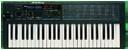
EX-800 - display non-functional (possibly not booting?)
2010-08-15 by korgex800
Hi all,

I'm the owner of an EX-800 with the HAWK-800 and AtomaHawk kits installed. The device has previously worked fine, and all upgrades have been functional. At present, however, the machine's display does not work, and I can only get it to produce the white-noise filter-ramp-up sound when switched on. Here's what happened:

My upgrade has been a bit troubled, and Mike has been very generously helping me work through difficulties. Most recently, I was experiencing a problem in which hooking up pin 18 of the AtomaHawk board to the main board caused the EX to not boot. Mike suspected this was related to a non-functional DS-1666, and he sent me a new 1666 chip to try and fix it.

I had also installed Atom's FM-800 and Moog Slayer mods, and wanted to mount the pots on the front panel of the EX. I figured that I might as well do this while I had the EX disassembled to put in the new 1666. I unplugged all of the connectors hooking the front panel up to the chassis and drilled three holes for the pots through the main logo plate KORG EX-800. I (stupidly, lazily) neglected to remove all of the PCBs from the front panel; in other words, the display/keypad board and the board that hooks up to CN6 were still bolted on to the front panel while I was drilling.

I hooked up pin 18 of the AtomaHawk board to the main board, reassembled the EX, and switched it on. The display did not switch on, and all I got out of it as audio was the filter ramping up over white noise. I disconnected pin 18 of the AH board, but the display still refuses to work.

I'm concerned that in my haste, I may have damaged the display board with vibrations from the drilling. Is there any way I could check this? Are there any other plausible culprits?

Evan