How to save patches
2005-03-03 by vvyoureyesvv
Yahoo Groups archive
Index last updated: 2026-04-03 01:27 UTC
Thread
2005-03-03 by vvyoureyesvv
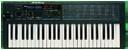
I just got a Korg Poly 800 today (without the manual) and I'm having
to manually put in all of the factory patches because I screwed it
all up without learning about it.
Has anyone ever had to do this? If so, how do you save the presets
so that they stay??
Everytime I program it, it will work for a little bit but as soon as
I go onto the next Program Number, the presets are gone from the one
I just did...? PLEASE HELP!!!
2005-03-03 by satnom2000
--- In korgpolyex@yahoogroups.com, "vvyoureyesvv"
<vvyoureyesvv@y...> wrote:
>
> I just got a Korg Poly 800 today

Congratulations!

> to manually put in all of the factory patches because I screwed it
> all up without learning about it.

You can download the factory patches from this site.  It's a wav
file.  In order to load the bank in your Poly 800, you'll have to
transfert the data with an audio jack (1/8)connect from an audio
source (walkman, computer audio out) to the cassette connection
located at the rear of the keyboard.  You have to put the little
button to the enable position and send the audio signal (kind of a
fax tone).  Don't worry, it's not workimg very efficiently, you'll
have a lot of error message, it' because you have to set the level
proprely.  A couple of try and you'll succeed.

> Has anyone ever had to do this? If so, how do you save the presets
> so that they stay??
> Everytime I program it, it will work for a little bit but as soon
as
> I go onto the next Program Number, the presets are gone from the
one

It's because yo have to store your patches.  When you programm a
sound, you have to put the little button at the rear of the keyboard
(the one for the program) at the enable position, then you press the
store button and enter the number of the patch, and go back to the
rear and put the program button to the disable position.

Voilà!  Have fun.
2005-03-03 by vvyoureyesvv
--- In korgpolyex@yahoogroups.com, "satnom2000" <satnomb@m...> wrote:
>
> --- In korgpolyex@yahoogroups.com, "vvyoureyesvv"
> <vvyoureyesvv@y...> wrote:
> >
> > I just got a Korg Poly 800 today
>
> Congratulations!
>
> > to manually put in all of the factory patches because I screwed
it
> > all up without learning about it.
>
> You can download the factory patches from this site.  It's a wav
> file.  In order to load the bank in your Poly 800, you'll have to
> transfert the data with an audio jack (1/8)connect from an audio
> source (walkman, computer audio out) to the cassette connection
> located at the rear of the keyboard.  You have to put the little
> button to the enable position and send the audio signal (kind of a
> fax tone).  Don't worry, it's not workimg very efficiently, you'll
> have a lot of error message, it' because you have to set the level
> proprely.  A couple of try and you'll succeed.
>
> > Has anyone ever had to do this? If so, how do you save the
presets
> > so that they stay??
> > Everytime I program it, it will work for a little bit but as
soon
> as
> > I go onto the next Program Number, the presets are gone from the
> one
>
> It's because yo have to store your patches.  When you programm a
> sound, you have to put the little button at the rear of the
keyboard
> (the one for the program) at the enable position, then you press
the
> store button and enter the number of the patch, and go back to the
> rear and put the program button to the disable position.
>
> Voilà!  Have fun.


Thank you for your response... I don't have a "Store" button
anywhere on my keyboard though? I have a red button that
says "Write" and then next to the numbers where you put in the
program number there are little white words the
say "save," "load," "verify," & "cancel" but I cant figure out how
to select those??
2005-03-03 by satnom2000
--- In korgpolyex@yahoogroups.com, "vvyoureyesvv"
<vvyoureyesvv@y...> wrote:
>
> --- In korgpolyex@yahoogroups.com, "satnom2000" <satnomb@m...>
wrote:
> >
> > --- In korgpolyex@yahoogroups.com, "vvyoureyesvv"
> > <vvyoureyesvv@y...> wrote:
> > >
> > > I just got a Korg Poly 800 today
> >
> > Congratulations!
> >
> > > to manually put in all of the factory patches because I
screwed
> it
> > > all up without learning about it.
> >
> > You can download the factory patches from this site.  It's a wav
> > file.  In order to load the bank in your Poly 800, you'll have
to
> > transfert the data with an audio jack (1/8)connect from an audio
> > source (walkman, computer audio out) to the cassette connection
> > located at the rear of the keyboard.  You have to put the little
> > button to the enable position and send the audio signal (kind of
a
> > fax tone).  Don't worry, it's not workimg very efficiently,
you'll
> > have a lot of error message, it' because you have to set the
level
> > proprely.  A couple of try and you'll succeed.
> >
> > > Has anyone ever had to do this? If so, how do you save the
> presets
> > > so that they stay??
> > > Everytime I program it, it will work for a little bit but as
> soon
> > as
> > > I go onto the next Program Number, the presets are gone from
the
> > one
> >
> > It's because yo have to store your patches.  When you programm a
> > sound, you have to put the little button at the rear of the
> keyboard
> > (the one for the program) at the enable position, then you press
> the
> > store button and enter the number of the patch, and go back to
the
> > rear and put the program button to the disable position.
> >
> > Voilà!  Have fun.
>
>
> Thank you for your response... I don't have a "Store" button
> anywhere on my keyboard though? I have a red button that
> says "Write" and then next to the numbers where you put in the
> program number there are little white words the
> say "save," "load," "verify," & "cancel" but I cant figure out how
> to select those??

Yes!  You are right, I mean the red button that say write.  So you
put the program button at the rear to enable position and push
write, then you'll see two dash sign, that means you have to enter
the number of the patch you want to store.
The words save, load, cancel and verify are for the cassette
loading.  Again, you put the tape rear button to enable position.
Then you push the load, start the tape and wait for a message, wich
can be Err or Good.
Good luck.