KawaiK3Zone group photo

Yahoo Groups archive

KawaiK3Zone

Index last updated: 2026-04-13 23:50 UTC

Thread

Kawai Repairs

Kawai Repairs

2003-07-10 by Stuart Williams

Hey ppl

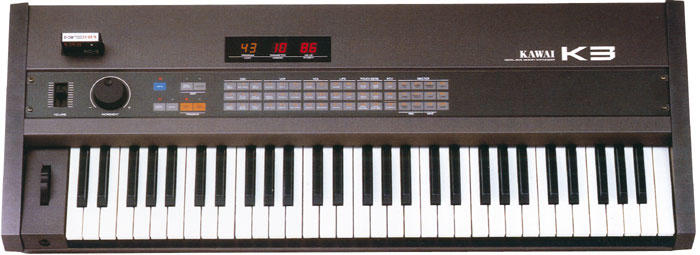
I thought I would share with you some experience I had with a very long term repair of my Kawai K3 synth. Want to know what the longest running repair job is on a K3 ?

My repair started about 10 years ago. I had a strange overheating problem with K3, it would play all sorts of strange noises once it had heated up, takes around 2 hours or so to overheat. I would then experience strange irregular sounds being generated, and the LEDs would flash erratically.

With the K3 running, I did a bit of flexing and tapping. I pulled all the boards out and examined the boards for cracks, and checked for bulging caps. Discovered a small crack on the lower PCB closest to the power supply, this was effecting one segment of the LED display! I repaired this track, and the LED display segment came up good. I waited for the K3 to heat up, to see if this fixed the other problem and experienced the same random noises etc. The boards had many dry solder joints, I would suggest a reflow to anyone who has not done so recently on the K3. I replaced most of the components on the power supply and checked and pushed nearly everything I could!

I found that around the processor board, near the processor, it was very sensitive to heat.

The processor is an Intel 8031P manufactured in 1980 (by many companies; Sanyo, Philips, Intel, MHS), its an 8-bit Microprocessor in the family of the 8051, 8052, 8054, 8058, 8751, 8752, 8754, 8758, 8032 which later evolved to 8086, 80x86....

The processor does everything, controls the display and runs the K3 operating system, ie. You press a button and you control another part of the synth. Its quite amusing to think there is a whole operating system (OS) in there chugging away.

Looking at the specifications for around then, it was NMOS technology. I suspected the processor was faulty so I sourced a replacement. I do not know a great deal about the manufacturing, but I know that CMOS reduces the heat vastly, and there is an 80C31 CMOS processor that will operate at the same voltage/pin specification as the original NMOS 8031 at half the density, which means a lot less heat. You can easily find the datasheets and verify that it is a suitable replacement.

I desoldered the original 8031 and replaced it with a socketed shiny new 80C31 processor. I fired up the K3..... and DEAD!. Nothing at all on the display. After all this it did not work at all \ufffd bullocks I say...

I went over more of the Philips 80C3X datasheets and realized the K3 may be configured to clock in the wrong way, what this thing needs is XTAL1 juice.

On the 80C31 pins 18 XTAL2 and 19 XTAL1 need to be swapped. Pin 18 should not be connected, ie. Do not ground it like the K3 does, clock the pin 19 instead (where pin 18 was connected on the board). This is very easy to fix with a DIP socket. You can simply lift out pin 18 and bend pin 19 across to fill its place.

The K3 now runs at a very low temperature, I ran it all day and all night with the new 80C31. It has been running now for a couple of weeks with no heat problems or random noises. The original processor was a power pig, this processor uses a lot less power -- CMOS replacement may be a solution to other peoples heat / power consumption problems on the K3?

Regards,

Elliot


Yahoo! Mobile
- Check & compose your email via SMS on your Telstra or Vodafone mobile.

Re: Kawai Repairs

2003-07-11 by chromal

Wow, sounds like quite an ordeal; awesome diagnosis and repair,
though.  Replacing the CPU with another (and slightly incompatible)
chip is no joke. Maybe the keyboard be problem free for the next
twenty years of its life.

Ben


--- In kawaik3zone@yahoogroups.com, Stuart Williams
<netbrowserman@y...> wrote:
> Hey ppl mobile.

Re: Kawai Repairs

2003-07-19 by jboy917

Amazing job, Elliot, congrats...  I opened up my CZ101 to change the LCD,
took one look & said 'screw that', & put it back together...  wanna do me a=
 
favor?
jonboy

--- In kawaik3zone@yahoogroups.com, Stuart Williams <netbrowserman@y...> 
wrote:
> 
> 
> 
> 
> 
> Hey ppl
> 
>  
> 
> I thought I would share with you some experience I had with a very long t=
erm 
repair of my Kawai K3 synth.  Want to know what the longest running repair =

job is on a K3 ?
> 
>  
> 
> My repair started about 10 years ago.  I had a strange overheating proble=
m 
with K3, it would play all sorts of strange noises once it had heated up, t=
akes 
around 2 hours or so to overheat.  I would then experience strange irregula=
r 
sounds being generated, and the LEDs would flash erratically.
> 
>  
> 
> With the K3 running, I did a bit of flexing and tapping.  I pulled all th=
e boards 
out and examined the boards for cracks, and checked for bulging caps.  
Discovered a small crack on the lower PCB closest to the power supply, this=
 
was effecting one segment of the LED display!   I repaired this track, and =
the 
LED display segment came up good.  I waited for the K3 to heat up, to see i=
f 
this fixed the other problem and experienced the same random noises etc.  T=
he 
boards had many dry solder joints, I would suggest a reflow to anyone who h=
as 
not done so recently on the K3.  I replaced most of the components on the 
power supply and checked and pushed nearly everything I could!
> 
>  
> 
> I found that around the processor board, near the processor, it was very =

sensitive to heat.
> 
>  
> 
> The processor is an Intel 8031P manufactured in 1980 (by many companies; =

Sanyo, Philips, Intel, MHS), its an 8-bit Microprocessor in the family of t=
he 
8051, 8052, 8054, 8058, 8751, 8752, 8754, 8758, 8032 which later evolved 
to  8086, 80x86....  
> 
>  
> 
> The processor does everything, controls the display and runs the K3 
operating system, ie. You press a button and you control another part of th=
e 
synth.  Its quite amusing to think there is a whole operating system (OS) i=
n 
there chugging away.
> 
>  
> 
> Looking at the specifications for around then, it was NMOS technology.  I=
 
suspected the processor was faulty so I sourced a replacement.  I do not kn=
ow 
a great deal about the manufacturing, but I know that CMOS reduces the heat=
 
vastly, and there is an 80C31 CMOS processor that will operate at the same =

voltage/pin specification as the original NMOS 8031 at half the density, wh=
ich 
means a lot less heat.  You can easily find the datasheets and verify that =
it is 
a suitable replacement.
> 
>  
> 
> I desoldered the original 8031 and replaced it with a socketed shiny new =

80C31 processor.  I fired up the K3..... and DEAD!.  Nothing at all on the =
display. 
After all this it did not work at all – bullocks I say...
> 
>  
> 
> I went over more of the Philips 80C3X datasheets and realized the K3 may =
be 
configured to clock in the wrong way, what this thing needs is XTAL1 juice.=

> 
>  
> 
> On the 80C31 pins 18 XTAL2 and 19 XTAL1 need to be swapped.  Pin 18 shoul=
d 
not be connected, ie. Do not ground it like the K3 does, clock the pin 19 i=
nstead 
(where pin 18 was connected on the board).  This is very easy to fix with a=
 DIP 
socket.  You can simply lift out pin 18 and bend pin 19 across to fill its =
place.
> 
>  
> 
> The K3 now runs at a very low temperature, I ran it all day and all night=
 with 
the new 80C31.  It has been running now for a couple of weeks with no heat =

problems or random noises.  The original processor was a power pig, this 
processor uses a lot less power -- CMOS replacement may be a solution to 
other peoples heat / power consumption problems on the K3?
Show quoted textHide quoted text
> 
>  
> 
> Regards,
> 
> Elliot
> 
> 
> 
> 
> ---------------------------------
> Yahoo! Mobile
> - Check & compose your email via SMS on your Telstra or Vodafone mobile.

Move to quarantaine

This moves the raw source file on disk only. The archive index is not changed automatically, so you still need to run a manual refresh afterward.