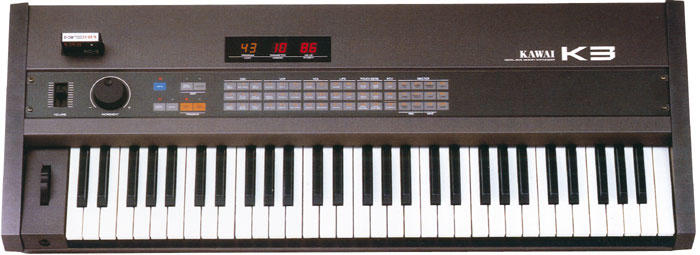
KawaiK3Zone group photo

Yahoo Groups archive

KawaiK3Zone

Index last updated: 2026-04-13 23:50 UTC

Thread

How to upgrade the K3 OS chip!

How to upgrade the K3 OS chip!

2004-03-26 by travesty14850

Hey all--I just added some photos to the photo section to accompany
this little tutorial--I have just replaced the OS chip in my K3 and is
was quite easy!  Here's how to do it, in ten easy steps.  Good luck!

HOW TO UPDATE YOUR KAWAI K3 OPERATING SYSTEM

1. To see if you have the latest OS, save your patches to your
computer or an RC-2 cartridge.  Then reset the synth to the factory
patches by turning it on while the bottom three keys are pressed.  Try
patch 49.  If it's the sound of a jet taking off, you've already got
it!  If it's a helicopter, you could use the upgrade.

2. Send an email to emitechnical@..., saying that you would
like the latest version of the K3 OS.  Give your credit card
information and address; they will charge you $95, which will be
refunded when you send the old chip back to them.  BE CAREFUL not to
damage the old chip--it has to be completely intact if you want your
refund.  They won't refund the shipping, but the upgrade is worth ten
bucks, in my opinion.

3. When the chip comes, get out your K3.  Unplug the synth and
discharge any static electric charge you might have built up.  Remove
the four screws on the front panel, and the two similar ones on the
sides of the back panel. Lift the front panel.  It ought to lift up
very smoothly on its hinges (Fig. 1).

4. There are several chips in the K3 that are the same size as the OS
chip. The one you want (Fig. 1, circled in yellow) is on the underside
of the front panel. It will have a sticker on it reading KAWAI 5P36,
followed by a letter.  The letter roughly corresponds to the software
version on the chip.  Mine was G; on your new chip, it will be I.

5. Using a right-angle screwdriver or chip extractor, gently pry the
chip (Fig. 2) out of its socket.  Do this carefully and gradually,
making sure that you don't bend the pins, damage the socket, or crush
the capacitor soldered just above the chip.  Remember which end of the
chip has a notch in it, because you will have to install the new one
in the same direction.

6. Remove the new chip from its bag and size it up against the empty
socket. The distance between the two rows of pins may be a bit wide. 
If so, lay the chip on its side on a flat surface and GENTLY bend each
row of pins in a little.  BE CAREFUL!  When the pins will comfortably
fit in their places in the socket, press in the chip, FACING THE RIGHT
WAY, firmly but, again, gently.

7. Close the lid and replace the screws.  Put the old chip away in the
box your new chip arrived in.  Plug in the K3 and turn it on while
pressing down the three bottom keys (this includes the black one). 
Now try out patch 49. If it's a jet, your OS is installed!

8. Play the synth a bit using a familiar patch--one that employs
aftertouch. You'll notice a considerable difference--the aftertouch is
more sensitive and has a greater range.  It should be pretty clear
that the expressive potential of the synth has increased!  I also
found my patches to have a bit more depth and dimension, but I might
be kidding myself.

9. Return the chip (insured!) to Kawai America Corp. / ATTN: TSD /
2055 E. University Drive / Compton, CA 90220.  Include an explanation
of what it is and why you're returning it, your credit card info
again, and the packing slip from the box.  Remind them about the 95 bucks!

10. Finally, enjoy your K3, and participate in the resurrection of this
fine, unsung instrument!

Best,
John

Re: [kawaik3zone] How to upgrade the K3 OS chip!

2004-03-26 by anyone@t-online.de

hi -
thanks for uploading and investigating - great !
what os version does your k3 now run ?
mine is 1.01 here -
i had the following problem:
couldn't get sysex to work -
in  the system menue I couldn't scroll down to menue point 6 to enable the
receive of sysex.
in mine 1.01 it just has point 5 as last to scroll down.
does this change with the latest os?

nik

Hey all--I just added some photos to the photo section to accompany
this little tutorial--I have just replaced the OS chip in my K3 and is
was quite easy!  Here's how to do it, in ten easy steps.  Good luck!

HOW TO UPDATE YOUR KAWAI K3 OPERATING SYSTEM

1. To see if you have the latest OS, save your patches to your
computer or an RC-2 cartridge.  Then reset the synth to the factory
patches by turning it on while the bottom three keys are pressed.  Try
patch 49.  If it's the sound of a jet taking off, you've already got
it!  If it's a helicopter, you could use the upgrade.

2. Send an email to emitechnical@..., saying that you would
like the latest version of the K3 OS.  Give your credit card
information and address; they will charge you $95, which will be
refunded when you send the old chip back to them.  BE CAREFUL not to
damage the old chip--it has to be completely intact if you want your
refund.  They won't refund the shipping, but the upgrade is worth ten
bucks, in my opinion.

3. When the chip comes, get out your K3.  Unplug the synth and
discharge any static electric charge you might have built up.  Remove
the four screws on the front panel, and the two similar ones on the
sides of the back panel. Lift the front panel.  It ought to lift up
very smoothly on its hinges (Fig. 1).

4. There are several chips in the K3 that are the same size as the OS
chip. The one you want (Fig. 1, circled in yellow) is on the underside
of the front panel. It will have a sticker on it reading KAWAI 5P36,
followed by a letter.  The letter roughly corresponds to the software
version on the chip.  Mine was G; on your new chip, it will be I.

5. Using a right-angle screwdriver or chip extractor, gently pry the
chip (Fig. 2) out of its socket.  Do this carefully and gradually,
making sure that you don't bend the pins, damage the socket, or crush
the capacitor soldered just above the chip.  Remember which end of the
chip has a notch in it, because you will have to install the new one
in the same direction.

6. Remove the new chip from its bag and size it up against the empty
socket. The distance between the two rows of pins may be a bit wide.
If so, lay the chip on its side on a flat surface and GENTLY bend each
row of pins in a little.  BE CAREFUL!  When the pins will comfortably
fit in their places in the socket, press in the chip, FACING THE RIGHT
WAY, firmly but, again, gently.

7. Close the lid and replace the screws.  Put the old chip away in the
box your new chip arrived in.  Plug in the K3 and turn it on while
pressing down the three bottom keys (this includes the black one).
Now try out patch 49. If it's a jet, your OS is installed!

8. Play the synth a bit using a familiar patch--one that employs
aftertouch. You'll notice a considerable difference--the aftertouch is
more sensitive and has a greater range.  It should be pretty clear
that the expressive potential of the synth has increased!  I also
found my patches to have a bit more depth and dimension, but I might
be kidding myself.

9. Return the chip (insured!) to Kawai America Corp. / ATTN: TSD /
2055 E. University Drive / Compton, CA 90220.  Include an explanation
of what it is and why you're returning it, your credit card info
again, and the packing slip from the box.  Remind them about the 95 bucks!

10. Finally, enjoy your K3, and participate in the resurrection of this
fine, unsung instrument!

Best,
John


Yahoo! Groups Sponsor   ADVERTISEMENT


Yahoo! Groups Links
To visit your group on the web, go to:
http://groups.yahoo.com/group/kawaik3zone/
 
To unsubscribe from this group, send an email to:
kawaik3zone-unsubscribe@yahoogroups.com
<mailto:kawaik3zone-unsubscribe@yahoogroups.com?subject=Unsubscribe>
 
Your use of Yahoo! Groups is subject to the Yahoo! Terms of Service
<http://docs.yahoo.com/info/terms/> .

Re: How to upgrade the K3 OS chip!

2004-03-26 by travesty14850

Hmmm, I dunno, actually.  I haven't even used Sysex yet on the
K3--I've just been putting my patches onto a cartridge.  I just
checked though, and despite the upgrade, that parameter indeed only
goes up to five!  Surely somebody here has the answer?

However, that "1 - 01" that appears when you power up is not the
version number, I've found out.  It says "1 - 01" regardless of the OS
version--the software version doesn't get displayed anywhere as far as
I know--the only surefire way I'm aware of to find out what you've got
is to try factory patch 49 and see if it's a helicopter or jet, or to
look at the letter on the chip.

J.

> hi -
> thanks for uploading and investigating - great !
> what os version does your k3 now run ?
> mine is 1.01 here -
> i had the following problem:
> couldn't get sysex to work -
> in  the system menue I couldn't scroll down to menue point 6 to
enable the
Show quoted textHide quoted text
> receive of sysex.
> in mine 1.01 it just has point 5 as last to scroll down.
> does this change with the latest os?
> 
> nik

Move to quarantaine

This moves the raw source file on disk only. The archive index is not changed automatically, so you still need to run a manual refresh afterward.