Yahoo Groups archive

Disklavier

Index last updated: 2026-04-28 23:20 UTC

Thread

Disklavier Mark II PPG100R/DKC100R not recording properly

Disklavier Mark II PPG100R/DKC100R not recording properly

2019-04-16 by bill@...-a-geek.com

Greetings,

I just joined this group. Hopefully, I am behaving O.K.

A am a resident of Japan. In 2017, I bought a used Yamaha C3 with a Disklavier, PPG100R which translates to a US DKC100R. The piano is relatively old. However, the technician who went with me told me it was in pristine condition. Indeed it is, no scratches and the sound is good, good enough for me to practice.

When the movers brought in the piano, they tested the playing of the Disklavier by inserting a prerecorded disk of classical music. So far, so good.

When I tried to record, at first, all I was able to do was record the activation of the pedal, they keys would not record. Later, I was able to play some notes. However, the playback was sporadic, only a few of the notes played back.

Somehow, I think that the piano keys are not properly registering with the control unit. I have been able to get into maintenance mode and test "Keyboard Measurement" routine. No problems there. I am not sure where I can go from here. Although I have learned to tune the piano, I am reluctant to take things apart, unless.

Any ideas/suggestions are welcome.

Thanks,

Bill
Re: [disklavier] Disklavier Mark II PPG100R/DKC100R not recording properly

2019-04-16 by GDPERRY@...

When we moved my DC6A to a new home I had a similar problem which was caused by a broken wire from the keyboard to the electronics. It was one wire of many in a flat cable. Fortunately, there was enough extra cable so that I could splice the wire with a small wire nut. Apparently, the movers broke or pinched the wire during assembly or disassembly.Hope your problem is as simple,Glen Perry
In a message dated 4/16/2019 12:57:45 AM Central Standard Time, disklavier@yahoogroups.com writes:


Greetings,

I just joined this group. Hopefully, I am behaving O.K.

A am a resident of Japan.  In 2017, I bought a used Yamaha C3 with a Disklavier, PPG100R which translates to a US DKC100R. The piano is relatively old. However, the technician who went with me told me it was in pristine condition. Indeed it is, no scratches and the sound is good, good enough for me to practice. 

When the movers brought in the piano, they tested the playing of the Disklavier by inserting a prerecorded disk of classical music. So far, so good. 

When I tried to record, at first, all I was able to do was record the activation of the pedal, they keys would not record. Later, I was able to play some notes. However, the playback was sporadic, only a few of the notes played back.  

Somehow, I think that the piano keys are not properly registering with the control unit. I have been able to get into maintenance mode and test "Keyboard Measurement" routine. No problems there. I am not sure where I can go from here. Although I have learned to tune the piano, I am reluctant to take things apart, unless.

Any ideas/suggestions are welcome.

Thanks,

Bill
Re: Disklavier Mark II PPG100R/DKC100R not recording properly

2019-04-16 by bill@...-a-geek.com

Hi,

Can you play piano on a floppy disk normally?

Yes. I was able to play prerecorded floppies. I presume that they were original from the initial purchase.

Can you measure the keyboard(maintenance mode→Keyboard measurement)
but can not record your performance?

Yes. I did the Keyboard measurement routine. Loud and clear.

Can you enter the test mode and check the key and hammer sensor?

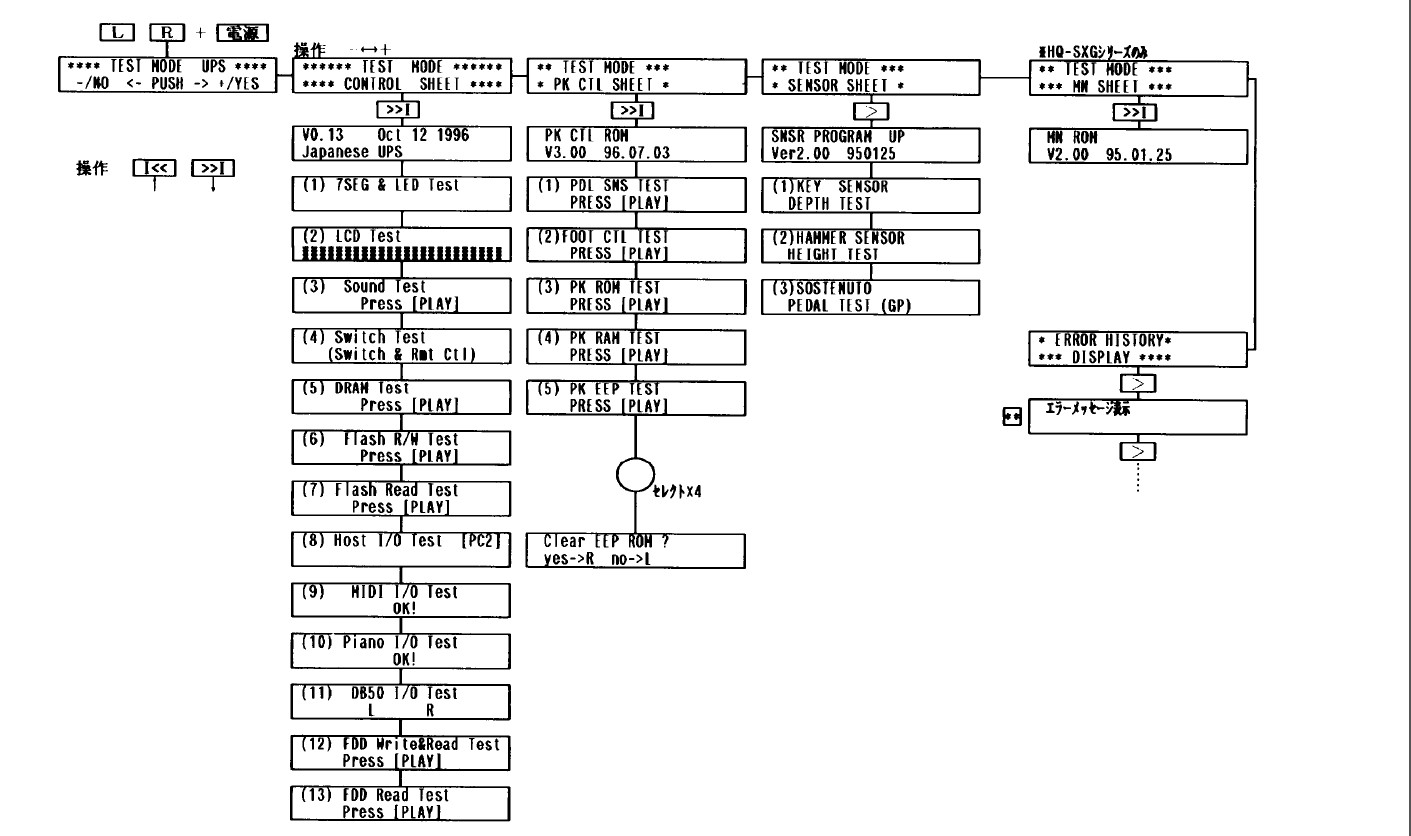
Yes, I was able to enter Test Mode and navigate to the Key and Hammer Sensor pages. However, nothing happened. I am not sure on how to activate that test or if it is an automated procedure. For example, I get to the Sensor sheet test:

(1) KEY SENSOR DEPTH TEST

However, I cannot get to the screen:

(1) KEY TEST KEY NUMBER= xx

With recording, I hooked up the MIDI cables to my Mac and was able to record to Garage Band. Only a few of the notes were recorded, but with extremely low velocity.

I think that this is where I might need to do more checking. Weak velocity on MIDI output to the computer and just a few notes when played back from the console.

Bill


Re: Disklavier Mark II PPG100R/DKC100R not recording properly

2019-04-17 by bill@...-a-geek.com

Hi,

I am resending this. I am not sure if my responses are being moderated. Apologies if it seems duplicated.

"Can you play piano on a floppy disk normally?"

Yes. I did that without a problem.

"Can you measure the keyboard(maintenance mode→Keyboard measurement) but can not record your performance?"

Yes, this is the problem

"Can you enter the test mode and check the key and hammer sensor?"

Yes. I was able to enter test mode and see the screens for key and hammer check. However, I am not sure on how to activate the sensor.

Bill

Re: [disklavier] Disklavier Mark II PPG100R/DKC100R not recording properly

2019-04-17 by tnmshd@...

Hi Bill

 I do not recommend erasing the EEP-ROM.
 All maintenance information is erased and has a negative effect.

 I would advise you to check following points.

If you can remove the keyboard lid, check the  sensor connector ( around 88C key)
reconnect the D-sub control cable.

Test mode--- Error history display ---Error message.

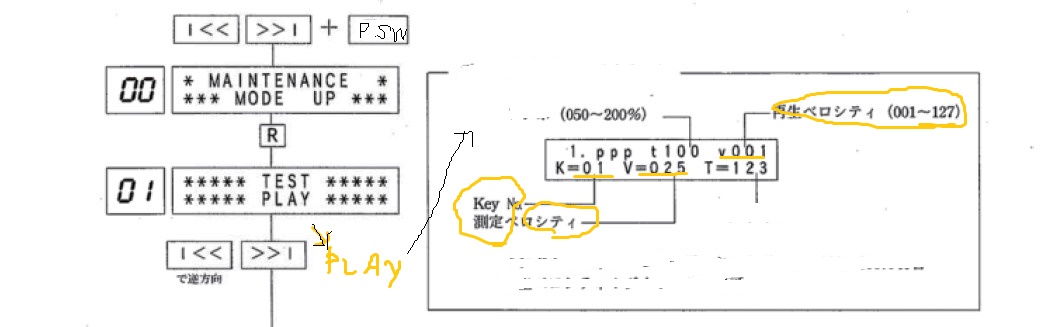
Maintenance mode ---Test play ----pp,---- Key No, and Velocity(V,v)

Attachments

Re: [disklavier] Disklavier Mark II PPG100R/DKC100R not recording properly

2019-04-18 by bill@...-a-geek.com

Hello,

> If you can remove the keyboard lid, check the sensor connector ( around 88C key)
> reconnect the D-sub control cable.
>

I did that.

> Test mode--- Error history display ---Error message.

I get two errors:

08 SENSOR
LED ON ERROR !

09 SENSOR
NOT CONNECTED !

> Maintenance mode ---Test play ----pp,---- Key No, and Velocity(V,v)

I was able to get this working. The piano executes a chromatic scale to 88C. However, some keys sound weaker than others.

Bill

Move to quarantaine

This moves the raw source file on disk only. The archive index is not changed automatically, so you still need to run a manual refresh afterward.