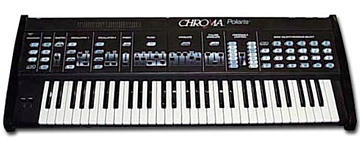
> I'm wondering how to use all 6 extra midi channels,
> and assign different patches to midi different channels...

You won't be able to have the Polaris 'send' data on 6 channels; however,
you can certainly have it simultaneously receive on 6 channels, and to be
playing up to 6 different sounds/patches.

The only real extra step is to program the Polaris to use the 'extra'
channels.

To do this, you'll use the "Lower Function" "K" selection (MIDI Channel
Selection).

Buttons 1-6 will set the base channel of the Polaris.

You can then use 7-12 to select how many 'extra' channels the polaris should
respond to.

You can actually have up to 8 channels being listened to (base -> base+7);
however, at any one time only 6 instruments can be sounding.

Here's an example configuration:

- LF-K to get into MIDI Channel Select mode
- Turn 2, 3, 4, 5 and 6 off.  Turn 1 on.  This will set the base MIDI
Channel as "1"
- Turn 10 on.  This will allow the use of base, base+1, base+2, base+3,
base+4 and base +5.

Now - you should be able to use your sequencer to control the polaris on
channels 1, 2, 3, 4, 5 and 6.

If you do a program select over midi on each of these channels, you can have
your 6 channels active at once.

If you have any problems setting this up - just let us know.
Message
Re: [chromapolaris] midi extra channels
2006-07-22 by David Clarke
Attachments
- No local attachments were found for this message.