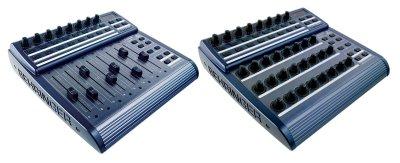
Bc2000 (for the BCF2000 & BCR2000) group photo

Yahoo Groups archive

Bc2000 (for the BCF2000 & BCR2000)

Index last updated: 2026-04-28 23:16 UTC

Thread

Bcr2k Live Mackie preset version 5.0

Bcr2k Live Mackie preset version 5.0

2008-12-12 by k5kip_1999

I have posted a new mackie preset.
It includes stefan_soundstudies dpots for native live support of
device control, as well as his fix for the Returns button to stay lite
when on.

It also includes peter_resolent's idea for 8 cursor up/downs and clip
fire push buttons.  These 8 are on the top row of encoders, that can
be banked!  So they can control tracks 1-8 or 9-16 or 17-24 etc... by
using the back buttons.
They automatically select the track when you turn them, the move thru
the clips of a track, when you have selected the clip you want, push
the knob down and the selected clip will fire.  Opt + knob push = stop
selected clip.


Alas - rec arms were removed for this feature.
Perhaps we need a performance oriented mackie preset and a
recording/mixing oriented mackie preset...

Vpots were moved to the top row.  
No vpots when clip_fires selected.
D. pots are always available.

I will put this on the the genmce bcr2000 site soon.


Below is an image of the changes from the BCmanager program.


[URL=http://img258.imageshack.us/my.php?image=bcrlivever50layoutff5.gif][IMG]http://img258.imageshack.us/img258/6998/bcrlivever50layoutff5.th.gif[/IMG][/URL]

Re: Bcr2k Live Mackie preset version 5.0

2008-12-13 by k5kip_1999

This file is also hosted at my BCR 2000 site.

http://shoshin.110mb.com/genmce/bcr2000/Presets/presets.htm

I have a few more ideas I am trying to iron out
like moving the plugins sends and pans to the group encoder buttons.
If I did that I would at least remove 1 button push to get to a plugin
control using the vpots.
I'll post it when I get something going.

Can someone who knows Adobe Illustrator make a nice overlay?
I know there are some overlays posted for the bcr, I tried to edit
them, but I can figure out how to use AI.  I have it on this work
machine, but I have never used it. I can open the layouts but I can't
figure out how to add text where it should go, can someone make a nice
overlay for version 5.0, I will add it to the download.


Kip
--- In bc2000@yahoogroups.com, "k5kip_1999" <k5kip_1999@...> wrote:
>
> I have posted a new mackie preset.
> It includes stefan_soundstudies dpots for native live support of
> device control, as well as his fix for the Returns button to stay lite
> when on.
> 
> It also includes peter_resolent's idea for 8 cursor up/downs and clip
> fire push buttons.  These 8 are on the top row of encoders, that can
> be banked!  So they can control tracks 1-8 or 9-16 or 17-24 etc... by
> using the back buttons.
> They automatically select the track when you turn them, the move thru
> the clips of a track, when you have selected the clip you want, push
> the knob down and the selected clip will fire.  Opt + knob push = stop
> selected clip.
> 
> 
> Alas - rec arms were removed for this feature.
> Perhaps we need a performance oriented mackie preset and a
> recording/mixing oriented mackie preset...
> 
> Vpots were moved to the top row.  
> No vpots when clip_fires selected.
> D. pots are always available.
> 
> I will put this on the the genmce bcr2000 site soon.
> 
> 
> Below is an image of the changes from the BCmanager program.
> 
> 
>
[URL=http://img258.imageshack.us/my.php?image=bcrlivever50layoutff5.gif][IMG]http://img258.imageshack.us/img258/6998/bcrlivever50layoutff5.th.gif[/IMG][/URL]
>

RE: [bc2000] Re: Bcr2k Live Mackie preset version 5.0

2008-12-19 by James Glover

Wow...

This stuff is amazing, and I'm so excited at the prospect of really getting into dj'ing with Ableton using my BCR2000 in Mackie Mode. I've installed this v.5 and I'm starting to get the hang of it. It's so cool being able to move around and trigger clips without using the mouse.

I have to say though I am more than a little amateur with the whole thing, and so far I'm a bit confused.

I first of installed 'Bcr_Live_ver5_0 .syx' and this seems to load and store a configuration into preset 26. It also loads one into preset 22, but doesn't save it, so unless you use another midi file to do that, it disappears as soon as you move to another preset.

When I install 'Bcr_Live_ver5_0_store22 .syx', it loads both the same, and saves them both.

This is all ok, but from reading the manual and the emails, I thought it was preset 22 that was the new one? I'm confused because the 'clip fire' thing only works in preset 26, making me think that preset 26 is actually the new one.

The top row of rotary switches (the encoders?) light up half the way round on preset 22 to show the position of the fader in ableton, but in preset 26 there are no leds lighting up on the encoders at all? This seems a bit of a shame as they are quite useful?

The row of rotarys second from the bottom (the middle row on the main part of the console) don't seem to do anything either. In the youtube video they control the faders, but whilst the leds go around they don't actually appear to do anything in ableton.

I'm sure I'm misunderstanding some things here, and help would be very gratfully received!
Thanks :)
James.


To: bc2000@yahoogroups.com
From: k5kip_1999@...
Date: Sat, 13 Dec 2008 15:25:14 +0000
Subject: [bc2000] Re: Bcr2k Live Mackie preset version 5.0


This file is also hosted at my BCR 2000 site.

http://shoshin.110mb.com/genmce/bcr2000/Presets/presets.htm

I have a few more ideas I am trying to iron out
like moving the plugins sends and pans to the group encoder buttons.
If I did that I would at least remove 1 button push to get to a plugin
control using the vpots.
I'll post it when I get something going.

Can someone who knows Adobe Illustrator make a nice overlay?
I know there are some overlays posted for the bcr, I tried to edit
them, but I can figure out how to use AI. I have it on this work
machine, but I have never used it. I can open the layouts but I can't
figure out how to add text where it should go, can someone make a nice
overlay for version 5.0, I will add it to the download.

Kip
--- In bc2000@yahoogroups.com, "k5kip_1999" ...> wrote:
>
> I have posted a new mackie preset.
> It includes stefan_soundstudies dpots for native live support of
> device control, as well as his fix for the Returns button to stay lite
> when on.
>
>; It also includes peter_resolent's idea for 8 cursor up/downs and clip
> fire push buttons. These 8 are on the top row of encoders, that can
> be banked! So they can control tracks 1-8 or 9-16 or 17-24 etc... by
> using the back buttons.
> They automatically select the track when you turn them, the move thru
> the clips of a track, when you have selected the clip you want, push
> the knob down and the selected clip will fire. Opt + knob push = stop
> selected clip.
>
>
> Alas - rec arms were removed for this feature.
> Perhaps we need a performance oriented mackie preset and a
> recording/mixing oriented mackie preset...
>
> Vpots were moved to the top row.
> No vpots when clip_fires selected.
> D. pots are always available.
>
> I will put this on the the genmce bcr2000 site soon.
>
>
> Below is an image of the changes from the BCmanager program.
>
>
>
[URL=http://img258.imageshack.us/my.php?image=bcrlivever50layoutff5.gif][IMG]http://img258.imageshack.us/img258/6998/bcrlivever50layoutff5.th.gif[/IMG][/URL]
>


Great search results, great prizes. BigSnapSearch.com Search now

Re: Bcr2k Live Mackie preset version 5.0

2008-12-20 by k5kip_1999

Thanks James,
You have found some errors in my syx files.

I will upload a new version that will contain presets for vpots on top
as well as faders...
I just can't decide which I like better.
I will upload in a few, revising the document now.

The problem with the leds on the vpots is they put out relative data
and that really can't be shown very well on the leds.
The faders are will show levels.
I will upload shortly.
Kip


--- In bc2000@yahoogroups.com, James Glover <james.glover@...> wrote:
>
> 
> Wow...
>  
> This stuff is amazing, and I'm so excited at the prospect of really
getting into dj'ing with Ableton using my BCR2000 in Mackie Mode. I've
installed this v.5 and I'm starting to get the hang of it. It's so
cool being able to move around and trigger clips without using the mouse.
>  
> I have to say though I am more than a little amateur with the whole
thing, and so far I'm a bit confused.
>  
> I first of installed 'Bcr_Live_ver5_0 .syx' and this seems to load
and store a configuration into preset 26. It also loads one into
preset 22, but doesn't save it, so unless you use another midi file to
do that, it disappears as soon as you move to another preset.
>  
> When I install 'Bcr_Live_ver5_0_store22 .syx', it loads both the
same, and saves them both.
>  
> This is all ok, but from reading the manual and the emails, I
thought it was preset 22 that was the new one? I'm confused because
the 'clip fire' thing only works in preset 26, making me think that
preset 26 is actually the new one.
>  
> The top row of rotary switches (the encoders?) light up half the way
round on preset 22 to show the position of the fader in ableton, but
in preset 26 there are no leds lighting up on the encoders at all?
This seems a bit of a shame as they are quite useful?
>  
> The row of rotarys second from the bottom (the middle row on the
main part of the console) don't seem to do anything either. In the
youtube video they control the faders, but whilst the leds go around
they don't actually appear to do anything in ableton.
>  
> I'm sure I'm misunderstanding some things here, and help would be
very gratfully received!
> Thanks :)
> James.
> 
> 
> 
> To: bc2000@...: k5kip_1999@...: Sat, 13 Dec 2008 15:25:14
+0000Subject: [bc2000] Re: Bcr2k Live Mackie preset version 5.0
> 
> 
> 
> This file is also hosted at my BCR 2000
site.http://shoshin.110mb.com/genmce/bcr2000/Presets/presets.htmI have
a few more ideas I am trying to iron outlike moving the plugins sends
and pans to the group encoder buttons.If I did that I would at least
remove 1 button push to get to a plugincontrol using the vpots.I'll
post it when I get something going.Can someone who knows Adobe
Illustrator make a nice overlay?I know there are some overlays posted
for the bcr, I tried to editthem, but I can figure out how to use AI.
I have it on this workmachine, but I have never used it. I can open
the layouts but I can'tfigure out how to add text where it should go,
can someone make a niceoverlay for version 5.0, I will add it to the
download.Kip--- In bc2000@...m, "k5kip_1999" <k5kip_1999@>
wrote:>> I have posted a new mackie preset.> It includes
stefan_soundstudies dpots for native live support of> device control,
as well as his fix for the Returns button to stay lite> when on.> > It
also includes peter_resolent's idea for 8 cursor up/downs and clip>
fire push buttons. These 8 are on the top row of encoders, that can>
be banked! So they can control tracks 1-8 or 9-16 or 17-24 etc... by>
using the back buttons.> They automatically select the track when you
turn them, the move thru> the clips of a track, when you have selected
the clip you want, push> the knob down and the selected clip will
fire. Opt + knob push = stop> selected clip.> > > Alas - rec arms were
removed for this feature.> Perhaps we need a performance oriented
mackie preset and a> recording/mixing oriented mackie preset...> >
Vpots were moved to the top row. > No vpots when clip_fires selected.>
D. pots are always available.> > I will put this on the the genmce
bcr2000 site soon.> > > Below is an image of the changes from the
BCmanager program.> >
Show quoted textHide quoted text
>[URL=http://img258.imageshack.us/my.php?image=bcrlivever50layoutff5.gif][IMG]http://img258.imageshack.us/img258/6998/bcrlivever50layoutff5.th.gif[/IMG][/URL]>

> 
> 
> 
> 
> 
> _________________________________________________________________
> Get a bird's eye view of the world with Multimap
> http://clk.atdmt.com/GBL/go/115454059/direct/01/
>

Move to quarantaine

This moves the raw source file on disk only. The archive index is not changed automatically, so you still need to run a manual refresh afterward.