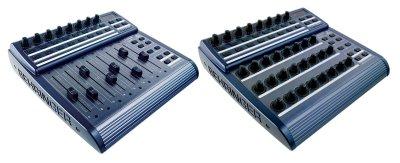
Bc2000 (for the BCF2000 & BCR2000) group photo

Yahoo Groups archive

Bc2000 (for the BCF2000 & BCR2000)

Index last updated: 2026-04-28 23:16 UTC

Thread

using bcf2000 to control roland mks-7 via sysex

using bcf2000 to control roland mks-7 via sysex

2008-11-02 by teddy.stuart10

I posted a topic on this a long time ago, but I do not know a thing about editing sysex or 
really how to load a preset onto the bcf2000. I started to look for an editor, but couldn't find 
one for mac. 
Can anybody explain to an ignorant user like me how to at least START going about using 
this midi controller to send sysex messages to a Roland MKS-7? 
In the last post it was recommended to begin with the mks-50 patch but I do not know how 
to even go about this. (Also I've heard that perhaps they are not very similar to each other in 
this regard0
anyways, any dumbed down help would be GREATLY appreciated. In fact, I'm willing to paypal 
somebody $$ if they can create an MKS-7 preset for me! Seriously

Re: using bcf2000 to control roland mks-7 via sysex

2008-11-04 by rpcfender

Hi,
I am happy to help you if I can.
I assume you have the manual? If not there are copies on the web.

The steps I use in the process.
1) What do you want to control?
    Do a layout and decide what knob changes what parameter. (Note the
top row of encoders - the ones with push switches in
        them- are like 4 rows of 8 knobs. the rows are swapped by
pressing the group buttons on the right.)
    This is the thing that usually takes the longest time for me.
    So on the BCF you can have
          4 rows of eight push switches (Buttons 1 to 32)
          4 rows of eight rotary encoders (Encoders 1 to 32)
          2 rows of eight buttons  (Buttons 33 to 48)
          8 faders (Fader 1 to 8)
          4 Switches on the bottom right (Buttons 49 to 52)
    We can take over some of the other switches as well if needed, but
try to keep it to the above list.
    Once this is done post it to the group or to me.
2) Make sure there is a sysex message that will control the MKS-7
(usually there is) in the back of the manual
3) Use an editor to write the preset
4) Test the message coming out of the BC to make sure it is correct (I
use MidiOX to check)


> I posted a topic on this a long time ago, but I do not know a thing
about editing sysex or
> really how to load a preset onto the bcf2000. I started to look for an
editor, but couldn't find
> one for mac.
There is a Java editor that sort of works, but there are Mac programs to
send sysex code to the BC
There are Windows emulators that will let you run Marks PC editor (I
think this is correct. Any Mac users out there to help here?)

> Can anybody explain to an ignorant user like me how to at least START
going about using
> this midi controller to send sysex messages to a Roland MKS-7?
Only limited Sysex messages can be programmed by the front panel so you
need and editor to get it working with the MKS7

> In the last post it was recommended to begin with the mks-50 patch but
I do not know how
> to even go about this. (Also I've heard that perhaps they are not very
similar to each other in
> this regard0
> anyways, any dumbed down help would be GREATLY appreciated. In fact,
I'm willing to paypal
> somebody $$ if they can create an MKS-7 preset for me! Seriously

I would but I don't have a MKS-7 to test it on.
My guess is that you really need to get Mark's editor going on the Mac.

Royce

Re: using bcf2000 to control roland mks-7 via sysex

2008-11-04 by Mark van den Berg

--- In bc2000@yahoogroups.com, "rpcfender" <rpcfender@...> wrote:
> There are Windows emulators that will let you run Marks PC editor (I
> think this is correct. Any Mac users out there to help here?)

> My guess is that you really need to get Mark's editor going on the Mac.

Several months ago the question of a Mac editor came up as well - at
that time I suggested using BC Manager from a Windows guest OS too,
but no response came to that suggestion, so it may have been total
nonsense, but let me try to explain again:

Personally I use Sun's (free!) VirtualBox "virtual machine"
application (see virtualbox.org) to run several kinds of guest
operating systems (other Windows versions, several Linux
distributions, and the new OpenSolaris) under my host OS (Windows XP).
It's helped me a lot in developing BC Manager.
In this situation, VirtualBox's USB facilities are very good (at least
for Windows XP and Vista guests): after some fiddling, I've even
managed to install Behringer's USB drivers within the guest OS and
then run BC Manager from that guest OS "as normal".

There is also a VirtualBox version for Mac OS hosts. Using that
program you might be able to run e.g. Windows XP as a guest OS on your
Mac, and if you can get the USB connection to work from the guest OS
you might then be able to run BC Manager from that guest OS. Kind of
complicated, no doubt, but if you're really desperate...

Mark.

Move to quarantaine

This moves the raw source file on disk only. The archive index is not changed automatically, so you still need to run a manual refresh afterward.