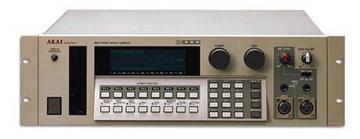
Akai S1000 / S1100 samplers group photo

Yahoo Groups archive

Akai S1000 / S1100 samplers

Index last updated: 2026-04-28 23:15 UTC

Thread

[akaiS1000S1100Samplers] S1100 Software for PC/Atari? (+S950 Freezing up)

Re: [akaiS1000S1100Samplers] S1100 Software for PC/Atari? (+S950 Freezing up)

2008-01-22 by PeWe

Hi !

Emagic Sounddiver for PC and Mac includes a program-editor module for the Akai S-1100.
It´s discontinued, so to have to find it used @ebay.
There´s also a Sounddiver users group @yahoo.
Probably you´ll find more info there.
Sounddiver runs with Windows systems from Win95 to Win 2000 AFAIK ( or a MAC OS 8 up to 9.2)

CDXtract might be the program which allows you to burn and store Akai CD-ROM images in S1000/S1100 format on a PC as also to built up a library of samples.

For sample transfer, you´ll need a (Adaptec) SCSI PCI card for the PC w/ a 50pin Centronics connector, a SCSI hard drive not larger than 540MB (or 1GB which you format to 540MB) and a compatible older CD-ROM drive for the S1100.

If you have written your S1100 library as AKAI CD-ROM images w/ CDXtract, you can burn original AKAI format CDs from this and read this CDs content w/ the external CD-ROM drive into your S-1100 and store a selection of Samples/programs onto the external SCSI harddrive being connected together w/ the CD ROM drive in a SCSI chain.

In addition, a good sample editor which supports the S1000/S1100 is a good idea.

Forget the ATARI for sample editing, it´s good for midi but sample transfer over midi is by far too slow and 4Meg of RAM is worth nothing for a full blown 32meg S1100.

Older versions of Propellerheads ReCycle ( v1.5 possibly up to 1.7) supported AKAI hardware samplers on PC AFAIK.

In any case you´ll need several programs, there´s no one which can do it all, - and the add. SCSI hardware.

PeWe


Matthew O'Donnell schrieb:
Show quoted textHide quoted text

Hi everyone, first post so I've got three, count em, questions:

Can somebody can point me in the direction of some software I can use to operate the S1100 from my Atari or PC?

Has anybody tried using a USB SCSI interface to use their computer as SCSI storage for the sampler?

I've also got an S950 that freezes up if it's not used - so 30 seconds after I power it up, it'll freeze and not accept any input. If I give it something to think about, it'll stay alive for a bit longer, but not long enough to do anything useful.
It seems as if the RAM's corrupt; does anyone have a suggestion? Is the RAM replaceable?

Thanks for your thoughts,
Matt

RE: [akaiS1000S1100Samplers] S1100 Software for PC/Atari? (+S950 Freezing up)

2008-01-22 by daddio

"... For sample transfer, you\ufffdll need a (Adaptec) SCSI PCI card for the PC
w/ a 50pin Centronics connector, a SCSI hard drive not larger than 540MB (or
1GB which you format to 540MB) and a compatible older CD-ROM drive for the
S1100.

If you have written your S1100 library as AKAI CD-ROM images w/ CDXtract,
you can burn original AKAI format CDs from this and read this CDs content w/
the external CD-ROM drive into your S-1100 and store a selection of
Samples/programs onto the external SCSI harddrive being connected together
w/ the CD ROM drive in a SCSI chain."


Let me get this straight ...
You've had a scsi drive connected to the scsi cdrom and you can see samples
on the hard drive from the sampler? And if I have that right, is there any
limit to how many 540mb partitions the S1100 can see, just one? Only one
drive in the chain, or can you add more (terminating the last one of
course)?

gm

www.tapewarm.com

Re: [akaiS1000S1100Samplers] S1100 Software for PC/Atari? (+S950 Freezing up)

2008-01-22 by PeWe

>>>

daddio schrieb:


Let me get this straight ...
You've had a scsi drive connected to the scsi cdrom and you can see samples
on the hard drive from the sampler?


You need to have a SCSI harddrive as also a CD-ROM drive connected to your S1100,- the harddrive to store programs and samples as volumes/banks.
A volume/ bank is the content of the whole RAM of an S1000/S1100 being sub-devided in programs and samples.
You see volumes, programs and samples being loaded into the S1100´s RAM in the display of the S1100 as also you see volumes, programs and samples on a CD-ROM being inserted in the CD-ROM drive in the SCSI chain.
This must be a AKAI format CD-ROM media, ISO isn´t recognized.

There are 3 ways to get material into the RAM: Floppy disks w/ programs/samples, CD-ROMs or real sampling.
All transfer is running via the S1100´s RAM if SCSI devices are being conected to a Akai S1000/S1100.
If you have the programs I mentioned and a SCSI adapter card for your PC, you can connect the S1100 directly to the PC
for transfering samples and so on. But because the S1100 has only a max of 32Meg of memory, this would result in a continuous connection of the S1100 w/ the PC.

I prefer to collect my samples, programs on the SCSI harddrive and occasionally connect the drive to the PC to store larger libray collections there.
On the PC then, it´s possible to create different compilations of programs/samples, burn ´em on a CD-ROM and import ´em this way into the S1100 on demand without having the S110 being connected to the PC.
If you perform w/ a S1100, maybe on stage, - you´re fine w/ a 540 MB harddrive, that´s arouind 20 volumes/banks = 20x the S1100 memory itself. You see these volumes, programs and samples obe by one in the S1100 display if you scroll thru the harddrives content. You can load volumes/banks by midi program change command from THE harddrive into the S1100´s memory and change programs by midi prg.-change within the S1100 too.
You cannot select different harddrives by midi commands, this has to be done manually selected by SCSI ID, - so 1 HD is enough anyway.

your question below:

S1000 / S1000PB and S1100 adressable partitions of a drive is a max of 60MB.
If you try to format a SCSI HD w/ the sampler, you will be asked for partition sizes you wish, but the max. is 60Meg.
So, you can have 8-9 partitions on a 540 Meg drive in 60meg sizes or more partitions in smaller sizes.
Formatting of a drive reduces the storage capacity of a 540Meg drive to a real amount of 520 Meg or so, so it will be 8 partitions pf 60MB and a smaller one.
The S1100 sees one partition at a time, each as a virtual drive.
You can have 7 devices in a chain w/ SCSI, the S1100, the CD-ROM and 5 harddrives, each devided into partitions.
Or, - S1100, CD-ROM, 4 harddrives and a computer w/ SCSI PCI adapter.
Last device one must be terminated.
You cannot have several S1000/S1100 in the same SCSI chain ´cause their SCSI ID is fixed (#5 or #6 AFAIK).

The S1100 is a good sounding machine, I kept all my S-Samplers up today even I use software samplers ( which don´t sample except the EMU-X2) like Steinberg Halion and NI Kontakt mainly these days... :-)


And if I have that right, is there any
limit to how many 540mb partitions the S1100 can see, just one? Only one
drive in the chain, or can you add more (terminating the last one of
course)?

gm

www.tapewarm.com

Re: [akaiS1000S1100Samplers] S1100 Software for PC/Atari? (+S950 Freezing up)

2008-01-22 by Gordon JC Pearce

On Tue, 2008-01-22 at 00:13 +0000, Matthew O'Donnell wrote:

> I've also got an S950 that freezes up if it's not used - so 30 seconds
> after I power it up, it'll freeze and not accept any input.  If I give
> it something to think about, it'll stay alive for a bit longer, but
> not long enough to do anything useful. 
> It seems as if the RAM's corrupt; does anyone have a suggestion?  Is
> the RAM replaceable?

If the RAM was damaged it would be more likely to just fail to work at
all, or work perfectly but with garbled sound (probably only at one
point in the sample).

The RAM is replaceable, but maybe not without special tools.  If it's
surface-mount it's especially fiddly.  If it's socketed it's easy but
tedious - you need to heat up each pin and use a solder sucker to suck
the molten solder from the joint and make sure it's completely free of
the copper through-hole tube, for *every single pin*.  If it's stuck at
all, you'll pull the through-hole plating out with the pin, which isn't
good.  On double-sided boards you can get away with bridging wires to
where the pin is supposed to connect to, but on more sophisticated
equipment there are tracks sandwiched within the fibreglass that you
can't get at.

The first thing I'd look at is the power supply.  I haven't had
specifically an S950 apart, but I'd suspect it uses a linear power
supply, like nearly everything of that age (big transformer, big
smoothing caps, big regulator heatsinks).  Often you'll be lucky enough
to find that the voltages are marked on the board near the terminals, or
near test points.  Check that they're all within expected limits -
you'll probably find at least +5V, +12V and -12V (or maybe 15V).  The
big smoothing capacitors dry out and lose capacitance, which means they
no longer smooth the mains ripple so well, which as you can imagine can
cause all kinds of mayhem.  They usually get worse as they warm up,
after about five minutes.

Gordon

Move to quarantaine

This moves the raw source file on disk only. The archive index is not changed automatically, so you still need to run a manual refresh afterward.