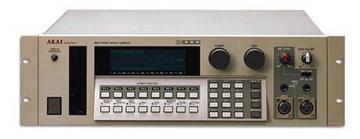
Last I heard,
you can't exchange cards between an 1100 and a 1000.
Though they are similar in build and design, the firmware is written
specifically for that unit. (For some, exchanging cards has actually
damaged the unit) I'd try a call into Akai to confirm...
Erik
--- In
akaiS1000S1100Samplers@yahoogroups.com, In Choi >
wrote:
>
> hello daniel
> i tried all those things but couldn't get it to work
> but thanks very much for the help!
> somebody help me plz
>
> have a Good Day.
> "Gorny, Daniel (Daniel)** CTR **" wrote:
> Rapslow,
>
> There is also a setting to switch from electrical to optical as I
remember right.
> Hope that helps.
>
> RR
>
>
> ---------------------------------
>
> From:
akaiS1000S1100Samplers@yahoogroups.com [mailto:
akaiS1000S1100Samplers@yahoogroups.com] On Behalf Of rapslow
> Sent: Wednesday, November 28, 2007 10:33 PM
> To:
akaiS1000S1100Samplers@yahoogroups.com> Subject: [akaiS1000S1100Samplers] Optical Card help plz!!!
>
>
> hello guys
> i have a s1000 with the Digital interface (took it out of an s1100)
> i tried to record digitally from S1000 -> computer
> but cannot get it to work.
> i went Optical Out of s1000 to Optical Direct In of my interface.
> and i pressd 'play' on my s1000
> and i tried the 'send' soft key that transmits samples under
the 'DIGI'
> menu
> but nothing seemed to work
>
> can someone
help me how to do this please?!
>
> thank you have a good day!!
>
>
>
>
>
>
>
>
>
>
> ---------------------------------
> Get easy, one-click access to your favorites. Make Yahoo! your
homepage.
>