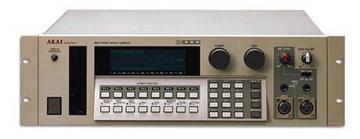
Akai S1000 / S1100 samplers group photo

Yahoo Groups archive

Akai S1000 / S1100 samplers

Index last updated: 2026-04-28 23:15 UTC

Thread

LCD Backlight

LCD Backlight

2012-02-22 by swede950

So I replaced my backlight yesterday on my 1100 and ran into a problem. It appears as though the new backlight is working but I don't see any characters, only a vertical line in the middle of the screen in "select prog"  "edit sample" and "disk" mode.  With the old screen I could see characters just fine but no backlighting. 

Could it be during the sandwich process of the new screen some contacts not making contact?  Faulty screen?  I don't know.  FWIW there was a slight hum with the old screen and its still there with the new one. Could it be an inverter?  Not sure where the inverter lays but the sound it coming from In between the left side of the sampler and the floppy drive on a small 2"x4" PCB which happen to have the screen wires connected to it. 

Thanks

KTB

Re: LCD Backlight

2012-02-22 by narfman96

Probably the rubber strips are not making good contact with either the board or the glass. When these backlights are changed it's best not to disassemble the display. Try to remove the backlight assembly without taking the display apart. You may not have enough pressure holding the display together to make proper contact. You might have to bend the metal tabs a bit. If there is too much pressure it will cause the display to have dark spots. Also if there is any dirt betweent the strips and the contacts you will have lines missing.

The hum should be the inverter driving the backlight. This is normal but most in machines it sounds like a whine.

Good luck, Fran    

--- In akaiS1000S1100Samplers@yahoogroups.com, "swede950" <swede950@...> wrote:
Show quoted textHide quoted text
>
> So I replaced my backlight yesterday on my 1100 and ran into a problem. It appears as though the new backlight is working but I don't see any characters, only a vertical line in the middle of the screen in "select prog"  "edit sample" and "disk" mode.  With the old screen I could see characters just fine but no backlighting. 
> 
> Could it be during the sandwich process of the new screen some contacts not making contact?  Faulty screen?  I don't know.  FWIW there was a slight hum with the old screen and its still there with the new one. Could it be an inverter?  Not sure where the inverter lays but the sound it coming from In between the left side of the sampler and the floppy drive on a small 2"x4" PCB which happen to have the screen wires connected to it. 
> 
> Thanks
> 
> KTB
>

Re: LCD Backlight

2012-02-29 by swede950

Thanks for your reply Fran.  Can I ask what rubber strips your talking about?  I don't remember seeing anything like this during the swap.  I took the assembly apart three times now with hopes of making a better contact but still no success.   When you say disassemble the display are we talking about those metal tabs that need to be bent in alignment with the slits in the PCB?  Was I only supposed to slide the old backlight display out instead of pulling everything apart?  Oh boy I hope not.   I took some photos of what I'm seeing but not sure how to upload the photos for you to see.   The backlight is working as it should. Just no characters.   As soon as I find out I'll let you know. 
Also I have another S1100 and the whine you talk about is not existent on the machine  I still don't think this is normal.

BTW I bought a multimeter today based on reading one other owner from the web who was having the same problem as I am. I am not sure how to use  it yet. Do you have any advice?  I am determined to fix this because the sampler is in great condition. I went to my local tech the other day and he said I'd be better off buying another one. I don't want to do that. I'm looking at this as a learning experience relying on your guys input.  HELP!!!

--- In akaiS1000S1100Samplers@yahoogroups.com, "narfman96" <narfman96@...> wrote:
Show quoted textHide quoted text
>
> Probably the rubber strips are not making good contact with either the board or the glass. When these backlights are changed it's best not to disassemble the display. Try to remove the backlight assembly without taking the display apart. You may not have enough pressure holding the display together to make proper contact. You might have to bend the metal tabs a bit. If there is too much pressure it will cause the display to have dark spots. Also if there is any dirt betweent the strips and the contacts you will have lines missing.
> 
> The hum should be the inverter driving the backlight. This is normal but most in machines it sounds like a whine.
> 
> Good luck, Fran    
> 
> --- In akaiS1000S1100Samplers@yahoogroups.com, "swede950" <swede950@> wrote:
> >
> > So I replaced my backlight yesterday on my 1100 and ran into a problem. It appears as though the new backlight is working but I don't see any characters, only a vertical line in the middle of the screen in "select prog"  "edit sample" and "disk" mode.  With the old screen I could see characters just fine but no backlighting. 
> > 
> > Could it be during the sandwich process of the new screen some contacts not making contact?  Faulty screen?  I don't know.  FWIW there was a slight hum with the old screen and its still there with the new one. Could it be an inverter?  Not sure where the inverter lays but the sound it coming from In between the left side of the sampler and the floppy drive on a small 2"x4" PCB which happen to have the screen wires connected to it. 
> > 
> > Thanks
> > 
> > KTB
> >
>
Re: [akaiS1000S1100Samplers] Re: LCD Backlight

2012-02-29 by Les Lambert

I've done about 10 of these in various items over the years. Korg Akai, Emu,Kurzweil,Fostex,Roland,Alesis............Aaaargh!

If the backlight is glued in place you've had it. The Korg A3 (?) was glued. Dismantling of that assembly is a nightmare.
The Korg Service guy said not to try, and he's getting paid! It can't be done with used parts by mere mortals. 

Even the ones that seem to be improved for a while just keep getting worse with time.
The contact between the rubber suasage and the back of the pcb is a temporary construction and only works when everything is perfect, untouched by time's slings and arrows. Or our fingers

The bending of the metal tabs looks easy, but isn't, and the deforming of the parts isn't visible to the naked eye, not mine anyway, and the sausage is a major item in the sandwich. Would you try to re-use a second hand sausage?

If it's not illegal it's covered by health and safety regulations.
Everybody makes mistakes, it takes a grown up to admit it and move on.
I've got a nice S3200 I'll be passing on soon, once I finish transferring Emax via EIIIxp to EIII zip  via S3200 to zip then via S5000 to pc ( phew)
Get the offerred S110 if it's cheap, you'll have some spare bits


________________________________
 From: swede950 <swede950@...>
To: akaiS1000S1100Samplers@yahoogroups.com 
Sent: Wednesday, 29 February 2012, 2:25
Subject: [akaiS1000S1100Samplers] Re: LCD Backlight


Thanks for your reply Fran.  Can I ask what rubber strips your talking about?  I don't remember seeing anything like this during the swap.  I took the assembly apart three times now with hopes of making a better contact but still no success.   When you say disassemble the display are we talking about those metal tabs that need to be bent in alignment with the slits in the PCB?  Was I only supposed to slide the old backlight display out instead of pulling everything apart?  Oh boy I hope not.   I took some photos of what I'm seeing but not sure how to upload the photos for you to see.   The backlight is working as it should. Just no characters.   As soon as I find out I'll let you know. 
Also I have another S1100 and the whine you talk about is not existent on the machine  I still don't think this is normal.

BTW I bought a multimeter today based on reading one other owner from the web who was having the same problem as I am. I am not sure how to use  it yet. Do you have any advice?  I am determined to fix this because the sampler is in great condition. I went to my local tech the other day and he said I'd be better off buying another one. I don't want to do that. I'm looking at this as a learning experience relying on your guys input.  HELP!!!

--- In akaiS1000S1100Samplers@yahoogroups.com, "narfman96" <narfman96@...> wrote:
Show quoted textHide quoted text
>
> Probably the rubber strips are not making good contact with either the board or the glass. When these backlights are changed it's best not to disassemble the display. Try to remove the backlight assembly without taking the display apart. You may not have enough pressure holding the display together to make proper contact. You might have to bend the metal tabs a bit. If there is too much pressure it will cause the display to have dark spots. Also if there is any dirt betweent the strips and the contacts you will have lines missing.
> 
> The hum should be the inverter driving the backlight. This is normal but most in machines it sounds like a whine.
> 
> Good luck, Fran 
> 
> --- In akaiS1000S1100Samplers@yahoogroups.com, "swede950" <swede950@> wrote:
> >
> > So I replaced my backlight yesterday on my 1100 and ran into a problem. It appears as though the new backlight is working but I don't see any characters, only a vertical line in the middle of the screen in "select prog"  "edit sample" and "disk" mode.  With the old screen I could see characters just fine but no backlighting. 
> > 
> > Could it be during the sandwich process of the new screen some contacts not making contact?  Faulty screen?  I don't know.  FWIW there was a slight hum with the old screen and its still there with the new one. Could it be an inverter?  Not sure where the inverter lays but the sound it coming from In between the left side of the sampler and the floppy drive on a small 2"x4" PCB which happen to have the screen wires connected to it. 
> > 
> > Thanks
> > 
> > KTB
> >
>

Re: LCD Backlight

2012-02-29 by juppdich

I realy like to have the S1000 with a LED Display.
The EL Light Thing ist not powerful enough for Eye Relaxing.

I would like to start diggin this, here are some infos i gathered:
-Its a very Proprietary Type of LCD
-Display has 240 * 64 Pixels
-Controlled via 1 Bit serial Bus
-Has no controller onboard (rare these days)
-Max thickness for Backlight: 2.9 mm, Size: 13mm x 3.9mm

Possible approaches towards a LED Display could be:
-Buying a ready Led Backlight (i found none 2,9mm thick) :-(
-DIY Building a customised Backlight from Plexiglas/Led
-Hacking with Microcontroller to translate the 1 Bit Akai bus into a modern Display 

So, what are your Opinions?

Re: [akaiS1000S1100Samplers] Re: LCD Backlight

2012-02-29 by Les Lambert

1. Get an S5000, the display's much nicer, it'll play all your old samples. 

    If it's too clean, do what guitar players have always done, use a valve amp or modern equivalent.

2. Get out more, take some of your music to people yuou visit and see if they like it. Or not.
    Either way you win.

Just my view. [: >)


________________________________
Show quoted textHide quoted text
 From: juppdich <juppdich@...>
To: akaiS1000S1100Samplers@yahoogroups.com 
Sent: Wednesday, 29 February 2012, 16:14
Subject: [akaiS1000S1100Samplers] Re: LCD Backlight


I realy like to have the S1000 with a LED Display.
The EL Light Thing ist not powerful enough for Eye Relaxing.

I would like to start diggin this, here are some infos i gathered:
-Its a very Proprietary Type of LCD
-Display has 240 * 64 Pixels
-Controlled via 1 Bit serial Bus
-Has no controller onboard (rare these days)
-Max thickness for Backlight: 2.9 mm, Size: 13mm x 3.9mm

Possible approaches towards a LED Display could be:
-Buying a ready Led Backlight (i found none 2,9mm thick) :-(
-DIY Building a customised Backlight from Plexiglas/Led
-Hacking with Microcontroller to translate the 1 Bit Akai bus into a modern Display 

So, what are your Opinions?

Re: LCD Backlight

2012-02-29 by juppdich

Haha Dude, i just Got a S5000 before christmas.
Still i had no chance to do much comparision and i don´t have sampled material from the s1000 because i never used it much because the display sucked. ;-))


--- In akaiS1000S1100Samplers@yahoogroups.com, Les Lambert <les_lmbrt@...> wrote:
Show quoted textHide quoted text
>
> 1. Get an S5000, the display's much nicer, it'll play all your old samples. 
> 
> Â Â Â  If it's too clean, do what guitar players have always done, use a valve amp or modern equivalent.
> 
> 2. Get out more, take some of your music to people yuou visit and see if they like it. Or not.
> Â Â Â  Either way you win.
> 
> Just my view. [: >)
> 
> 
> 
> ________________________________
>  From: juppdich <juppdich@...>
> To: akaiS1000S1100Samplers@yahoogroups.com 
> Sent: Wednesday, 29 February 2012, 16:14
> Subject: [akaiS1000S1100Samplers] Re: LCD Backlight
>  
> 
> Â  
> I realy like to have the S1000 with a LED Display.
> The EL Light Thing ist not powerful enough for Eye Relaxing.
> 
> I would like to start diggin this, here are some infos i gathered:
> -Its a very Proprietary Type of LCD
> -Display has 240 * 64 Pixels
> -Controlled via 1 Bit serial Bus
> -Has no controller onboard (rare these days)
> -Max thickness for Backlight: 2.9 mm, Size: 13mm x 3.9mm
> 
> Possible approaches towards a LED Display could be:
> -Buying a ready Led Backlight (i found none 2,9mm thick) :-(
> -DIY Building a customised Backlight from Plexiglas/Led
> -Hacking with Microcontroller to translate the 1 Bit Akai bus into a modern Display 
> 
> So, what are your Opinions?
>

Re: LCD Backlight

2012-03-01 by din5pin

The electrical connection between the LCD and its pc board is typically made via "zebra strip". If it's not clamped with the correct pressure, or mispositioned, one or more connections won't be made.

See this:
http://www.densitron.com/displays/content.aspx?id=808

Re: LCD Backlight

2012-03-01 by narfman96

Thank you sooooo much for that link!!!!!!

I have tried for years to explain how these elastomeric (rubber) strips work and now I can just provide the link and a much shorter explanation. 

Thanks again,  Fran 

--- In akaiS1000S1100Samplers@yahoogroups.com, "din5pin" <din5pin@...> wrote:
Show quoted textHide quoted text
>
> The electrical connection between the LCD and its pc board is typically made via "zebra strip". If it's not clamped with the correct pressure, or mispositioned, one or more connections won't be made.
> 
> See this:
> http://www.densitron.com/displays/content.aspx?id=808
>

Re: LCD Backlight

2012-03-01 by din5pin

You're welcome! I'm glad to have come across that web page myself, because I also found it a challenge to explain.

--- In akaiS1000S1100Samplers@yahoogroups.com, "narfman96" <narfman96@...> wrote:
Show quoted textHide quoted text
>
> Thank you sooooo much for that link!!!!!!
> 
> I have tried for years to explain how these elastomeric (rubber) strips work and now I can just provide the link and a much shorter explanation. 
> 
> Thanks again,  Fran 
> 
> --- In akaiS1000S1100Samplers@yahoogroups.com, "din5pin" <din5pin@> wrote:
> >
> > The electrical connection between the LCD and its pc board is typically made via "zebra strip". If it's not clamped with the correct pressure, or mispositioned, one or more connections won't be made.
> > 
> > See this:
> > http://www.densitron.com/displays/content.aspx?id=808
> >
>

Re: LCD Backlight

2012-03-01 by swede950

Thanks to both of you!  This actually makes sense now. 

So, do I have a chance in hell to get this back to normal again or am i done like you said?

I guess I should just play around with it until I get the zebra strip aligned once again.


--- In akaiS1000S1100Samplers@yahoogroups.com, "din5pin" <din5pin@...> wrote:
Show quoted textHide quoted text
>
> You're welcome! I'm glad to have come across that web page myself, because I also found it a challenge to explain.
> 
> --- In akaiS1000S1100Samplers@yahoogroups.com, "narfman96" <narfman96@> wrote:
> >
> > Thank you sooooo much for that link!!!!!!
> > 
> > I have tried for years to explain how these elastomeric (rubber) strips work and now I can just provide the link and a much shorter explanation. 
> > 
> > Thanks again,  Fran 
> > 
> > --- In akaiS1000S1100Samplers@yahoogroups.com, "din5pin" <din5pin@> wrote:
> > >
> > > The electrical connection between the LCD and its pc board is typically made via "zebra strip". If it's not clamped with the correct pressure, or mispositioned, one or more connections won't be made.
> > > 
> > > See this:
> > > http://www.densitron.com/displays/content.aspx?id=808
> > >
> >
>

Re: LCD Backlight

2012-03-01 by narfman96

With the knowledge you now have keep messing with it. I'm betting you'll get it fixed!

--- In akaiS1000S1100Samplers@yahoogroups.com, "swede950" <swede950@...> wrote:
Show quoted textHide quoted text
>
> Thanks to both of you!  This actually makes sense now. 
> 
> So, do I have a chance in hell to get this back to normal again or am i done like you said?
> 
> I guess I should just play around with it until I get the zebra strip aligned once again.
> 
> 
> 
> --- In akaiS1000S1100Samplers@yahoogroups.com, "din5pin" <din5pin@> wrote:
> >
> > You're welcome! I'm glad to have come across that web page myself, because I also found it a challenge to explain.
> > 
> > --- In akaiS1000S1100Samplers@yahoogroups.com, "narfman96" <narfman96@> wrote:
> > >
> > > Thank you sooooo much for that link!!!!!!
> > > 
> > > I have tried for years to explain how these elastomeric (rubber) strips work and now I can just provide the link and a much shorter explanation. 
> > > 
> > > Thanks again,  Fran 
> > > 
> > > --- In akaiS1000S1100Samplers@yahoogroups.com, "din5pin" <din5pin@> wrote:
> > > >
> > > > The electrical connection between the LCD and its pc board is typically made via "zebra strip". If it's not clamped with the correct pressure, or mispositioned, one or more connections won't be made.
> > > > 
> > > > See this:
> > > > http://www.densitron.com/displays/content.aspx?id=808
> > > >
> > >
> >
>

Move to quarantaine

This moves the raw source file on disk only. The archive index is not changed automatically, so you still need to run a manual refresh afterward.