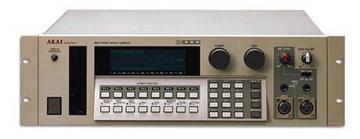
Akai S1000 / S1100 samplers group photo

Yahoo Groups archive

Akai S1000 / S1100 samplers

Index last updated: 2026-04-28 23:15 UTC

Thread

First post. Some technical questions.

First post. Some technical questions.

2004-10-02 by degraafdennis

Hi,

So exciting. Next week I receive the Akai S1100 sampler with 32mb 
installed and SCSI cdrom. and two syquest disks each with 260mb of 
samples. yum yum yum!

Planning to install a Iomega zipdrive, harddisk and Cdrom

Both have to be SCSI, I have an ICT background, questions about 
installing a SCSI interface ain't that hard, in the books.

So here are the questions.

-When installing internal components, is there room for all 
components? (floppy drive, harddisk, Zipdrive, Cdrom)

-What is the maximum capacity size (in gbytes ofcourse) of the HDD 
what can be installed in the S1100. Zipdrive is 100 MB i've read. 
And which HDD are compatible with the S1100. Personal experience. 

-Installing a SCSI interface you need to have an SCSI controller. 
Does the S1100 has one built in?

I'm searching for the manual. S1100 specific.

Thanks for the support,

Re: First post. Some technical questions.

2004-10-02 by formals777

Dennis,

Welcome to the group.
When you're good at scsi, maybe you can help us!

1.There is only place for an internal floppy. Maybe you can replace
that with an internal ZIP. Look at earlier messages about this. By
taking away your floppy you loose the possibility to store  OS updates
etc..

2. Please read the documents you find in the links and files section -
especially these about hard drives and scsi. 520 Mb is the maximum
that is recognized, but you can use bigger HD's.

3. The S1100 has a built in scsi card. Many of these cards have been
damaged because of hot plugging cables. Find replacement cards
manufacturers in the links section.

4. We have no manual specific for the S1100, but the one for the S1000
will do. Look in the files section.

5. Some of us tried to install an internal HD - but not without
problems. Look at the messages on that.

Regards

Frank

--- In akaiS1000S1100Samplers@yahoogroups.com, "degraafdennis"
<exonicon@h...> wrote:
Show quoted textHide quoted text
> 
> Hi,
> 
> So exciting. Next week I receive the Akai S1100 sampler with 32mb 
> installed and SCSI cdrom. and two syquest disks each with 260mb of 
> samples. yum yum yum!
> 
> Planning to install a Iomega zipdrive, harddisk and Cdrom
> 
> Both have to be SCSI, I have an ICT background, questions about 
> installing a SCSI interface ain't that hard, in the books.
> 
> So here are the questions.
> 
> -When installing internal components, is there room for all 
> components? (floppy drive, harddisk, Zipdrive, Cdrom)
> 
> -What is the maximum capacity size (in gbytes ofcourse) of the HDD 
> what can be installed in the S1100. Zipdrive is 100 MB i've read. 
> And which HDD are compatible with the S1100. Personal experience. 
> 
> -Installing a SCSI interface you need to have an SCSI controller. 
> Does the S1100 has one built in?
> 
> I'm searching for the manual. S1100 specific.
> 
> Thanks for the support,

Re: First post. Some technical questions.

2004-10-03 by degraafdennis

One final question , though.

One of the reasons I want this sampler is because of the audio 
quality. I've read that this sampler sounds fat, warm, and clear. 

It compresses the sounds. Does the sampler do this with all the 
sounds in the sampler of only the recorded ones.
If you insert a AKAI Sample cd does it also makes it warmer, more 
fat?
or does it only 'play' the sample.

-


--- In akaiS1000S1100Samplers@yahoogroups.com, "formals777" 
<frank.govaerts@p...> wrote:
> 
> Dennis,
> 
> Welcome to the group.
> When you're good at scsi, maybe you can help us!
> 
> 1.There is only place for an internal floppy. Maybe you can replace
> that with an internal ZIP. Look at earlier messages about this. By
> taking away your floppy you loose the possibility to store  OS 
updates
> etc..
> 
> 2. Please read the documents you find in the links and files 
section -
> especially these about hard drives and scsi. 520 Mb is the maximum
> that is recognized, but you can use bigger HD's.
> 
> 3. The S1100 has a built in scsi card. Many of these cards have 
been
> damaged because of hot plugging cables. Find replacement cards
> manufacturers in the links section.
> 
> 4. We have no manual specific for the S1100, but the one for the 
S1000
> will do. Look in the files section.
> 
> 5. Some of us tried to install an internal HD - but not without
> problems. Look at the messages on that.
> 
> Regards
> 
> Frank
> 
> --- In akaiS1000S1100Samplers@yahoogroups.com, "degraafdennis"
> <exonicon@h...> wrote:
> > 
> > Hi,
> > 
> > So exciting. Next week I receive the Akai S1100 sampler with 
32mb 
> > installed and SCSI cdrom. and two syquest disks each with 260mb 
of 
> > samples. yum yum yum!
> > 
> > Planning to install a Iomega zipdrive, harddisk and Cdrom
> > 
> > Both have to be SCSI, I have an ICT background, questions about 
> > installing a SCSI interface ain't that hard, in the books.
> > 
> > So here are the questions.
> > 
> > -When installing internal components, is there room for all 
> > components? (floppy drive, harddisk, Zipdrive, Cdrom)
> > 
> > -What is the maximum capacity size (in gbytes ofcourse) of the 
HDD 
> > what can be installed in the S1100. Zipdrive is 100 MB i've 
read. 
> > And which HDD are compatible with the S1100. Personal 
experience. 
> > 
> > -Installing a SCSI interface you need to have an SCSI 
controller. 
Show quoted textHide quoted text
> > Does the S1100 has one built in?
> > 
> > I'm searching for the manual. S1100 specific.
> > 
> > Thanks for the support,
Move to quarantaine

This moves the raw source file on disk only. The archive index is not changed automatically, so you still need to run a manual refresh afterward.