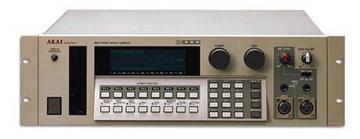
Hi,

1. You can try to put a hard drive into your S1100. First check the
several other messages about that topic in this group. Not all scsi
cards have an internal connector. If they do, not all of them are
still working. Another solution is to have a flat cable with on one
side an internal scsi connector and on the other side an external one.
That way you can connect the HD on the external scsi connector in case
its needed. DO NOT make the mistake of (un)plugging the cable while
the sampler is still powered on. That damages your scsi card.
Also, there is no ready place to mount the HD on. So you must be a bit
technical.

2. There is no easy way of loading all samples on power on. Maybe
someone can write a clever midi file that sends all necessary sysex.

3. No problem to add a fan to the S1100. Best place is the top lid.
But then you'll need to dril a big hole in that thick metal plate.

4. Backlight is easy to replace if youre a bit technical. ALl
instructions are on the website of backlights.co.uk
Just make sure that you specify akai S1100 when you order one. It will
save your eyes !

5. In case youre not so technical, find a technical friend before you
start with screwing and soldering.

Greetings,

Frank


--- In akaiS1000S1100Samplers@yahoogroups.com, wederniet
<wederniet@y...> wrote:
> Thanks for the input David.
> But I actually want to have a SCSI hard disk built inside and see if
anyone has any experience with that.
> And I wanted to know that, if this is done, if it is possible to
automatically load samples from this drive on startup (just as it
loads a floppy when it's in the floppy drive at start-up). People with
an external hard disk probably know the answer to this too.
>
> Everything has to be compact and as much "plug-and-play" as
possible, so I don't want to have external storage devices attached to
the S1100, and I want to perform as little manual operations as
possible in a live situation.
>
> Wouldn't it be feasible to build in a fan on the power-transformer?
> BTW, my S1100 is loaded with 32Mb (or so they told me, I'll have to
check that).
>
> You're right, It's probably best to leave the display alone (if it
isn't broken, don't fix it)
>
> Regards,
> Franky
>
> David Castle <dgc21music@y...> wrote:
> HELLO FRANKY.
> WHAT YOU SHOULD DO IS THIS:
> BUY A 100 MEG ZIP DRIVE ON E-BAY.
> SCSI THAT TO YOUR 1100.
> HOPE YOUR 1100 IS LOADED WITH 32MEGS.
> THE CARDS ARE ALOT OF MONEY IF YOU CAN FIND THEM.
> THE POWER TRANFORMER DOES GET VERY HOT SO GIVE IT
> SPACE IN YOUR RACK AND BLOW A FAN ON THE TOP LID .YOUR
> DISPLAY I WOULD LEAVE ALONE IF YOU CAN READ IT.IF YOU
> WANT MORE MEMORY FOR YOUR 1100 CHECK OUT REAL WORLD
> INTERFACES.DO A SEARCH FOR THE AKAI S1100 AND YOU WILL
> SEE IT.THE BOARD YOU NEED IS #M32S1.IF YOU WANT TO
> SPEAK TO A FRIEND OF MINE IN NEW YORK CITY HIS # IS
> 1-212-685-7900. HE IS AN AKAI TECH WHO HAS PUT MY 1100
> AND EXPANDER IN PERFECT SHAPE.THIS GUY IS GREAT. HIS
> NAME IS PETER LANZILOTTA.HOPE I HAVE BEEN SOME HELP TO
> YOU. GOOD LUCK!!
>
> DAVID CASTLE N.Y.C
>
>
>
> ---------------------------------
> Do You Yahoo!?
>  Yahoo! Small Business - Try our new Resources site!
Message
Re: New member - Hard drive questions etc..
2005-05-27 by formals777
Attachments
- No local attachments were found for this message.