Try a different .Iso file,
It sounds like that could be the problem,
Also try maybe different cd burn software,
I have used Nero on PC and toast on Mac,
One of these should work, if you
Still have problems just email me
And I'll try and help,I have done this
Often.
To: husc3000@... [akaiS1000S1100Samplers] ;
Subject: [akaiS1000S1100Samplers] AKAI S1000 and CD-ROM
Sent: Fri, May 23, 2014 11:49:01 AM
Hi People,
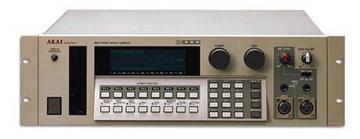
Ok so after having massive problems with my S1100 I decided to look around and see if I could purchase a replacement. I found a local seller that had an S1000 with 26mb Memory and a SCSI CD-ROM for a bargain price!
Just wondering as I am a bit of a newbie to all this. The CD-ROM wich is in a unit with 2 50 Pin Centronics connectors on the back do I need to buy a terminator block for this ? I dont think the AKAI is seeing this drive as every time I power it on it says drive read error. Also taking into account I dont actually have and CD-ROM’s to read in. I went about burning some to CD following this guide :
http://www.platinumaudiolab.com/tutorials.php?page=akai_burning_instructions
but the iso file I downloaded which I think is made for the S1000 (Spectrasonics Bass Legends John Patitucci AKAI S1000) and any other similar ISO for the AKAI S1000 wont load into any burning software it says “Invalid or unknown image file format” so I am at a bit of a loss what to do.
Any advice would be greatly appreciated. I may have to just resort to using floppy disks instead which is cool and I am well versed in doing so now
Thanks,
Hughesee