Message
Help with SCSI CD ROM
2014-02-06 by <xxxdna@...>
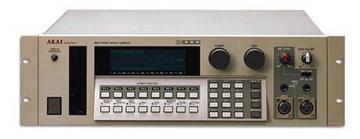
I picked up a S1100 a few months ago and have been slowly working to bring it into the 21st century. It had a dead LCD and floppy drive so I replaced the LCD and ditched the floppy. In its place I installed an internal Compact Flash read (PDC-60B) which is working great. I have one or two 1gb CF cards that I can hot swap and save/load files from. I also updated the EEPROM chips so it is running OS 4.3
I recently decided to get a SCSI CD ROM for use with the AKAI. I have been using SCSI for quite some time with computers/sampler so I know the usual culprits but for some reason I cannot get this drive to work with the S1100. Here is the config
- PDC-60B scsi card reader connected internally to IB103 on ID 5
- external SCSI CD ROM (Toshiba XM-5401B aka XM-5401 TA) connected to IB103 centronics connection on rear of the sample on ID 3. This is physically terminated with a passive centronics terminator.
Akai settings:
- in the HDSK menu the following is configured:
"SCSI Drive ID = X" (normally set to 5 for the card reader, but i change it to 3 to read the cdrom)
"S1100 SCSI ID = 6"
When I adjust SCSI Drive ID to 3 the CDROM disc starts spinning and it's activity LED flashes but I get the error "Device is not ready"
The CDROM works fine with my EMU Ultra sampler on any ID I choose and can read the media I burned to test with. I've checked the pin options on the CDROM drive and the only things I can choose to play around with are the Mode Select pins: "PRTY" (not sure what that is), PRV/ALW, TEST, and TERM..
I'm still fiddling with it but any suggestions would be wonderful!
Attachments
- No local attachments were found for this message.