>
> Oh sorry, the parameter on the Master pages would say "MODE" and you probably have it set for "MULTI" or "POLY." You want it to say "MULTI" to set up the 12 multi-timbre Performance sounds (which mean, you can have your controller keyboard play up to 12 different parts/sounds on 12 different MIDI channels on the SD-1).
>
> If you set up a Sequence/Pattern with the 12 tracks like I was describing, you can have Track 1 be SD-1 sounds (set the MIDI on that track in the Performance section to "Local", and channel 1), and Track 2 be your VK-8M (set the MIDI on that track to "EXT" and channel 2). You can set the remaining 10 slots up with additional SD-1 sounds if you'd like; be sure each slot/track has a different MIDI channel.
>
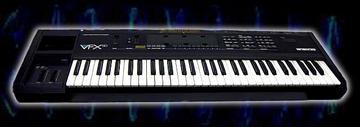
> I don't know where an SD-1 manual can be found, but the VFX-SD manual (which is 99% the same) is here:
> http://soundprogramming.net/synthesizers/ensoniq/ensoniq_vfx_sd
>
> The stuff I am describing is in Section 3 - Performance Parameters (pg 40 of the pdf).
>
>
> --- In Ensoniq-VFX-SD@yahoogroups.com, "Rich Horton" <drhrtn@> wrote:
> >
> > feeling rather dense, but when I page thru the Master, I cant find any item with 'omni' on it. This is an earlier SD-1.
> >
> > what I want to do is play all the SD-1 programs-presets etc just as they normally play on the instrument by itself, but using another midi controller keyboard.
> >
> > and then, I want the keyboard on the SD-1 to only control the VK-8M module. I can do it individually for each sound (program), but I wondered if you can do this globally?
> >   ----- Original Message -----
> >   From: az_spunky
> >   To: Ensoniq-VFX-SD@yahoogroups.com
> >   Sent: Monday, April 23, 2012 2:42 PM
> >   Subject: [Ensoniq-VFX-SD] Re: controlling SD-1 from another keyboard
> >
> >
> >
> >   Omni off setting is under the Master button..
> >
> >   but if I'm reading your original post correctly, you want the opposite - you want to use a controller keyboard to play sounds on your SD-1. The right way to set that up is to put the SD-1 sounds you want into a Sequence or Pattern set. Then you have to turn the MIDI setting for each of the 12 slots to "MIDI Ext" external, in the MIDI button in the Performance section of buttons on the SD-1. You will be about to set up to 12 different sounds, on different MIDI channels, on the SD-1.
> >
> >   --- In Ensoniq-VFX-SD@yahoogroups.com, "Rich Horton" <drhrtn@> wrote:
> >   >
> >   > where do I find the 'omni off'?
> >   >
> >   > ----- Original Message -----
> >   > From: jammie
> >   > To: Ensoniq-VFX-SD@yahoogroups.com
> >   > Sent: Monday, April 23, 2012 1:51 PM
> >   > Subject: Re: [Ensoniq-VFX-SD] controlling SD-1 from another keyboard
> >   >
> >   >
> >   >
> >   >
> >   > omni off then the keyboard will not trigger the vfx but will send out midi information
> >   >
> >   > its the same for any synth if you dont want to trigger the internal sounds from the keyboard
> >   >
> >   > as its best for external sequencing as if you play the keyboard while recieving the sequence you will get double notes
> >   > ----- Original Message -----
> >   > From: rhorton21
> >   > To: Ensoniq-VFX-SD@yahoogroups.com
> >   > Sent: Monday, April 23, 2012 7:37 PM
> >   > Subject: [Ensoniq-VFX-SD] controlling SD-1 from another keyboard
> >   >
> >   >
> >   >
> >   > My basic performance rig is the SD-1, and a Roland VK-8M Hammond clone controlled by a 45 key midi-controller keyboard. What I would like to do is use the keyboard of the SD-1 to control the VK-8M only, and control everything on the SD-1 with a larger external controller (76 or 88 key) since i use the pianos primarily. This seems to work if i set an individual piano program to midi-in. Is there anyway to set this globally so all the programs on the SD-1 play from the external keyboard, and the SD-1's keyboard plays none (except for the VK-8M)? I have poked around the Musicians Manual but Im rather dyslexic when it comes to midi.
> >   >
> >   > Rich
> >   >
> >
>