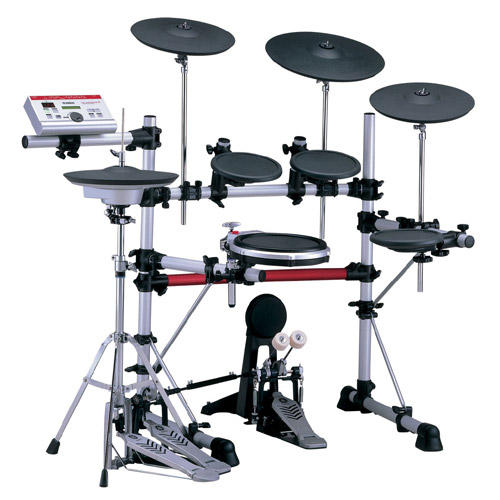
Yamaha DTXpress/DTXplorer/DTXtreme group photo

Yahoo Groups archive

Yamaha DTXpress/DTXplorer/DTXtreme

Index last updated: 2026-04-28 22:44 UTC

Thread

Buzz rolls on mesh pad

Buzz rolls on mesh pad

2003-06-21 by Stephanie

Hi Everyone:

I hope someone can help me out here...  I have the DTXpress II brain on my 
kit, and I've been trying to resolve a problem with my playing buzz rolls on 
a home made mesh drum pad.  

I have it plugged into the Tom 3 plug, which has the TP65-2 trigger setup by 
default.  When I try to do a buzz roll, I get a lot of sound dropouts, like 
the set up can't keep up with the data flow or something.  When I try 
different trigger setups, (as in shift-trigger edit, user trigger set up #7) 
like DT Snare or DT hi tom, the sound is even worse (probably because of the 
parameters, and I know I'm not supposed to use these for a mesh pad).  

I wonder about the "misc 1-6" pad types - anyone know what this is for?  I'm 
trying to find a setting that will allow for clean buzz rolls on a mesh pad.

Thank you!
Stephanie

Re: Buzz rolls on mesh pad

2003-06-22 by liberatusvirus

Stephanie wrote: 
> I hope someone can help me out here...  I have the DTXpress II 
brain on my kit, and I've been trying to resolve a problem with my 
playing buzz rolls on 
> a home made mesh drum pad.

Hi Stephanie,

I don't know whether I can help, but I'll try. The ultimate answer 
may lie, at least to some extent, in the physical characteristics of 
your homemade mesh pad. What kind of trigger are you using? Do you 
have the piezo inside a foam wedge (like the Pintechs) or inside a 
foam cone (like the Rolands)? Is the mesh head touching the foam 
cover, clamping down as you tighten? We'll leave these questions 
aside for now and tackle the module.
 
> I have it plugged into the Tom 3 plug, which has the TP65-2 
trigger setup by 
> default.  When I try to do a buzz roll, I get a lot of sound 
dropouts, like 
> the set up can't keep up with the data flow or something. 

The easiest solution would be that, whatever trigger setting you're 
in, you simply have your min. velocity setting too high and/or your 
gain too low. If tinkering with those settings gets you back in the 
game, then you're done, though I don't think that the TP65 defaults 
are ultimately your best bet. Another setting to check is self-
rejection; if that's too high, some of the buzz hits will drop out. 
Lower it until the problem goes away.

> When I try different trigger setups, (as in shift-trigger edit, 
user trigger set up #7) 
> like DT Snare or DT hi tom, the sound is even worse (probably 
because of the 
> parameters, and I know I'm not supposed to use these for a mesh 
pad).

Just for the record, my kit is comprised completely of mesh pads, 
and I use the DT trigger settings for all of them individually, as 
well as the global one. I get buzz rolls, pressed rolls (on my 
snare, anyway), etc. You name it; I get it with these settings. In 
other words, my electronic kit is programmed as if I were triggering 
acoustic drums.  
 
> I wonder about the "misc 1-6" pad types - anyone know what this is 
for?  I'm 
> trying to find a setting that will allow for clean buzz rolls on a 
mesh pad.

I can't tell you exactly what Yamaha was thinking when they added 
the misc. settings, but if your problems persist after you try the 
suggestions above. By all means, give the relevant misc. options a 
go, one by one. For example, I've found that the misc. cymbal 
settings are the most responsive for my Visu-lite cymbals, though 
they don't make a world of difference. If, in the end, nothing is 
working, and nobody else comes up with any suggestions, we may have 
to look more closely at your mesh heads and triggers.

Ed
Re: [DTXpress] Re: Buzz rolls on mesh pad

2003-06-22 by Stephanie

> I don't know whether I can help, but I'll try. The ultimate answer
> may lie, at least to some extent, in the physical characteristics of
> your homemade mesh pad. What kind of trigger are you using? Do you
> have the piezo inside a foam wedge (like the Pintechs) or inside a
> foam cone (like the Rolands)? Is the mesh head touching the foam
> cover, clamping down as you tighten? 

It has a Radio shack piezo tranducer on top of a piece of foam, with a Roland 
foam cone on top, and it was designed so the cone would touch the mesh head 
just before the mesh head would sit on the bearing edge, so the cone has good 
contact with the head.

> The easiest solution would be that, whatever trigger setting you're
> in, you simply have your min. velocity setting too high and/or your
> gain too low. If tinkering with those settings gets you back in the
> game, then you're done, though I don't think that the TP65 defaults
> are ultimately your best bet. Another setting to check is self-
>  rejection; if that's too high, some of the buzz hits will drop out.
> Lower it until the problem goes away.

Here's what I did - My guess it might have to do something with the pad type 
setting for the trigger input.  When you go Shift-Trig Edit and go to 7 (for 
a user trigger setup), you can select the pad type.  I tried the RHP-pad 
(which is for a mesh head type pad), but there were too many gaps in the 
sound of the buzz  roll.  The DT series settings were even worse.  I went to 
the misc-1 pad setting and bumped the gain all the way (to get THE most 
sensitive setting.  With this, just barely touching the pad with my finger 
would trigger the pad).  I was able to get a coarse buzz roll pretty good, 
and I wasn't able to tell if it's my playability or the setup making it sound 
a bit uneven, but it sounded a lot better.  I couldn't tell if there were 
drop outs with a finer buzz roll (remember, hearing's not that good).  I go 
after this because I had a dream one night in which I was playing a buzz roll 
on a snare drum.  I was really roiling over the drum head, and it sounded 
perfectly even.  That must have gone on for about 7 seconds.

Thanks!
Stephanie

Re: [DTXpress] Re: Buzz rolls on mesh pad

2003-06-22 by Stephanie

> are ultimately your best bet. Another setting to check is self-
>  rejection; if that's too high, some of the buzz hits will drop out.

WHAT is rejection - self rejection - specific rejection?  I tried to read the 
manual, but it doesn't seem to translate for my computer networking brain... 

Thanks!
Stephanie

Re: [DTXpress] Re: Buzz rolls on mesh pad

2003-06-23 by Stephanie

> yourself a little more leeway, have you tried setting the DIP
> switches on the back of the module, corresponding to inputs 1-6 (or
> at least the one for input 3), at the high setting? That strategy
> might well get you a sensitivity boost without the risk of excessive
> gain.

Yep!  I did that a couple of days ago,  and that didn't seem to change the 
dropouts much.  I still have it on there, though, but I use the very high 
gain setting on that pad in a user trigger setup for snare drum practice.  
When I'm playing my drum set, I go back to the dynamic trigger setup.

Thanks!
Stephanie

Re: Buzz rolls on mesh pad

2003-06-23 by liberatusvirus

> I went to 
> the misc-1 pad setting and bumped the gain all the way (to get THE 
most 
> sensitive setting.  With this, just barely touching the pad with 
my finger 
> would trigger the pad).  I was able to get a coarse buzz roll 
pretty good, 
> and I wasn't able to tell if it's my playability or the setup 
making it sound 
> a bit uneven, but it sounded a lot better.  

One more suggestion. It sounds like you're well on your way to 
reaching buzz nirvana. I'm pretty sure that you'll be able to get  
even strokes. But bumping up gain too high can have dire 
consequences (crosstalk, self-choking, machine-gun effect). To allow 
yourself a little more leeway, have you tried setting the DIP 
switches on the back of the module, corresponding to inputs 1-6 (or 
at least the one for input 3), at the high setting? That strategy 
might well get you a sensitivity boost without the risk of excessive 
gain. 

Ed

Re: Buzz rolls on mesh pad

2003-06-23 by liberatusvirus

> WHAT is rejection - self rejection - specific rejection?  I tried 
to read the 
> manual, but it doesn't seem to translate for my computer 
networking brain... 

Stephanie,

The short version is that the rejection parameters keep crosstalk 
between pads, and within a single pad, at bay. What the rejection 
setting per se does is mute a pad for a split second while an event 
on any another pad is taking place so that the former won't reach 
sympathetically to the latter. For obvious reasons, rejection 
settings should be only as high as it takes to keep particular 
reverberations along the rack from making extraneous noises; muting 
pads is definitely not the reason why we bought these things. Self-
rejection is protection against a pad's triggering itself (most 
likely when sensitivity is too high)--in other words, double 
triggers; specific rejection is the way that one pad protects itself 
from a particular pad's reverberations. Again, if you were to notice 
a problem (like the hi hat keeps tripping the snare), you would set 
the snare's specific rejection to the point at which the problem 
stops, but no higher. A pad's high specific rejection setting almost 
guarantees that it will not make a noise when hit at the same time 
as its offending counterpart, since the higher the setting, the 
smaller is the window of opportunity of that pad to make a sound 
when you want it to. I know that even this short version is 
confusing, but the long version is even more complicated. We can 
delve into it more if you need to.

Ed

Move to quarantaine

This moves the raw source file on disk only. The archive index is not changed automatically, so you still need to run a manual refresh afterward.