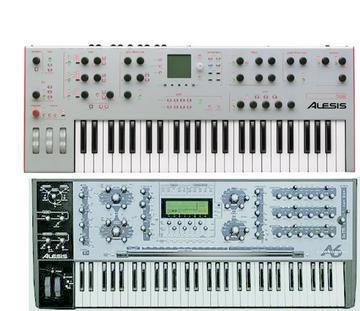
Each mix channel uses the corresponding voice output, like mix channel 1
uses out 1 and so on, they are hard wired and there's no way to get
channel 1 to be routed to channel 2.  The only control you have is to
enable or disable the dedicated voice output.  I don't see this as a
limitation.

The only way to route polyphonic instruments is through the Main and Aux
output, would you really need a third output pair?

To understand why they did not include the ability to route poly
instruments to dedicated outputs, you have to understand how this synth
was built, and specifically understand analog and ideally modular synths.

Basically there are 16 analog mono synths that can work together and
each synth can be repatched on the fly by the processor.  Each of these
16 synths have their own analog output, which are the ones you get in
the back.  Additionally, they included 2 16-channel mixer modules, one
for Main out and one for Aux out. Each voice is hard wired to its
dedicated output and to both mixers, they included switches to
enable/disable each voice's connection to all 3 patch points.

One funny thing with this synth is when you do use the dedicated voice
outputs, all going to a mixer and you play a polyphonic patch, you see
notes get triggered on seemingly random voices.  This can get annoying
when you think you're using a monophonic patch with a dedicated output
but it's erroneously set to poly, you hear the first note on the right
voice channel, then other notes play on other channels and you don't
hear it.  It can be quite scary the first time this happens, but you get
used to it.

One of the best reasons to use the dedicated outputs is that they are
very hot, and good sounding. If you think this synth does not sound
analog or fat enough, it's surely because you're listening to the main
output, try the dedicated outputs, and make sure to strap your seatbelt
on. :)

I hope this makes sense.

Guillaume


equity 7 wrote:
>
>
> That's exactly what I meant - where is the setting to route monophonic
> instruments to specific voice outputs?
>
> I also think it would have been nice to include a feature for polyphonic
> instruments to be allocated to a pair of voice outputs (for stereo), but
> that might have been a bit complicated to do while keeping the cost as
> low as it was.
>
> Thanks
>
>  > To: Andromeda_A6-ION@yahoogroups.com
>  > From: guillaume.marier@...
>  > Date: Wed, 15 Jul 2009 16:48:31 -0400
>  > Subject: Re: [Andromeda_A6-ION] Andromeda screen replacement and a
> bit of a rant...
>  >
>  > IMHO, the individual outputs are only relevant in MIX mode.
>  >
>  > This way you can record and apply external effects to each patch
>  > individually.
>  >
>  > It's also only useful with monophonic instruments.
>  >
>  > For Polyphonic patches, you should use the Main or Aux outs where all
>  > voices are mixed together.
>  >
>  > You could run all 16 voice outs to a mixer and use a polyphonic patch,
>  > but there would be very little purpose to this since you get this from
>  > the Main and aux outs.
>  >
>  > I hope this helps,
>  >
>  > Guillaume
>  >
>  >
>  >
>  > equity 7 wrote:
>  > >
>  > >
>  > > > To: Andromeda_A6-ION@yahoogroups.com
>  > > > From: vout@...
>  > > > Date: Wed, 15 Jul 2009 14:55:42 +0000
>  > > > Subject: [Andromeda_A6-ION] Andromeda screen replacement and a bit
>  > > of a rant...
>  > > >
>  > >
>  > > > On the plus side though, I do like the basic sound of this synth,
>  > > very solid, very American, very different from everything else I own.
>  > > Also the complexity of the voice architecture, the individual outputs
>  > > for each voice, The possibilities are obvious.
>  > >
>  > > This reminds me of something I've been meaning to ask the list for
>  > > awhile - what are some good uses for the individual outputs? I made
>  > > room for them on my patch bay and can send each out to its own channel
>  > > on my console, but I haven't figured out how to do much more with the
>  > > individual outputs besides having them output sequential voices of the
>  > > synth based on sequential voice allocation. To me, this doesn't offer
>  > > a great deal of control. What I'd love to do is force the A6 to limit
>  > > output of voices in mixer mode by instrument. For example, my
>  > > monophonic instruments would be limited and have exclusive use of one
>  > > of the 16 voice outs. Polyphonic instruments could be limited to and
>  > > have exclusive use of a small range of voice outs.
>  > >
>  > > Is there any way to do this?
>  > >
>  > > Thanks
>  > >
>  > >
> ------------------------------------------------------------------------
>  > > Internet Explorer 8 makes surfing easier. Get it now!
>  > > <http://go.microsoft.com/?linkid=9655264>
>  > >
>  >
>  >
>  > ------------------------------------
>  >
>  > Yahoo! Groups Links
>  >
>  >
>  >
>
> ------------------------------------------------------------------------
> Windows Live helps you keep up with all your friends, in one place.
> <http://go.microsoft.com/?linkid=9660824>
>
Message
Re: [Andromeda_A6-ION] Andromeda screen replacement and a bit of a rant...
2009-07-15 by Guillaume Marier
Attachments
- No local attachments were found for this message.